
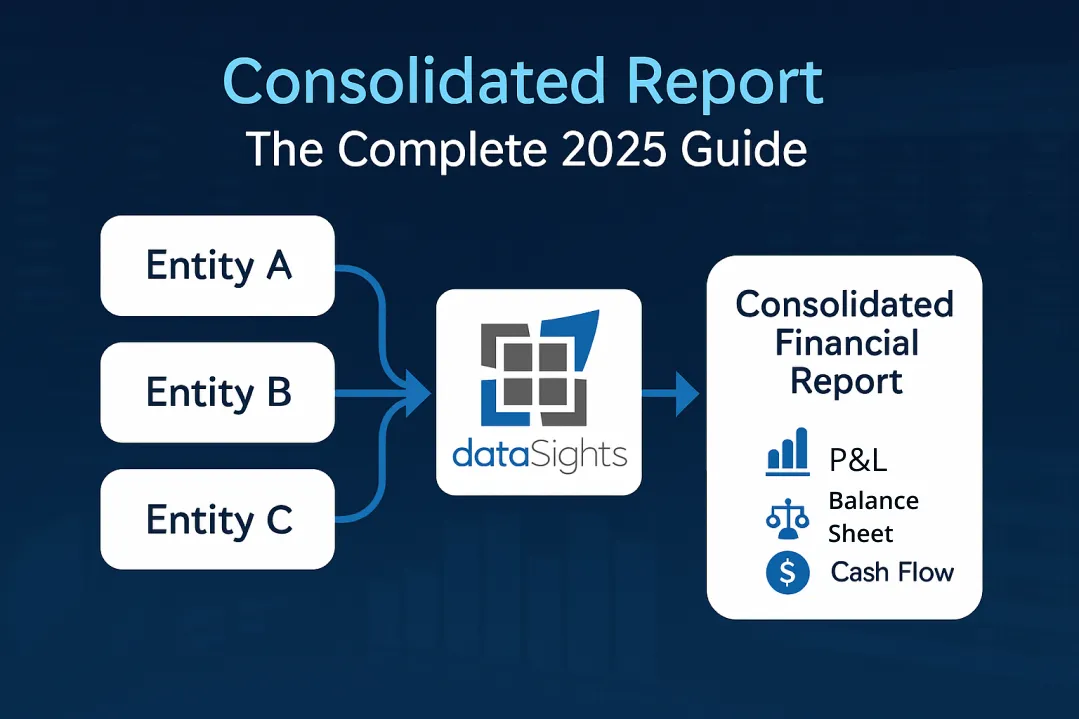
You run a multi-entity business. Month-end close takes over 15 days. Your balance sheets don’t balance across entities. Intercompany transactions need to be manually eliminated in Excel. You need a consolidated report that actually works.
What Is a Consolidated Report?
A consolidated report combines financial data from a parent company and its subsidiaries into a single set of financial statements, presenting the entire group as one economic entity. Under IFRS 10, consolidated financial statements eliminate intragroup balances and transactions so the group is presented as a single economic entity. dataSights clients cut month-end close from over 15 days to under 5 days through automated consolidation that always balances.
Ready to Automate Your Financial Consolidation?
Stop wrestling with manual consolidations and broken formulas. dataSights automates multi-entity reporting, Xero consolidations, and Power BI connections. Join 300+ businesses already transforming their financial reporting with our platform, rated 5.0 out of 5 by 90+ verified Xero users.
Table of Contents
Understanding Consolidated Reports
A consolidated report aggregates the financial position and performance of a parent company and its controlled subsidiaries into unified financial statements. The definition comes from International Accounting Standard 27 and International Financial Reporting Standard 10, which state that consolidated accounts present the following as a single economic entity:
- Assets of the parent company and its subsidiaries
- Liabilities across all entities
- Equity of the group
- Income from all operations
- Expenses incurred by the group
- Cash flows throughout the organisation
The consolidation process starts after you prepare accounts for each constituent company. You then follow two procedures: first, cancel out items that appear as assets in one company and liabilities in another; second, add together all uncancelled items.
Research from financial software providers confirms that businesses typically consolidate when an investor holds at least 50% ownership, giving them control over the investee’s financial and business decisions. But the requirement is based on control, not just ownership percentage.
Trial Balance: The Foundation of Every Consolidated Report
Every accurate consolidated report starts with the Trial Balance. This is non-negotiable. Your Trial Balance ensures all accounts reconcile before you attempt any eliminations or adjustments.
Manual consolidation in Excel often skips proper Trial Balance verification, leading to balance sheets that don’t balance and profit figures that don’t reconcile. Automated consolidation through dataSights pulls complete Trial Balance data from each entity, ensuring your consolidated reports always tie back to source systems.
Components of a Consolidated Report
A complete consolidated report includes these financial statements:
- Statement of Profit or Loss and Other Comprehensive Income (single statement or two statements): Shows combined revenues and expenses from all entities after eliminating intercompany sales. Use full consolidation when the parent controls the subsidiary; ownership >50% often indicates control, but IFRS 10 bases consolidation on control – power over relevant activities, exposure to variable returns, and the ability to affect those returns.
- Statement of Financial Position (Balance Sheet): Combines assets, liabilities, and shareholders’ equity from the parent and subsidiaries. Investment accounts in subsidiaries are cancelled against share capital accounts, with only the parent’s share capital appearing in the consolidated statement.
- Statement of Cash Flow: Tracks cash inflows and outflows from operations, investments, and financing activities across the entire group.
- Statement of Changes in Equity: Reports changes in equity components over the reporting period, including net income, dividends, and share transactions.
- Notes to the Financial Statements: Polices, judgments and required disclosures
Consolidated Report vs Combined Report: Critical Distinction
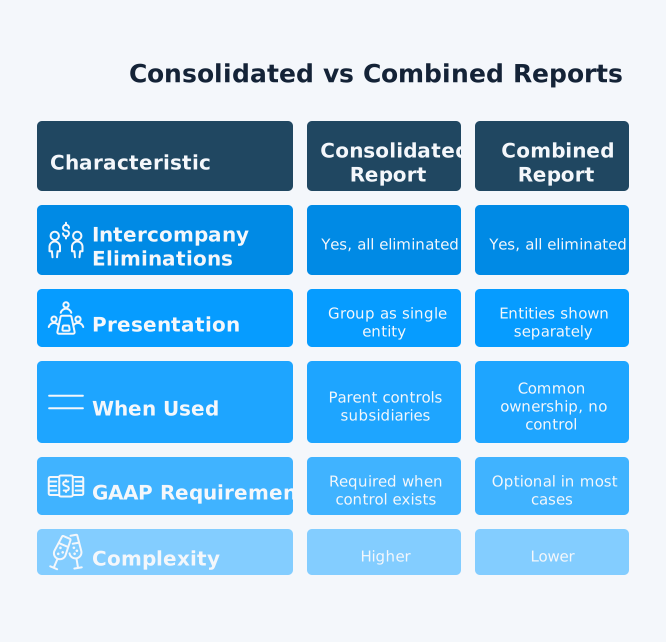
Many finance teams confuse these terms. The distinction matters for accuracy and compliance. Consolidated reports eliminate all intercompany transactions and present the group as one economic entity. They are required under GAAP when a parent controls a subsidiary, commonly through owning more than 50% of voting stock. Combined reports are used for entities under common control without a parent-subsidiary relationship. IFRS doesn’t define ‘combined’ statements; in practice, intercompany balances/transactions among presented entities are typically eliminated to avoid overstatement.
| Feature | Consolidated Report | Combined Report |
| Intercompany eliminations | Yes, all eliminated | Yes, all eliminated |
| Presentation | Group as a single entity | Entities shown separately |
| When used | Parent controls subsidiaries | Common ownership, no control |
| GAAP requirement | Required when control exists | Optional in most cases |
| Complexity | Higher | Lower |
The critical distinction is not about eliminations – both require them. The difference is the basis for combining: consolidated statements are based on a parent’s controlling financial interest in subsidiaries, while combined statements present entities under common control or management without that parent-subsidiary control relationship.
When Are Consolidated Reports Required?
IFRS 10 requires consolidation when the parent controls an investee, meaning the following are true:
- It has power over relevant activities
- Exposure to variable returns
- It can use that power to affect returns
Control typically exists with ownership over 50%, but the test is control itself, not the percentage.
In the UK, parent directors must prepare group accounts unless an exemption applies (Companies Act 2006 s.399). From FYs beginning on/after 6 Apr 2025, ‘small group’ thresholds increase to turnover ≤ £15m, balance sheet total ≤ £7.5m, and ≤ 50 employees (meet any two).
Under US GAAP, ASC 810 uses the voting interest and VIE models to determine when a controlling financial interest exists and consolidation is required. Even when statutory consolidation isn’t required, many businesses prepare management consolidations for boards and investors.
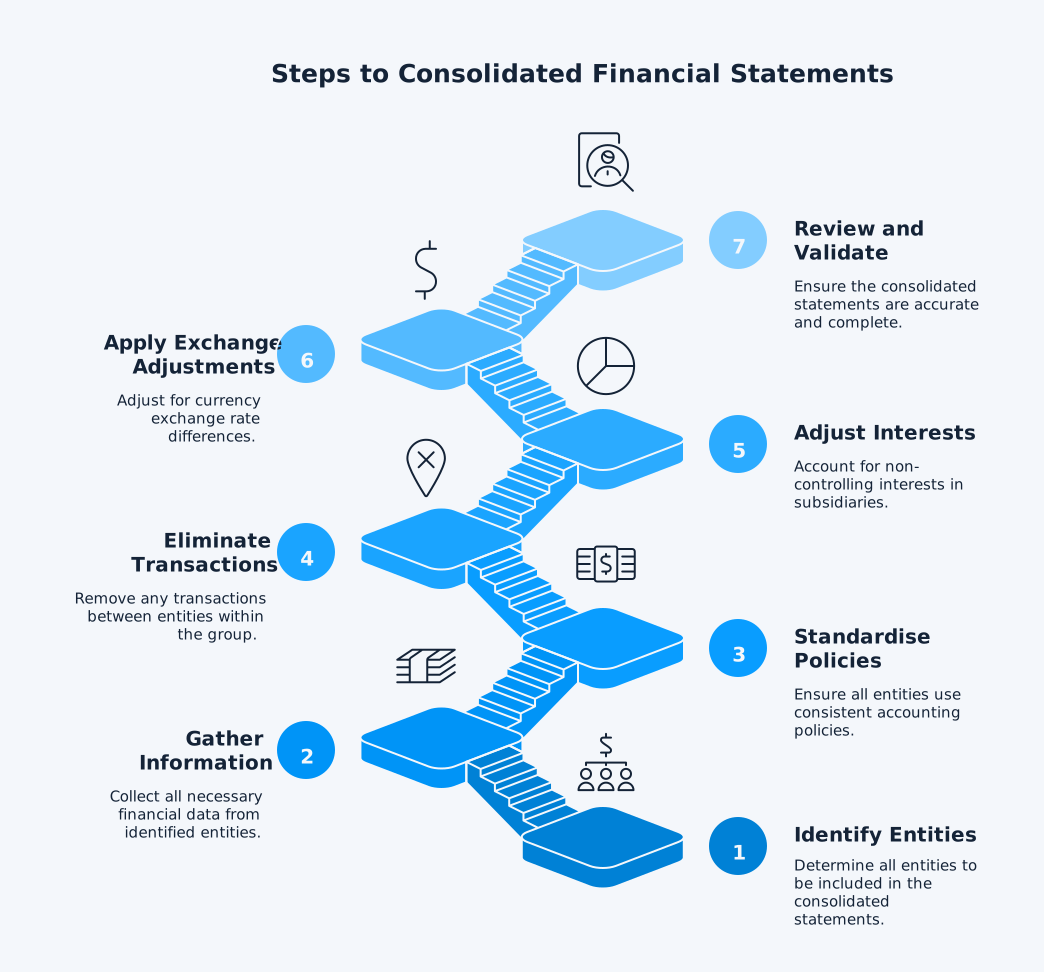
How to Create a Consolidated Report: 7-Step Process
Creating accurate consolidated reports requires systematic data gathering, proper eliminations, and thorough validation. Manual processes extend month-end close beyond two weeks, but following these steps ensures your consolidated statements balance. Automated platforms like dataSights handle steps 3-6 automatically, reducing consolidation time to under 5 days.
Step 1: Identify All Reporting Entities
List every subsidiary, joint venture, and entity where you have controlling interest or significant influence. Identify all subsidiaries you control (per IFRS 10’s three-part control model), plus joint arrangements and associates (significant influence).
Step 2: Gather Financial Information
Collect Trial Balances, general ledgers, and supporting documentation from each entity. Ensure all entities follow consistent accounting policies and report for the same period. Align reporting dates where possible; if not, IFRS 10 allows up to a three-month gap with adjustments for significant intervening transactions.
Step 3: Standardise Accounting Policies
Before consolidating, align subsidiaries’ policies with the parent’s – IFRS 10 requires uniform policies for like transactions. This includes revenue recognition, depreciation methods, and inventory valuation.
Step 4: Eliminate Intercompany Transactions
Eliminate intragroup balances/transactions and any unrealised profit (e.g., inventory and fixed assets) so only external results remain. Common eliminations include:
- Intercompany sales and purchases
- Loans between entities (eliminate both receivable and payable)
- Interest income and expense between entities
- Dividends paid by subsidiaries to parent
- Unrealised profit in closing inventory from intra-group sales
Mayday’s research confirms that manual intercompany reconciliation involves “pulling transactions into Excel, going through it line by line” – a process that’s laborious and error-prone.
Step 5: Adjust for Non-Controlling Interests
When the parent owns less than 100% of a subsidiary, calculate the portion owned by external shareholders. Present NCI within equity and attribute profit or loss and OCI to owners of the parent and to NCI.
Goodwill (IFRS 3): Goodwill = Consideration transferred + fair value of any previously held interest + fair value of NCI (if measured at fair value) − fair value of identifiable net assets acquired.
Step 6: Apply Foreign Exchange Adjustments
For subsidiaries operating in different currencies, translate assets/liabilities at the closing rate and income/expenses at transaction-date rates (often approximated by period averages) per IAS 21.
Step 7: Review and Validate
Verify that consolidated reports reflect the true financial position of the group. Ensure balance sheets balance, Trial Balances reconcile, and all eliminations are properly documented.
Management Reports vs Statutory Consolidated Reports
This distinction is critical but often overlooked. Statutory consolidated reports meet GAAP or IFRS compliance requirements. They follow prescribed formats and disclosure rules for regulators, auditors, and external stakeholders.
Management consolidated reports provide operational intelligence for decision-making. They include:
- Board-ready reports with commentary
- KPI dashboards showing margins, DSO, ROE
- Budget variance analysis
- Drill-down capabilities from group to transaction level
Your consolidated reports should deliver both compliance statements and management insights. CFOs need more than balance sheets and P&Ls – they need actionable intelligence.
dataSights delivers pre-formatted management packs including Profit & Loss, Balance Sheet, Trial Balance, Budget & Budget Variance, AR & AP Summary and Detailed reports. All reports include automatic eliminations with complete audit trails.
Benefits of Consolidated Reports
Consolidated reports give you a single, accurate view of the group by eliminating intragroup balances and transactions. With one source of truth, you can compare entities consistently, spot risks earlier, and focus on the numbers that matter – leading to faster closes and more confident decisions.
- Complete Financial Overview: Consolidated statements allow investors, analysts, and business owners to view overall health at a glance, understanding how each subsidiary impacts the parent company.
- Reduced Paperwork and Complexity: Without consolidation, a parent with nine subsidiaries would require 40 separate financial reports (four statements per entity plus parent). Consolidation provides one comprehensive view.
- Better Decision-Making: Consolidated reports enable stakeholders to assess overall performance and make informed strategic decisions. You identify trends, assess liquidity and solvency, and evaluate capital structure across the entire group.
- Regulatory Compliance: Both GAAP and IFRS require consolidated statements for companies with significant control over subsidiaries, ensuring transparency and accountability.
- Time Savings Through Automation: Manual consolidation extends month-end close to over 15 days. Automated consolidation through dataSights reduces this to under 5 days, as confirmed by our 90+ five-star Xero user reviews.
Xero Consolidated Reporting: The dataSights Solution
Xero organisations are separate; Xero currently doesn’t consolidate multiple organisations natively – users typically connect an app or export data. Each legal entity requires its own Xero organisation, and Xero offers no built-in consolidation tools.
Manual Xero consolidation means downloading data for each entity, uploading into Excel, and reconciling fields against one another. The process is “laborious and fiddly”, leaving even diligent accountants prone to human error.
How dataSights Automates Xero Consolidation
dataSights syncs data from multiple Xero entities via API into a cloud database. You then connect Power BI, Excel, or Google Sheets directly to this consolidated database for real-time reporting.
The workflow:
- Xero APIs sync to dataSights cloud database automatically
- Eliminations and adjustments configured once in Excel Online
- Power BI connects to consolidated data
- Reports refresh automatically with always-balanced figures
No CSV exports. No manual copy-paste. No broken formulas. See automated Xero consolidation in action. This demonstration shows how dataSights syncs multiple Xero entities, applies eliminations automatically, and delivers balanced consolidated statements in Power BI and Excel.
Consolidation Capabilities
- Entity scale: Handle both small and large consolidation of entities without performance degradation
- Processing speed: Pull consolidated Trial Balance data with automatic reconciliation to source systems
- Automated eliminations: Configure elimination rules once; they apply automatically every period with full audit trails.
- Multi-currency: Automatic exchange rate handling across all entities
- Real-time updates: Changes in Xero flow through to consolidated reports automatically
Common Consolidation Challenges and Solutions
Even well-run finance teams hit speed bumps at month-end – mismatched charts of accounts, inconsistent policies, intercompany imbalances, FX noise, and late adjustments that stretch the close. This section highlights the most common pitfalls and how to fix them – from standardising mappings and close calendars to automating eliminations, FX translation, and NCI. Use it as a quick checklist to cut rework, reduce errors, and keep the group view audit-ready.
- Challenge: Balance Sheets Don’t Balance
Manual consolidation in Excel often produces balance sheets where total equity and net assets don’t match. This occurs when eliminations are incomplete or Trial Balances weren’t verified first.
Solution: Start with Trial Balance verification. dataSights consolidations are always reconciled to the Trial Balance, guaranteeing balanced output.
- Challenge: Eliminations Lack Audit Trails
Spreadsheet eliminations lack version control, documentation of who made changes, and a trail back to source transactions. This creates audit nightmares.
Solution: System-level audit logs showing who made eliminations, when, and why. dataSights maintains permanent records for historical recreation.
- Challenge: Month-End Discovery of Mismatches
Manual processes mean you only discover intercompany mismatches two weeks after month-end, when context is lost and corrections are complex.
Solution: Continuous consolidation. dataSights provides an always-on, real-time group view. Issues surface daily, not at month-end. Investigation time is reduced by 60% when problems surface immediately.
- Challenge: Inconsistent Accounting Across Entities
Different chart of accounts, varied depreciation methods, and inconsistent revenue recognition policies across subsidiaries create consolidation chaos.
Solution: Map subsidiary accounts to group-level consolidated accounts. dataSights links subsidiary-level codes to standard group summary codes, extracting consistent data regardless of local coding variations.
Consolidation Methods by Ownership Level
The consolidation method depends on your level of control or influence over the subsidiary.
- Full Consolidation (>50% ownership): Transfer all assets, liabilities, equity, revenues, and expenses to the parent’s financial statements. Used when the parent controls the subsidiary. All intercompany transactions must be eliminated.
- Equity Method (20-50% ownership): Used when you have significant influence but not control. Record your proportionate share of the subsidiary’s profits or losses. For example, if you own 35% and the subsidiary earns £100,000, you report £35,000 as income.
- No significant influence (<20% usually): Account for the investment as a financial asset – IFRS 9 (FVPL or elective FVOCI for specific equity instruments); under US GAAP, use ASC 321 (fair value through earnings, or measurement alternative for certain non-marketable equity).
Frequently Asked Questions
What Is the Difference Between a Consolidated Report and Consolidated Financial Statements?
These terms are used interchangeably. Both refer to combined financial data from parent and subsidiaries presented as one economic entity. “Consolidated report” is often used in management reporting contexts, while “consolidated financial statements” appears in regulatory and compliance contexts.
How Long Does It Take to Create a Consolidated Report Manually?
Manual consolidation typically extends month-end close to over 15 days for multi-entity businesses. Individual consolidation steps take a few minutes each, but this scales to hours or days when processing hundreds of transactions across multiple entities with intercompany eliminations.
Can I Create Consolidated Reports in Excel?
Yes, but manual Excel consolidation is time-consuming and error-prone. You must export data from each system, paste into spreadsheets, create elimination journals, and reconcile everything line by line. Even diligent accountants make errors in this process.
What Software Creates Consolidated Reports Automatically?
Automated consolidation software pulls data directly from your accounting systems via API, applies elimination rules automatically, and generates balanced consolidated reports. dataSights provides this for Xero users, connecting multiple entities to Power BI, Excel, or Google Sheets with automated refresh.
Do I Need Consolidated Reports if I Only Have 2 Entities?
If you control both entities and they transact with each other, yes. Consolidated reports prevent double-counting intercompany activity and give you accurate group-level visibility. Even with just two entities, manual consolidation is time-consuming enough to justify automation.
What Are Eliminations in Consolidated Reports?
Eliminations remove intercompany transactions and balances from consolidated reports. Suppose Entity A sells £10,000 to Entity B within your group. In that case, this sale appears as revenue for A and expense for B. Consolidation eliminates both to show only external transactions, since the group as a whole earned no external revenue from this internal transfer.
When Should I Use Combined Statements Instead of Consolidated Statements?
Use combined statements when entities are under common ownership but lack a parent-subsidiary control relationship. Combined statements show each entity separately within one document. Use consolidated statements when a parent controls subsidiaries – this is typically required under GAAP and IFRS.
How Do I Handle Subsidiaries With Different Year-Ends in Consolidated Reports?
If a subsidiary’s reporting date differs, IFRS 10 permits a gap of no more than three months, with adjustments for significant intervening transactions. Align reporting dates where possible to simplify consolidation.
What Happens to Minority Interests in Consolidated Reports?
Non-controlling interests (minority interests) represent the portion of subsidiaries not owned by the parent. They appear as a separate line in consolidated equity and as an allocation of consolidated profit. If you own 80% of a subsidiary earning £100,000 profit, £20,000 is attributed to non-controlling interests.
Can Xero Produce Consolidated Reports Natively?
No. Xero has no native consolidated reporting features. Each Xero organisation operates independently. You need third-party automation to consolidate multiple Xero entities. dataSights provides this through direct API connections to a cloud database.
Turn Consolidation Into Insight
Manual consolidation means discovering problems two weeks after month-end. Spreadsheet eliminations lack audit trails. Balance sheets don’t balance. Month-end close extends beyond 15 days. Automated consolidation through dataSights delivers always-balanced consolidated reports. Trial Balance foundations ensure accuracy. Automated eliminations include complete audit trails. Real-time visibility means issues surface daily, not at month-end.
Automate Your Xero Consolidation with dataSights
Cut month-end from over 15 days to under 5 with automated Xero consolidation. dataSights connects multiple Xero entities directly to Power BI and Excel through secure API sync. Eliminations happen automatically with full audit trails. Balance sheets always balance. Rated 5.0 out of 5 by 90+ Xero users. Join 300+ businesses who’ve transformed their financial reporting.
About the Author
Kevin Wiegand
Founder & Client happiness
I’m Kevin Wiegand, and with over 25 years of experience in software development and financial data automation, I’ve honed my skills and knowledge in building enterprise-grade solutions for complex consolidation and reporting challenges. My journey includes developing custom solutions for data teams at Gazprom Marketing & Trading and E.ON, before founding dataSights in 2016. Today, dataSights helps over 300 businesses achieve 100% report automation. I’m passionate about sharing my expertise to help CFOs and Financial Controllers reduce their month-end close time and eliminate the manual Excel exports that drain their teams’ valuable time.