
Managing invoices across multiple entities in Xero can quickly become overwhelming. You’re switching between different Xero organisations, manually copying data, and watching your month-end close stretch from days into weeks. If you’re using Xero’s Copy & Merge function for draft invoices manually, you already know the pain: reconciliations that don’t balance, reference numbers that disappear, and hours spent on tasks that should take minutes. This guide shows you exactly how Xero’s copy-and-merge feature works for draft invoices, what the platform can and can’t do natively, and how to dramatically reduce your month-end close from weeks to just days.
What Is Consolidated Invoicing in Xero?
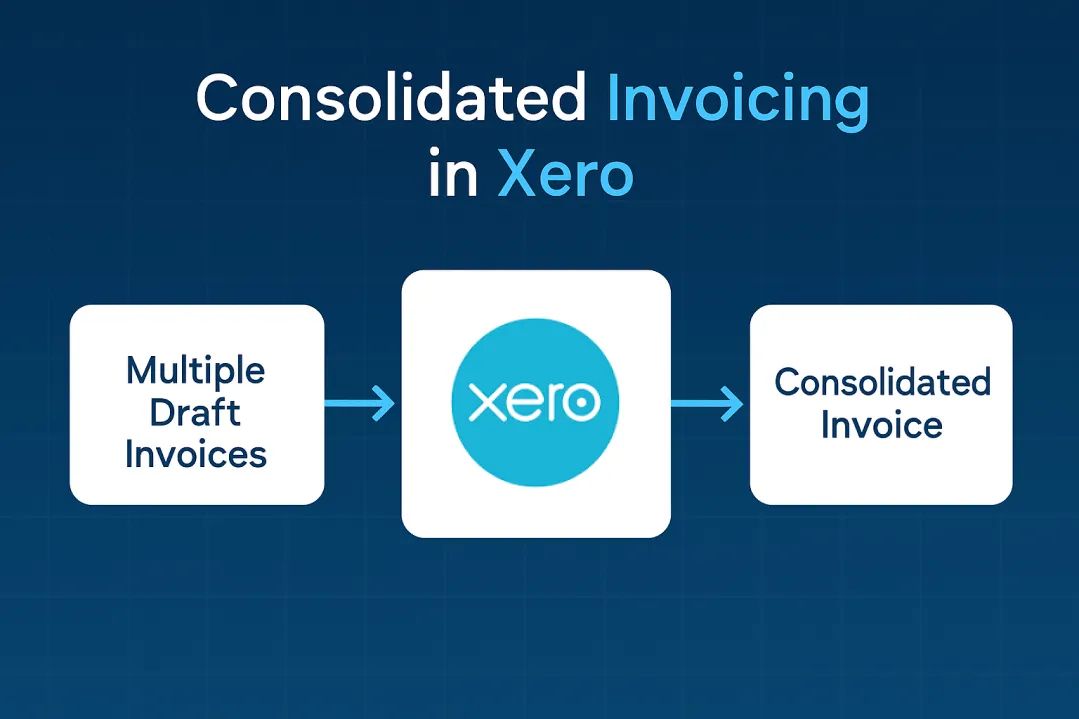
Consolidated invoicing in Xero is the process of combining multiple draft invoices using the Copy & Merge function to create a single billing document. This feature copies line items from your selected draft invoices (same contact, same currency) and generates a new invoice – though the original drafts remain in the system until you manually delete them. It’s not true consolidation since Xero doesn’t actually merge the invoices but creates a new one with copied line items. With manual processes taking finance teams “10 to 15 days” for month-end close, automated solutions reduce this to 5 days.
Ready to Automate Your Financial Consolidation?
Stop wrestling with manual consolidations and broken formulas. dataSights automates multi-entity reporting, Xero consolidations, and Power BI connections. Join 300+ businesses already transforming their financial reporting with our platform, rated 5.0 out of 5 by 90+ verified Xero users.
Table of Contents
How Does Invoice Consolidation Work in Xero?
The Copy-and-Merge Process
Xero’s Copy & Merge function for draft invoices requires manual intervention at every step. When you select multiple draft invoices for the same contact and currency, Xero doesn’t consolidate them directly. Instead, the system copies all line items from your selected invoices and creates an entirely new draft invoice containing those combined details.
Where to Start
The process starts in your Draft invoices tab:
- Select the checkboxes next to the invoices you want to consolidate
- Click “Copy & Merge into a new…” to open a dialogue window
- Specify the customer name (select from dropdown if customer exists)
- System generates a fresh invoice with all the line items
Critical Limitation
Your original invoices remain untouched in the system after consolidation. This creates immediate challenges for finance teams:
- Duplicate invoices cluttering your drafts folder
- Risk of double-billing if not carefully managed
- Manual deletion required for each original invoice
- Reference numbers from original drafts disappear
Alternative Approaches
For businesses using integrated systems like Cin7 Core, consolidation happens before data reaches Xero. These platforms:
- Group invoices by date, currency, tax status, and store location
- Export a single consolidated document automatically
- Use standardised naming formats
- Eliminate manual work but require additional software investment
See dataSights’ comprehensive Xero automation platform in action, featuring management reporting that always balances, automated eliminations, multi-entity journal uploads, and direct connections to Excel and Power BI – showing how invoice consolidation fits within a complete finance automation solution.
Step-by-Step: Using Xero’s Copy and Merge Feature
The manual process for consolidating invoices in Xero follows a specific workflow that finance teams repeat hundreds of times during month-end. Understanding each step helps identify where automation can save the most time.
- First, navigate to Business > Invoices > Draft tab to view all pending invoices.
- Select the invoices for consolidation by ticking their checkboxes, ensuring they’re all for the same customer and in the same currency.
- Click the “Copy & merge into a new…” button at the bottom of the screen.
- The system defaults to creating an invoice, though you can change this to a quote if needed.
- In the merge dialogue, type your customer’s name in the “Merge all contents into one for:” field.
- Xero will suggest existing contacts as you type, or you can enter a new contact name.
- After clicking merge, review the newly created draft invoice carefully. The consolidated invoice won’t automatically include reference numbers from your original invoices, so add these manually in the Reference field if you need them for tracking.
- Check that all line items transferred correctly and totals match your expectations.
- Add any additional information like logos, addresses, or tax numbers through the “Add details” option.
- Save the consolidated invoice, which now appears alongside your original drafts.
- Navigate back to the drafts list and manually delete each original invoice, but only after recording their reference numbers elsewhere, as this information is permanently lost once deleted.
This manual process typically takes a few minutes per consolidation, scaling to hours for businesses processing hundreds of invoices monthly. For businesses processing hundreds of invoices monthly, that translates to hours of repetitive work that dataSights’ automated consolidation can complete in seconds.
Limitations of Manual Invoice Consolidation in Xero
No Native Multi-Entity Consolidation
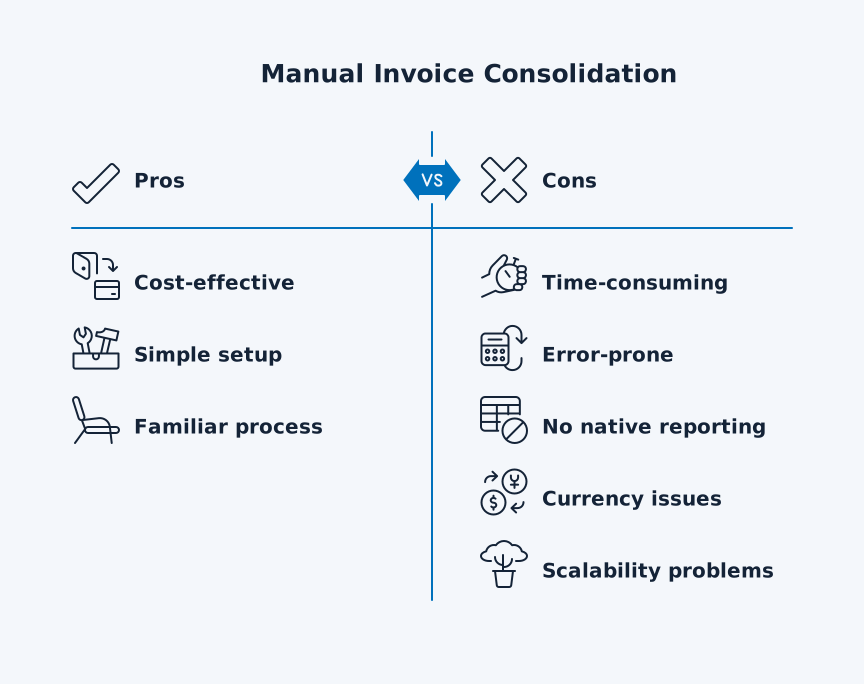
Manual invoice consolidation in Xero creates bottlenecks that compound as your business grows. The most significant limitation is that Xero provides no native consolidated reporting across multiple entities.
Multi-entity challenges include:
- Each legal entity requires its own Xero organisation with separate subscription
- Constant switching between organisations to manage consolidated invoicing
- No unified view across your entire business
- Manual data export and import for every consolidation
Operational Risks and Audit Trail Issues
The copy-and-merge function itself introduces operational risks:
- Original invoices remain in the system after consolidation
- Duplicate entries confuse reporting and potentially lead to double-billing
- Critical reference information disappears during consolidation
- The new draft invoice won’t include reference numbers from original invoices
- This information “is not recorded” unless manually added, creating audit trail complications
Currency and Tracking Category Complications
Currency complications multiply the challenges for multi-entity businesses:
- Xero supports multi-currency invoicing at the individual invoice level (Premium plan required)
- You cannot consolidate invoices across different currencies natively
- Cin7 Core uses average exchange rates across the consolidation period
- Xero’s manual Copy & Merge requires same-currency invoices
For businesses using tracking categories:
- Automated platforms can group consolidations by Xero tracking category to maintain departmental visibility
- Xero’s native copy and merge function requires careful manual management
- Risk of losing category assignments during consolidation
Escalating Time Costs
Time costs escalate dramatically for multi-entity businesses:
- DataSights clients report reducing month-end reporting from “10 to 15 days” to just 5 days through automation
- Manual process involves:
- Exporting each entity’s data to CSV
- Manipulating data in Excel
- Re-importing processed data
- Process described as “laborious and fiddly” that leaves “even the most diligent accountants prone to human error”
- Manual cycle repeats monthly with no efficiency gains over time
Why Manual Doesn’t Scale
These limitations explain why dataSights has 90+ five-star reviews from Xero users who’ve automated their consolidation. The manual approach simply doesn’t scale.
Automating Multi-Entity Invoice Consolidation
From Manual Chaos to API-Driven Automation
Automated consolidation transforms multi-entity invoicing into a streamlined, accurate process. Manual methods require:
- Downloading data from each Xero file
- Formatting in Excel
- Re-uploading across multiple organisations
Automation handles everything in real-time through API connections.
How dataSights Automation Works
dataSights’ platform consolidates data from multiple Xero entities directly into Power BI or Excel, eliminating CSV exports entirely. The system:
- Pulls transactional data from all connected Xero organisations simultaneously
- Applies your consolidation rules automatically
- Delivers formatted reports in seconds
- Handles 30+ entities without performance degradation
For businesses managing 30+ entities, this represents a reduction in month-end close from “10 to 15 days” to 5 days.
Beyond Speed: Accuracy and Audit Trails
The automation advantage extends beyond time savings:
- Automated consolidation reduces overhead costs associated with tracking individual payments
- Ensures accuracy across all transactions
- Maintains complete audit trails
- Preserves links between original and consolidated documents
- Creates documentation impossible with manual processes
Complex Scenarios Handled Automatically
Modern consolidation platforms process complex requirements without manual intervention:
Multi-Currency Management:
- Convert transactions at real-time exchange rates
- Apply consistent rates across consolidation periods
- Handle foreign exchange adjustments automatically
Tracking Categories:
- Map categories correctly across entities
- Maintain departmental visibility
- Preserve project-level analysis
Intercompany Processing:
- Eliminate intercompany transactions automatically
- Balance eliminations across entities
- Maintain compliance documentation
Businesses report improving cash flow simply by consolidating invoices more efficiently.
Subscription and Recurring Billing Benefits
For subscription businesses or those with recurring billing, automation delivers specific advantages:
- Generate consolidated statements automatically based on defined cycles
- Replace hundreds of individual monthly invoices with single consolidated documents
- Deliver cleaner, more professional invoices to customers
- Reclaim hours of productive time for finance teams
- Set daily, weekly, or monthly consolidation periods
- Maintain consistency across billing cycles
Managing Intercompany Transactions and Eliminations
The Intercompany Challenge in Xero
Intercompany transactions create unique challenges in consolidated invoicing that Xero doesn’t address natively. When Entity A invoices Entity B within your group, these transactions must be eliminated from consolidated reports to avoid inflating revenue and expenses.
Manual elimination in Xero requires:
- Exporting data from each entity
- Matching transactions in Excel
- Creating adjustment journals
- Managing a process prone to errors and imbalances
Multi-Currency Complications
The complexity multiplies with multi-currency operations. Without automation, finance teams face:
- Foreign exchange adjustments that must be calculated and posted correctly
- Days spent reconciling discrepancies in intercompany accounts
- Downloading transaction reports from every entity
- Manually matching entries across organisations
The Manual Reconciliation Reality
Mayday’s documentation confirms that “reconciling intercompany loan accounts manually” involves “pulling transactions into Excel, going through it line by line”.
Their Balancer tool exists specifically because:
- Reconciling these accounts has historically been a very manual process
- Requires pulling account transaction reports from multiple entities
- Involves ‘ticking’ to compare the data
Multi-currency accounts require:
- Manual posting of FX adjustments
- Calculation of interest on intercompany loans
- Tasks that remain unautomated without third-party tools
Automated Elimination with dataSights
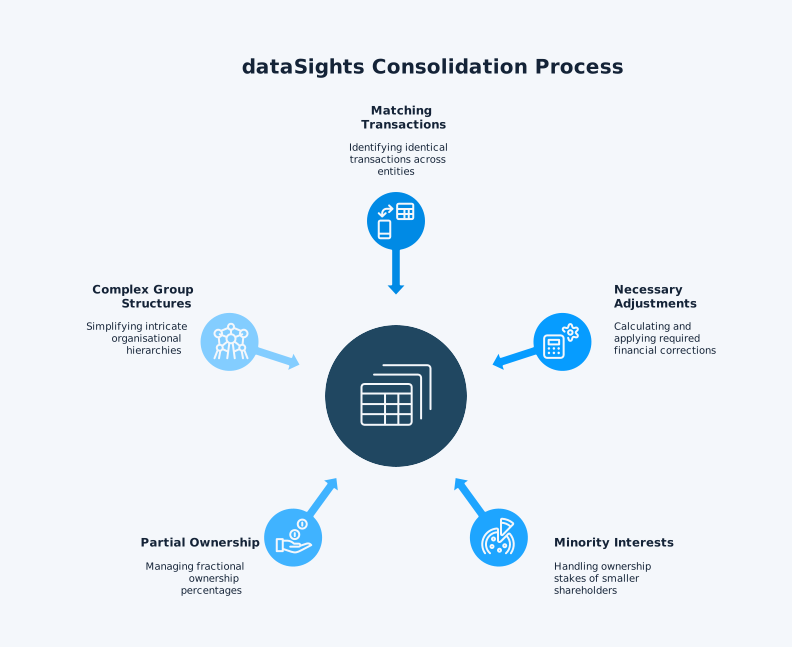
dataSights handles eliminations automatically through its consolidation engine. The platform:
- Identifies matching transactions across entities
- Calculates necessary adjustments
- Produces clean consolidated statements with eliminations already processed
- Handles minority interests automatically
- Manages partial ownership percentages
- Processes complex group structures that would take days to reconcile manually
Tracking Category Complexity
Tracking category consolidation adds another layer of complexity:
The Problem:
- Different entities use different categories for the same departments
- Projects have inconsistent naming across organisations
- Manual consolidation requires massive mapping spreadsheets
- Mapping documents become outdated quickly
The Solution: Automated platforms, like dataSights, map these variations to unified reporting categories, ensuring accurate departmental analysis across your entire group.
Audit Trail Requirements
The audit trail for eliminations is critical for compliance:
Professional consolidation tools provide:
- Detailed logs showing which transactions were eliminated
- Records of all adjustments made
- Approval documentation and timestamps
- Complete transparency as required by best practices
Manual Excel-based consolidation lacks:
- Any record of changes made
- Approval workflows
- Version control
- Compliance documentation
Manual Excel-based consolidation does not provide system-level audit trails; changes can be made without logs or approvals.
Best Practices for Xero Invoice Consolidation
- Successful invoice consolidation in Xero starts with standardising your chart of accounts across all entities. According to Reach Reporting, establishing a consistent chart of accounts is the first step to simplifying consolidation, as it ensures revenues, expenses, and assets are categorised uniformly. This standardisation reduces errors during aggregation and speeds up the entire consolidation process.
- Define clear consolidation cycles based on your business needs. Monthly consolidation works for most businesses, but high-volume operations might benefit from weekly or even daily cycles. Document your cycle in your accounting procedures and ensure all team members understand the timeline. For Malaysian businesses, consolidated e-invoices must be submitted by the 7th of each month, making timing critical.
- Maintain meticulous documentation of original invoice references. Since Xero’s merge function doesn’t preserve reference numbers from source invoices, create a separate log before consolidation. Include invoice numbers, dates, amounts, and customer details. This documentation becomes your audit trail and helps resolve queries months later.
- Leverage tracking categories strategically for better consolidation. When using platforms like Cin7 Core, transactions can be grouped by Xero tracking categories, allowing departmental or project-based consolidation alongside entity-level grouping. Set up categories consistently across all entities before beginning consolidation.
Consider automation when manual processes consume more than 5 hours monthly. Calculate your current time cost by multiplying your hourly rate by the consolidation hours, which equals your monthly consolidation cost. If this exceeds automation platform fees, the business case is clear.
For businesses not ready for full automation, hybrid approaches work well. Use Xero’s manual consolidation for simple, same-entity invoices while deploying automation tools for complex multi-entity or multi-currency scenarios. This staged approach lets you gain efficiency immediately while planning a fuller automation rollout.
Frequently Asked Questions
Can You Consolidate Invoices Across Different Currencies in Xero?
Xero’s manual merge function doesn’t handle currency conversion automatically. Third-party platforms like Cin7 Core calculate average exchange rates across the consolidation period and apply them during consolidation. For manual consolidation, you must convert currencies yourself before merging.
How Do I Maintain Audit Trails When Consolidating Invoices?
Document all original invoice numbers before consolidation, since Xero doesn’t preserve these references automatically. Create a spreadsheet linking original invoices to consolidated versions. Automated platforms maintain these trails automatically, storing complete transaction histories.
What Happens to the Original Invoices After Merging?
Original invoices remain in Xero as separate draft invoices after using the copy and merge function. You must manually delete them to avoid duplication. This creates risk – deleting too early loses your audit trail, but keeping them causes confusion and potential double-billing.
Can Xero Automatically Consolidate Recurring Invoices?
No, Xero has no native automatic consolidation feature. Each consolidation requires manual selection and merging. For recurring consolidation needs, third-party automation tools are essential to avoid repetitive manual work every billing cycle.
How Long Does Manual Invoice Consolidation Typically Take?
Manual consolidation across multiple entities can extend month-end close from weeks to just under 5 days with automation. Individual invoice consolidation typically takes a few minutes per merge, but this scales to hours for businesses processing hundreds of invoices monthly.
What's the Difference Between Consolidation and Elimination?
Consolidation combines invoices or financial data from multiple sources into unified reports. Elimination removes intercompany transactions from consolidated reports to prevent double-counting revenue and expenses when entities within your group trade with each other.
Does Xero Support Batch Invoice Processing?
Xero allows batch actions like sending or approving multiple invoices, but not batch consolidation. Each consolidation requires individual processing through the copy and merge function. Automated solutions handle actual batch consolidation, processing hundreds of invoices simultaneously.
How Do Tracking Categories Work During Consolidation?
Tracking categories don’t automatically transfer during Xero’s manual merge process. Platforms with Xero integration can group consolidations by tracking category, maintaining departmental or project visibility in consolidated invoices.
Transform Your Invoice Consolidation Today
Manual invoice consolidation in Xero drains your finance team’s productivity and increases error risk with every month-end close. While Xero’s copy and merge function provides basic consolidation, it leaves you managing duplicate invoices, lost reference numbers, and hours of repetitive work. For multi-entity businesses, these limitations compound into weeks of unnecessary effort that automation eliminates instantly.
Automate Your Xero Consolidation with dataSights
Stop spending weeks on month-end close when you could finish in days. dataSights’ Xero consolidation platform connects all your entities, automates eliminations, and delivers consolidated reports in seconds, not days. With 90+ five-star reviews from finance teams who’ve already transformed their consolidation process, you can trust dataSights to handle your most complex multi-entity challenges. See how 300+ businesses worldwide have revolutionised their financial reporting.
About the Author
Kevin Wiegand
Founder & Client happiness
I’m Kevin Wiegand, and with over 25 years of experience in software development and financial data automation, I’ve honed my skills and knowledge in building enterprise-grade solutions for complex consolidation and reporting challenges. My journey includes developing custom solutions for data teams at Gazprom Marketing & Trading and E.ON, before founding dataSights in 2016. Today, dataSights helps over 300 businesses achieve 100% report automation. I’m passionate about sharing my expertise to help CFOs and Financial Controllers reduce their month-end close time and eliminate the manual Excel exports that drain their teams’ valuable time.