Connect Cin7 Core to Excel, Power BI, Looker and any AI
Sync Cin7 Core into your own database alongside Xero, Shopify and 160+ other systems. Reconcile inventory to the ledger, report in any tool, and post corrections back. No manual exports, no two systems that never quite agree.
14-day free trial, no credit card required
Used by over 300 businesses globally


What dataSights does for Cin7 Core
dataSights syncs your Cin7 Core data into a dedicated Azure SQL database you own, alongside your Xero organisations, Shopify stores and any of 160+ other systems. Clean, report-ready views mirror the reports you already run in Cin7 Core, sales invoices with COGS, product availability, fulfilment and financial transactions, with the hard joining done for you. From there your data is live in Excel, Power BI, Google Sheets and Looker, and in any AI tool through AI Connect. And because Cin7 Core and Xero finally sit in the same database, you can reconcile the two in one pass and post corrections back, the job neither app can do alone.
300+
Businesses
160+
Connectors
5.0
Xero App Store rating
The dataSights difference
An MCP for Cin7 Core that already knows your Xero
Pointing an AI at the Cin7 Core API alone gets you one system's raw tables. The dataSights MCP exposes curated views over Cin7 Core, Shopify and Xero together in your own database, so the AI can answer the questions that span systems, is this shipped, invoiced and posted, and act on the answer by posting back to Xero. One connector, joined data, both read and write.
Three steps to automated reporting
dataSights connects to your source systems via API, syncs your data into a secure, dedicated SQL database, and makes it available to the reporting tool of your choice.
Connect your Cin7 Core account
Sign up for a free trial and connect Cin7 Core, then add your Xero organisations and Shopify stores in the same trial. dataSights syncs everything via API into your own dedicated, secure Azure SQL database. No CSV exports, no manual uploads.
Choose your output
Connect Excel, Power BI, Google Sheets, Looker Studio, or an AI agent via MCP. Your data is structured and ready to use from day one, with pre-built views and report templates.
Automate and scale
Schedule refreshes, combine with data from 160+ other connectors, and build consolidated reports across your entire tech stack. Add new sources any time.
Reconcile Cin7 Core, Shopify and Xero in one pass
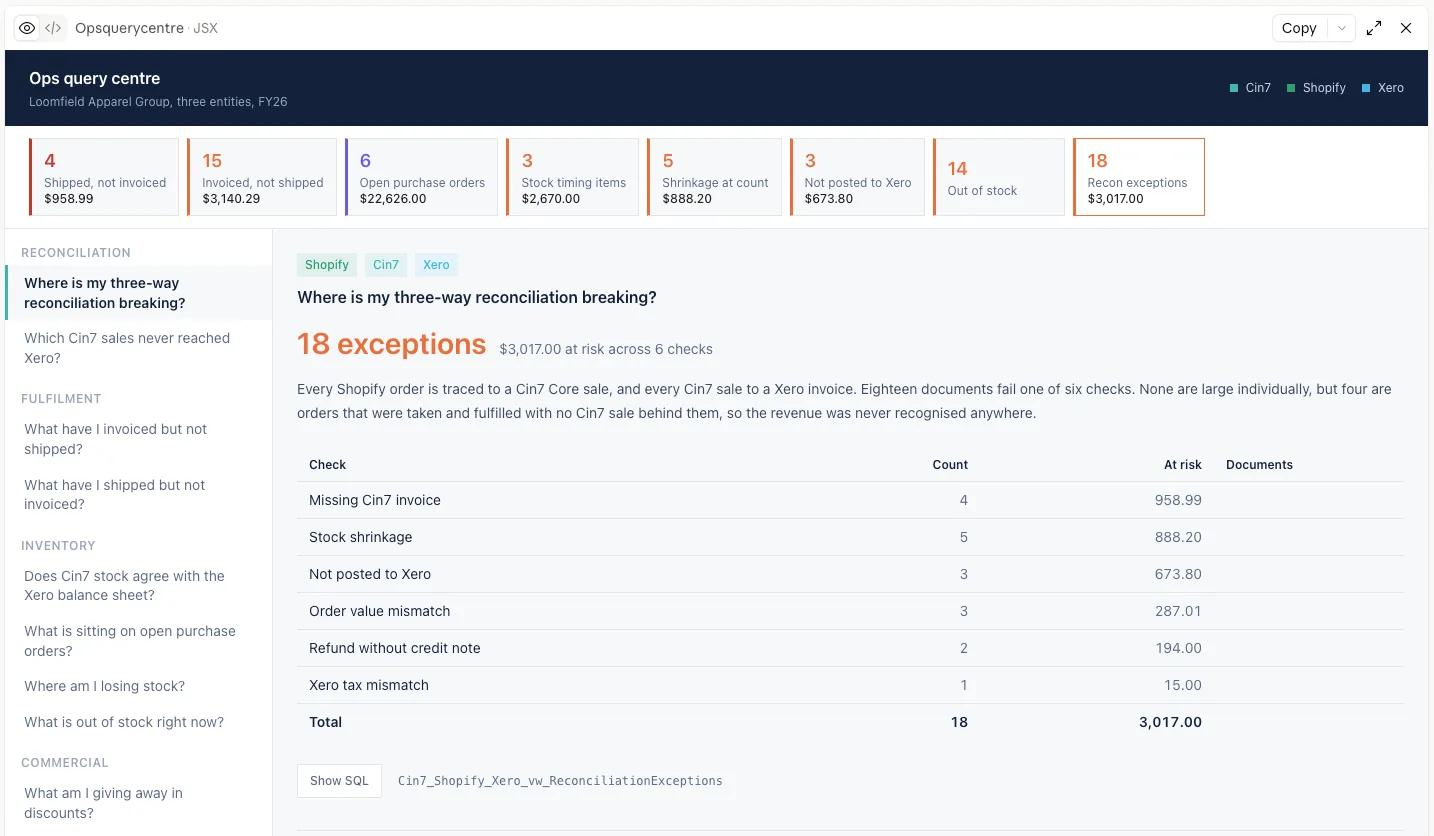
Inventory lives in Cin7 Core, orders in Shopify, the ledger in Xero, and the three never quite agree. With all of them in one database, the reconciliation becomes one workflow instead of three exports.
- 1Run the checks across all three systems: missing invoices, order value mismatches, transactions never posted to Xero, tax mismatches, refunds without credit notes, stock differences
- 2Review the exceptions with the dollar exposure on each
- 3Post the corrections back to Xero
- 4Track it all in a live command centre, week after week
Ops query centre, built using dataSights AI Connect MCP. Not a dataSights screen: a report built from a dataSights consolidated database. Demo data.
In this demo dataset, one pass surfaces 18 exceptions worth $3,017 across six checks and three systems.
Data out, and data back in
Post to Xero
Post journals, invoices and corrections to Xero from Excel or Claude, with a full audit trail on every posting.
Bulk update Cin7 Core from Excel
Bulk update products in Cin7 Core straight from a spreadsheet with the dataSights add-in. See the step-by-step guide
COGS, margin and a ledger that agrees with the warehouse
Reconcile Cin7 Core to Xero as a routine, not a quarterly archaeology project. Sales with COGS, landed costs and margin by product and channel, joined to the P&L. Month-end postings back to Xero from Excel or from Claude, with a full audit trail.
Exceptions surfaced before they become write-offs
Stock on hand versus the ledger, invoiced-not-shipped and shipped-not-invoiced, open purchase orders, zero-cost SKUs, discount leakage and returns, each check with a count and dollar exposure, each one click from the underlying transactions.
"dataSights reporting solutions have enabled us at Recoup to both streamline and automate our Cin7 reporting, saving countless hours and ensuring people always have access to the information they need. We have just scratched the surface in regards to what is possible but we are already very impressed and the after care provided by the dataSights team is second to none."
Supply Chain Manager, Recoup Energy Solutions
Ask AI questions across your Cin7 Core data
Plain English in. Reports, SQL views, dashboards and automated workflows out. Works with Claude, ChatGPT, Microsoft Copilot and any MCP-compatible AI.
Ask AI across Cin7 Core, Shopify and Xero
Ask anything, no SQL required
Plain-English queries across all your Cin7 Core data, joined with Xero, Shopify and any other system you sync.
Build reusable SQL views by chatting
Non-technical users describe what they want. AI Connect writes the SQL view back to your database. Power BI, Excel and Looker Studio pick it up immediately.
Automate workflows and build apps
Customers are using AI Connect to automate recurring reporting tasks and build internal tools on top of their dataSights database. No developer needed.
Report where your team already works
The report views land in your database ready to connect. Point your tool at them once and the refresh looks after itself from then on.
Excel, properly automated
The reports your team already builds, connected straight to the Cin7 Core report views in your database. Refresh every entity with one click through Power Query or the dataSights Office Add-In. No exporting from Cin7 Core, no pasting between tabs, no rebuilding the workbook every month. And no AI anywhere in the refresh path, it is Microsoft talking to a database.
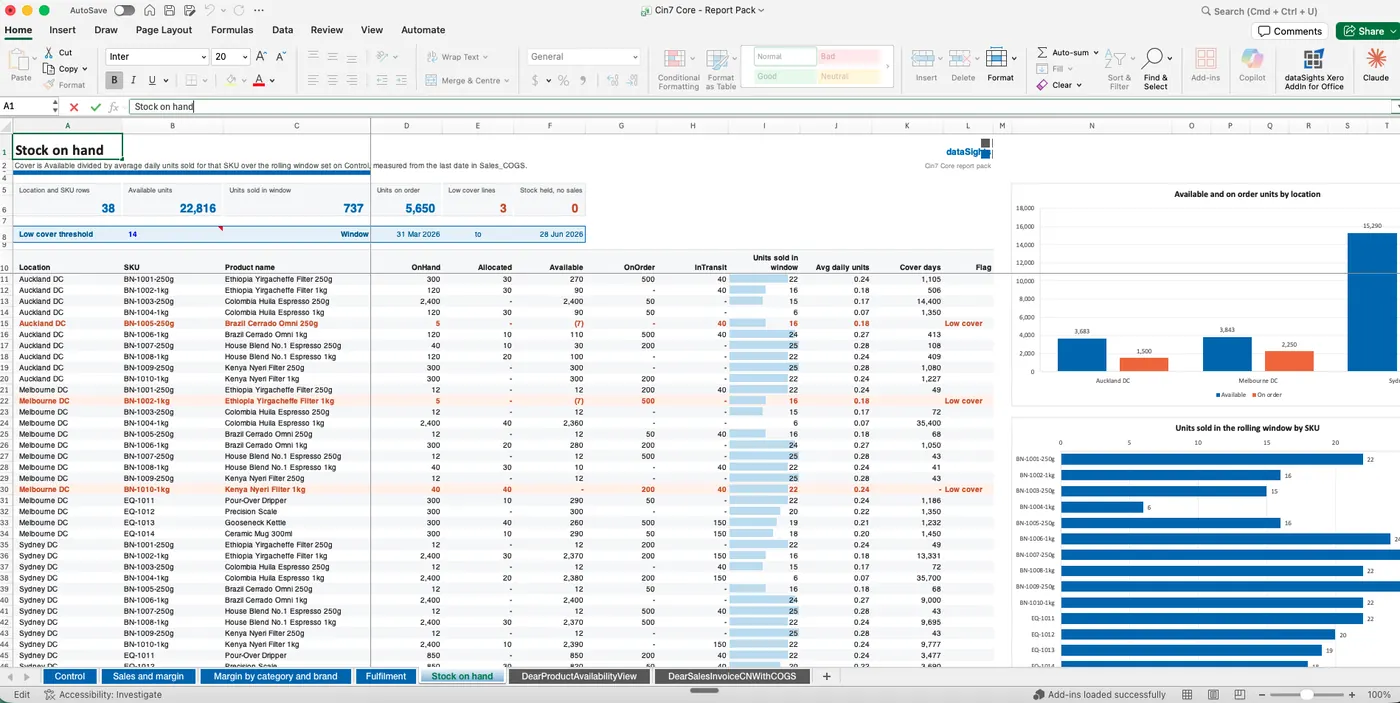
Stock on hand by location and SKU, built in Excel with Power Query. Refreshed with one click, and no AI anywhere in the refresh path, but use AI at any stage if you want.
Power BI
For teams that need custom dashboards and drill-down. Import or DirectQuery straight off the same views.
Google Sheets
For lightweight sharing and anything that needs to be live in a browser.
Looker Studio
Supported for teams already standardised on it.
Any AI tool
Through AI Connect. See the AI Connect page.
110 Cin7 Core tables and views, in your own database
Not a curated subset. Every object the Cin7 Core API exposes syncs into your database, structured and ready to query, and joined to your Xero and Shopify data.
Sales and fulfilment29
Sales, sale orders and order lines, quotes and quote lines, invoices and invoice lines, invoice payments, invoice additional charges, credit notes with lines, refunds and restocks, fulfilments with pick, pack and ship lines, shipped fulfilments, sale inventory movements, billing and shipping addresses, sales manual journal lines
Production and assembly24
Finished goods with order lines, pick lines and transactions, disassemblies with order lines, pick lines and transactions, product BOMs, production BOMs and BOM operations with components, input and output products, resources, notes and operation links, production order list, production cost analysis components
Inventory and stock19
Product availability, stock levels, stock adjustments with existing and new stock lines, stock takes with zero and non-zero stock on hand, stock transfers with order and transfer lines, inventory write-offs with lines and transactions, locations and location bins
Purchasing17
Purchases, purchase orders and order lines, advanced purchases, advanced purchase orders, invoices and credit notes with lines and additional charges, stock received lines, put away lines, credit note unstocks, purchase inventory movements
Products11
Products, product families and family lines, categories, attribute sets, price tiers, custom prices, reorder levels, product suppliers, attachments, SKU master list
Customers and suppliers8
Customers with addresses, contacts and credits, customer product prices, suppliers with addresses and contacts
Finance and reference2
Transactions, chart of accounts, organisation
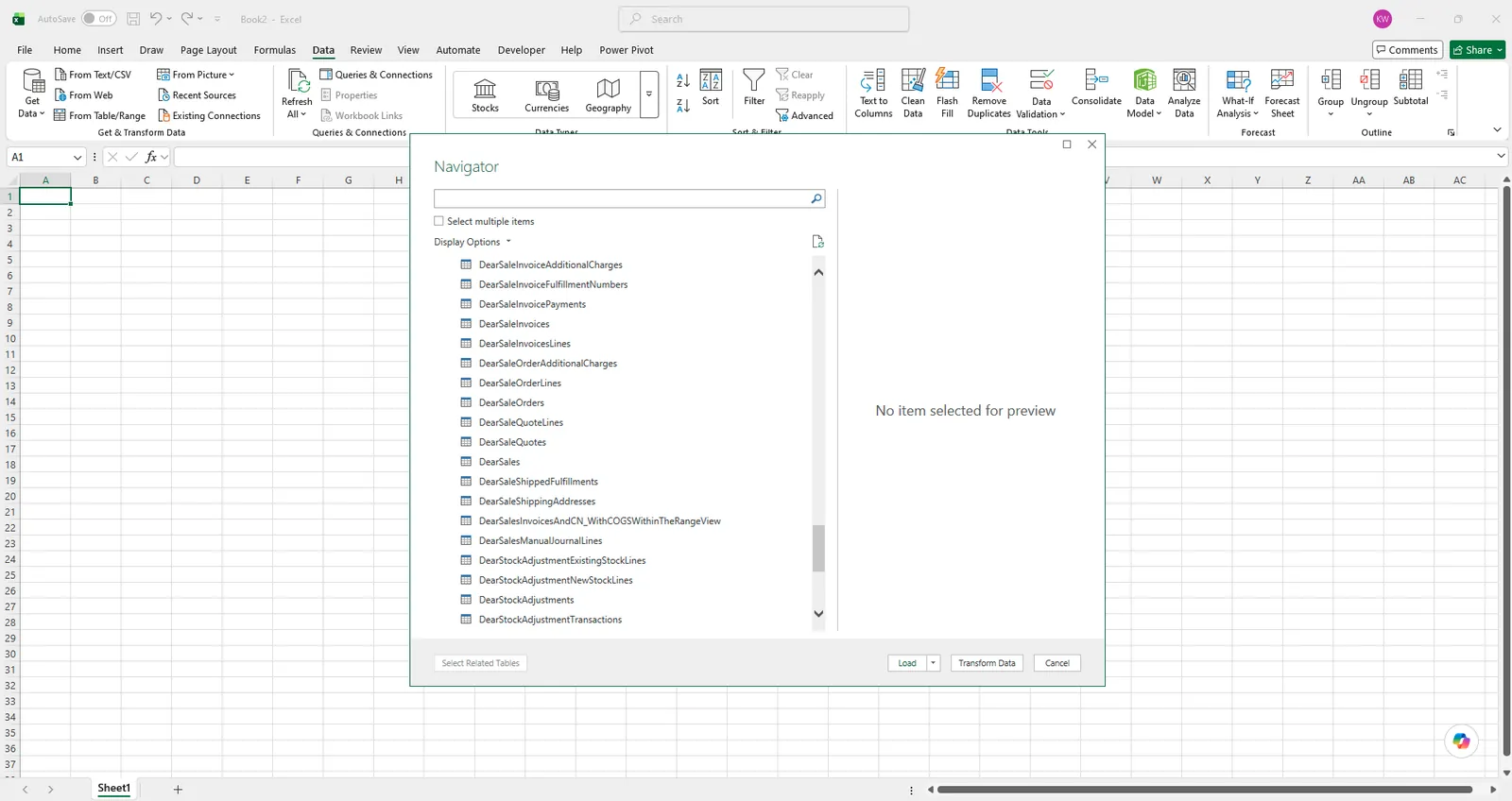
That includes the transaction tables, not just the summaries: stock adjustments, stock takes, finished goods, disassemblies and inventory write-offs all sync at transaction level. In one customer's database that is over 690,000 finished goods transaction rows alone.
Objects sync where you use them. A business not running production will not carry production BOM data, and nothing needs configuring for that.
Report views that replicate your Cin7 Core reports, then go further
The reports you already run in Cin7 Core, rebuilt as SQL views in your own database. They land ready to use on day one, and because the SQL is yours, it can be extended by us, by your team, or by an AI tool. A report becomes a starting point rather than a dead end.
- Sales invoices and credit notes with COGS
- Sales product COGS
- Sales order details
- Pending sales orders
- Sales invoices and credit note fulfilment
- Fulfilment details
- Product availability
- Purchase order details
- Inventory movement
- Financial transactions
- Product BOM products
- Production cost analysis, component
- Production cost analysis, product
- Production cost analysis, product name lookup
Ask for a report you run today and we will build the view for you.
Your data stays yours
These are settings you control, not promises we make.
- ✓ Every connection runs against your dedicated Microsoft Azure SQL database
- ✓ Per-user permissions by Xero entity, by individual table and view, and by operation, enforced on every query
- ✓ Multi-factor authentication standard
- ✓ You can revoke AI Connect access at any time
- ✓ Bring your own Azure subscription option, you own everything
"dataSights gives us the raw data in a database we actually own, which means I can audit it, version it, and query it however I need, and when connected with Claude, data becomes intelligence. That's the difference between a reporting tool and infrastructure: I'm not limited to what someone else decided to expose."
Co-founder and CEO, ALEMAIS
Frequently asked questions
Yes, and it is the main reason product businesses use us. Cin7 Core and Xero sync into the same database, so reconciliation checks run across both in one pass: missing invoices, value mismatches, transactions never posted, tax mismatches, refunds without credit notes, and stock on hand versus the Xero stock balance. Exceptions come back with a count and dollar exposure, and corrections can be posted back to Xero.
Report-ready views that mirror the reports you already run in Cin7 Core, including sales invoices with COGS, product availability, fulfilment and financial transactions, plus every underlying API table. Tell us which reports you use and we set the views up for you.
Yes. Shopify (including multiple storefronts) syncs into the same database, so orders, fulfilment and payouts sit alongside Cin7 Core and Xero for three-way reconciliation and channel reporting.
Yes. AI Connect is the dataSights MCP, and it exposes your Cin7 Core data joined with Xero, Shopify and any other synced system. Claude, ChatGPT, Copilot or any MCP-compatible AI can query across all of them and post corrections back to Xero. It is included with every plan at no extra cost.
Yes. The dataSights Excel add-in bulk-updates products in Cin7 Core directly from a spreadsheet, and posting to Xero (journals, invoices, corrections) works from Excel or from Claude.
Cin7 Core was DEAR Systems before Cin7 acquired it, and Cin7's own API still runs on the dearsystems.com domain today, so the table names mirror the source they sync from. We have also kept the prefix deliberately: changing it would break every view, Power BI model and Excel workbook our existing customers have already built on top of their database.
Cin7 Core is one of our 160+ pre-built connectors. Pricing follows the standard plans, and every plan includes unlimited users and reports, scheduled refreshes and AI Connect. Start with a 14-day free trial, no credit card required.

Having trouble? Contact our support team
About Cin7 Core
Cin7 Core is a cloud-based inventory and order management platform for product-based businesses. It supports multi-channel sales, purchasing, production, and warehousing workflows in a single integrated system. Cin7 Core connects with accounting platforms, e-commerce stores, and 3PL providers to provide end-to-end inventory visibility. It is widely used by wholesale, retail, and manufacturing businesses to manage their supply chains.