
Whether you’re tracking monthly performance or preparing year-end accounts, Xero’s reporting system determines how quickly and accurately you can access critical business insights. But with extensive report templates and numerous customisation options, mastering Xero reporting requires understanding both its capabilities and limitations. You’ll find everything from basic profit and loss statements to complex multi-entity consolidations in this comprehensive guide. We’ll show you exactly which reports matter for your business, how to customise them for your specific needs, and most importantly, how to automate the entire process to save hours each month.
What Is Xero Reporting?
Xero reporting encompasses the complete suite of financial analysis tools within the Xero accounting platform, offering real-time data at your fingertips with customisable reports organised into categories like financial performance, statements, and reconciliations. The system generates real-time reports directly from your accounting data, providing instant visibility into profit and loss, balance sheets, cash flow, and aged receivables without manual data entry. According to Xero’s own data, businesses using their reporting features gain clear, reliable information for financial decisions through customisable layouts and automated calculations.
Ready to Automate Your Financial Consolidation?
Stop wrestling with manual consolidations and broken formulas. dataSights automates multi-entity reporting, Xero consolidations, and Power BI connections. Join 300+ businesses already transforming their financial reporting with our platform, rated 5.0 out of 5 by 90+ verified Xero users.
Table of Contents
Understanding Xero’s Core Financial Reports
Your financial reporting starts with four primary statements that form the backbone of business analysis:
- Balance sheet for your financial position
- Income statement for profitability tracking, and
- Cash flow statement for liquidity management.
- Trial balance for consolidation foundation
Balance Sheet Reports
The balance sheet provides a snapshot of your business’s financial position at any given date. In Xero, you can generate this report with three standard comparison formats:
- Monthly comparison showing the current month against the previous two
- Quarterly comparison for tracking progress across quarters, and
- Yearly comparison displaying your position against previous years.
Each format automatically calculates your total assets, liabilities, and equity, ensuring your primary accounting equation always balances.
Profit and Loss Statements
Your profit and loss report (also called an income statement) tracks revenue and expenses over specific periods. Xero’s P&L reports include automatic calculations for gross profit margins, operating expenses breakdown, and net profit or loss. You can filter these reports by tracking categories to see departmental performance or project profitability, though only one tracking category can be selected at a time in standard reports.
Cash Flow Analysis
Cash flow statements in Xero break down into three key activities:
- Operating activities showing cash from core business operations
- Investing activities tracking asset purchases and sales, and
- Financing activities monitoring loans and dividend payments.
The short-term cash flow tool provides real-time projections, helping you spot potential cash crunches before they impact operations.
Trial Balance: The Foundation for Consolidation
The Trial Balance is your definitive report for multi-entity consolidation, yet it’s often overlooked in basic Xero workflows. This report lists every account balance at a specific date, ensuring debits equal credits before any consolidation begins.
For single entities, Xero’s Trial Balance works adequately – export it, review it, done. But for multi-entity businesses, it becomes critical infrastructure. Without a consolidated Trial Balance, you cannot:
- Verify all entities reconcile before eliminations
- Identify intercompany imbalances systematically
- Create audit trails for consolidated adjustments
- Ensure your consolidated balance sheet actually balances
Xero generates static Trial Balances per entity – no consolidation, no eliminations, no drill-down. Manual consolidation means exporting each entity’s Trial Balance to Excel, mapping accounts, creating elimination journals, and hoping everything ties. One mapping error and your consolidated balance sheet won’t balance.
dataSights delivers live, consolidated Trial Balances across 30+ entities. Every elimination posts automatically with full audit trails. Drill down from group totals to individual entity transactions. Your Trial Balance becomes the control point for accurate consolidation, not another Excel headache.
Management Reports: The Missing Piece
Management reports combine financial and operational metrics into board-ready narratives – and Xero’s Management Report pack bundles five financial reports:
- Executive Summary
- Cash Summary
- P&L
- Balance Sheet
- Aged Receivables and Payables
Customisation options are available for each report, though it lacks automated distribution and multi-entity consolidation features.
What CFOs actually need for board packs:
- Consolidated group performance across entities
- KPI dashboards with trend analysis
- Variance explanations with commentary
- Non-financial metrics integrated with financials
- Visual charts and executive summaries
Xero’s approach: Export to Excel, build manually, repeat monthly. No automated KPI calculations. No dynamic visualisations. No consolidated views. Board packs become multi-day Excel projects instead of automated outputs.
With dataSights, generate pre-formatted management packs combining:
- Consolidated P&L with automatic eliminations
- Balance Sheet
- Trial Balance
- Budget and Budget variance with drill-down capability
- Accounts Receivable Summary and Detailed
- Accounts Payable Summary and Detailed
Management reports generate in seconds, not days. Schedule distribution to board members automatically. Update narratives while data refreshes live. This is management reporting that actually works for multi-entity businesses.
Customising Your Xero Reports
Xero provides both pre-built templates and a Blank report feature that lets you create custom reports from scratch, giving you complete control over your financial reporting structure.
Report Layout Customisation
Accessing the Blank Report
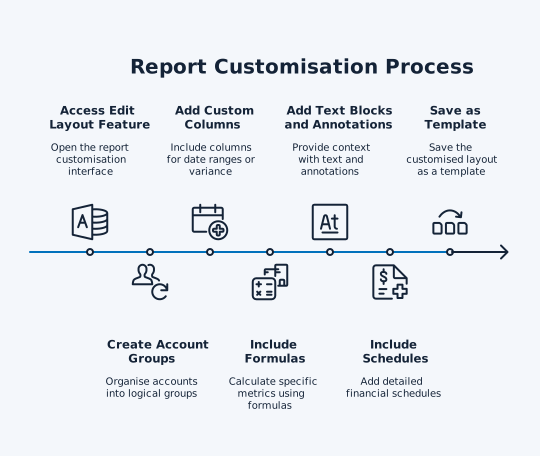
Build reports from scratch using Xero’s Blank report feature:
- Navigate to Accounting menu > Reports
- Select Blank Report under Financial Statements
- Set your date range
- Click Edit layout to start building
Building Your Custom Structure
Add these core components to construct your report:
Account Organisation:
- Schedules for detailed account breakdowns
- Account groups for structured presentation
- Drag-and-drop reorganisation for existing accounts
Calculations and Logic:
- Formulas for calculated metrics (group accounts first – formulas only work with grouped accounts)
- Switch rules for conditional display
- Date and comparison columns for period analysis
Documentation Elements:
- Text blocks for context and headers
- Notes for detailed explanations
- Tracking category filters (display as text blocks for transparency)
Multicurrency Configuration
For organisations using foreign currencies:
- Balances automatically display in base currency
- Exchange rates shown as at the report date
- Conversion details are visible for each currency
- Optional exchange rate notes for transaction details
Additional Display Options
Configure these settings under the More menu:
- Accounting basis: Choose accrual or cash
- Zero balance accounts: Show or hide inactive accounts
- Account codes: Display codes from the chart of accounts
- Number format: Limit to whole numbers only
- Exchange rates: Include conversion notes (multicurrency only)
Saving and Reusing Reports
Once configured:
- Save as custom report template for repeated use
- Access saved reports in the Custom tab
- Create multiple versions for different purposes
- Modify existing templates using the same Layout Editor
Using Tracking Categories Effectively
Tracking categories transform your reporting capabilities by allowing you to tag transactions for detailed analysis across departments, locations, or projects. Use tracking categories for multi-dimensional reporting – for example, filtering reports to see specific combinations like ‘Marketing department in the East region’.
Tracking categories have constraints, though. You can only select one category at a time in standard reports. Creating budgets for multiple tracking categories requires individual setup for each – with 20 categories, that’s 20 separate budget configurations to maintain.
Budget vs Actual Reporting
Budget variance reporting compares your actual performance against planned budgets, but Xero’s budget features work best for simple, company-level reporting. When using tracking categories, you must create separate budgets for each category option, carefully naming them for identification. The Budget Variance Report shows month and year-to-date comparisons, though getting meaningful reports requires familiarity with the Layout Editor to ensure columns display the correct tracking category data.
Xero Reporting Limitations and Challenges
Understanding Xero’s reporting constraints helps you plan workarounds and identify when third-party solutions become necessary.
Performance Issues
Reports can experience significant slow loading times when processing large data volumes or complex calculations, particularly for multi-year periods or businesses with thousands of transactions. Browser limitations compound these issues when multiple reports run simultaneously or the cache accumulates. During peak periods, such as month-end or tax season, concurrent user access can further impact performance, leading to slower response times or temporary access issues.
Multi-Entity Consolidation Gaps
Xero doesn’t provide native consolidated reporting for multiple organisations, forcing businesses to manually export data from each entity into Excel for reconciliation. This manual process typically takes hours or even days monthly, introducing significant error risk during field mapping and elimination. Without automated consolidation, maintaining accurate group-level visibility becomes increasingly complex as entity numbers grow.
Customisation Restrictions
While the Blank report feature allows building custom reports from scratch, Xero still has reporting constraints that impact analysis flexibility.
- Tracking Category Limitations: Tracking categories can be filtered together in reports but cannot be displayed side-by-side as columns for comparison (except for P&L). This prevents multi-dimensional analysis within a single report view – requiring separate reports for each tracking category to compare departmental or regional performance.
- Budgeting Constraints: Budgets for tracking categories do not roll up automatically into master budgets. This creates manual work, requiring reconciliation between:
- Individual category budgets
- Company-level totals
- With multiple departments, each budget must be maintained separately without automatic synchronisation
- Formula and Grouping Restrictions: When building custom reports with formulas:
- Accounts must be grouped first before formulas can reference them
- Calculations cannot be created using ungrouped, individual accounts
- The Blank report adds flexibility but is still confined to Xero’s available data fields and predefined calculation types
- Trial Balance Limitations: Xero’s Trial Balance is static and single-entity only:
- No consolidated Trial Balance across entities
- No elimination entry capability
- No drill-down from summary to detail
- Cannot serve as foundation for group reporting
For businesses needing advanced analytics beyond Xero’s capabilities, like multi-entity consolidated views, complex statistical analysis, Trial Balance consolidation, or integration with external data sources, third-party solutions provide the additional functionality required for comprehensive business intelligence.
Automating Xero Reporting with External Tools
Modern automation platforms transform Xero’s raw data into dynamic, self-updating reports that save hours of manual work monthly.
Power BI Integration
Benefits of Connecting Xero to Power BI:
- Automated reporting with scheduled data refreshes
- Custom dashboards tailored to your business metrics
- Real-time data sync from Xero’s API (no manual CSV exports)
- Advanced visualisations not possible within Xero
Power BI capabilities include:
- Multi-entity consolidation views
- Predictive analytics and forecasting
- Interactive drill-down reporting
- Transformation of static Xero data into actionable business intelligence
With the dataSights Xero to Power BI connector, you can fully automate financial reporting workflows such as:
- Profit and loss analysis across multiple entities
- Balance sheet consolidations with automatic eliminations
- Cash flow forecasting with scenario modelling
Excel Automation Solutions
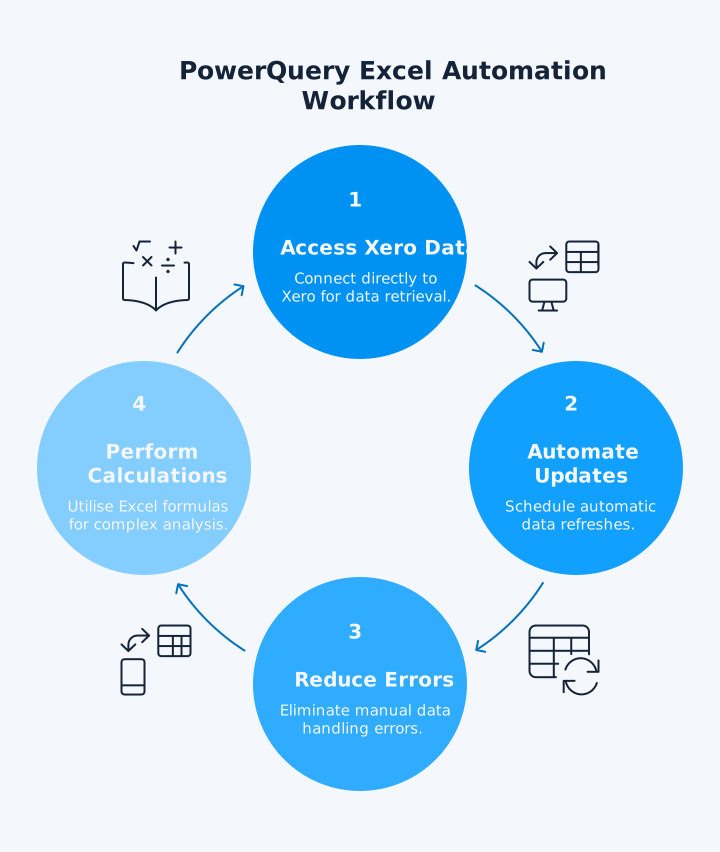
PowerQuery enables direct Xero data access from Excel and Power BI, automating report updates through refresh schedules while maintaining familiar spreadsheet functionality. This approach eliminates manual data exports, reduces errors from copy-paste processes, and enables complex calculations using Excel’s full formula capabilities.
The dataSights Excel Add-in takes automation further by posting data to multiple Xeros with one click, syncing bi-directionally for real-time updates, and maintaining version control across all reports. Finance teams report reducing report preparation from days to hours while maintaining complete accuracy.
Real-Time Data Synchronisation
Automated data flows replace manual processes through API connections that sync continuously, ensuring reports always reflect current data. Scheduled refreshes run automatically, from every 5 minutes to daily updates based on your needs. Multi-source consolidation combines Xero data with CRM, inventory, and other systems for comprehensive reporting.
These automated workflows eliminate the traditional export-import-reconcile cycle, providing instant access to consolidated metrics across all business systems. Error reduction through automation ensures data consistency while freeing finance teams for analysis rather than data manipulation.
Advanced Reporting Techniques
Sophisticated reporting methods unlock insights beyond standard Xero capabilities, enabling deeper financial analysis and strategic decision-making.
Creating Management Reports
Management reporting requires combining multiple data views into cohesive narratives that drive decisions. Begin with executive dashboards that display KPI trends and variance analysis, and then drill into departmental performance using tracking categories. Include forward-looking elements like cash flow projections and pipeline analysis from integrated CRM data. Visual elements such as charts and heat maps make complex data digestible for non-financial stakeholders.
The key to effective management reporting lies in automation. With dataSights, create templates that auto-populate monthly, combining Xero financials with operational metrics for complete business visibility.
Consolidation Strategies
For multi-entity businesses, consolidation apps eliminate hours of manual work through automated field mapping and elimination entries. Best practices include:
- Standardising charts of accounts across entities
- Implementing consistent tracking categories, and
- Setting up automated elimination rules for intercompany transactions.
From Error-Prone to Audit-Ready
Manual elimination entries are consolidation’s biggest risk. In Excel, you’re creating journals to remove intercompany sales, eliminate intercompany balances, and adjust for unrealised profits. Each elimination needs documentation. Every adjustment requires sign-off. One formula error cascades through your entire consolidation.
The manual elimination nightmare:
- No audit trail linking eliminations to source transactions
- Inconsistent treatment month-to-month
- Hours spent reconciling intercompany differences
- Zero drill-down from consolidated to entity level
- High risk of unbalanced consolidations
dataSights automates eliminations with repeatable, documented rules:
- Set elimination logic once, apply forever
- Full audit trail from consolidated balance to source transaction
- Automatic intercompany reconciliation before elimination
- Version control on all adjustments
- Balance sheet guarantees – if entities balance, consolidation balances
The dataSights platform handles consolidation of 30+ entities with automatic currency conversions, intelligent elimination entries, and real-time balance sheet reconciliation. Reports generate in seconds rather than days, with drill-down capability to transaction level across all entities.
Report Packs: Manual Distribution vs Automated Delivery
Xero’s Report Packs bundle multiple reports for distribution – but they’re static snapshots requiring manual setup each time. You select reports, set date ranges, generate PDF, then email manually. Next month? Repeat the entire process.
Report Pack limitations:
- Manual selection and generation every period
- Static PDFs with no interactivity
- No automatic distribution schedules
- Single-entity only – no consolidated packs
- No integration with management commentary
dataSights automates report distribution completely:
- Schedule packs to generate and send automatically
- Include consolidated reports with eliminations
- Embed dynamic Power BI dashboards
- Distribute to stakeholder groups based on roles
- Update data in real-time while maintaining formatting
Your board receives consistent, accurate packs on schedule. Finance teams save hours of manual preparation. Stakeholders access live dashboards instead of static PDFs.
Custom Metric Development
Beyond standard financial metrics, develop custom KPIs that reflect your unique business model. Calculate customer lifetime value by combining Xero sales data with CRM retention metrics. Track project profitability through detailed tracking category analysis with overhead allocations. Monitor working capital efficiency through automated days sales outstanding and inventory turnover calculations.
These custom metrics require data from multiple sources, which dataSights efficiently combines through its 160+ connectors, creating unified reporting databases that update automatically.
Implementing Xero Reporting Best Practices
Regular financial reporting helps you track performance over time, but success depends on consistent execution and proper controls.
- Standardise Data Entry
- Use consistent naming conventions for accounts (e.g. ADM for admin expenses, SAL for sales accounts)
- Enforce required fields on every transaction (especially tracking categories and tax codes)
- Set up approval hierarchies for transactions over a specified amount
- Build Your Reconciliation Rhythm
- Complete bank reconciliations daily (not monthly) to catch errors within 24 hours
- Review aged receivables weekly to spot collection issues early
- Match supplier statements monthly before processing payments
- Regular reconciliation prevents month-end surprises and keeps consolidations balanced
- Control Report Access
- Use role-based permissions to control visibility
- Department heads: read-only access to their tracking category reports
- Finance team: exclusive access to balance sheet reports
- Set up automated report distribution (e.g. sales reports every Monday to sales managers; cash flow reports daily to the CFO)
- Document Your Reporting Processes
- Create one-page guides for report settings, KPI methods, and budget mappings
- Ensure continuity during staff changes by standardising documentation
- Schedule Your Reporting Calendar
- Run preliminary reports on day -2 to detect errors early
- Generate final reports by day 3 after month-end
- Distribute board packs by day 5
- Use tools like dataSights to refresh data with 1-click and reduce close from 15+ days to under 5 days
Frequently Asked Questions
How Many Types of Reports Does Xero Offer?
Xero provides extensive pre-built report templates organised into categories, including financial performance, financial statements, payables and receivables, and reconciliations. Each template can be customised with different date ranges, comparison periods, and tracking category filters.
Can I Create Custom Reports in Xero from Scratch?
Yes, Xero’s Blank report feature lets you build custom reports from scratch using the Layout Editor. Add account groups, formulas, date columns, and text blocks to create exactly the report structure you need. Save your custom creation as a template for repeated use. You can also modify existing report templates to suit your requirements.
What Are the Main Limitations of Xero Reporting?
Key limitations include no native multi-entity consolidation, the inability to select multiple tracking categories simultaneously, performance issues with large data sets, and limited budget integration with tracking categories.
How Can I Automate Xero Reporting?
Automation platforms like dataSights connect directly to Xero’s API, enabling scheduled data refreshes, automatic report generation, and real-time dashboard updates. These tools eliminate manual exports while adding capabilities like multi-entity consolidation.
What's the Best Way to Handle Multi-Entity Reporting in Xero?
Since Xero lacks native consolidation, use specialised apps for automated consolidation. These tools map accounts across entities, handle elimination entries, and generate consolidated statements automatically.
How Do Tracking Categories Improve Reporting?
Tracking categories enable multi-dimensional analysis by tagging transactions with departments, locations, or projects. This provides granular visibility into profitability and performance across business segments.
Can I Connect Xero Reports to Power BI?
Yes, multiple integration methods exist, including direct API connections and third-party connectors. dataSights enables real-time data synchronisation and advanced visualisation capabilities beyond Xero’s native features.
What Causes Slow Report Loading in Xero?
Performance issues arise from large data volumes, complex calculations over extended periods, browser cache accumulation, and concurrent user access during peak times like month-end.
How Do I Create Budget vs Actual Reports by Department?
Set up tracking categories for departments, then create individual budgets for each tracking option. Use the Layout Editor to display actual vs budget columns, though this requires manual setup for each department.
Is There a Way to Schedule Automatic Report Delivery?
Xero allows you to set up recurring reports, though automation platforms expand these capabilities significantly. dataSights enables automated refresh schedules that update your reports as frequently as needed, from real-time to daily updates, depending on your requirements.
Master Your Financial Reporting with Automated Solutions
Xero reporting provides the foundation for financial visibility, but achieving true reporting efficiency requires looking beyond native capabilities. While Xero’s templates cover basic needs, businesses managing multiple entities or requiring real-time insights need automated solutions that eliminate manual processes and deliver instant, accurate reporting.
The path forward is clear: automate your data flows, consolidate across entities automatically, and create dynamic reports that update in real-time. Your finance team shouldn’t spend days on month-end reporting when technology can deliver the same results in minutes.
Transform Your Xero Reporting Today
Xero’s reports show single-entity data, while dataSights build management packs that combine financial and operational KPIs in one place. Turn your complex Xero reporting challenges into automated workflows with dataSights’ comprehensive consolidation solution. Rated 5.0 by 90+ users, our platform reduces month-end close from weeks to days while efficiently managing both small and large consolidation of entities. Join 300+ businesses already transforming their financial reporting with real-time insights and automated consolidations.
About the Author
Kevin Wiegand
Founder & Client happiness
I’m Kevin Wiegand, and with over 25 years of experience in software development and financial data automation, I’ve honed my skills and knowledge in building enterprise-grade solutions for complex consolidation and reporting challenges. My journey includes developing custom solutions for data teams at Gazprom Marketing & Trading and E.ON, before founding dataSights in 2016. Today, dataSights helps over 300 businesses achieve 100% report automation. I’m passionate about sharing my expertise to help CFOs and Financial Controllers reduce their month-end close time and eliminate the manual Excel exports that drain their teams’ valuable time.