AI that talks to all your business data, and acts on it
Put Claude, ChatGPT, Microsoft Copilot or any MCP-compatible AI to work over your dataSights database: the trusted, consolidated layer under every Xero and 160+ connectors. Develop reports instantly in a chat, run month-end workflows, post back to multiple Xeros, create and update mapping tables, and build SQL views for any reporting tool to use. All in plain English.
14-day free trial, no credit card required
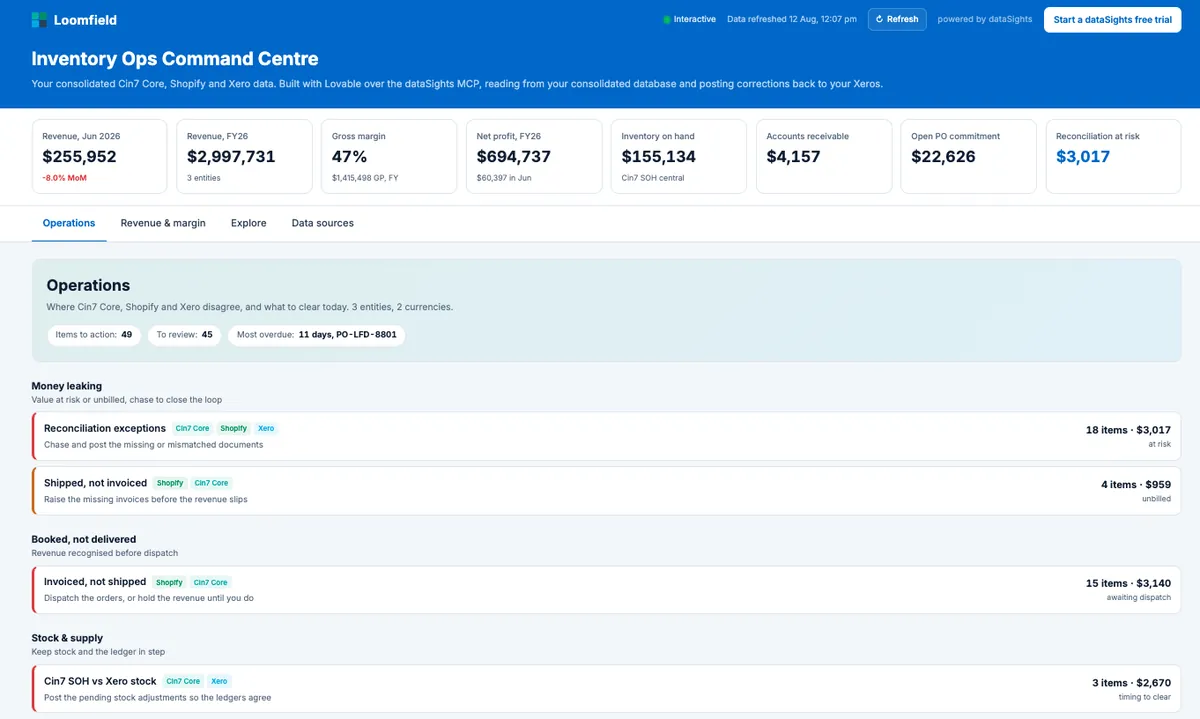
Three entities, three systems, one database
A web app built with Lovable over the dataSights database. Fully interactive. Demo data. Open it full screen
160+
Business systems supported
4,500+
Xero entities synced daily
Any
MCP-compatible AI
What is AI Connect
AI Connect is the dataSights MCP: a secure bridge between your database and the AI tools you already use, built on the open Model Context Protocol standard. MCP lets large language models read from and write to live business systems.
In practical terms, once you connect Claude, ChatGPT, or Microsoft Copilot to your dataSights account, they can query your synced data, generate reports, post back to multiple Xeros and even save data back to your database. Every interaction runs against your dedicated Microsoft Azure SQL database. No data is shared with anyone you have not authorised.
How AI Connect works in 3 steps
Sync your data
Your business data already syncs into your dedicated Microsoft SQL database. Xero, Cin7 Core, Salesforce, HubSpot, Shopify, and 160+ other sources, consolidated and ready to use.
Connect your AI tool
Add dataSights as a connector in Claude, ChatGPT, or Microsoft Copilot. One-time setup, secure authentication, you control access.
Ask. Build. Post back. Automate.
Ask questions in plain English. Generate reports. Save reusable SQL views back to your database. Post journals and updates back to multiple Xero entities. Trigger workflows your team relies on.
"I can't believe how easy this was. The connection to Claude took 30 seconds and I was creating reports in minutes."
 Erica Warren
CFO, Direct Pool Supplies · Review from Xero App Store
Full workflows, not just answers
AI Connect runs the whole loop, not just the question. Query the data, act on it, trigger a sync, and verify the result landed, all in one conversation with a full audit trail. Here are two workflows customers run today.
Month-end across every Xero
- 1Query consolidated transactions across every entity, right down to the invoice
- 2Run your existing Excel-based month-end tasks, or point Anthropic's finance plugins at your data
- 3Have the journals prepared for you to review, then posted to multiple Xeros at once
- 4Trigger a resync, verify every posting landed, and refresh your reports and checks
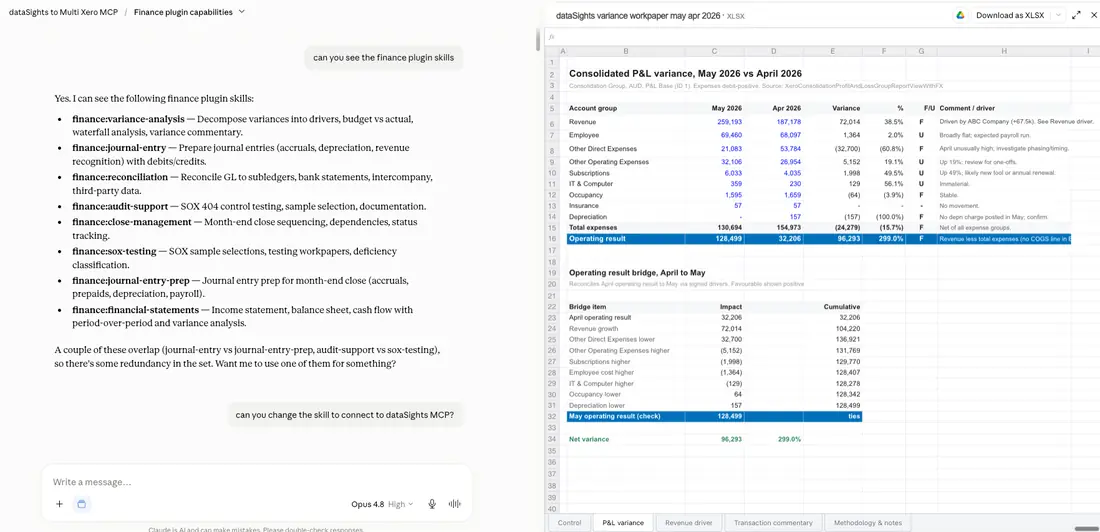
One way to run it: Anthropic's finance plugins pointed at your consolidated data.
Ops across Cin7 Core, Shopify and Xero
- 1Reconcile all three systems in one pass
- 2Surface the exceptions across six types: missing invoices, value mismatches, transactions never posted to Xero, tax mismatches, refunds without credit notes, stock differences
- 3Post the corrections back to Xero
- 4Track it all in a live command centre
Cin7 Core, Shopify and Xero, reconciled
Cin7 Core, Shopify and Xero, reconciled. 18 exceptions, $3,017 at risk. Demo data. Not a dataSights screen: a web app built with Lovable over the dataSights database.
Open the full demo"We run 50+ Xero files and dataSights keeps them manageable... The Claude integration is incredible: it analyses your data, creates reports, even posts back to Xero in bulk."
 Alasdair Forrest
CFO, El Jannah · Xero App Store review
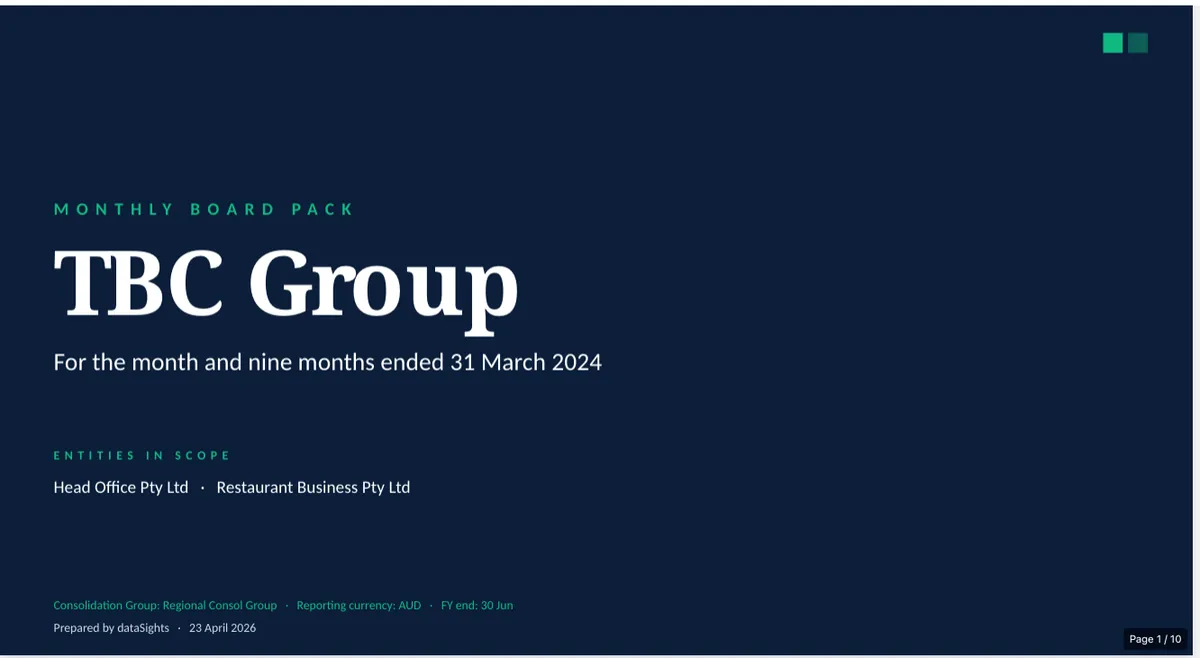
What customers run on AI Connect today
Finance and reporting want different things from the same data. AI Connect serves both, without either waiting on the other.
A month-end, minus the manual work
Everything your controller asks in a month, answered from one place: consolidated Xeros, 160+ connectors, down to the invoice. No exports, no waiting on a report to be built. And when the answer needs an action, the action happens in the same conversation.
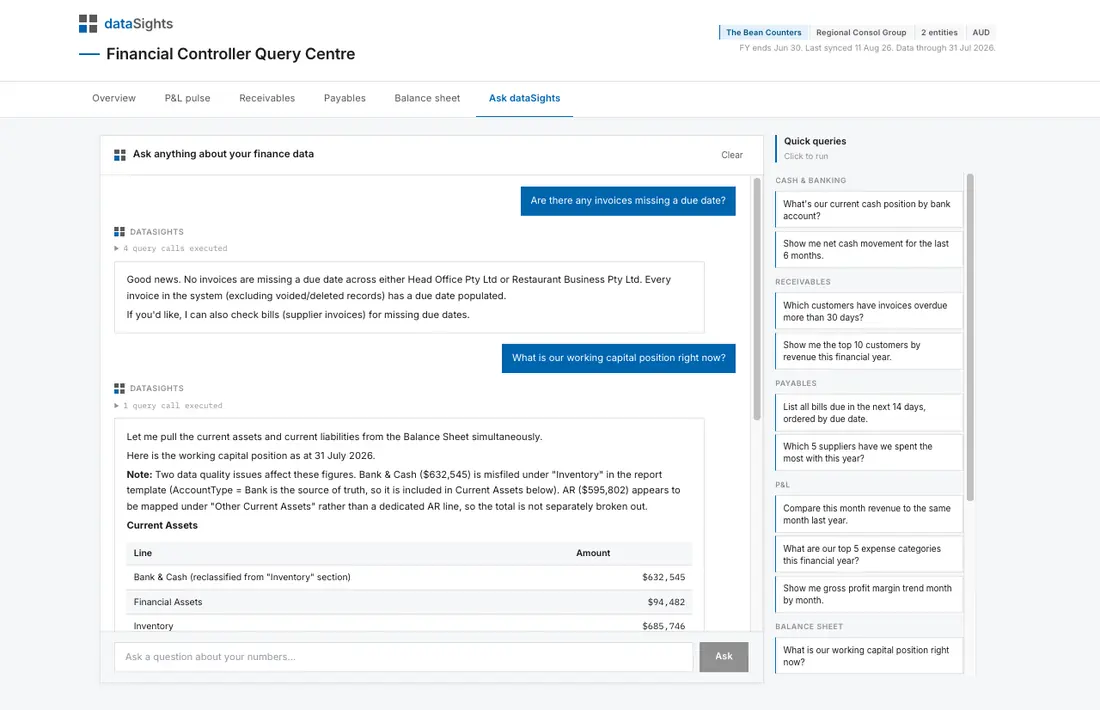
FC Query Centre. Ask a question, get the answer, and get told what the data did.
"The AI-driven capabilities are clearly built with finance teams in mind."
Alan Rust, CFO, MCL Capital · Xero App Store review
From raw data to a live report, faster
Claude, ChatGPT or Copilot works down the whole development path with you: query the data tables, create and save SQL views, then create and edit mapping tables, so the hard modelling is done once and done right. From there the report builds easily in any tool, Excel, Power BI, Looker or a custom app. The modelling that used to take a BI developer days happens in a chat.
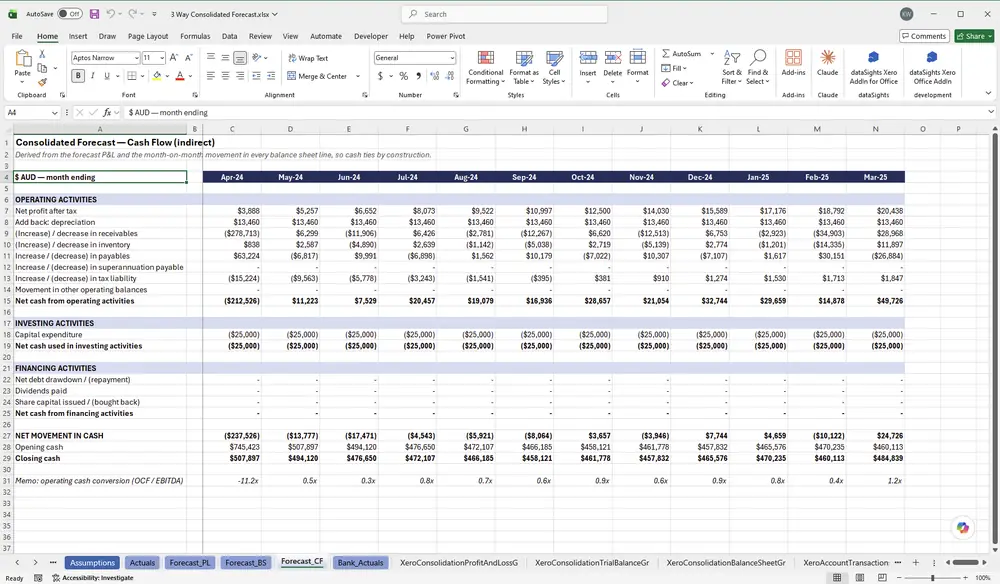
Three-way consolidated forecast. Built once with Claude, refreshed with no AI at all.
"I've tried SyncHub, Flex Financial, Syft, Coupler and others. dataSights is the go-to for Power BI and Excel integration across multiple Xero entities."
James Kemp, BI Developer, Centenary Childcare · Xero App Store review
A Xero MCP that answers at the consolidated layer
Other platforms expose raw single-entity Xero data through MCP. dataSights exposes the consolidated layer with eliminations, FX and account mappings applied, so AI tools answer group-level questions correctly the first time.
There is a second difference under the hood. AI connectors that hit app APIs directly burn tokens and are unreliable for bulk reads and consolidations. The dataSights MCP exposes your database, so the AI writes SQL against curated, well-described views, and it also carries the API operations that matter: saving views and mappings, posting to Xero, triggering syncs. MCP-to-SQL and MCP-to-API, in one connector.
"Claude has become a genuine real-time collaborator in our work to solve complex problems that would otherwise not be solvable. In short, it's a game changer."
360 Early Education
Use the AI you already trust

Claude (Anthropic)
Available on Claude Pro, Team, Enterprise. Strong at long-context reasoning and code generation. Our recommended pairing.

ChatGPT (OpenAI)
Available on ChatGPT Plus, Team, Enterprise. Familiar interface with broad ecosystem support.

Microsoft Copilot
Available on Microsoft 365 Copilot. Native integration with Excel, Outlook and Teams.
Also works with
 Claude Code
 Lovable
 Gamma
Gamma Cursor
 n8n
n8n Zapier
Any tool that speaks MCP works with dataSights. More are added every month.
Your data stays yours
These are settings you control, not promises we make.
- ✓ Every connection runs against your dedicated Microsoft Azure SQL database
- ✓ Per-user permissions by Xero entity, by individual table and view, and by operation, enforced on every query
- ✓ Multi-factor authentication standard
- ✓ You can revoke AI Connect access at any time
- ✓ Bring your own Azure subscription option, you own everything
"dataSights gives us the raw data in a database we actually own, which means I can audit it, version it, and query it however I need, and when connected with Claude, data becomes intelligence. That's the difference between a reporting tool and infrastructure: I'm not limited to what someone else decided to expose."
Co-founder and CEO, ALEMAIS





What our customers say
We focus on the reporting, you focus on what matters

The ultimate platform for consolidated Xero insights
I've tried SyncHub, Flex Financial, Syft, Coupler and others. dataSights is the go-to for Power BI and Excel integration across multiple Xero entities.
James Kemp, BI Developer, Centenary Childcare
Review from Xero App Store
From 15 days to 5: transforming our month-end
We now complete month-end reporting in 5 days, down from 15, so finance can spend more time in the business improving results.
Daniel Bratton, CFO, Obsequio
Review from Xero App Store
Brilliant for multi-entity consolidation, and the Claude integration is incredible
We run 50+ Xero files and dataSights keeps them manageable, syncing everything into one database we build reports off in a click, right down to transaction level. The Claude integration is incredible: it analyses your data, creates reports, even posts back to Xero in bulk.
Alasdair Forrest, CFO, El Jannah
Review from Xero App Store
Great product, responsive team
It's taken the heavy lifting out of month-end: consolidations, cashflow, AR/AP detail. Drilling straight through to source transactions and reconciling back to Xero gives real confidence in the numbers. The AI-driven capabilities are clearly built with finance teams in mind.
Alan Rust, CFO, MCL Capital
Review from Xero App StoreXero integration with Claude
I can't believe how easy this was. The connection to Claude took 30 seconds and I was creating reports in minutes. So good!
Erica Warren, CFO, Direct Pool Supplies
Review from Xero App Store
A game-changer for efficiency and business visibility
dataSights saves us days every month: we pull transactional data from hundreds of Xero files and push journals from Excel to all of them with one click.
Daniel Dalais, Finance Manager, Priceline Pharmacy
Review from Xero App StoreFrequently asked questions
AI Connect is the dataSights MCP, a secure bridge that lets AI assistants like Claude, ChatGPT, and Microsoft Copilot read from and write to your dataSights database. It runs on the open Model Context Protocol (MCP) standard, so any AI tool that supports MCP can connect.
Yes. If you consolidate Xero organisations through dataSights, AI Connect is your Xero MCP, with one difference from every other one: it exposes the consolidated layer with eliminations, FX and account mappings already applied, across every entity, at full transaction depth, and it can post back. MCPs wired straight to the Xero API expose one raw organisation at a time and are read-heavy by design.
Yes, and honestly framed: your AI tool does the reasoning, and AI Connect provides everything that makes the workflow safe to run, the consolidated data layer, the write operations (post to multiple Xeros, save views and mappings, trigger syncs) and a full audit trail on every action. Customers run month-end variance, journal preparation and posting, and cross-system reconciliations this way today.
Yes. Anthropic's finance plugins can be pointed at the dataSights MCP with a single line, and they run against your consolidated transactions rather than a single entity. The set includes variance analysis, journal entry preparation, reconciliation, close management, audit support and financial statements. Because the views are described in multi-entity financial controller language, the plugins get it right the first time.
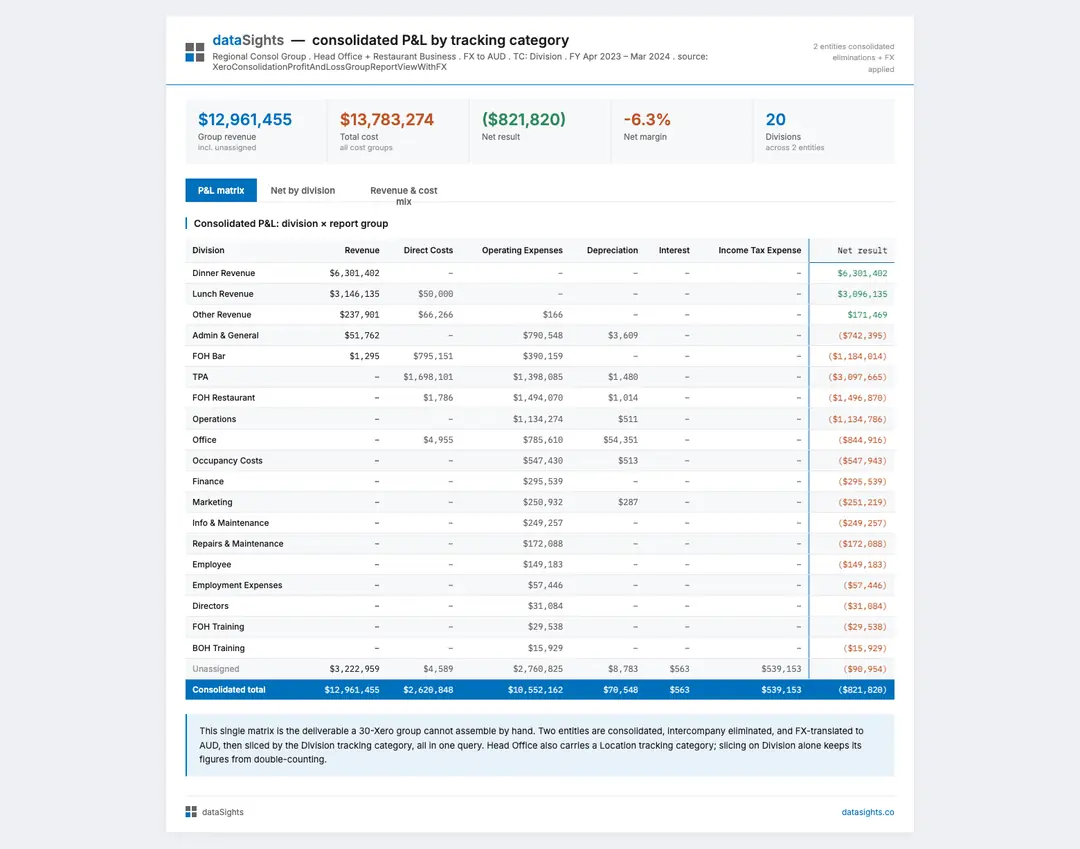
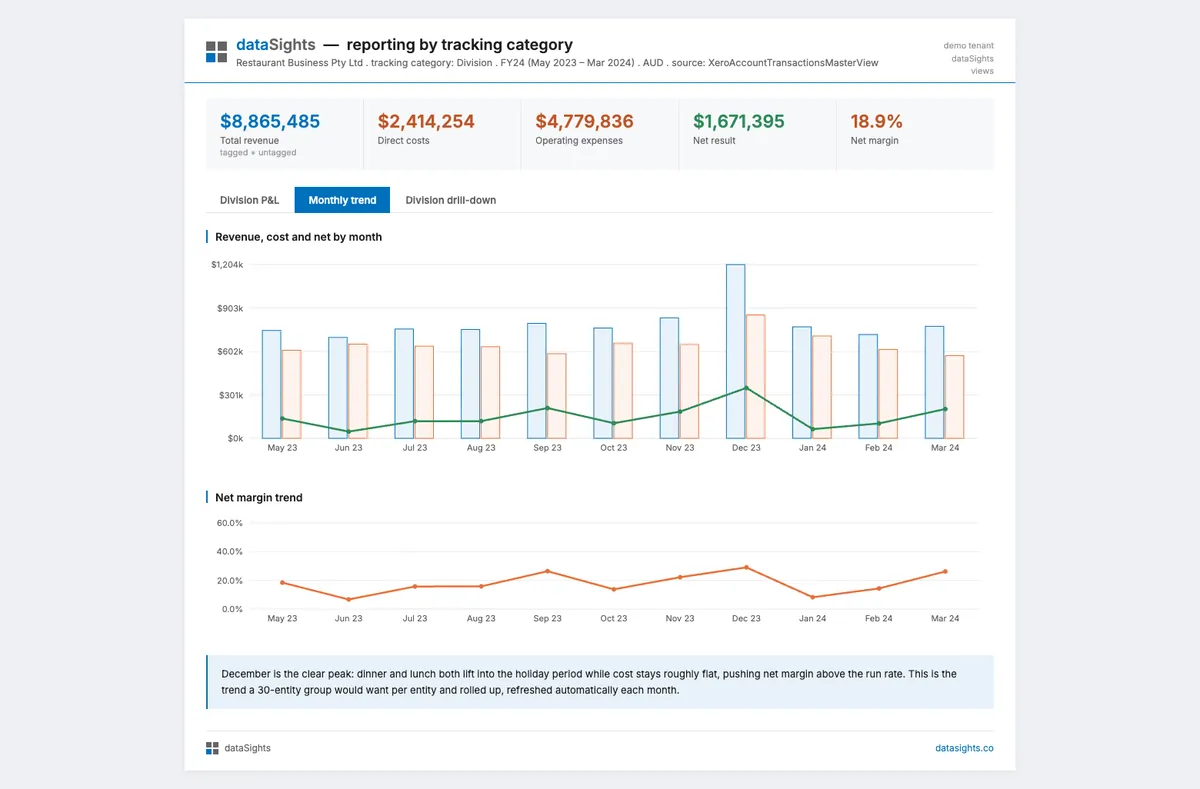
Yes. Tracking categories sync with your Xero data into your own database, including renames, with no limit on the number of options. Because the consolidation, eliminations and FX are applied in the database, you can slice a consolidated P&L by tracking category across every entity in one query, and drill from any division straight into the underlying account transactions. Entities that use different tracking categories are handled without double-counting.
Yes. The Inventory Ops Command Centre is a working demo built with Lovable on the dataSights MCP, showing reconciliation between Cin7 Core, Shopify and Xero across three entities. It runs on fictional demo data and is open to explore, no signup. Explore
Yes. If you are syncing Xero through dataSights, Claude can query that data once you have set up AI Connect on your Claude Pro, Team, or Enterprise account. The same applies to ChatGPT and Microsoft Copilot.
Yes. AI Connect supports any AI assistant that implements MCP, including ChatGPT (Plus, Team, Enterprise) and Microsoft Copilot. Setup is one-time per AI tool.
Xero's built-in AI works on a single Xero organisation, on summary data, and is read-only. AI Connect works across all of your data, every Xero organisation you consolidate, plus any of your 160+ other connected systems, at full transaction-level depth, and it's bidirectional. AI can drill from a board-level variance straight to the underlying Account Transactions, save reusable SQL views and mapping tables back to your database, and post journals or invoices to multiple Xero files in one chat. Xero's AI cannot do any of that.
No. You ask questions in plain English. The AI writes the SQL behind the scenes. If you do know SQL, you can ask the AI to generate views you then refine yourself.
Your data lives in your dedicated Azure SQL database. When you ask a question, your AI tool queries that database through the dataSights MCP and processes the results under your own AI subscription's terms, the same as connecting any Microsoft tool to your data. You control exactly which views the AI can see, every action is logged in a full audit trail, and you can revoke access at any time. Multi-factor authentication is standard, your database sits in your chosen global region, and you can optionally host it in your own Microsoft account so you own everything.
Yes, at three levels. Xero entity permissions scope each user to the entities they are allowed to see, and that scope follows them everywhere: management reports, SQL views, the Excel add-in and AI Connect. Data permissions control which views and tables the AI can query. Operation permissions control what it can do: query, save SQL views, edit user data, or post to Xero by document type. Every user authenticates individually over OAuth2, and dataSights enforces the permissions when the query runs, not the AI.
Yes. AI Connect can save SQL views and mapping tables to your dataSights database, and post journals, invoices, bills, credit notes and tracking categories back to multiple Xero organisations from a single chat. Every write goes through your existing dataSights workflows with full audit trails. Other source-system write-backs are supported where the connector supports it. Ask us what's available for your stack.
Any AI tool that supports the Model Context Protocol (MCP). Today that includes Claude (Anthropic), ChatGPT (OpenAI), Microsoft Copilot, Claude Code, Cursor, Lovable, Gamma, n8n MCP, Zapier MCP and a growing list of others. MCP is an open standard, so any tool that adopts it works with dataSights automatically. Customers are also building their own custom agents.
AI Connect is included with all dataSights plans at no additional charge. You will need an active subscription with the AI tool of your choice (Claude, ChatGPT, or Microsoft Copilot).
MCP is an open standard for connecting AI assistants to live data sources and tools. It was introduced by Anthropic and is now adopted by OpenAI, Microsoft, and others. Because dataSights speaks MCP, your data works with whichever AI tool you prefer.
Most customers are up and running in under 15 minutes. You authenticate dataSights as a connector inside your AI tool, and you are ready to ask questions.

Still have questions? Contact our support team