
Claude skills for Xero
Three free AI Data Skills for your own Claude: a report builder with 41 finance reports, a 13-week and three-way cash flow forecast, and a skill that moves your reports across from Fathom, Joiin or Spotlight. Every Xero entity is already consolidated in dataSights before Claude starts.
14-day free trial, no credit card required. The skills run in Claude today, with ChatGPT and Copilot versions coming.
Used by over 300 businesses globally








41
Finance reports in the report builder skill
13 weeks
Week-by-week cash forecast, then a 12 to 36 month three-way forecast
4,500+
Xero entities synced daily
Report builder: 41 finance reports for your Xero group
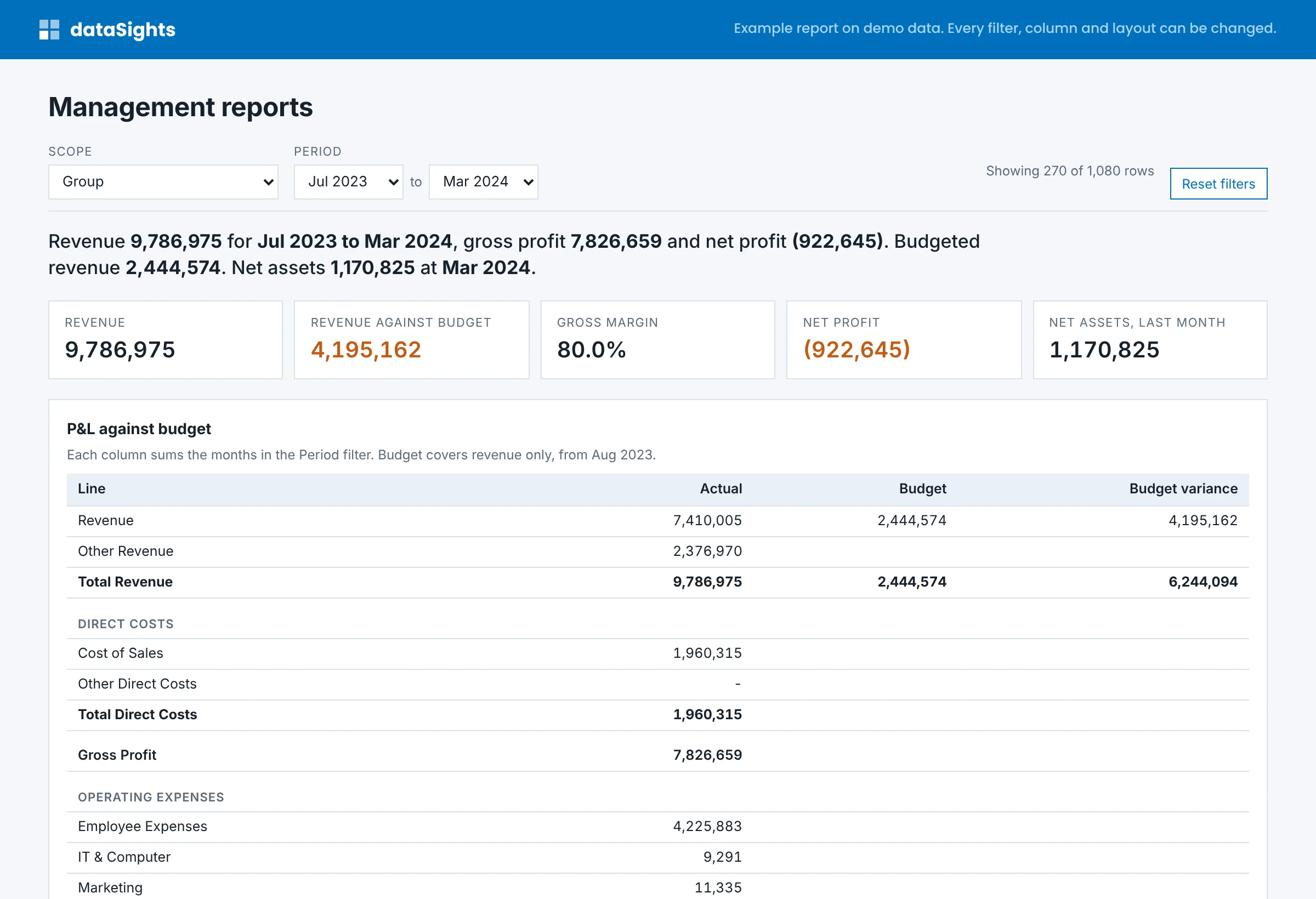
Management reports, the board pack, budget variance, ageing and more than 20 control reports, such as supplier bank account changes, duplicate payments and chart of accounts differences between entities. Every report runs on your own data, in your own templates, and the first one is on screen in minutes.
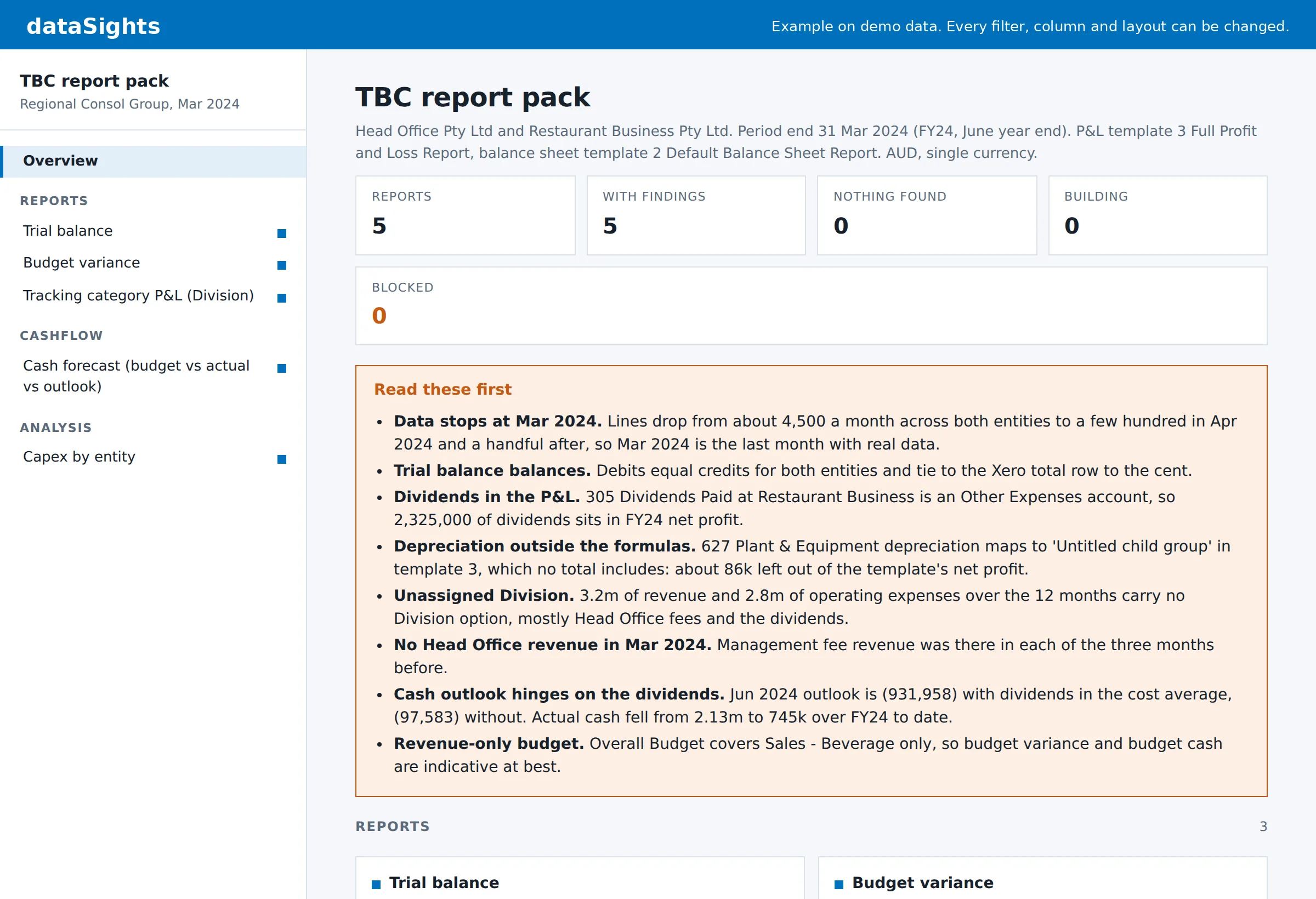
"Use the dataSights report builder to set up reporting for my group. Check my data, ask me what you need in one go, and show me the first report before building the rest."
- Type a report name and see it on screen with filters
- Run several reports into one pack
- Save it as an Excel workbook that refreshes in one click, or as a report skill for colleagues
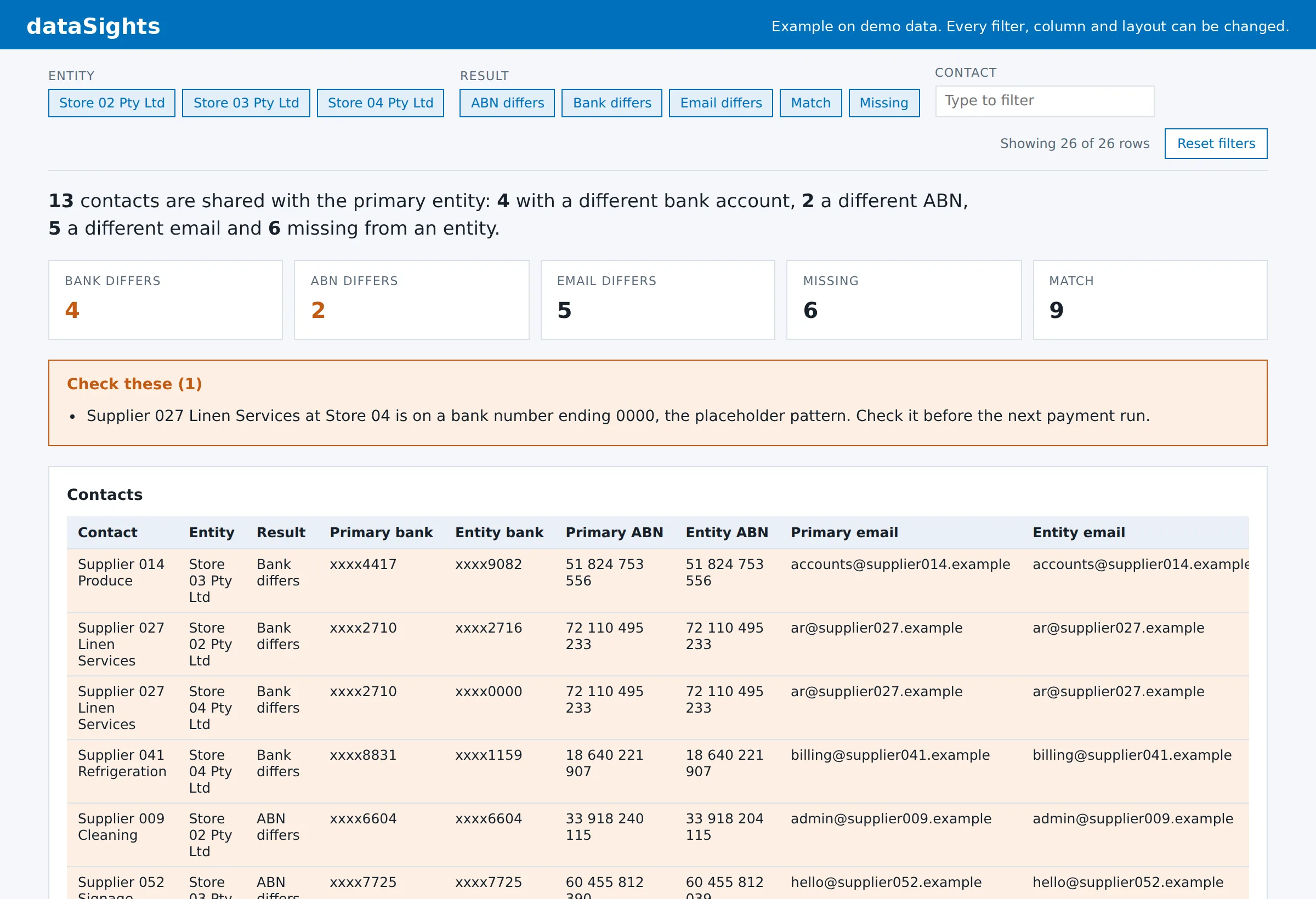
A control report: which suppliers have a different bank account in another entity.
Management reports with filters, in your template.
Run more reports into one pack, or save one as a small skill for colleagues.
Cash flow forecast: 13 weeks ahead, then a three-way forecast
A week-by-week forecast of the next 13 weeks, starting from your bank balance, with invoices and bills on their due dates and payroll, BAS and super on theirs. Then a three-way forecast for the next 12 to 36 months, with the P&L, balance sheet and cash flow linked and scenarios you can flex.
"Use the dataSights cash flow forecast skill to forecast my group's cash from the last closed month: the next 13 weeks and the next 12 months. Ask me what you need in one go, then show me the page and the Excel workbook."
- Every line names the invoices, bills or dates behind it
- The balance sheet balances every month
- Each run is saved, so next month shows forecast against actual
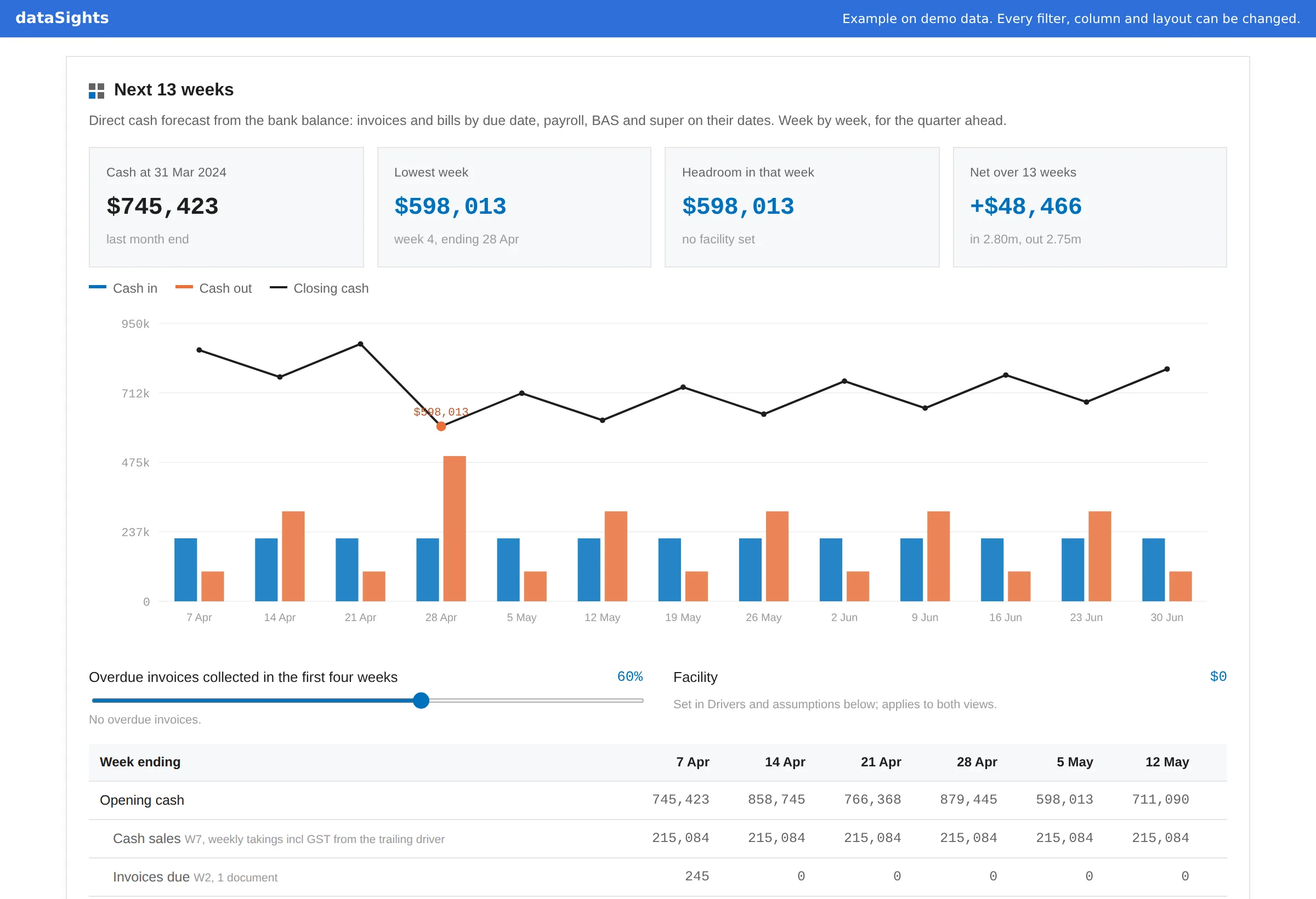
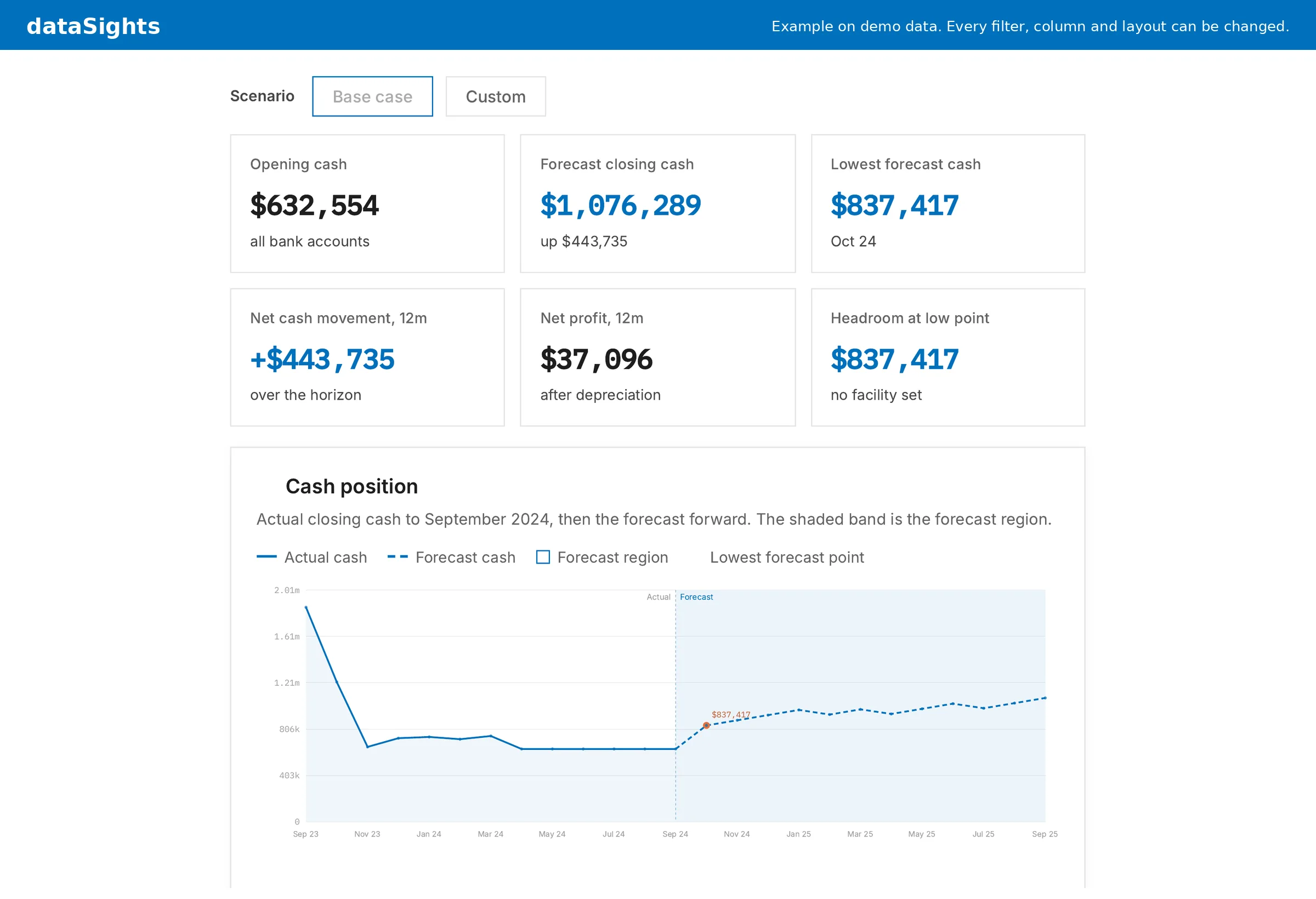
The next 13 weeks from the bank balance. Every line names the invoices, bills or dates behind it.
Opening cash, lowest point and the runway chart, actual then forecast.
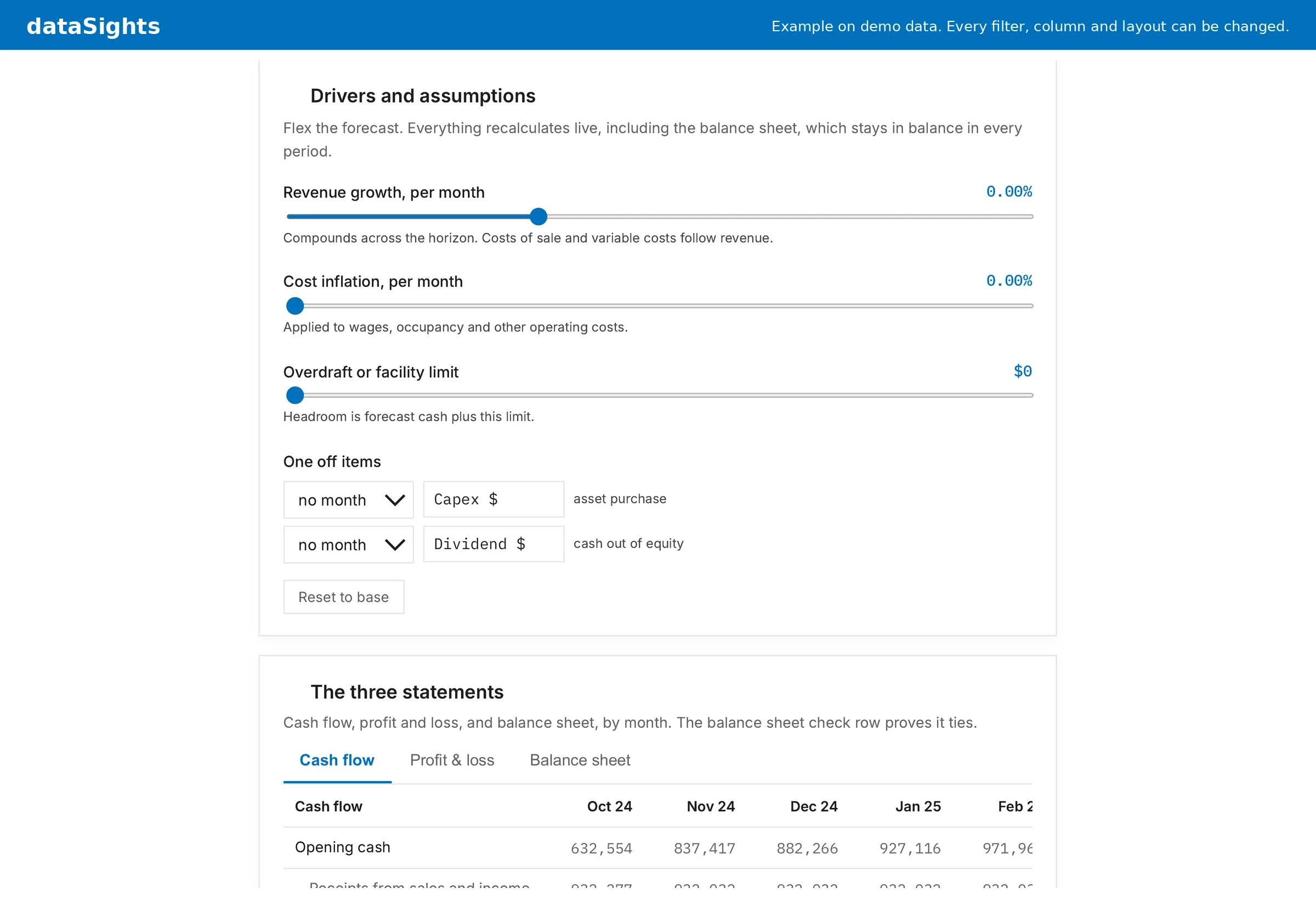
Flex revenue, costs and one-off items. The balance sheet stays in balance every month.
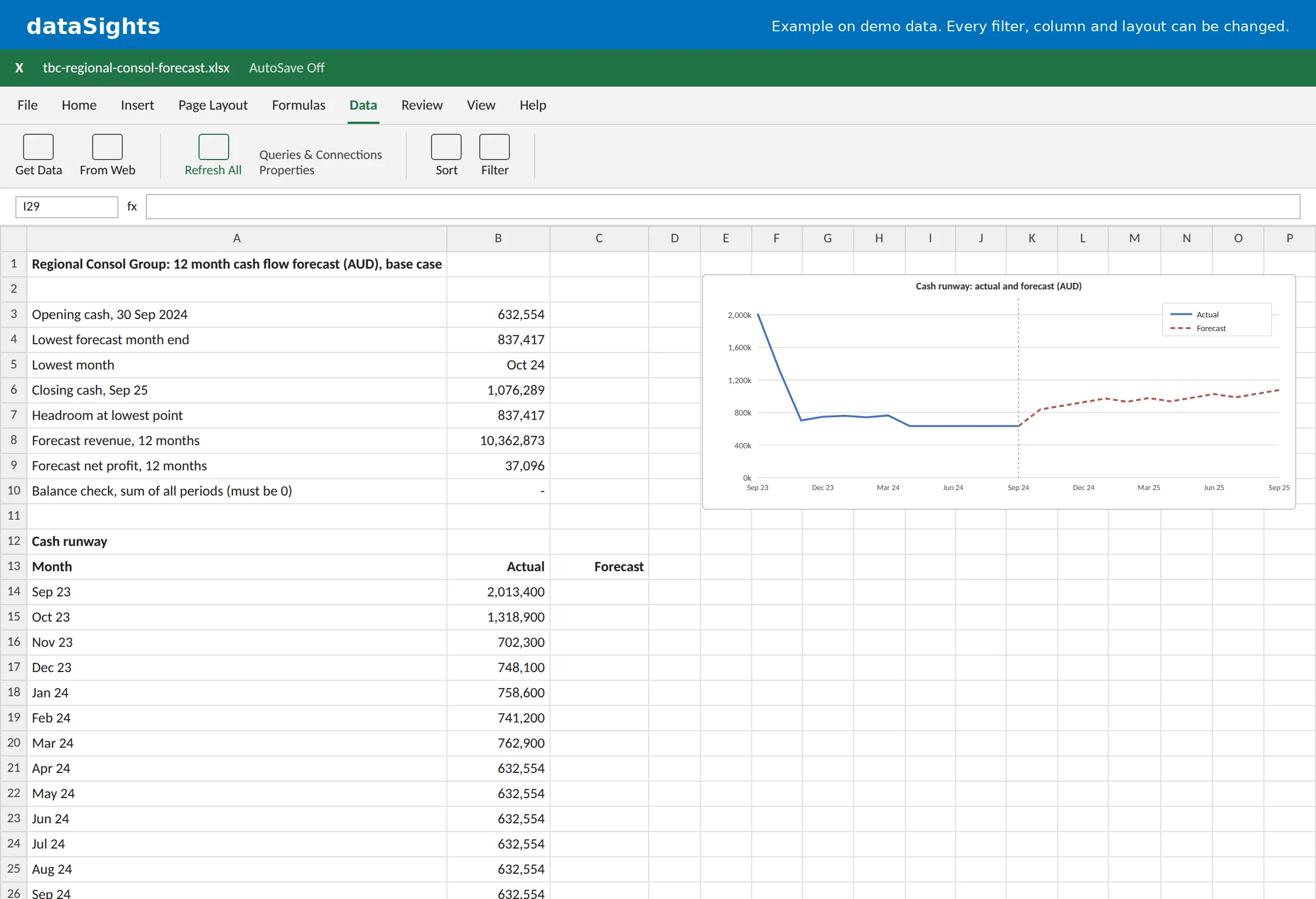
The same model in Excel. Data, Refresh All pulls fresh actuals from your database.
Migrate your reports from Fathom, Joiin, Spotlight or Xero custom reports
For groups moving from another Xero reporting tool. Give Claude an export of your current reports and the skill rebuilds your consolidated P&L and balance sheet as dataSights templates, recreates your eliminations and ties the result out to your original report for the same period.
"Use the dataSights report conversion skill to bring my P&L and balance sheet across from Fathom. Here is my export. Read my dataSights setup first, show me the mapping plan before saving anything, then tie it out to the same period."
- Reads Fathom, Joiin, LiveFlow, Spotlight and Syft exports, Xero custom reports, spreadsheets and PDFs
- Shows the mapping plan before anything is saved
- Ties out line by line to your original report
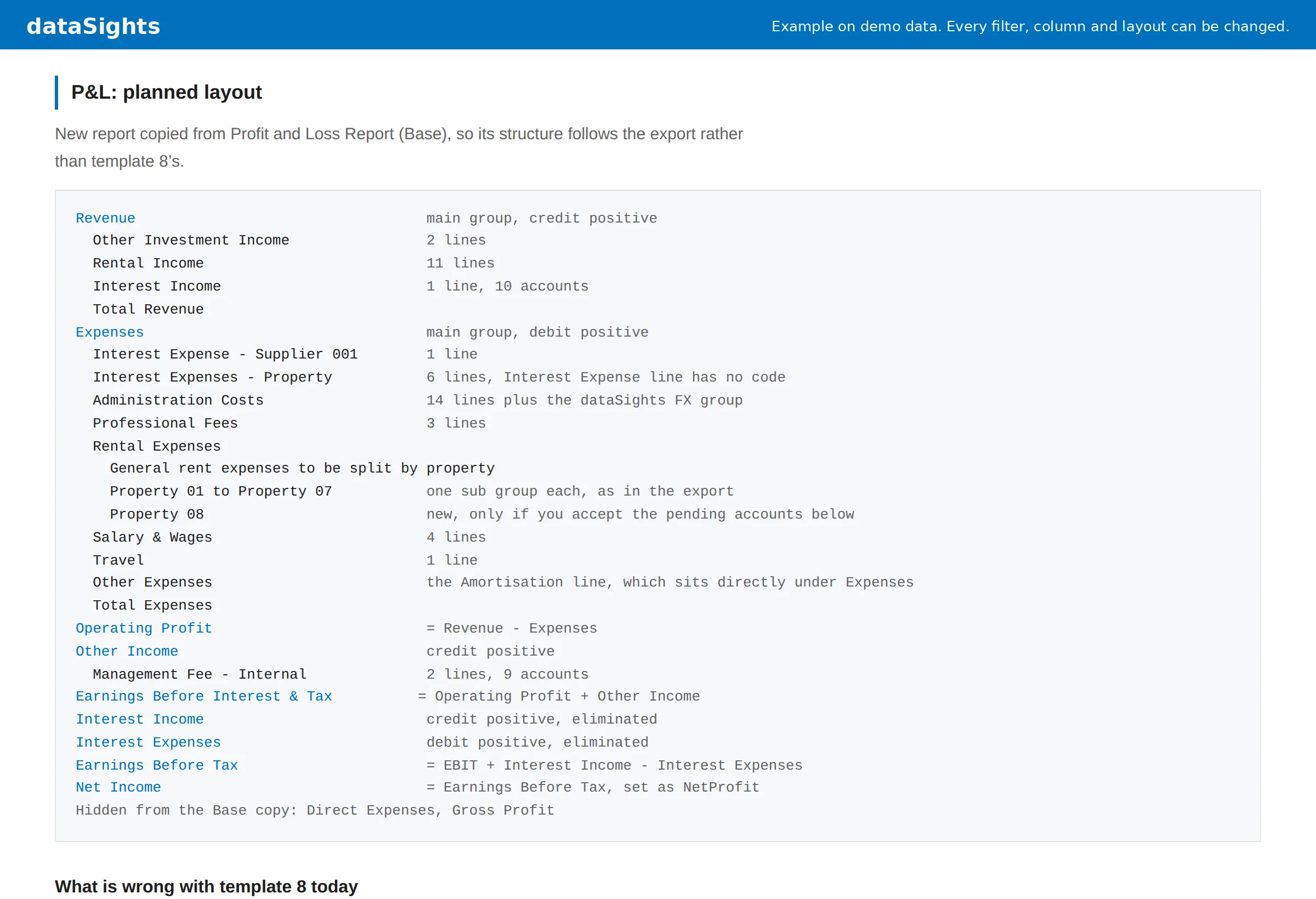
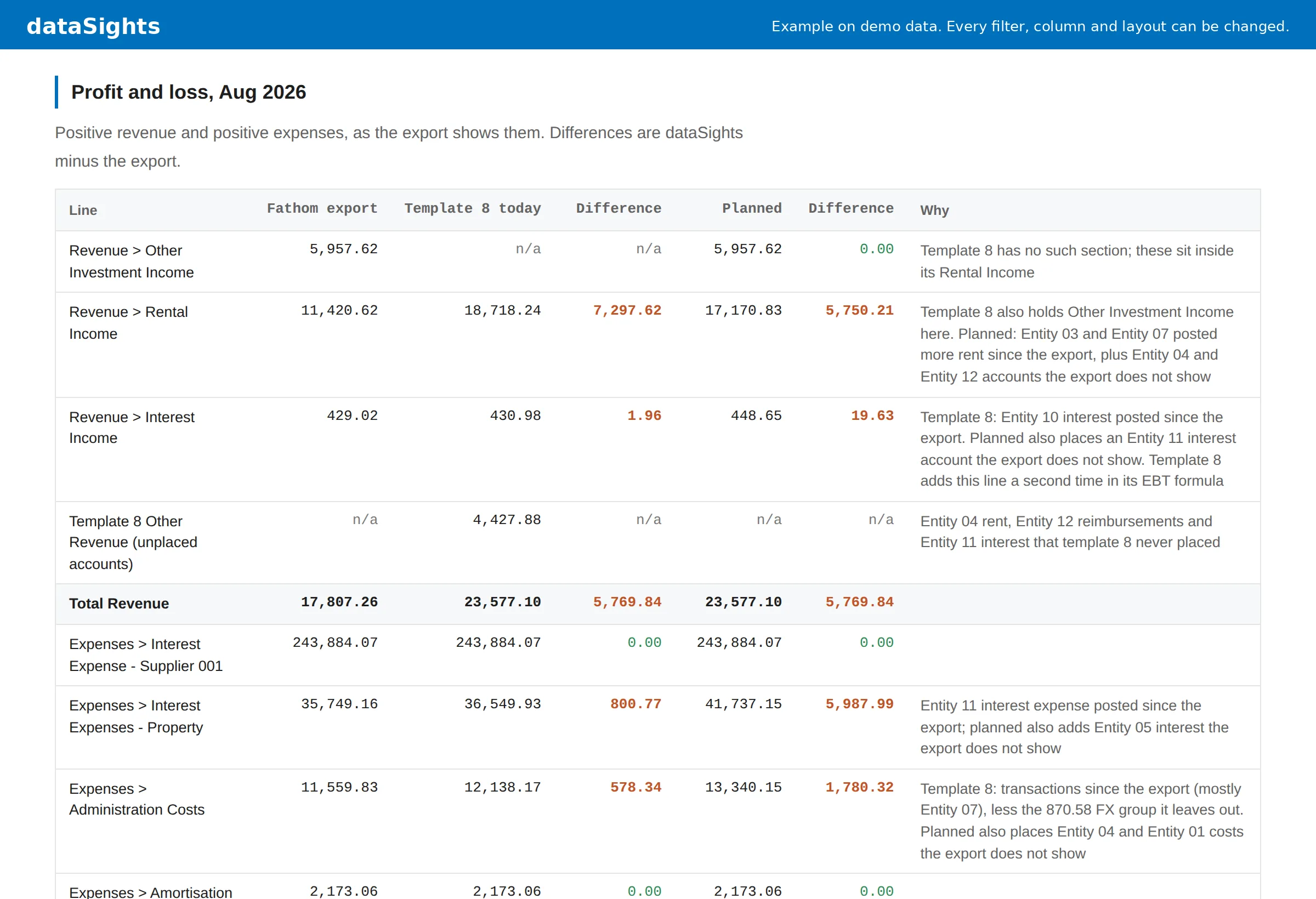
The plan before anything is saved: every source line and where its accounts land.
Reconciled to your original report for the same period, line by line.
How the skills differ from Xero's own Claude connector
Both run inside Claude. Xero's connector reads one organisation at a time, and the dataSights skills read your consolidated group.
Xero's connector in Claude
- It is read-only and works on one Xero organisation at a time.
- It covers revenue and profit, receivables and payables, financial and cash position, and invoices.
- A group total is Claude adding up each organisation in the chat, deciding again each time which accounts match and which exchange rate to use.
dataSights skills in Claude
- They read one database you own that holds every Xero entity and its full transaction history.
- Your account mappings, eliminations and currency rules are applied once, before Claude reads anything.
- They build reports, cash forecasts and migrated templates, and save to dataSights only after you approve.
A quick look at one organisation suits Xero's connector, and many dataSights customers use both. Read the full comparison of Xero's Claude connector and dataSights.
Build reports with Claude once, then run them without AI
Claude builds each report once, on the trusted data layer in dataSights. You then keep the report in a form your team can run without a chat: an Excel workbook that refreshes with Data, Refresh All, or a small report skill that colleagues add to their own Claude.
Every Xero entity in one consolidated database
The skills read the database behind dataSights Xero consolidation, where every entity is already mapped, eliminated and translated into your reporting currency.
Reports down to every transaction
With the Account Transactions data point switched on, reports reach the line-level ledger, so you can find duplicate payments and unusual transactions, or report spend by store by week.
You approve every save
Each skill shows its first result and stops so you can change it. It names any write to your dataSights database before making it, and it never posts to Xero.
Set up the Claude skills for Xero in four steps
You need a dataSights account with AI Connect, which every plan includes, and Claude with the dataSights connector added. Anthropic offers skills and custom connectors on every Claude plan, and the Free plan allows one custom connector. On Team and Enterprise plans, an owner adds the dataSights connector for the organisation and makes sure skills and code execution are turned on.
- 1
Download the skill
In dataSights, open AI Connect, then AI Data Skills, and select Download on the skill's card. Leave the zip file as it is.
- 2
Add the skill to Claude
In Claude, open Customize, then Skills. Select +, then Create skill, then Upload a skill, and choose the zip. Skills need code execution switched on in Claude's settings.
- 3
Start a chat with the skill
Select Get started on the skill's card to download the GET-STARTED.md file, then upload it to a new chat with the dataSights connector switched on. Claude checks your data and asks its setup questions in one message.
- 4
Tailor the report or forecast
Tell Claude what to change in plain words, such as the period, the entities, the columns or the layout. The skill rebuilds the result and keeps your choices for the next run.
Permissions and versions are covered in the AI Data Skills guide in the dataSights knowledge base. To connect Claude to dataSights for the first time, start with AI Connect.





What dataSights customers say
Rated 5.0 by 90+ verified Xero users

The ultimate platform for consolidated Xero insights
I've tried SyncHub, Flex Financial, Syft, Coupler and others. dataSights is the go-to for Power BI and Excel integration across multiple Xero entities.
James Kemp, BI Developer, Centenary Childcare
Review from Xero App Store
From 15 days to 5: transforming our month-end
We now complete month-end reporting in 5 days, down from 15, so finance can spend more time in the business improving results.
Daniel Bratton, CFO, Obsequio
Review from Xero App Store
Brilliant for multi-entity consolidation, and the Claude integration is incredible
We run 50+ Xero files and dataSights keeps them manageable, syncing everything into one database we build reports off in a click, right down to transaction level. The Claude integration is incredible: it analyses your data, creates reports, even posts back to Xero in bulk.
Alasdair Forrest, CFO, El Jannah
Review from Xero App Store
Great product, responsive team
It's taken the heavy lifting out of month-end: consolidations, cashflow, AR/AP detail. Drilling straight through to source transactions and reconciling back to Xero gives real confidence in the numbers. The AI-driven capabilities are clearly built with finance teams in mind.
Alan Rust, CFO, MCL Capital
Review from Xero App StoreXero integration with Claude
I can't believe how easy this was. The connection to Claude took 30 seconds and I was creating reports in minutes. So good!
Erica Warren, CFO, Direct Pool Supplies
Review from Xero App Store A game-changer for efficiency and business visibility
dataSights saves us days every month: we pull transactional data from hundreds of Xero files and push journals from Excel to all of them with one click.
Daniel Dalais, Finance Manager, Priceline Pharmacy
Review from Xero App StoreFrequently asked questions
They are ready-made skills you add to your own Claude account. They run on your Xero data through dataSights, which keeps every Xero entity in one consolidated database. So the reports, forecasts and migrations the skills produce already have your reporting groups, templates, eliminations and currency translation applied.
Xero's connector in Claude is read-only and works on one organisation at a time, so any group total is Claude adding up each set of books in the chat. The dataSights skills read your consolidated database, where your mappings, eliminations and currency rules are applied once, before you ask. A quick look at one organisation suits Xero's connector, and many dataSights customers use both. Read the full comparison of Xero's Claude connector and dataSights.
Yes. All three skills are free with every dataSights plan. You need a dataSights account with AI Connect, which every plan includes, and a Claude account with the dataSights connector added. Anthropic offers skills and custom connectors on every Claude plan, and the Free plan allows one custom connector.
The skills run in Claude today, and versions for ChatGPT and Microsoft Copilot are coming. AI Connect itself already works with Claude, ChatGPT, Copilot and any MCP-compatible AI tool, so you can query your data and post back from any of them now.
The skills run over AI Connect, the dataSights MCP. Xero's own Claude connector and developer MCP both work on one organisation at a time. AI Connect exposes your consolidated database instead: every entity and the full transaction history, with eliminations, FX and account mappings already applied.
Yes. The Migrate your reports skill reads exports from Fathom, Joiin, LiveFlow, Spotlight and Syft, as well as Xero custom reports, spreadsheets and PDFs. It rebuilds your consolidated P&L and balance sheet as dataSights templates, recreates your eliminations, shows you the plan before saving anything, and ties the result out to your original report for the same period. To compare the tools first, see dataSights vs Fathom, dataSights vs Joiin and dataSights vs Spotlight Reporting.
No. The skills read your data and build reports, forecasts and templates. A skill writes to your dataSights database only when you ask for something that needs it, such as an Excel workbook or a saved forecast, and it names each write and waits for your approval first. Posting to Xero is a separate AI Connect feature.
Every skill reads your data under your own dataSights permissions and Xero entity restrictions. Bank account numbers show the last four digits only, and a page you publish from Claude stays private until you share the link.

Still have questions? Contact our support team