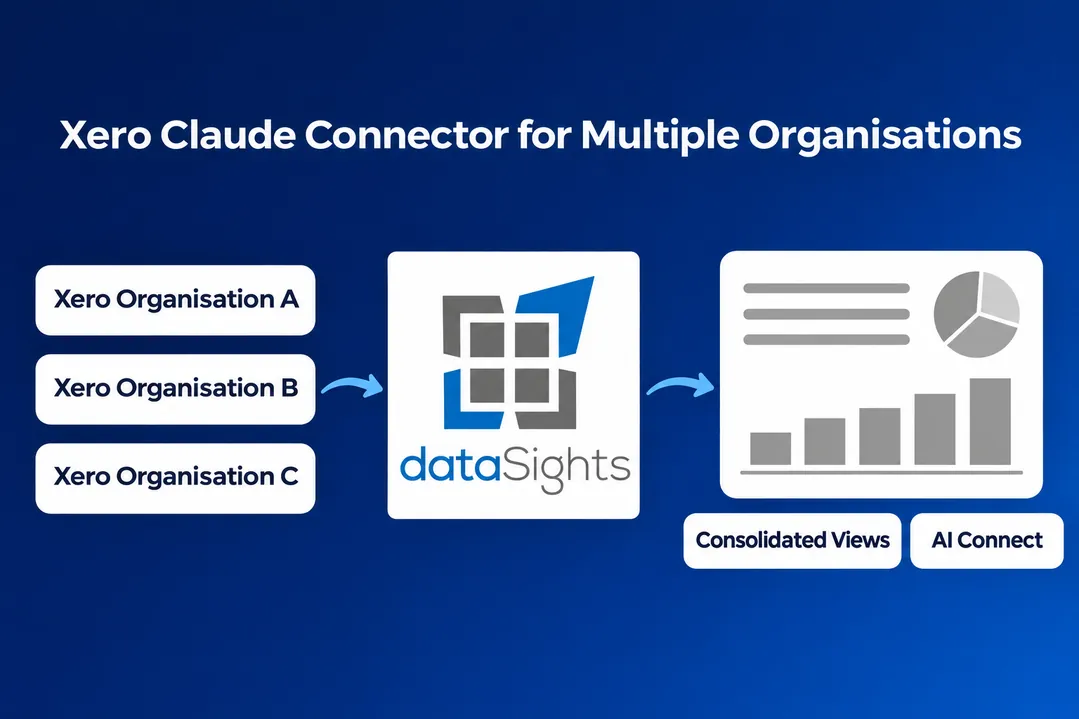
The Xero Claude connector for multiple organisations lets you ask Claude about your Xero organisations, and you can connect more than one. If you run one company, or you're an accountant checking client files one at a time, it's genuinely useful, and it's free.
If you run a group, the important detail is in Xero's own help article. The connector "provides data for one organisation at a time", and Xero adds that it "doesn't calculate or verify combined figures". So Claude can look at each set of books in turn, but any group total is Claude adding things up in the chat.
This page covers what Xero's connector can read, what it can't, whether it can post to Xero, how Xero's developer Remote MCP differs, and what changes when Claude reads a consolidated database through dataSights AI Connect. Xero's tools, plans and limits are described as at November 2026.
Xero Claude Connector for Multiple Organisations: The Short Answer
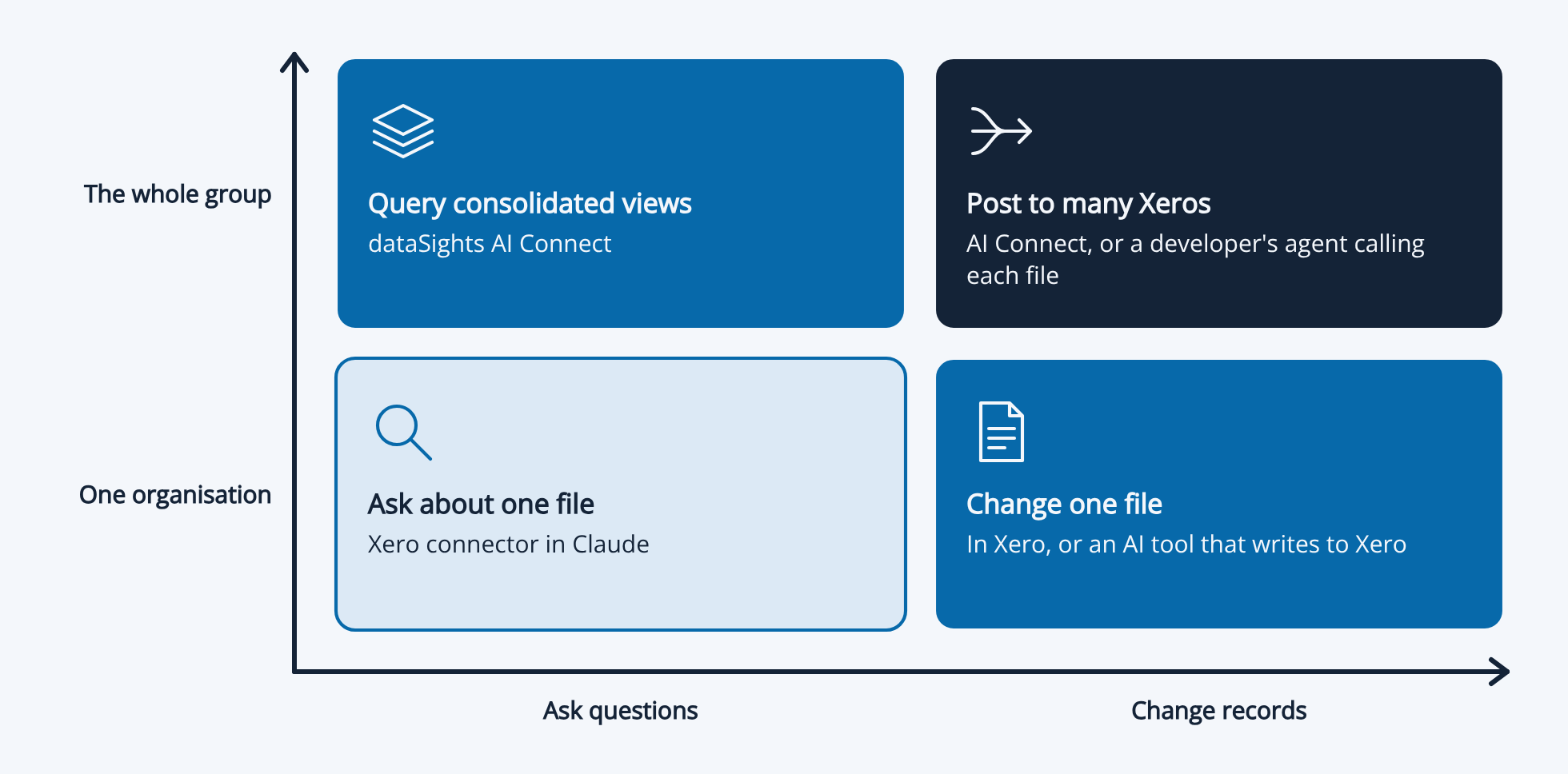
Is there a Xero Claude connector for multiple organisations? Yes, but it works on one organisation at a time and doesn't combine them. Xero's connector in Claude is read-only, works on one organisation at a time and covers four areas: revenue and profit, receivables and payables, financial and cash position, and invoices. It can't see journal lines, manual journals, credit notes, payments or the trial balance, and it can't post anything to Xero. Xero's developer Remote MCP can read and write more, but it's built for developers and each call still runs against one organisation. dataSights syncs every entity into one database you own, applies your mappings, eliminations and currency rules once, and lets Claude query every transaction across every entity and post back to as many Xero organisations as you like in one instruction.
Ready to Automate Your Financial Consolidation?
Stop wrestling with manual consolidations and broken
formulas. dataSights automates multi-entity reporting,
Xero consolidations, and Power BI connections. Join 300+
businesses already transforming their financial
reporting with our platform, rated 5.0 out of 5 by 90+ verified Xero users.
Start Your Free 14-Day Trial
Xero Connector vs Remote MCP vs dataSights AI Connect at a Glance
| Xero connector in Claude | Xero developer Remote MCP | dataSights AI Connect |
| Built for | Owners, accountants and bookkeepers asking quick questions | Developers building their own agents and apps | Finance teams reporting on a group |
| Organisations per question | One at a time; you name the one you want | One per tool call | Every entity in one query |
| Group figures | Xero says it doesn't calculate or verify combined figures | Left to the developer's agent | Consolidated in the database before you ask |
| Account mapping, eliminations, FX | No | No | Set up once, applied the same way every month |
| What Claude can read | Revenue and profit, receivables and payables, financial and cash position, invoices, bills, contacts, purchase orders, bank account transactions | Invoices, credit notes, contacts, bank transactions, payments, manual journals, P&L, balance sheet, trial balance, aged receivables and payables | Every journal line and transaction across every entity, plus account transactions, receivables and payables at any date and tracking categories |
| Journal lines and account transactions | No | No | Yes |
| Data freshness | Xero Analytics data, which you may need to refresh manually | Live from Xero's API | Scheduled syncs, intraday on request, plus manual refreshes Claude can trigger |
| Can post to Xero | No, read-only | Yes, one organisation per call | Yes, many organisations in one instruction |
| Confirmation before posting | Not applicable | Xero says V1 tools don't ask first | Each record type has its own permission; ask Claude to confirm first |
| Other systems | Xero only | Xero only | Xero plus 160+ connectors in the same database |
| Setup | A few minutes | Developer build with OAuth and PKCE | Consolidation set up once; Claude connects in about a minute |
| Cost | Free with a Xero subscription and a Claude account | Xero Developer Core plan or above for real organisations | From AUD 80 a month ex GST; AI Connect included; 14-day free trial |
What Xero's Connector in Claude Does
This is the ready-made option most people will try first. According to Xero:
- Read-only: Claude can view and retrieve data but can't make changes in Xero.
- Four areas: Revenue and profit, receivables and payables, financial and cash position, and invoices.
- One organisation at a time: You can connect several organisations, then name the one you want in your prompt. Claude uses it until you name another.
- Adding an organisation: To connect another organisation later, you disconnect the connector and reconnect it with all the organisations selected.
- Data from Xero Analytics: If an answer looks out of date, Xero says to refresh Xero Analytics and ask again.
- Default date ranges: With no period in the prompt, profit questions use the current month to date and receivables questions the last 12 months.
- Links back to Xero: Answers link to the report, invoice or contact they came from.
- Free: Any Xero business plan and a free or paid Claude account. Xero also offers a Small Business plugin with ready-made skills on paid Claude plans.
Claude's directory lists 20 tools for the connector, including profit and loss, cash and financial position, aged receivables and payables, invoices, bills, contacts, purchase orders, tracking categories, the chart of accounts and bank account transactions.
What Xero's Connector in Claude Can't Read
There's no tool in the connector for:
- Journal lines: The general ledger entries behind every report.
- Account transactions: Xero's Account Transactions report, the one most finance teams build their reporting from, isn't in Xero's API at all.
- Manual journals, credit notes and payments.
- The trial balance.
- Your custom Xero reports.
- Payroll, fixed assets or any system outside Xero.
That covers what most owners ask day to day. It's a much smaller set than what a finance team reports from, and the more transactional the question, the further it sits from what the connector can answer.
Why Switching Between Organisations Isn't a Group Figure
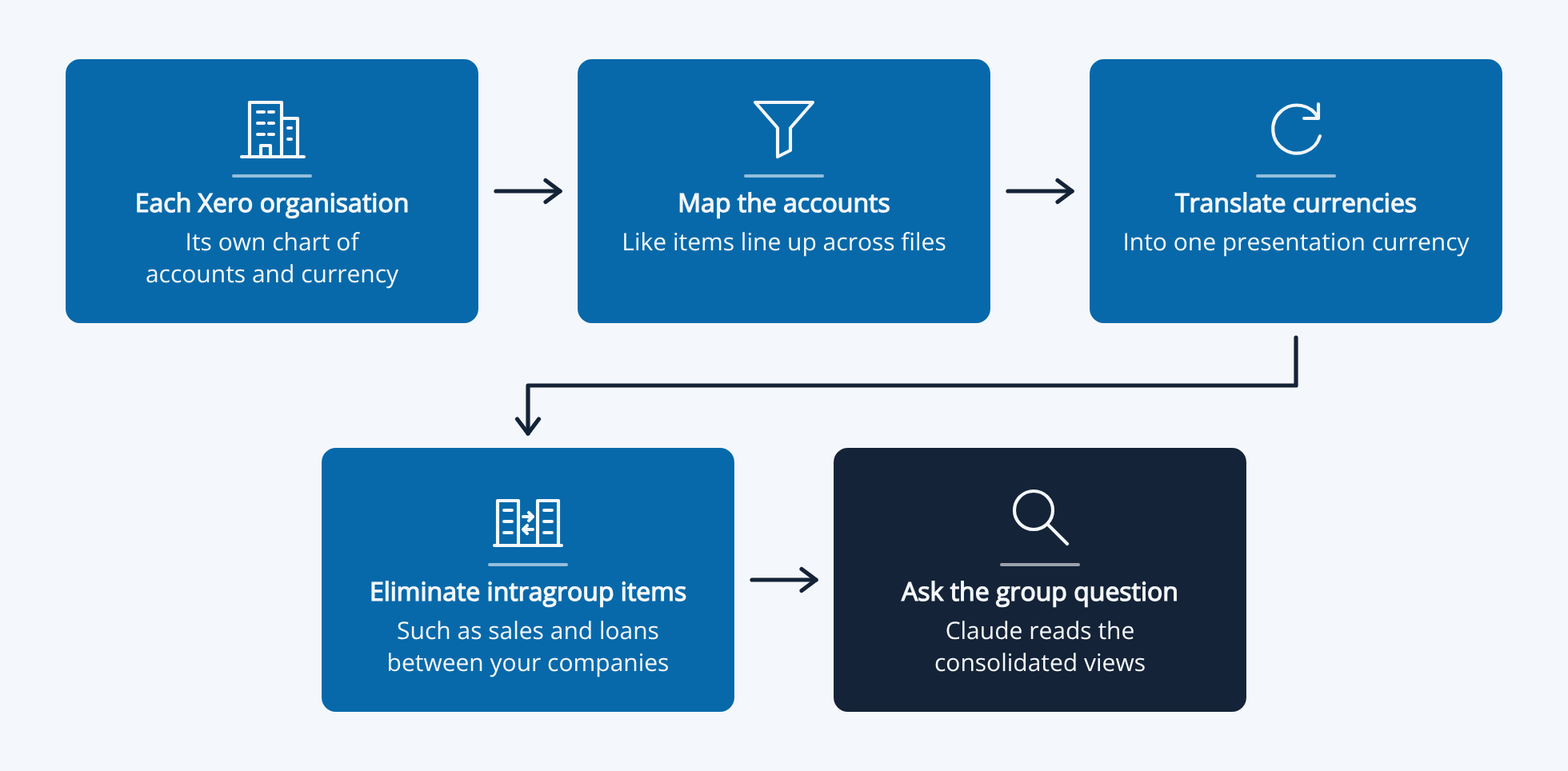
In Xero, each company in your group is its own organisation. A group figure needs three things done first:
- Mapping: Deciding which accounts in each company are the same line in the group report.
- Eliminations: Removing sales, costs, loans and balances between your own companies. Accounting standards such as AASB 10 require this in full.
- Currency translation: Converting each entity into the group's currency, using average rates for profit and loss and the closing rate for the balance sheet.
Picture an Australian parent that sold AUD 200,000 of stock to its New Zealand subsidiary last quarter. Ask Claude for group revenue through Xero's connector and it adds the two companies together. Group revenue comes out AUD 200,000 too high, because nothing removed the sale between them.
Claude also has to decide which accounts match and which exchange rate to use, and it makes those decisions again every time you ask. Ask for the same quarter twice and you can get two different totals, with nothing to tell you which is right. If you do ask Xero's connector for a group total, ask Claude to list the accounts it combined, what it removed and the rate it used.
"I joined a company with 9 Xero entities and no way of consolidating the data. Datasights has been a game changer for us... Datasights creates the consolidated data we need, in a well structured way, and we can use that as we see fit to define our reporting."
Scott Paterson, CFO, Inuvi, Xero App Store review
Claude Calling Xero vs Claude Reading a Database
The other difference is where the work happens.
When Claude goes through Xero's connector or Remote MCP, it builds the picture itself. Each tool reads one type of record from one organisation, so a twelve-month group report means many calls across many record types, then matching, adding up and eliminating inside the conversation. More months and entities mean more data to fetch, more tokens and more room for something to be missed. On the Remote MCP, every call also counts against Xero's daily API limits for that organisation.
With AI Connect, the picture is already built. Every entity is synced into one database, and the joins, mappings, eliminations and currency translation are done in SQL views before you ask. Claude writes a few lines of SQL against that final layer, dataSights runs it with your permissions applied, and the answer comes back. There's no AI on our side, just SQL, and the rules don't change from one question to the next.
"We're mainly using the AI Connect functionality, linking Claude to the SQL data. It's been a fantastic step forward for the businesses, being able to access our data and provide insightful reporting."
Xero App Store review
Xero's Developer Remote MCP
Xero also runs a Remote MCP for developers building their own agents and apps. In short:
- Reads and writes: It can read invoices, credit notes, contacts, bank transactions, payments, manual journals, the profit and loss, balance sheet, trial balance and aged reports. It can create and update invoices, credit notes, contacts, bank transactions, manual journals, items, quotes and tracking categories, create payments, and authorise or void invoices.
- One organisation per call: A user can authorise several organisations, but every tool call runs against one, and the agent has to track which one it's writing to.
- No confirmation step: Xero says its V1 tools don't ask the user before writing, so you build that into your agent.
- No journal lines: Like the connector, it has no tool for the general ledger journal lines or account transactions.
- Plans and limits: Real organisations need a Xero Developer Core plan or above. Xero's API limits apply, including 5,000 calls a day per organisation on Core.
Xero also publishes an open-source MCP server on GitHub that a developer runs themselves.
dataSights AI Connect: Claude on Your Whole Group
dataSights brings every Xero organisation you connect into one Microsoft Azure SQL database you own. Its management reports, Excel, Power BI and AI Connect all read that same data. It's used by 300+ businesses and rated 5.0 by 90+ verified Xero users on the Xero App Store. AI Connect works with Claude, ChatGPT, Microsoft Copilot and any MCP-compatible tool.
What Claude Can Read
- Every transaction: Journal lines, invoices, bills, credit notes, payments and bank transactions across every entity.
- Account transactions: Built from the underlying records and stored as a table, so Claude can drill from a group line to the entity, account, month and individual transactions.
- Any date: Receivables and payables as at any date, across every entity, in one query.
- Consolidated views: Your mappings, eliminations, journal adjustments and currency translation already applied.
- Other systems: Inventory, ecommerce, payroll, CRM and 160+ other connectors in the same database.
What Claude Can Post to Xero
- Records: Invoices, bills, credit notes, manual journals (including auto-reversing), purchase orders, contacts, accounts, bank transactions, payments and tracking categories, plus attachments and history notes on existing records.
- Many organisations at once: One instruction can post to as many Xero organisations as you like.
- Checked afterwards: Claude can sync the entities it posted to and confirm the entries landed in the right entities and accounts.
- Permission per record type: Each type has its own Post to Xero permission, so a user can query without being able to post.
What Claude Can Set Up
- Your consolidation: Account mappings, eliminations by account or by counterparty contact, and custom report templates. You check them once, and every question after that uses them.
- Your own views: Claude can save a query as a SQL view in your database, which Excel, Power BI and later questions then reuse.
Security and Control
- No AI inside: AI Connect contains no AI. Claude writes the SQL, dataSights runs it, and every AI query is logged.
- Your permissions: You control which entities each user can see and which views and tables the AI can query.
- Your database: By default, we host it in our Microsoft account, and we can move it into yours.
"Consolidated management reports, Excel automation, write-back to Xero, plus our Employment Hero Payroll data for reconciliations, all in one place. The new Claude integration takes it to another level."
Adam Young, Xero App Store review
Which One Should You Use?
Use Xero's connector in Claude when:
- You're asking about one organisation: cash, overdue invoices, profit or top customers.
- You move between client files and want a quick answer from each.
- You want it free and running in minutes.
Use Xero's developer Remote MCP when:
- You have a developer building an agent that reads or writes records in one named organisation at a time.
Use dataSights with AI Connect when:
- You report a group number that needs mappings, eliminations and currency rules applied the same way every month.
- You need the transactions behind a figure, across every entity.
- You want Claude to post journals, invoices or bills to several Xero organisations at once.
- Your questions span Xero and your other systems.
My rule is simple: heavy reads and anything across entities or systems go to the database. A quick look at one organisation suits Xero's connector, and many of our customers use both.