What Is QuickBooks Enterprise Consolidated Reporting?
QuickBooks Enterprise consolidated reporting refers to the multi-company reporting functionality that allows you to combine financial data from separate QuickBooks Desktop Enterprise company files into a single consolidated view. Unlike basic QuickBooks versions that only report on individual entities, Enterprise editions provide tools to merge reports across your entire group structure.
QuickBooks Enterprise serves mid-market companies managing multiple entities, divisions, or locations that need group-level visibility. The consolidation feature addresses a critical pain point; without it, finance teams:
- Manually export data from each QuickBooks file
- Copy-paste into Excel
- Perform eliminations by hand
- Rebuild consolidated statements every month-end
This manual process can consume several days to multiple weeks per close cycle, depending on group size and complexity, and introduces significant error risk.
QuickBooks Enterprise consolidated reporting works by accessing multiple company files simultaneously and generating combined reports that sum balances across entities. Aside from other standard reports, you can run:
- Consolidated Profit & Loss statements
- Balance Sheets
- Trial Balances
The system displays each entity’s data in separate columns with a consolidated total column, giving you visibility into individual entity performance alongside group results.
However, QuickBooks Enterprise consolidated reporting is not true financial consolidation. It combines totals but doesn’t automatically handle:
- Intercompany eliminations
- Non-controlling interests
- Foreign currency translation, or
- Complex ownership structures that consolidated financial statements require under IFRS 10 or ASC 810
QuickBooks Enterprise Multi-Company Reporting Capabilities
QuickBooks Enterprise includes a “combine reports from multiple companies” workflow that lets you produce combined financial reports across multiple company files. Exact practical limits can vary by edition, hosting model, and environment, so confirm the details in Intuit’s current documentation for your setup.
The multi-company reporting tool lets you combine these report types:
- Profit & Loss statements (partial)
- Balance Sheets showing combined assets, liabilities, and equity
- Trial Balances for reconciliation purposes
- Cash Flow Statements
The Combine Reports feature handles Profit & Loss Standard. However, year-over-year and budget comparisons are not a part of the native “combine” list unless you manually export & customize in Excel. QuickBooks Enterprise Advanced Reporting or custom reporting tools can generate those comparisons, but the basic native combine feature does not include built-in YOY/budget comparison consolidation.
When you generate a multi-company report, QuickBooks Enterprise pulls current balances from each selected company file (up to the number your edition supports) at the time the report is generated. There is no built-in scheduled refresh, no automated distribution, and no native real-time dashboard capability – combined reports must be generated manually on demand. The system displays results in a columnar format: one column per entity plus a total column that sums across all companies.
You can filter reports by:
- Date range
- Accounting basis (cash or accrual)
- Specific accounts
QuickBooks Enterprise maintains each entity’s Chart of Accounts (COA) separately in its own company file.
- When combining financial data from multiple company files, only accounts that are identical in name, type, and structure will automatically align in the combined output.
- QuickBooks does not include a dedicated account-mapping interface for reconciling differing account structures across entities.
- Consequently, if the COAs differ between companies, you must manually align or standardise accounts either by adjusting the source COAs to match or by using external tools or spreadsheet processes to create and apply a consistent mapping scheme for consolidated reporting.
Combined or individual reports can be exported to Excel, PDF, or printed, but these exported files are static. They do not maintain a live data link back to the source QuickBooks company files. If the underlying transactions change after export, you must regenerate the report in QuickBooks to capture updated figures.
How to Set Up Consolidated Reporting in QuickBooks Enterprise
Setting up consolidated reporting in QuickBooks Enterprise requires several prerequisites before you can generate your first multi-company report.
Prerequisites:
- QuickBooks Desktop Enterprise is installed on the workstation where you’ll run the combined reports (feature availability can vary by subscription – check your Intuit plan details).
- Microsoft Excel is available on that workstation (the standard workflow outputs the combined report to Excel).
- All company files you’re combining are QuickBooks Desktop company files (.qbw) that you can open from that workstation (local drive or network share).
- All company files are on the same QuickBooks Desktop Enterprise version to avoid compatibility issues when combining reports.
- You have the required logins/permissions for each company file you’re including (so QuickBooks can access each file during the combine process).
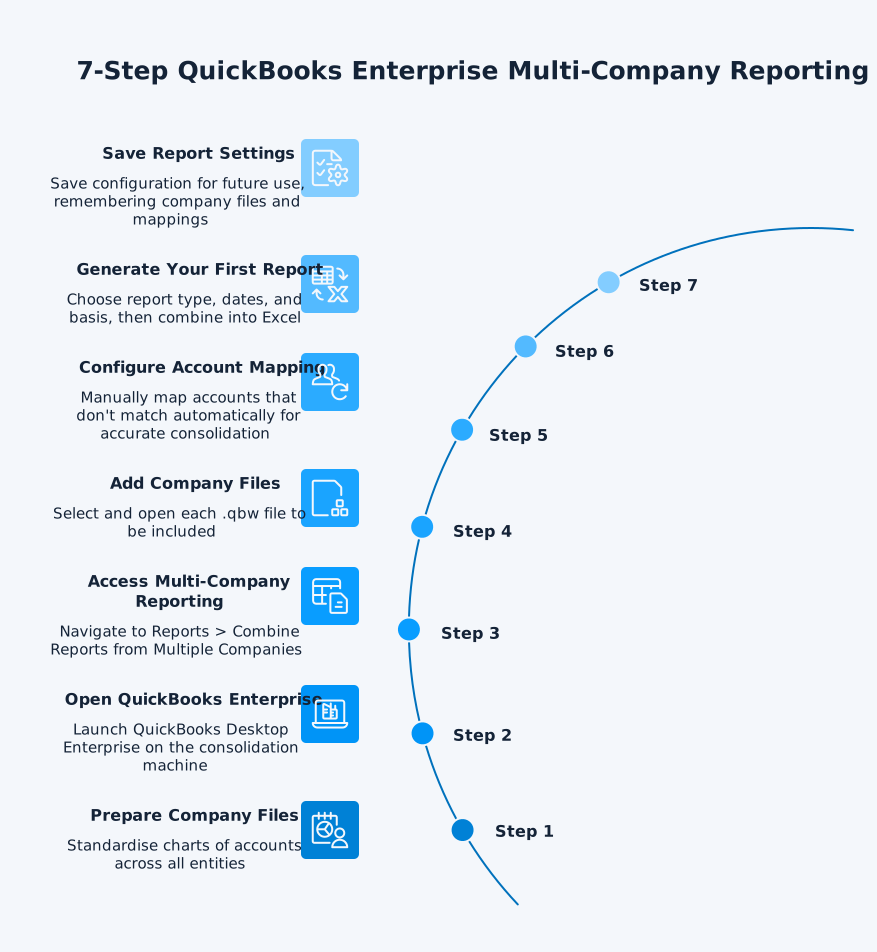
Step-by-Step Setup Process:
Step 1: Prepare Company Files
Ensure each entity’s chart of accounts is standardised. While QuickBooks allows different account structures, consolidation works best when account codes and names match across entities. If Entity A calls it “Cost of Goods Sold” and Entity B calls it “COGS”, you’ll need to map these manually.
Step 2: Open QuickBooks Enterprise
Launch QuickBooks Desktop Enterprise on the machine where you’ll generate consolidated reports. This machine must have access to all company files you want to consolidate.
Step 3: Access Multi-Company Reporting
From the Reports menu, select Combine Reports from Multiple Companies. If you don’t see this option, confirm you’re using QuickBooks Desktop Enterprise and that your user has the required permissions.
Step 4: Add Company Files
Select Add Files, then locate and open each company file (.qbw) you want to include. Repeat for each additional company file. If prompted, enter the login details required to access each file.
Step 5: Review Account Alignment
QuickBooks automatically aligns accounts only when they are identical in name, type, and structure across company files. QuickBooks does not provide a manual account-mapping interface within the Combine Reports workflow. If accounts do not match exactly (for example, “COGS” vs “Cost of Goods Sold”), they will appear as separate lines in the combined report. To achieve meaningful consolidation, you must standardise charts of accounts in the source company files or perform account mapping externally in Excel or a consolidation tool.
Step 6: Generate Your First Report
Under Select reports for combining, choose the report(s) you want (for example, Profit & Loss or Balance Sheet). Set the From and To dates and select the report basis (cash or accrual). Then select Combine Reports in Excel to output the combined report.
Step 7: Save Report Settings
Once you’ve selected company files and report parameters, save these settings so you don’t need to reselect files each time. QuickBooks remembers company file selections and report settings, but account alignment depends entirely on the underlying chart of accounts in each file.
Common Configuration Challenges:
- Different fiscal year-ends: QuickBooks Enterprise struggles when entities have different fiscal year-ends. You’ll need to manually adjust date ranges to align periods.
- Account structure differences: Significant chart of accounts variations require extensive manual mapping that must be maintained as accounts change.
- Network access issues: If company files are stored on network drives with permission restrictions, you may encounter file access errors.
- Version mismatches: All companies must run the same QuickBooks Enterprise version. If one entity upgrades and others don’t, consolidation breaks.
Best Practices:
- Standardise chart of accounts across all entities before implementing consolidation
- Document account mapping decisions for audit purposes
- Schedule regular backups before running multi-company reports
- Test consolidation with a small date range before running full-year reports
- Maintain a consolidation checklist, noting any manual adjustments required
Limitations of QuickBooks Enterprise Consolidation
QuickBooks Enterprise consolidation has fundamental limitations that prevent it from serving as a complete financial consolidation solution for multi-entity groups.
Manual Intercompany Eliminations
The most significant limitation: QuickBooks Enterprise does not automatically eliminate intercompany transactions. When Entity A sells £100,000 of inventory to Entity B, both the revenue in Entity A and the expense in Entity B appear in your consolidated reports. The consolidated Profit & Loss incorrectly shows £100,000 of revenue and £100,000 of expense that should be eliminated because no cash entered or left the group.
You must identify these intercompany transactions manually, calculate elimination entries, and adjust the consolidated reports in Excel after export. This manual process introduces significant error risk and consumes hours during each close cycle. There’s no system-level audit trail showing which eliminations you applied or why.
Mini example: Entity A sells inventory to Entity B for $100,000 at a $30,000 profit. If 40% of that inventory is still on hand at month-end, you eliminate the intercompany sale and remove the unrealised profit in closing inventory (40% × $30,000 = $12,000).
No Real-Time Consolidation Capabilities
QuickBooks Enterprise consolidation operates on-demand only. You manually generate reports when needed. There’s no scheduled refresh, no automated distribution, and no real-time dashboards that update as transactions post. If you need current consolidated results, you must manually regenerate every report.
This limitation means finance teams work with static snapshots rather than continuous consolidation. Issues surface weeks after month-end when it’s difficult to trace problems back to source transactions. Modern finance teams need daily visibility into group results, not monthly surprises.
QuickBooks Ecosystem Restrictions
QuickBooks Enterprise consolidated reporting only works with other QuickBooks Desktop Enterprise files. You cannot consolidate:
- QuickBooks Online data with QuickBooks Desktop Enterprise
- QuickBooks Pro or Premier files with Enterprise
- Data from other accounting systems (Xero, Sage, NetSuite)
- Operational data from CRM, inventory, or payroll systems
This restriction forces you to maintain all entities in QuickBooks Desktop Enterprise or accept that some entities won’t appear in consolidated reports. Many groups use different systems across regions or acquisitions, making QuickBooks-only consolidation impractical.
Lack of Advanced Analytics Integration
QuickBooks Enterprise reports export to Excel or PDF, but there’s no native integration with Power BI, Tableau, or other business intelligence platforms. You cannot build real-time consolidated dashboards, drill-down from group totals to transaction detail, or combine financial data with operational KPIs.
Finance teams wanting consolidated KPI dashboards must manually export QuickBooks data, structure it for analysis, and rebuild dashboards each period. Power BI financial reporting from QuickBooks requires third-party connectors that automate data extraction and refresh.
Complex Ownership Structure Challenges
QuickBooks Enterprise consolidation sums balances across entities, but doesn’t handle:
- Non-controlling interests (NCI) in partially-owned subsidiaries
- Equity method accounting for associates or joint ventures
- Goodwill arising from business combinations
- Different reporting dates between parent and subsidiaries
- Multi-tier corporate structures with intermediate holding companies
If Parent Company owns 80% of Subsidiary A, QuickBooks Enterprise shows 100% of Subsidiary A’s profit in the consolidated Profit & Loss. You must manually calculate the 20% attributable to non-controlling interests and adjust equity accordingly. There’s no system support for these calculations.
Mini example: Parent owns 80% of Subsidiary. If Subsidiary earns $200,000 profit, the consolidated statement attributes $160,000 to the parent and $40,000 to NCI (20%).
No Multi-Currency Translation
QuickBooks Enterprise operates in a single base currency per company file. If you have subsidiaries in different countries using different functional currencies, you must manually translate their results to the parent’s presentation currency before consolidation.
You need to apply closing rates to Balance Sheet items, average rates to Profit & Loss items, and track cumulative translation adjustments in equity – all manually outside QuickBooks. This introduces significant complexity and error risk for international groups.
Mini example: A EUR subsidiary’s assets translate at the closing rate, while revenue/expenses translate at an average rate. Translation differences accumulate in equity (OCI) until disposal under IAS 21.
Limited Audit Trail and Documentation
QuickBooks Enterprise provides no audit trail for consolidation activities. You cannot track:
- Who generated which consolidated reports and when
- What account mappings were applied
- Which manual eliminations were made and why
- How balances changed between consolidation runs
External auditors require transparent consolidation processes with documented elimination entries and clear audit trails. QuickBooks Enterprise consolidated reporting lacks the documentation capabilities that consolidated audited financial statements require.
Automating QuickBooks Enterprise Consolidation
dataSights delivers consolidated management packs for Xero entities through the web platform, with optional automation in Excel and Power BI for teams that prefer those tools. Modern automation transforms QuickBooks Enterprise consolidation from manual, month-end processes to continuous, near-real-time group reporting. Rather than replacing QuickBooks Enterprise (which remains your entity-level ledger), automation layers on top to:
- Extract data
- Apply eliminations
- Deliver consolidated results through Power BI dashboards, Excel reports, and management packs
SQL Database Consolidation Architecture
The most robust approach syncs QuickBooks Enterprise data from multiple entities into a dedicated SQL database, which serves as your consolidation layer. Here’s how it works:
- QuickBooks Enterprise APIs extract data from each entity’s company file on your configured schedule (hourly, daily, or on-demand). This data flows into your dedicated Azure SQL database, where consolidation rules, elimination entries, and currency translations apply automatically. The database maintains full Trial Balance detail from each entity, ensuring consolidations always reconcile back to source systems.
- Once consolidation rules are configured in the database layer (intercompany elimination pairs, ownership percentages, currency tables), your consolidated reports refresh automatically without manual intervention. Power BI connects directly to the consolidated SQL database, providing real-time dashboards that drill from group totals down to individual transactions in specific entities.
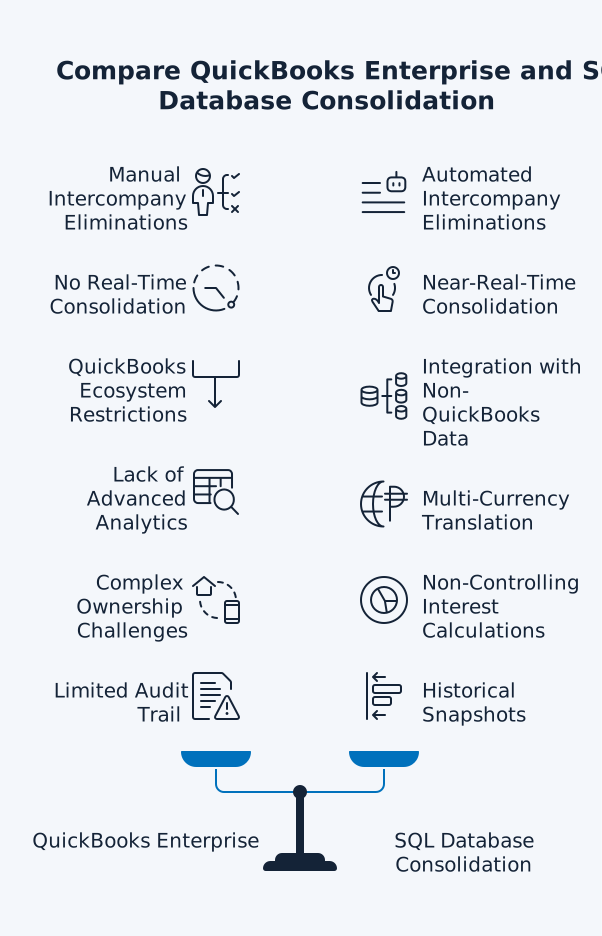
This architecture delivers capabilities QuickBooks Enterprise cannot:
- Automated intercompany eliminations with full audit trails
- Near-real-time consolidated dashboards (refreshing on your schedule)
- Integration with non-QuickBooks data sources (CRM, payroll, inventory)
- Multi-currency translation aligned with IAS 21 requirements
- Historical snapshots for period-over-period comparison
- Non-controlling interest calculations for partial ownership structures
Power BI Integration for Consolidated Dashboards
Connecting QuickBooks to Power BI enables consolidated KPI dashboards that update automatically as data changes. Rather than manually generating static reports in QuickBooks Enterprise, you build interactive dashboards once and they refresh with current data.
Power BI dashboards for QuickBooks consolidation typically include:
- Consolidated Profit & Loss with variance analysis and drill-down to entity level
- Group Balance Sheet with trend charts and ratio calculations
- Cash Flow waterfall showing sources and uses across the group
- KPI scorecards (revenue growth, EBITDA margin, working capital metrics)
- Departmental or divisional performance across multiple entities
- Entity-level comparison showing which companies drive group results
Users click on consolidated totals to drill through to underlying entity detail, then down to transaction level. This drill-down capability transforms reporting from static exports to dynamic analysis.
Power BI connects to your consolidated SQL database via DirectQuery or Import mode. DirectQuery queries the database when visuals load and when users interact with the report, while Import mode refreshes on a schedule. Import mode loads a dataset into Power BI and refreshes on schedule (hourly, daily). For QuickBooks Enterprise consolidation, scheduled Import mode typically works best – a balance between data freshness and query performance.
Excel Automation for Custom Consolidated Reports
Finance teams who prefer Excel for consolidation analysis can automate data refresh rather than manually exporting from QuickBooks Enterprise each period. Power Query in Excel connects directly to the consolidated SQL database, refreshing with one click instead of manual exports and copy-paste.
This approach keeps Excel as your reporting layer while eliminating manual data preparation:
- Build your consolidated Excel report template once with formulas, formatting, and calculations
- Connect Excel to the consolidated database using Power Query
- Each period, click “Refresh All” to update with current data
- Formulas, formatting, and layout remain intact – only data refreshes
Excel automation works particularly well for:
- Custom management reports that require specific layouts not available in QuickBooks
- Budget variance analysis combining QuickBooks actuals with Excel-based budgets
- Cash flow forecasting using historical QuickBooks data plus forward projections
- Board packs requiring specific formatting and narrative commentary
dataSights delivers Excel automation through the OfficeAddIn, enabling one-click refresh of your dataSights data directly into your Excel templates. No CSV exports, no manual copy-paste, no broken formulas each period.
Real-Time vs Scheduled Refresh
Consolidation refresh frequency depends on your business needs and data volume. Common refresh schedules:
- Hourly refresh: For businesses needing near-real-time group visibility (dashboards update throughout the day)
- Daily refresh: Standard for most organisations (overnight refresh provides current data each morning)
- On-demand refresh: For month-end close periods when you need to consolidate immediately after adjusting entries
QuickBooks Enterprise API limits and data volume affect maximum practical refresh frequency. For large multi-entity groups (30+ companies, millions of transactions), overnight scheduled refresh typically balances data freshness with system performance.
dataSights enables configurable refresh schedules aligned to your reporting cadence. Data syncs from your connected Xero and QuickBooks Online entities to your dedicated SQL database on your defined schedule, with consolidated reports and dashboards updating automatically once fresh data arrives.
Creating Consolidated Financial Statements from QuickBooks Enterprise
While QuickBooks Enterprise multi-company reporting generates combined reports, creating statutory consolidated financial statements that comply with IFRS 10 or ASC 810 requires additional consolidation processes beyond QuickBooks’ native capabilities.
IFRS/GAAP Compliance Requirements
While IFRS 10 and ASC 810 differ in detailed rules, both require you to adjust entity trial balances for eliminations, ownership, and FX before presenting group financial statements. Consolidated financial statements under IFRS 10 or US GAAP ASC 810 require specific adjustments that QuickBooks Enterprise doesn’t calculate automatically:
- Investment elimination entries: Remove the parent’s investment in subsidiary equity to avoid inflating consolidated equity accounts
- Intercompany transaction eliminations: Eliminate revenue/expense and receivable/payable balances between group entities
- Unrealised profit eliminations: Remove profit on intercompany sales of inventory or fixed assets not yet realised through external sales
- Non-controlling interest allocation: Calculate and present NCI’s share of subsidiary profit and equity for partially-owned subsidiaries
- Uniform accounting policies: Adjust subsidiary accounts to parent’s accounting policies before consolidation if policies differ
QuickBooks Enterprise provides the underlying entity-level Trial Balances, but you must apply these consolidation adjustments outside the system – typically in Excel or specialised consolidation software. The consolidated QuickBooks report becomes your starting point, not your final statutory financial statements.
Management Report Packs
Beyond statutory compliance, finance teams need management report packs that deliver:
- Consolidated Profit & Loss with eliminations and budget variance
- Balance Sheet reconciled across all entities
- Cash Flow statements showing group sources and uses
- KPI metrics (revenue growth, EBITDA margin, working capital days)
- Entity-level performance comparison
- Drill-down detail from group totals to transaction level
QuickBooks Enterprise multi-company reports provide basic consolidated totals but lack the KPI calculations, variance analysis, and visual presentation that management reporting requires. Modern finance teams extend QuickBooks data into Power BI dashboards or automated Excel templates that transform raw QuickBooks totals into board-ready insights.
dataSights delivers pre-formatted management packs that automatically refresh (based on scheduled frequency) from your connected entities:
- Consolidated Profit & Loss (including eliminations)
- Balance Sheet
- Trial Balance
- AR/AP summaries
- Budget variance
- Cash Flow
- KPI metrics
Board-Ready Outputs
Board reports require more than accurate numbers – they need clear presentation, narrative context, and comparison capabilities. Creating board-ready outputs from QuickBooks Enterprise typically means:
- Export consolidated reports from QuickBooks Enterprise
- Manually apply elimination adjustments in Excel
- Calculate KPIs and variance analysis
- Format reports with charts, commentary, and highlights
- Convert to PDF and distribute
This manual process consumes 1-2 business days each period and introduces version control challenges as multiple team members work on different sections. Automated pipelines can generate board packs in minutes once data is synced, with consistent formatting and a clearer audit trail than ad-hoc spreadsheet workflows.
Audit Trail Documentation
External auditors reviewing consolidated financial statements need transparent documentation of:
- How entities were identified and scoped for consolidation
- Which intercompany transactions were eliminated and why
- How non-controlling interests were calculated
- What accounting policy adjustments were made
- When consolidation was performed and by whom
QuickBooks Enterprise provides no audit trail for consolidation activities. You must maintain separate documentation showing:
- Elimination journals
- Consolidation workpapers
- Reconciliation to source Trial Balances
On the other hand, SQL-based consolidation platforms maintain automatic audit logs showing every elimination entry, who configured rules, and when consolidation ran – documentation external auditors can review directly without requiring separate Excel workpapers.