
You’re running multiple Xero entities, and every month-end feels like Groundhog Day. Export Trial Balances from each entity. Merge them in Excel. Create elimination journals. Build management reports. Check that everything balances. Then watch your board ask for “just one more adjustment” that sends you back to square one. There’s a better way to handle Xero consolidation management reporting that doesn’t involve the 15+ day month-ends many teams experience or broken Excel formulas.
What Is Xero Consolidation Management Reporting?
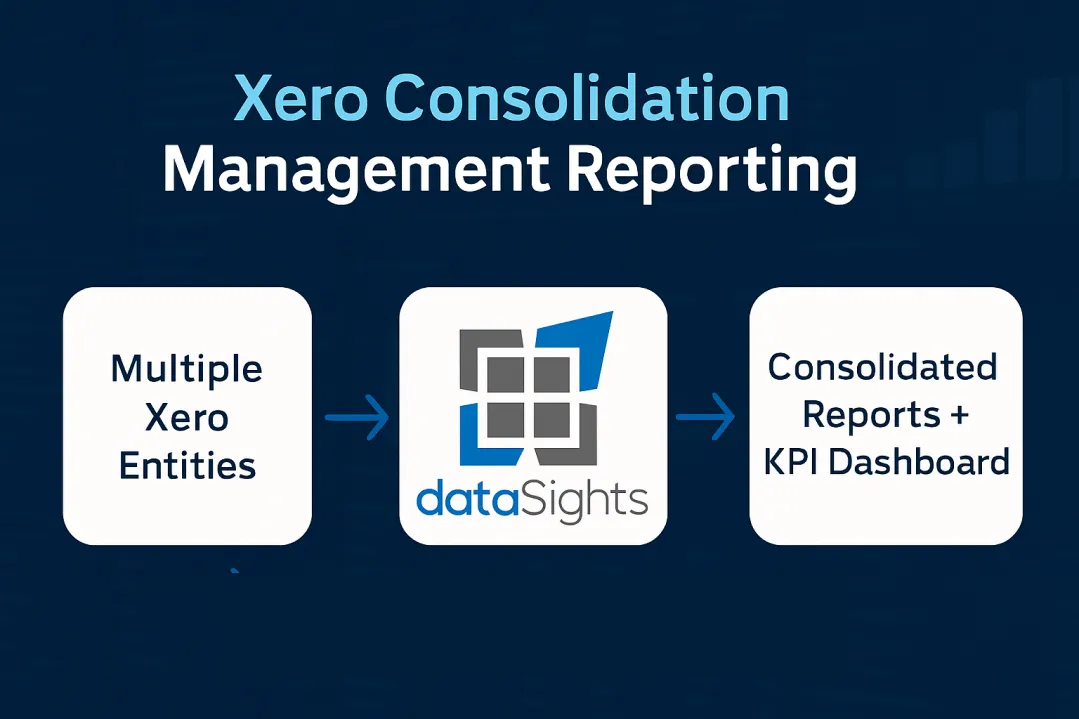
Xero consolidation management reporting combines financial data from multiple Xero entities into unified management reports, board packs, and KPI dashboards. Since Xero doesn’t offer native consolidation, you need third-party solutions or manual processes to create consolidated P&Ls, Balance Sheets, and management intelligence across your group. dataSights delivers pre-formatted management packs directly through our platform, with additional automation available in Excel and Power BI for teams preferring those tools. According to research from Mayday, consolidated financial statements enable companies to present a comprehensive view of their overall financial health – essential for multi-entity businesses like franchises and international enterprises.
Ready to Automate Your Financial Consolidation?
Stop wrestling with manual consolidations and broken formulas. dataSights automates multi-entity reporting, Xero consolidations, and Power BI connections. Join 300+ businesses already transforming their financial reporting with our platform, rated 5.0 out of 5 by 90+ verified Xero users.
Table of Contents
Why Xero Can’t Handle Consolidation Natively
Here’s the reality: Xero confirmed on their product ideas forum that consolidated reporting isn’t currently planned. Each Xero entity operates in isolation. You get beautiful single-entity reports, but no group view. No automatic eliminations. No consolidated Trial Balance. There are no management packs combining operational KPIs with financial metrics.
Your options? Manual Excel consolidation that takes days and risks errors, or automated consolidation that delivers management reports in minutes. dataSights’ platform pulls data from multiple Xero APIs into a cloud database where eliminations happen automatically, and consolidated management packs generate in seconds. For teams requiring Excel or Power BI workflows, we automate those too.
The Trial Balance Foundation for Accurate Consolidation
Every accurate consolidation starts with the Trial Balance – it’s the foundation that ensures your debits equal credits before any group reporting begins. Our analysis shows that Xero generates static Trial Balances per entity with no consolidation, no eliminations, and no drill-down capability.
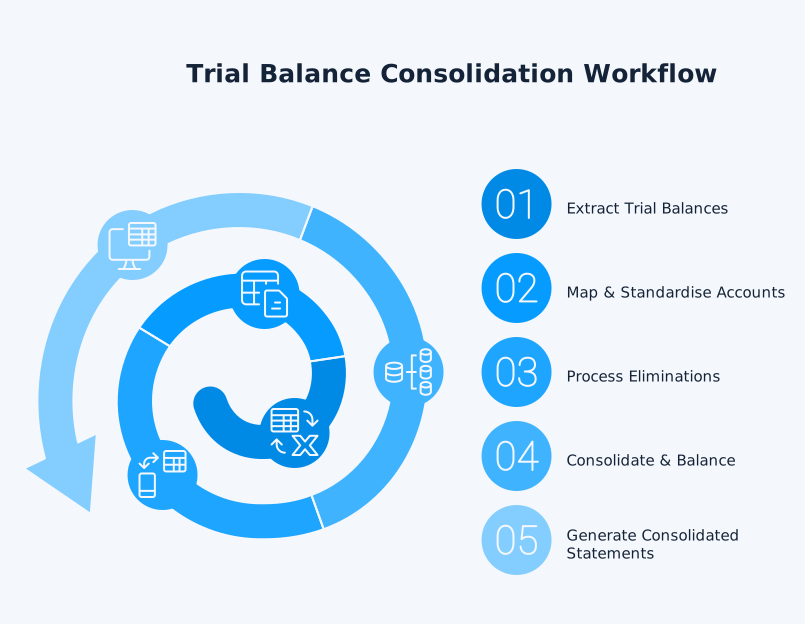
For multi-entity businesses, this creates a critical gap. Manual consolidation involves the following:
- Exporting each entity’s Trial Balance to Excel
- Mapping accounts
- Creating elimination journals
- Hoping everything ties together.
One mapping error and your consolidated balance sheet won’t balance.
dataSights delivers live, consolidated Trial Balances across small and large entities. Every elimination post automatically includes a full audit trail. You can drill down from group totals to individual entity transactions. Your Trial Balance becomes the control point for accurate consolidation, not another Excel headache.
Creating Management Packs and Board Reports
Management reporting goes beyond statutory financial statements. Your board needs consolidated financials plus operational KPIs, variance analysis, and forward-looking metrics – all in a digestible format. dataSights delivers pre-formatted management packs directly through our web platform, eliminating the need for manual report assembly every month.
The Components of Effective Management Packs
Management reports combine financial and operational metrics into board-ready narratives. A comprehensive management pack includes:
- Consolidated P&L with eliminations and year-on-year comparisons
- Balance Sheet reconciled across all entities
- Cash Flow statements showing group liquidity
- KPI dashboards tracking performance metrics
- Budget versus actual variance analysis
- Departmental performance by tracking categories
Moving From Static Reports to Dynamic Dashboards
Xero’s Report Packs bundle multiple reports for distribution. While you can save templates, packs still need regenerating each period and remain static PDFs.
- You select reports
- Set date ranges
- Generate a PDF
- Email manually.
Next month? Repeat the entire process.
dataSights transforms this into automated workflows. Our platform delivers pre-formatted management packs that refresh automatically with your latest Xero data. Board members access consolidated reports through our web interface with real-time updates. For teams preferring Excel, we automate data imports with scheduled refreshes. For advanced analytics, Power BI connects directly to your consolidated data with Import Mode or DirectQuery options. Your finance team saves hours of manual preparation while stakeholders get better insights.
Multi-Entity Consolidated Financial Statements
Creating consolidated financial statements from multiple Xero entities involves complex requirements that manual processes struggle to handle efficiently.
The Consolidation Process Requirements
Creating group consolidated financial statements typically requires the following:
- Account mapping across different charts of accounts
- Multi-currency conversion (average rates for P&L, closing rates for Balance Sheet, with cumulative translation adjustment to equity)
- Intercompany transaction eliminations
- Non-controlling interest calculations
- Goodwill and fair value adjustments
For example, if Entity A sells £50,000 of goods to Entity B within the group, both the sale and the corresponding purchase appear in individual entity accounts. Without elimination, consolidated revenue and expenses would be overstated by £50,000. Automated elimination rules catch these transactions and remove them from group totals.
Why eliminations matter: Intercompany eliminations are the hardest part of consolidation. Manual spreadsheets lack version control and documentation; automated rules provide system-level audit logs (who/what/when), repeatability, and guaranteed balanced consolidations.
Handling Different Entity Structures
Managing group financial statements across multiple entities requires addressing several complex tasks. Key requirements include:
- Robust handling of intercompany eliminations
- Foreign currency translation
- Chart-of-accounts mapping
Whether you’re consolidating subsidiaries, joint ventures, or internal divisions, each structure demands specific treatment to reflect its control or joint-control characteristics.
dataSights handles both small and large consolidation of entities with equal efficiency. The platform:
- Automatically maps accounts
- Processes eliminations based on your rules
- Generates consolidated statements that balance every time
Compliance note: While IFRS 10 and US GAAP ASC 810 differ in detail, both require groups to present consolidated financial statements. Automation helps enforce consistent policies and maintain audit evidence across entities. Apply uniform accounting policies and address different reporting dates (IFRS permits up to a three-month difference with adjustments). FX translation follows IAS 21.
Real-Time KPI Dashboards and Performance Monitoring
Static monthly reports tell you what happened. Real-time dashboards and management packs show you what’s happening now – enabling proactive management instead of reactive reporting. dataSights delivers KPI monitoring through pre-formatted management reports on our web platform, with additional dashboards available in Power BI for advanced visualisation.
Essential KPIs for Multi-Entity Monitoring
Our Power BI dashboard examples demonstrate how automated consolidation creates clear financial views across your entire organisation. Key metrics to track include:
- Gross margin by entity and consolidated group
- Days Sales Outstanding (DSO) trends
- Working capital movements
- Revenue per employee
- Return on assets by division
Building Automated KPI Reports and Dashboards
dataSights delivers essential KPIs through pre-formatted management reports on our web platform:
- Consolidated P&L with KPI metrics
- Balance Sheet with key ratios
- Cash Flow with working capital indicators
- AR/AP Summary with DSO tracking
- Budget vs Actual with variance analysis
Automating Excel for Custom Reporting and Month-End Tasks
For teams wanting to automate custom Excel reports or month-end tasks, dataSights automates consolidated Xero data directly into your spreadsheets through our OfficeAddIn and Power Query (Excel Data tab). This eliminates CSV exports and manual data manipulation entirely. With 75% of our customers automating Excel, we’ve built robust automation that lets you focus on using the data, not struggling to get it.
Once your consolidated Xero data refreshes in Excel, you can:
- Build custom management reports tailored to your business
- Automate month-end tasks and reconciliations
- Create custom cashflow forecasts with live data
- Post data to multiple Xeros from one Excel sheet with one click
The key difference: Excel becomes a powerful analysis tool fed by automated data pipelines, not a manual data entry battleground. Your team spends time analysing numbers, not copying and pasting them.
Advanced Visualisation with Power BI
For teams requiring advanced visualisation and drill-down capabilities, Power BI integration provides:
- Direct Query for real-time connections
- Import Mode with scheduled refreshes (8x daily on Pro, 48x on Premium)
- Drill-through from summary to transaction detail
- Cross-filtering between visuals
- Mobile-optimised views for on-the-go access
dataSights’ Xero connector automates the entire data pipeline for management reports, Excel workflows, and BI tools. Connect once, and your reports update automatically with consolidated data from all entities.
Automating Your Xero Consolidation Process
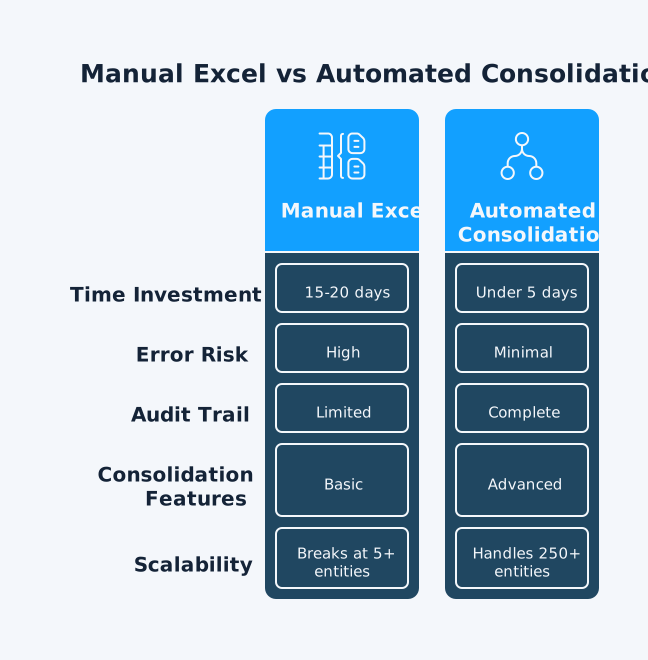
Manual consolidation isn’t just slow – it’s risky. No audit trails. No version control. No automatic validation. Automation transforms consolidation from a multi-day marathon into a streamlined process.
From Manual Excel to Automated Workflows
Manually consolidating multiple entities involves downloading data from each Xero file, uploading to Excel, and reconciling fields – a laborious process prone to human error.
Automated consolidation changes everything:
- Data syncs automatically from Xero APIs
- Eliminations process based on predefined rules
- Reports generate with one click
- Audit trails document every adjustment
- Validation checks ensure everything balances
The Technical Architecture Behind Automation
According to dataSights’ approach, the automation flow works like this: Xero APIs → dataSights Cloud Database → Management Reports (Web Platform) + Excel + Power BI.
- No manual file handling
- No CSV exports
- Just continuous data sync with automatic processing.
The platform handles:
- Multiple Xero API connections simultaneously
- Automatic currency conversions
- Elimination rule processing
- Balance sheet reconciliation
- Management report generation and distribution
- Excel automation and Power BI integration
Choosing Your Xero Consolidation Solution
The market offers various consolidation apps, each with different strengths. Your choice depends on entity count, reporting needs, and technical requirements.
Key Evaluation Criteria
When selecting a consolidation solution, consider:
- Entity limits: Some apps cap at 10 entities in certain tiers, others handle unlimited. dataSights efficiently manages both small and large consolidations of entities.
- Elimination capabilities: All major apps support eliminations, but implementation varies. Ensure the solution handles your specific intercompany structures.
- Reporting flexibility: Pre-built reports get you started, but can you customise them? Can you build new reports? Do they integrate with your existing BI tools?
- Currency handling: Multi-currency consolidation requires automated currency services or manual rate maintenance. Check how each solution manages FX conversions.
Integration Requirements
Your consolidation solution needs to play nicely with your existing tech stack. dataSights provides:
- Pre-formatted Management Reports through our web platform
- Excel automation for spreadsheet-based workflows
- Power BI integration for advanced analytics
- SQL databases for custom reporting
Our focus is delivering consolidated management packs directly, with Excel and Power BI automation for teams preferring those tools.
Frequently Asked Questions
Can Xero Do Consolidation Reporting Natively?
No, Xero doesn’t provide group consolidation across organisations. You need third-party apps or manual processes to consolidate multiple Xero entities.
How Long Does It Take to Consolidate Multiple Xero Entities?
For many groups, manual Excel consolidation often takes 15+ days for month-end close. dataSights typically reduces this to under 5 days through automation, with actual consolidation running in minutes once data syncs.
Do I Need Separate Xero Subscriptions for Each Entity?
Yes, each legal entity requires its own Xero organisation and subscription. Consolidation apps then combine data from these separate subscriptions.
How Are Intercompany Eliminations Handled?
Automated consolidation tools process eliminations based on your configured rules. dataSights handles this automatically with full audit trails, ensuring balanced consolidations every time.
What's Included in Management Reporting Packs?
dataSights delivers pre-formatted management reports directly through our web platform, including consolidated P&L, Balance Sheet, Trial Balance, Cash Flow, AR/AP Summary and Detailed, Budget and Budget Variance, and KPI metrics. For teams wanting to automate custom Excel reports or month-end tasks, a refresh of consolidated Xero data into Excel using the dataSights OfficeAddIn and Power Query enables teams to focus on using the data, never exporting CSVs or manipulating data to get it ready to use. For teams requiring advanced visualisation and drill-down capabilities, Power BI integration provides real-time connections and interactive dashboards.
Can I Connect Power BI to Consolidated Xero Data?
Yes, dataSights automates Power BI connections to your consolidated Xero data for teams requiring advanced visualisation. The connector supports DirectQuery for real-time connections and Import Mode with scheduled refreshes, enabling drill-down from summary to transaction detail across all entities.
How Much Do Xero Consolidation Apps Cost?
Pricing varies by entity count and feature set. Review vendors’ public pricing pages and Xero App Store listings to estimate total cost.
What Happens to Tracking Categories During Consolidation?
Tracking categories can be preserved during consolidation, allowing departmental or project analysis across entities. dataSights includes tracking categories in all consolidated views where applicable.
How Do Currency Conversions Work in Consolidation?
Multi-currency consolidation involves converting subsidiary accounts to the parent’s reporting currency – typically average rates for P&L items, closing rates for Balance Sheet items, with cumulative translation adjustments flowing to equity. Automated tools handle this with configurable rate sources and methods.
Is There an Audit Trail for Consolidation Adjustments?
Yes, automated consolidation provides complete audit trails. dataSights documents every elimination with timestamps, user identification, and rationale – essential for compliance and review.
Stop Fighting Spreadsheets, Start Delivering Insights
Manual Xero consolidation keeps your finance team trapped in Excel instead of analysing performance. Board meetings become exercises in explaining why reports aren’t ready rather than discussing strategic opportunities. Every month-end extends into weeks of reconciliation nightmares. The path forward is clear: automate your consolidation, integrate your reporting, and transform your finance function from data processor to strategic partner.
Transform Your Xero Consolidation Today
Ready to cut your month-end close from weeks to days? dataSights’ Xero consolidation solution automates multi-entity reporting with full eliminations and board-ready management packs. Rated 5.0 by 90+ Xero users, our platform handles both small and large entity consolidations efficiently. Join 300+ businesses already transforming their financial reporting.
About the Author
Kevin Wiegand
Founder & Client happiness
I’m Kevin Wiegand, and with over 25 years of experience in software development and financial data automation, I’ve honed my skills and knowledge in building enterprise-grade solutions for complex consolidation and reporting challenges. My journey includes developing custom solutions for data teams at Gazprom Marketing & Trading and E.ON, before founding dataSights in 2016. Today, dataSights helps over 300 businesses achieve 100% report automation. I’m passionate about sharing my expertise to help CFOs and Financial Controllers reduce their month-end close time and eliminate the manual Excel exports that drain their teams’ valuable time.