What GST Reconciliation Involves
At its core, GST reconciliation is a comparison exercise. You compare two sets of records to check that they agree. On one side, you have the GST amounts calculated from your invoices, bills, and journals in your accounting system. On the other side, you have the GST amounts reported to the ATO through your BAS lodgements.
The goal is to identify and resolve discrepancies before they become material. Common causes of GST variances include incorrect tax codes on transactions, timing differences between accrual and cash-basis reporting, missing or duplicate invoices, manual journal entries that affect GST accounts, and transactions posted to the wrong BAS period.
For Australian businesses, GST applies at a flat 10% rate on most goods and services. Getting the reconciliation right means you claim the correct input tax credits and report the correct GST liability. If you overclaim, the ATO may issue penalties. If you underclaim, you leave money on the table.
How to Reconcile GST Step by Step
A structured approach to GST reconciliation saves time and reduces the chance of errors compounding across BAS periods. Follow these steps each BAS period, whether you report monthly or quarterly.
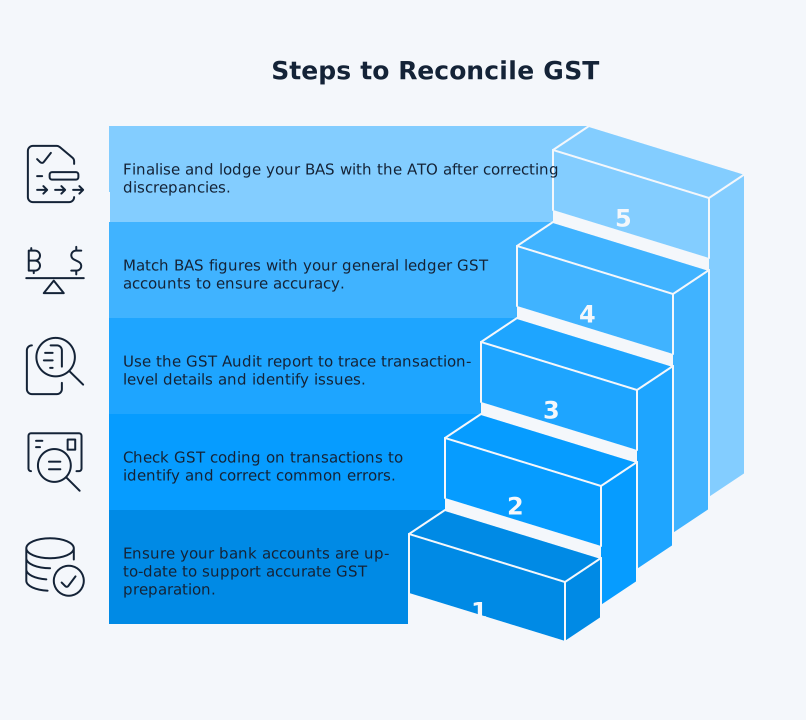
Step 1: Complete Your Bank Reconciliation
Before reviewing GST, reconcile your bank accounts so your bookkeeping is current and missing items surface early. Xero’s BAS preparation guidance recommends daily bank reconciliation as a foundation for accurate reporting, but BAS inclusion is driven by transaction coding and tax treatment, not simply by whether a bank line has been reconciled.
Step 2: Review GST Codes on Transactions
Check GST coding on each transaction. Common GST issues to be aware of include:
- Treating GST-free sales as taxable
- Claiming GST credits on purchases that relate to making input-taxed sales, such as residential rental income or financial supplies
- Lacking a valid tax invoice for purchases over A$82.50 (including GST) when claiming a GST credit
Step 3: Run the GST Audit Report
If you use Xero, run the GST Audit report alongside the GST Reconciliation report. The GST Audit report shows the transaction-level detail behind the Activity Statement, which makes coding, period, and adjustment issues easier to trace.
Step 4: Compare BAS Figures to Your General Ledger
Match the total GST on sales (field 1A on your BAS) and GST on purchases (field 1B) against your general ledger GST accounts. The GST control account on your balance sheet should reflect the net GST position for the period. If there is a variance, trace it back through the audit report to identify the source.
Step 5: Adjust and Lodge
Once you have identified and corrected any discrepancies, finalise your BAS and lodge it with the ATO. For quarterly lodgers, BAS due dates are generally 28 October, 28 February, 28 April, and 28 July, although tax-agent lodgement dates can differ.
GST Reconciliation in Xero
Xero includes a dedicated GST Reconciliation report that automates much of the comparison work. You can access it under Reports in the Accounting menu. The report breaks down GST by BAS period, showing collected GST, paid GST, and the balance on your GST control account. It also flags periods where the BAS has not yet been finalised.
Using the GST Reconciliation Report
The Xero GST Reconciliation report compares three figures for each BAS period:
- The GST calculated from transactions
- The GST reported on your published Activity Statement
- The opening and closing balance of your GST control account
When all three align, your reconciliation is complete. When they do not, Xero highlights the variance so you can investigate.
To complete the comparison in Xero, finalise each Activity Statement in the newer report or publish each BAS in the older report. In the older report, Xero uses the published amounts as the filed figures. In the newer Activity Statement, Xero may not automatically populate the Filed column, so you may need to manually enter your final BAS amounts from fields 1A and 1B before the GST Reconciliation report reflects the correct filed position.
Common Xero GST Reconciliation Issues
Several issues cause GST reconciliation variances in Xero. Manual journals posted to the GST account (often by your accountant at year-end) will create differences between the transaction-based GST and the ledger balance. Changes to GST codes after an Activity Statement has been published will also cause variances in subsequent periods. If you switched between cash and accrual GST reporting, your opening balances may not match.
After you finalise a BAS period and record the related ATO payment or refund, your GST control account balance for that period should reconcile. If it does not, common causes include:
- Conversion balances carried over when you migrated to Xero
- GST-coded manual journals (often posted by your accountant at year-end)
- Unfinalised Activity Statements from prior periods
Xero’s troubleshooting guide for GST discrepancies covers these scenarios in detail.
BAS Reconciliation: Your Pre-Lodgement Checklist
BAS reconciliation goes beyond GST. Your Business Activity Statement may also include PAYG withholding (W1 and W2 fields), PAYG instalments, and fuel tax credits. A complete BAS reconciliation confirms that all these figures are correct before you lodge.
Use this checklist before each BAS lodgement:
- Reconcile all bank accounts and credit cards for the BAS period
- Verify GST codes on all transactions, paying attention to GST-free and input-taxed items
- Run the GST Audit Report and review for coding errors
- Cross-check payroll figures (W1 gross wages, W2 tax withheld) against your Payroll Activity Summary for the BAS period, and verify annual totals against the Payroll Employee Summary at year-end
- Confirm PAYG instalment amounts if applicable
- Review aged payables and receivables for duplicate or missing invoices
- Compare Activity Statement figures to the GST Reconciliation report
- Finalise the Activity Statement, or publish the older BAS, and lock the BAS period to prevent changes
Missing even one of these steps creates risk. Late BAS lodgement can trigger failure-to-lodge penalties, so link directly to the ATO’s current penalty page rather than freezing the article to a single dollar amount. If you owe GST and pay late, the ATO’s General Interest Charge applies and is worked out daily on a compounding basis.
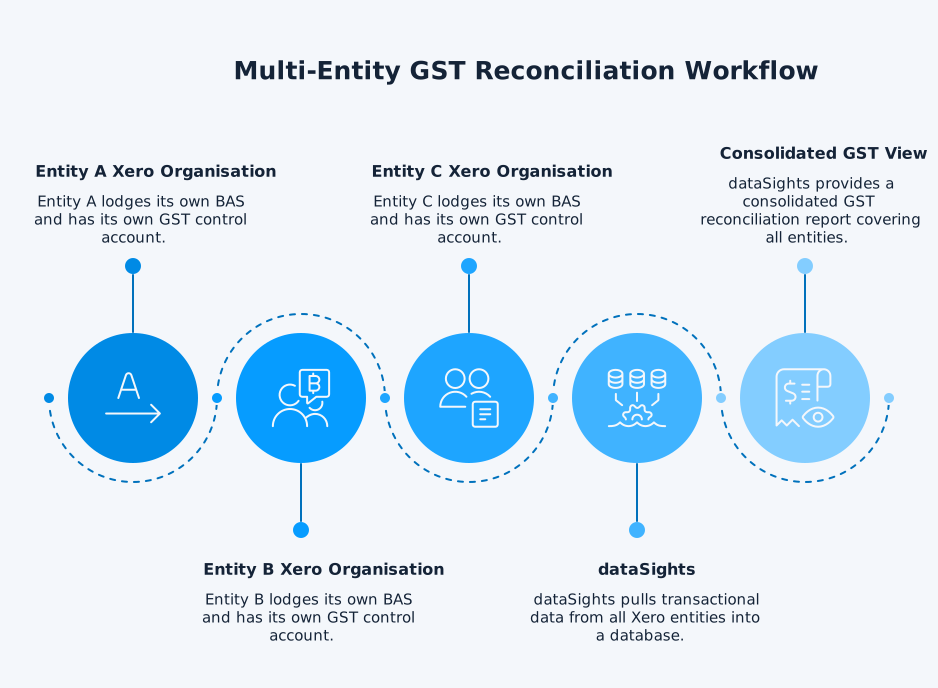
For single-entity businesses, this checklist is manageable within a few hours each quarter if your bookkeeping is current. For multi-entity groups running the same process across five, ten, or more Xero organisations, the time compounds. dataSights pulls transactional data from all your Xero entities into a dedicated Azure SQL database, so you can build BAS-period reconciliation checks in Excel or Power BI that cover every entity in one pass rather than repeating the checklist for each organisation individually.
GST Reconciliation for Multi-Entity Groups
If your business operates through multiple legal entities, each one with its own Xero organisation, GST reconciliation becomes more complex. Where entities have not formed an ATO GST group, each one:
- Lodges its own BAS independently
- Maintains its own GST control account
- May report on a different basis (cash or accrual) or frequency (monthly or quarterly)
If the entities are part of a GST group, the representative member completes activity statements and accounts for GST on behalf of all group members, and intra-group transactions are excluded from GST. In either structure, you still need visibility across all entities to confirm that intercompany balances are consistent and GST positions reconcile at the group level.
For group structures, Xero’s multi-entity accounting guide recommends reconciling each entity’s accounts individually and then reviewing the group position. The challenge is that Xero does not provide a single consolidated view across organisations. You need to log into each entity separately, run the GST Reconciliation report for each one, and manually aggregate the results.
Intercompany Transactions and GST
How GST applies to intercompany transactions depends on your group structure.
Within an ATO GST Group
If your entities are members of an ATO GST group, intra-group transactions are ignored for GST purposes and neither party accounts for GST on those supplies. The reconciliation focus shifts to confirming that transactions between group members are correctly excluded from the representative member’s activity statement.
Outside a GST Group
Where entities are not part of a GST group, intercompany transactions that are taxable supplies attract GST like any external sale. The selling entity charges GST and reports it on their BAS. The purchasing entity claims the input tax credit on theirs. Where the purchasing entity can fully claim the credit, the GST effect washes out at group level over time. In practice, mismatches still occur due to:
- Timing differences where one entity records the transaction in a different BAS period to the other
- GST coding errors on one side of the transaction
- Restricted input tax credits where the purchasing entity makes input-taxed sales
For example, Entity A sells goods to Entity B for A$11,000 including GST in March. If Entity A reports the sale in its March BAS but Entity B does not record the bill until April, one entity reports GST payable before the other claims the input tax credit. The group economics may wash out over time, but the period reconciliation will not.
Getting Visibility Across Entities
Intercompany GST mismatches are one of the most common sources of reconciliation errors in multi-entity groups. A platform like dataSights’ Xero consolidation solution pulls transactional data from all your Xero entities into a single dedicated Azure SQL database, giving you visibility over intercompany balances and GST positions across the group without logging into each entity individually.
Automating Group GST Visibility
Manually reconciling GST across five, ten, or forty entities each quarter is not practical. The time required multiplies with each additional entity, and the risk of human error grows. With dataSights, group GST visibility starts in pre-formatted management reports on the web platform. Finance teams that prefer spreadsheets can then automate GST analysis in Excel, and teams needing deeper drill-down can connect Power BI to the same consolidated dataset.
You can build GST reconciliation reports that:
- Pull BAS-period data from every entity in your group.
- Flag intercompany GST mismatches.
- Highlight variances from the general ledger.
For many groups, this reduces a multi-day quarterly review to a much shorter exception-based process. Exact time savings depend on entity count, data quality, and how consistently GST coding is maintained.
GST Annual Reconciliation
While best practice suggests reconciling GST every BAS period, the annual reconciliation at the end of the financial year is where you catch any errors that have slipped through. This involves comparing the total GST reported across all four quarterly (or twelve monthly) BAS lodgements against your annual financial statements.
What the ATO Expects
The ATO’s GST governance expectations for large businesses include completing a GST Analytical Tool (GAT) reconciliation to understand variances between audited financials and BAS-reported figures. The GST Analytical Tool is an ATO reconciliation framework used in large-business assurance contexts, not a blanket requirement for every GST-registered business. For most businesses, treat annual GST reconciliation as a governance check that compares year-to-date BAS outcomes to the year-end accounts and investigates material differences.
What to Focus On
During the annual reconciliation, look for:
- Timing differences that have accumulated across BAS periods over the year
- GST on capital items that may have been miscoded at the time of purchase
- Year-end adjusting journals posted by your accountant that affect the GST account
- Transactions posted to the wrong financial year, shifting GST between periods
Connecting GST Reconciliation to Your Close
GST reconciliation is one part of the broader month-end close process. If your close still takes weeks because each entity’s GST, payroll, and intercompany positions are reconciled manually, the annual reconciliation becomes a year-end bottleneck. Bringing GST data from all entities into a single reporting environment earlier in the process removes the scramble when the auditor asks for your annual GST position.
Penalties for Getting GST Wrong
The financial consequences of incorrect GST reporting are real. The ATO applies a base failure-to-lodge penalty of one penalty unit for every 28-day period (or part thereof) that a BAS is overdue, up to a maximum of five penalty units. With the penalty unit value at $330 from November 2024, the base penalty can reach $1,650 per late BAS for small entities, even if the BAS would have resulted in a refund. Medium and large entities face multiplied penalty amounts, so the actual penalty can be significantly higher depending on entity size.
Beyond lodgement penalties, errors in GST reporting can trigger shortfall penalties based on the amount of tax avoided. These range from 25% to 75% of the shortfall, depending on whether the ATO considers the error a failure to take reasonable care, a reckless statement, or an intentional disregard of the law. Voluntary disclosure before ATO contact can reduce penalties by up to 80%.
The ATO’s GST Administration Performance Report shows net GST cash collections reached $90.2 billion in 2024-25, with $3.9 billion raised through compliance activities in that year. With the net GST gap at 9.4% of theoretical GST in 2023-24, the ATO’s focus on accurate reporting is not easing.