
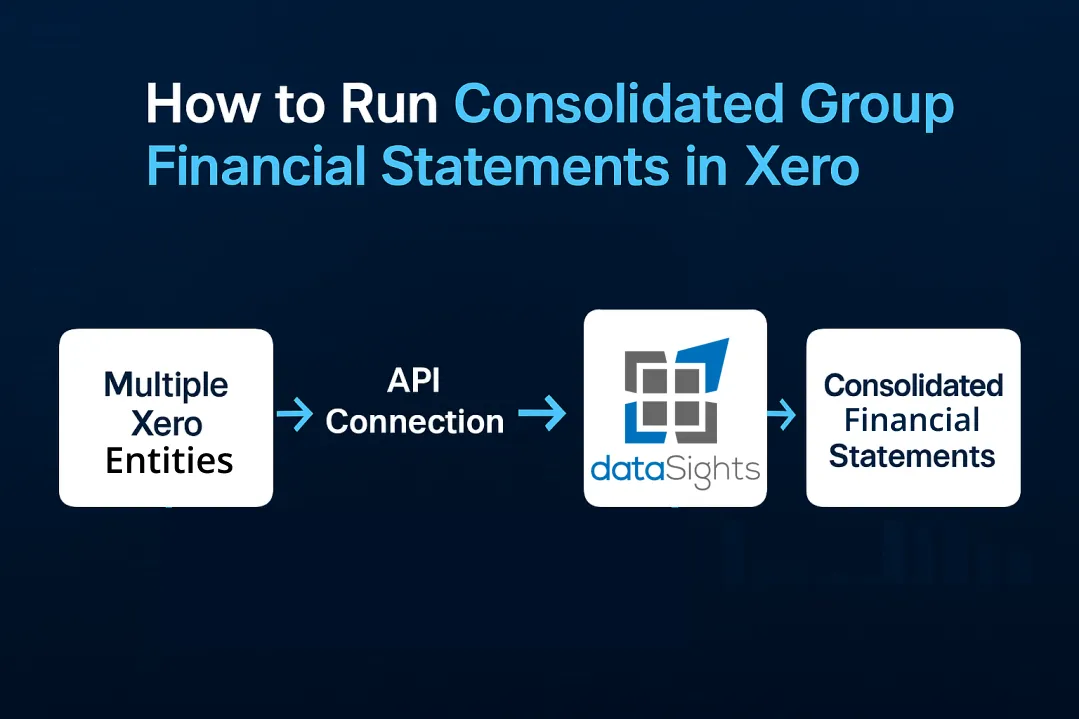
If you’re searching for how to run consolidated group financial statements in Xero, there are two routes: a controlled Excel workflow or an automated approach via the Xero API. Excel can work for simple groups, but it quickly breaks down for multi-entity organisations, multiple currencies, or heavy intercompany activity. For those scenarios, the dataSights consolidation app is the better choice – it automates Trial Balance ingestion, standardises mapping to a group chart, handles eliminations, and applies consistent FX policy. You’ll retain drill-down and an audit-ready trail while producing accurate, comparable consolidated statements in far less time.
A Guide on How To Run Consolidated Group Financial Statements in Xero
How to run consolidated group financial statements in Xero: because Xero reports are per organisation and has no native consolidation, you must either export each entity’s data to Excel for manual consolidation or connect a consolidation platform via the Xero API. As of July 2025, Xero’s Product Ideas thread indicates built-in consolidated reporting isn’t planned, despite requests dating back to 2012.
Ready to Automate Your Financial Consolidation?
Stop wrestling with manual consolidations and broken formulas. dataSights automates multi-entity reporting, Xero consolidations, and Power BI connections. Join 300+ businesses already transforming their financial reporting with our platform, rated 5.0 out of 5 by 90+ verified Xero users.
Table of Contents
Why Xero Doesn’t Offer Native Consolidation
Xero is designed to manage single-entity financials. Each legal entity requires its own Xero organisation and subscription. You cannot directly generate consolidated Profit & Loss, Balance Sheet, or Cash Flow reports across subsidiaries within Xero itself.
The platform takes a modular approach instead. Rather than building consolidation into the core product, Xero provides API integration points for specialist consolidation software. This lets finance teams choose tools that match their specific requirements – from simple two-entity consolidations to complex multi-currency eliminations.
Your options are clear: manual Excel consolidation or automated third-party tools. Let’s examine both approaches.
Manual Consolidation Process: The Excel Method
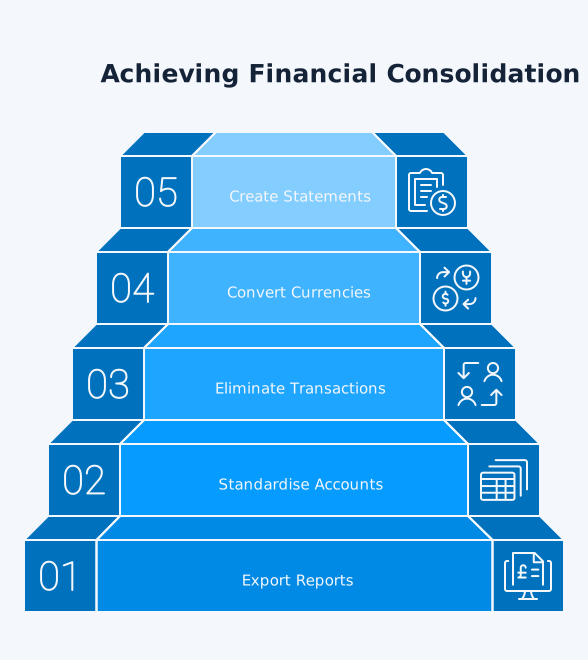
Here’s a step-by-step way to consolidate without extra software. We’ll walk through exporting the right reports, aligning policies, posting top-side journals, and managing the risks that often creep into spreadsheets.
Step 1: Export Reports from Each Entity
Navigate to Accounting > Reports in each Xero organisation. Export these essential reports:
- Trial Balance (the foundation document)
- Profit & Loss Statement
- Balance Sheet
- Cash Flow Statement
Export Trial Balances or connect Xero to Power Query to automate refreshes. You’ll repeat this process for every entity in your group.
Step 2: Standardise Your Chart of Accounts
Create a master spreadsheet with tabs for each report type. Copy data from each entity into the corresponding tabs, labelling rows clearly to identify each entity’s sections.
Mapping different account structures is essential before combining data. Entity A might call it “Revenue” while Entity B uses “Sales Income” – both need mapping to your group’s standard “Group Sales” account.
Step 3: Eliminate Intercompany Transactions
This step prevents double-counting when entities trade with each other. You must eliminate:
- Intercompany sales and purchases
- Intercompany loans and interest
- Intercompany dividends
- Management fees between entities
Create elimination journal entries that reverse these transactions at the consolidated level.
Step 4: Handle Multi-Currency Conversion
For foreign subsidiaries, apply exchange rates consistently. Under IAS 21 guidelines:
- Average rates for P&L items
- Closing rates for Balance Sheet items
- Historical rates for equity transactions
Step 5: Create Consolidated Statements
Sum the adjusted figures from all entities after eliminations. Your consolidated balance sheet must balance – if it doesn’t, review your elimination entries and currency conversions.
Manual Process Reality Check
This manual process typically takes:
- 2-3 hours for basic two-entity consolidations
- Full days for groups with 5+ entities
- Multiple days when handling multi-currency and complex eliminations
Automated Consolidation Through Third-Party Tools
If your group has multiple entities, currencies, or recurring eliminations, automation removes manual rework and preserves an audit trail. This section shows how connecting Xero via API streamlines data ingestion, mapping, eliminations, and reporting.
How Consolidation Software Works
Consolidation apps pull data directly through Xero’s API, automating calculations and journal preparations. They connect to all your Xero files simultaneously, automatically syncing Trial Balance data and other reports.
These platforms provide:
- Automatic data synchronisation from multiple Xero organisations
- Pre-configured elimination rules
- Multi-currency conversion at correct rates
- Audit trails for all consolidation adjustments
- Real-time consolidated reporting
Key Features of Consolidation Platforms
Effective consolidation tools offer:
- Common Chart of Accounts (CCOA): Map varying account names across entities to standardised group categories. Your UK entity’s “Turnover” automatically maps to “Group Revenue” alongside your Singapore entity’s “Sales”.
- Automated Eliminations: Set rules once for recurring intercompany transactions. The system automatically reverses these entries during consolidation.
- Multi-Currency Support: Apply consistent exchange rates across the group with automatic currency translation adjustments posted to equity.
- Drill-Down Capability: Click through consolidated figures to see underlying entity-level transactions.
Implementation Timeline
Most consolidation tools follow this setup process:
- Connect Xero Organisations (15 minutes): Authorise API access for each entity
- Map Accounts (1-2 hours): Match entity accounts to group chart
- Configure Eliminations (30 minutes): Set intercompany rules
- Generate First Report (instant): Consolidated statements ready
For a simple group, these tasks can often be completed in hours. However, actual time will depend on the number of entities, data alignment, and the complexity of consolidations. MayDay reports that users can achieve their first consolidated P&L in under 30 minutes.
IFRS 10 Compliance Requirements
Regardless of the tool you use, consolidation must follow IFRS 10. Here we summarise control assessment, uniform accounting policies, reporting-date alignment, and the core elimination principles you’re expected to apply.
Control as the Consolidation Trigger
IFRS 10 requires consolidation when you control an investee – not just when owning over 50%. Control exists when you have:
- Power over relevant activities
- Exposure to variable returns
- Ability to use power to affect returns
Uniform Accounting Policies
The standard mandates the use of uniform accounting policies across all group entities. Before consolidation, adjust subsidiary accounts to align with parent policies. This might mean changing depreciation methods or inventory valuation approaches.
Reporting Date Alignment
IFRS permits a maximum three-month reporting date difference between parent and subsidiaries. Adjust for significant transactions occurring in the gap period.
Managing Intercompany Eliminations
Intragroup transactions can distort group results if they aren’t eliminated correctly. This section covers the common elimination types, example journals, and how to document evidence so auditors can trace each adjustment.
Types of Eliminations Required
According to AccountingTools, three elimination categories exist:
- Intercompany Debt: Remove loans between entities, including related interest income and expenses. A parent company loan to a subsidiary appears as both an asset (parent) and liability (subsidiary) that must net to zero.
- Intercompany Revenue and Expenses: Eliminate all internal sales. If Entity A sells £100,000 of services to Entity B, remove both the revenue and cost of sales.
- Intercompany Stock Holdings: Eliminate parent’s investment in subsidiaries against subsidiary equity, with goodwill calculated per IFRS 3.
Under IFRS 3, goodwill = purchase consideration – fair value of identifiable net assets.
Note for Xero Users: Xero does not calculate goodwill; post adjustments in your consolidation layer.
Journal Entry Examples
Here are some typical journal entries for some elimination examples:
To eliminate intercompany sale:
- Dr Sales Revenue £50,000
- Cr Cost of Goods Sold £50,000
To eliminate intercompany loan:
- Dr Intercompany Payable £20,000
- Cr Intercompany Receivable £20,000
Elimination Audit Trails
Here’s how to structure audit trails:
- Timestamp of each adjustment
- User identification
- Business rationale
- Supporting documentation
- Version control for changes
These controls align with audit documentation expectations.
Multi-Currency Consolidation Challenges
Foreign currency adds translation, remeasurement, and disclosure complexities to every close. We outline the rate choices, where translation differences go, and practical controls to keep your FX policy consistent across entities.
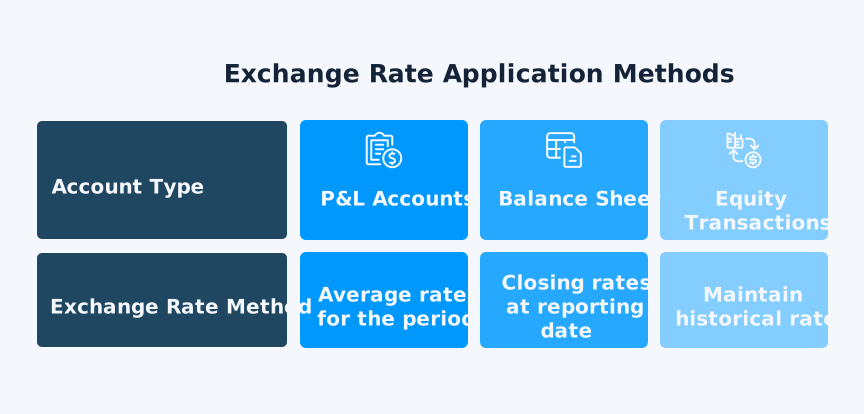
Exchange Rate Application
Foreign currency translation essentials for consolidation (closing, average, historical, CTA) include:
- P&L Accounts: Use average rates for the period. Q1 revenue at average Q1 rates, not month-end rates.
- Balance Sheet: Apply closing rates at reporting date. All assets and liabilities convert at period-end spot rates.
- Equity Transactions: Maintain historical rates. Share capital stays at original transaction rates.
Currency Translation Adjustments
Translation differences post to equity as Currency Translation Adjustments (CTA). These arise from:
- Different rates for different account types
- Rate changes between periods
- Timing differences in intercompany transactions
Xero’s rates can differ from your consolidation layer. Review the rate Xero has stored for the period and edit rates when your policy requires it.
Managing Exchange Rate Volatility
We recommend:
- Locking rates for significant transactions
- Using consistent rate sources across the group
- Documenting rate application policies
- Considering hedging for material exposures
Choosing the Right Consolidation Solution
The best fit depends on your entity count, currencies, chart-of-accounts differences, and reporting cadence. Use this buyer’s checklist to compare capabilities against your requirements.
For Small Groups (2-5 entities)
Simple consolidation needs work with basic tools:
- Power Query or a direct connector for automated Xero data imports
- Excel with manual processes if monthly volume is low
- Entry-level consolidation apps with essential features
For Growing Businesses (5-20 entities)
Mid-scale requirements need:
- Automated daily synchronisation
- Elimination rule engines
- Multi-currency support
- Basic audit trails
For Complex Groups (20+ entities)
Enterprise features become essential:
- Advanced elimination matrices
- Minority interest calculations
- Goodwill tracking
- Comprehensive audit documentation
- dataSights consolidates data from 72 Xero entities within 3 seconds
Cost Considerations
Consolidation app costs vary based on:
- Number of entities
- User seats required
- Feature complexity
- Support levels
Pricing varies by entity count, users, features, and support. Request a quote from your chosen provider.
Best Practices for Xero Consolidation
These field-tested practices help standardise inputs, reduce manual fixes, and keep your outputs audit-ready. Apply them to shorten month-end while improving accuracy and comparability period-to-period.
- Standardise Reporting Dates and Policies Across the Group: Use uniform accounting policies and align reporting dates (a difference of up to three months is only acceptable with appropriate adjustments).
- Map Subsidiary Ledgers to a Group Chart of Accounts: Create a clear mapping from each entity’s chart to a group CCoA and keep presentation consistent period-to-period (supports comparability and consistent presentation).
- Base Consolidation on Final Trial Balances and Lock Periods: Consolidate from each entity’s closed Trial Balance and document the data lineage, who prepared and reviewed each step, and when, so the audit trail stands up to scrutiny.
- Eliminate Intragroup Balances, Transactions, and Unrealised Results: Remove intragroup receivables/payables, revenue/expense, and unrealised gains or losses (e.g., inventory and PPE) in full; apply uniform policies before consolidation.
- Apply IAS 21 for Foreign Currency Translation: Define functional currencies; translate assets and liabilities at the closing rate; translate profit or loss items at rates that approximate the date of the transactions (often averages); use historical rates for equity components; recognise translation differences in OCI.
- Account for Goodwill and NCI per IFRS 3/IFRS 10: Measure goodwill at acquisition (consideration transferred less fair value of identifiable net assets) and present non-controlling interests in equity; attribute profit or loss and OCI to owners and NCI after eliminations.
- Control the FX Rates Used in Xero: Understand how Xero applies rates in reports and comparisons, and edit rates at the transaction or date-range level when policy requires. Document any manual rate overrides.
- Confirm the Complete Set of Consolidated Statements: Produce (and keep internally consistent) the statement of profit or loss and other comprehensive income, balance sheet, statement of changes in equity, cash flow statement, and notes.
- Maintain Evidence for All Top-Side Adjustments and Eliminations: Record purpose, source data, calculations, reviewer sign-offs, and timestamps for each journal; this aligns with audit documentation expectations.
- Document Group Policies and Review Them Annually: Keep written consolidation, FX, and elimination policies with clear thresholds and materiality guidelines and ensure disclosures of significant accounting policies are complete.
- Reconcile Intercompany Balances Monthly: Perform entity-to-entity reconciliations before consolidation and investigate mismatches so eliminations don’t mask unresolved posting errors. (Supports IFRS 10’s requirement to eliminate intragroup items.)
- Use Xero’s Multicurrency Features Appropriately: Check eligibility and setup (currencies, bank accounts, and rates) so source ledgers reflect the intended policy before you export or connect to a consolidation layer.
- Regular Reconciliation Cycles: Don’t wait for month-end. Weekly or daily consolidation cycles surface issues early when context is fresh.
Handling Non-Controlling Interests (NCI)
- At acquisition (IFRS 3): Choose an NCI measurement basis (fair value or proportionate share of the acquiree’s identifiable net assets). Calculate goodwill accordingly and disclose the basis chosen.
- Presentation (IFRS 10/IAS 1): Present NCI within equity, separate from the parent’s equity.
- Attribution each period (IFRS 10): Attribute profit or loss and OCI to owners of the parent and to NCI after eliminations – even if this creates a deficit balance for NCI.
- Post-acquisition changes without loss of control (IFRS 10): Treat parent-ownership changes as equity transactions – no gain/loss in P&L; adjust parent equity and NCI for the difference between consideration and the carrying amount of NCI.
- Dividends to NCI: Debit NCI for dividends declared/paid to the non-controlling shareholders (they do not affect consolidated P&L).
- Loss of control (IFRS 10): Derecognise the subsidiary’s assets/liabilities and NCI; recognise any retained interest at fair value with gain/loss in P&L; reclassify related OCI as required.
- Practical setup in Xero-based consolidations: Maintain separate “NCI – Equity” and “NCI – Profit Allocation” lines in your consolidation layer; Xero won’t calculate NCI automatically, so post NCI allocations and ownership-change entries as top-side journals in the consolidation tool.
Frequently Asked Questions
Can You Consolidate Financial Statements Directly in Xero?
No, Xero has no native consolidation features. You must export data to Excel or use third-party consolidation software that connects via API.
How Long Does Manual Xero Consolidation Take?
Basic two-entity consolidation takes 2-3 hours. Groups with 5+ entities typically need full days, especially with multi-currency and eliminations. Keep in mind that actual time will depend on the number of entities, data alignment, and complexity of consolidations.
What’s the Easiest Way to Consolidate Multiple Xero Files?
Connect consolidation software through Xero’s API for automated synchronisation. With automation, teams typically produce an initial consolidated report shortly after setup.
Do I Need the Same Chart of Accounts Across All Entities?
Not necessarily. Consolidation tools map different account names to standard group categories. However, standardised accounts simplify the process significantly.
How Do You Handle Foreign Currency in Xero Consolidation?
Apply average rates to P&L items and closing rates to Balance Sheet accounts. Post translation differences to equity as Currency Translation Adjustments.
What Are the Minimum Requirements for IFRS 10 Compliance?
Use uniform accounting policies, eliminate all intercompany transactions in full, and ensure reporting dates don’t exceed a three-month difference.
Can Excel Handle Complex Xero Consolidations?
Excel works for simple consolidations but becomes error-prone with multiple entities, currencies, and eliminations. Manual Excel consolidation lacks audit trails required for compliance.
Which Reports Do I Need to Export from Xero?
Export Trial Balance (essential), Profit & Loss, Balance Sheet, and Cash Flow statements from each entity. Trial Balance forms the foundation for accurate consolidation.
How Do Elimination Entries Work in Consolidation?
Create journal entries that reverse intercompany transactions. These remove internal trading, loans, and dividends to show only external activity.
What Happens to Goodwill in Consolidated Statements?
Calculate goodwill as purchase price minus fair value of net assets acquired. This posts during consolidation, not in individual entity accounts.
Transform Your Consolidation Process Today
Manual consolidation in Excel wastes weeks of your team’s time and risks critical errors that surface during audits. You’re exporting Trial Balances, matching accounts, calculating eliminations – and still discovering your consolidated balance sheet doesn’t balance. There’s a better way to handle your Xero consolidation requirements.
Automate Your Xero Group Reporting Now
Stop spending 15+ days on month-end consolidation when you could complete it in under 5. dataSights’ automated Xero consolidation handles both small and large groups of entities, with full intercompany eliminations and multi-currency support. Join 300+ businesses worldwide who’ve already transformed their financial reporting – all backed by 90+ five-star reviews from verified Xero users.
About the Author
Kevin Wiegand
Founder & Client happiness
I’m Kevin Wiegand, and with over 25 years of experience in software development and financial data automation, I’ve honed my skills and knowledge in building enterprise-grade solutions for complex consolidation and reporting challenges. My journey includes developing custom solutions for data teams at Gazprom Marketing & Trading and E.ON, before founding dataSights in 2016. Today, dataSights helps over 300 businesses achieve 100% report automation. I’m passionate about sharing my expertise to help CFOs and Financial Controllers reduce their month-end close time and eliminate the manual Excel exports that drain their teams’ valuable time.