
Whether you’re building your first Xero integration or looking to automate complex financial workflows, understanding how to work with the Xero API can transform your accounting processes. With over 300 businesses already using automated solutions, the right API implementation can significantly reduce manual data entry and cut month-end close from over two weeks to under 5 days. This guide provides practical Xero API examples in Python, JavaScript, and other popular languages to help you build reliable integrations that connect your financial data without complexity.
What Are Xero API Examples?
Ready to Automate Your Financial Consolidation?
Table of Contents
Setting Up Your Xero API Development Environment
Before diving into code examples, you’ll need to establish a proper development environment. Xero requires OAuth 2.0 authentication for all API access, which means setting up an app in their developer portal.
First, create a free Xero developer account and register your application. You’ll receive a Client ID and Client Secret; store these securely, as they’re required for authentication. Xero offers a demo company specifically for testing, enabling you to experiment without affecting your actual financial data.
Your redirect URI must match exactly what you configure in the app settings. For local development, http://localhost:5000/callback works well; however, note that localhost and 127.0.0.1 are treated as distinct URLs.
Python Xero API Examples: Getting Started
Python developers can leverage the official Xero-Python SDK to streamline their integration. Here’s a practical example of setting up authentication and retrieving invoices:
python
from xero_python.api_client import ApiClient
from xero_python.api_client.configuration import Configuration
from xero_python.api_client.oauth2 import OAuth2Token
from xero_python.accounting import AccountingApi
# Configure the API client
api_client = ApiClient(
Configuration(
oauth2_token=OAuth2Token(
client_id=”YOUR_CLIENT_ID”,
client_secret=”YOUR_CLIENT_SECRET”
)
)
)
# Set the access token
api_client.set_oauth2_token(“YOUR_ACCESS_TOKEN”)
# Initialise the accounting API
accounting_api = AccountingApi(api_client)
xero_tenant_id = “YOUR_XERO_TENANT_ID”
# Retrieve invoices
try:
invoices = accounting_api.get_invoices(xero_tenant_id)
for invoice in invoices.invoices:
print(f”Invoice {invoice.invoice_number}: ${invoice.total}”)
except Exception as e:
print(f”Error: {str(e)}”)
For creating invoices, the process involves building the appropriate objects:
python
from xero_python.accounting import Contact, LineItem, Invoice
# Create a new invoice
contact = Contact(contact_id=”EXISTING_CONTACT_ID”)
line_item = LineItem(
description=”Consulting Services”,
quantity=1.0,
unit_amount=1000.00,
account_code=”200″
)
invoice = Invoice(
type=”ACCREC”,
contact=contact,
line_items=[line_item],
due_date=”2025-02-28″
)
# Submit the invoice
try:
result = accounting_api.create_invoices(
xero_tenant_id,
invoices=[invoice]
)
print(f”Created invoice: {result.invoices[0].invoice_id}”)
except Exception as e:
print(f”Error creating invoice: {str(e)}”)
When dealing with large datasets, implement pagination to avoid hitting memory limits:
python
page = 1
all_contacts = []
while True:
response = accounting_api.get_contacts(xero_tenant_id, page=page)
if not response.contacts:
break
all_contacts.extend(response.contacts)
page += 1
Here’s how the Xero API connects to dataSights for automated financial reporting. This video demonstrates practical API usage with tracking categories and consolidation:
JavaScript and Node.js Xero API Examples
JavaScript developers can use the xero-node SDK for seamless integration. Here’s how to set up authentication and make your first API call:
javascript
const { XeroClient } = require(‘xero-node’);
const xero = new XeroClient({
clientId: ‘YOUR_CLIENT_ID’,
clientSecret: ‘YOUR_CLIENT_SECRET’,
redirectUris: [‘http://localhost:5000/callback’],
scopes: [‘openid’, ‘profile’, ’email’, ‘accounting.transactions’, ‘offline_access’]
});
// Generate authorization URL
const authUrl = await xero.buildConsentUrl();
console.log(‘Authorize here:’, authUrl);
// After authorization, exchange code for tokens
const tokenSet = await xero.apiCallback(req.url);
await xero.setTokenSet(tokenSet);
// Get organisation details
const orgs = await xero.accountingApi.getOrganizations(”);
console.log(‘Connected to:’, orgs.body.organizations[0].name);
Creating and updating invoices in JavaScript follows a similar pattern:
javascript
// Create an invoice
const invoice = {
type: ‘ACCREC’,
contact: {
contactID: ‘EXISTING_CONTACT_ID’
},
lineItems: [{
description: ‘Web Development Services’,
quantity: 1,
unitAmount: 2000.00,
accountCode: ‘200’
}],
date: ‘2025-01-28’,
dueDate: ‘2025-02-28’,
reference: ‘Project ABC’,
status: ‘DRAFT’
};
try {
const result = await xero.accountingApi.createInvoices(
tenantId,
{ invoices: [invoice] }
);
console.log(‘Invoice created:’, result.body.invoices[0].invoiceID);
} catch (error) {
console.error(‘Error:’, error.response.body);
}
For bulk operations, you can send up to 50 records in a single request:
javascript
const invoices = customerOrders.map(order => ({
type: ‘ACCREC’,
contact: { contactID: order.customerID },
lineItems: order.items.map(item => ({
description: item.name,
quantity: item.quantity,
unitAmount: item.price,
accountCode: ‘200’
})),
date: new Date().toISOString().split(‘T’)[0]
}));
const result = await xero.accountingApi.createInvoices(
tenantId,
{ invoices: invoices }
);
Common Xero API Use Cases with Code Examples
Financial teams typically implement Xero API integrations for several key workflows. Here are practical examples for the most common scenarios:
Automated Invoice Creation from External Systems
When orders come through your e-commerce platform or CRM, you can automatically generate Xero invoices:
python
def create_invoice_from_order(order_data):
# Map your order data to Xero format
line_items = []
for item in order_data[‘items’]:
line_item = LineItem(
description=item[‘name’],
quantity=item[‘quantity’],
unit_amount=item[‘price’],
tax_type=”OUTPUT2″, # GST on Income
account_code=”200″ # Sales account
)
line_items.append(line_item)
invoice = Invoice(
type=”ACCREC”,
contact=Contact(email=order_data[‘customer_email’]),
line_items=line_items,
reference=f”Order-{order_data[‘order_id’]}”,
status=”AUTHORIZED” # Automatically approve
)
return accounting_api.create_invoices(tenant_id, invoices=[invoice])
Bank Reconciliation Automation
Match bank transactions with invoices automatically to streamline month-end processes:
javascript
async function reconcileBankTransactions() {
// Get unreconciled bank transactions
const bankTransactions = await xero.accountingApi.getBankTransactions(
tenantId,
undefined,
‘Status==”UNMATCHED”‘
);
for (const transaction of bankTransactions.body.bankTransactions) {
// Find matching invoice by amount and date proximity
const invoices = await xero.accountingApi.getInvoices(
tenantId,
undefined,
`Total==${transaction.total} AND Status==”AUTHORIZED”`
);
if (invoices.body.invoices.length === 1) {
// Create bank transaction with matched invoice
const matchedTransaction = {
…transaction,
invoiceID: invoices.body.invoices[0].invoiceID,
status: ‘RECONCILED’
};
await xero.accountingApi.updateBankTransaction(
tenantId,
transaction.bankTransactionID,
{ bankTransactions: [matchedTransaction] }
);
}
}
}
Multi-Entity Consolidation
For businesses managing multiple Xero organisations, consolidating data becomes critical. Our Xero consolidation solution automates this process, but here’s how to retrieve data from multiple entities:
python
def consolidate_entities(tenant_ids):
consolidated_data = {
‘total_revenue’: 0,
‘total_expenses’: 0,
‘invoices’: []
}
for tenant_id in tenant_ids:
# Get P&L report for each entity
reports = accounting_api.get_report_profit_and_loss(
tenant_id,
from_date=”2025-01-01″,
to_date=”2025-01-31″
)
# Extract and sum key metrics
for row in reports.reports[0].rows:
if row.title == “Income”:
consolidated_data[‘total_revenue’] += row.cells[-1].value
elif row.title == “Expenses”:
consolidated_data[‘total_expenses’] += row.cells[-1].value
# Collect invoices for inter-company elimination
invoices = accounting_api.get_invoices(tenant_id)
consolidated_data[‘invoices’].extend(invoices.invoices)
return consolidated_data
Handling Authentication and OAuth 2.0 in Xero API
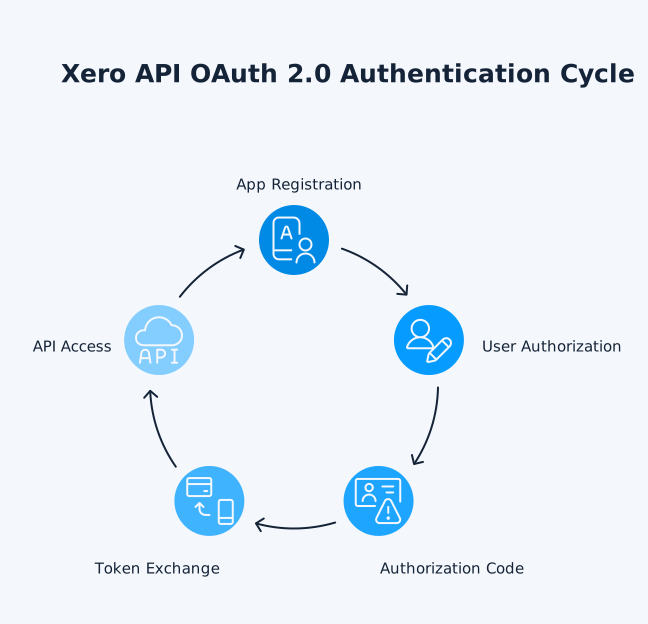
OAuth 2.0 authentication is mandatory for all Xero API access. The process involves several steps that must be implemented correctly for secure access.
Initial Authorisation Flow
The authorisation process starts by directing users to Xero’s authorisation endpoint:
javascript
// Build authorization URL with required scopes
const authorizationUrl = xero.buildConsentUrl();
// Required scopes for full accounting access
const scopes = [
‘openid’,
‘profile’,
’email’,
‘accounting.transactions’,
‘accounting.contacts’,
‘accounting.settings’,
‘offline_access’ // Critical for refresh tokens
];
Token Management and Persistence
Access tokens expire after 30 minutes, so implementing proper token refresh logic is necessary:
python
class XeroTokenManager:
def __init__(self, initial_token):
self.token = initial_token
self.expires_at = time.time() + initial_token[‘expires_in’]
def get_valid_token(self):
# Check if token needs refresh (5 minutes buffer)
if time.time() > (self.expires_at – 300):
self.refresh_token()
return self.token
def refresh_token(self):
# Exchange refresh token for new access token
token_response = requests.post(
‘https://identity.xero.com/connect/token’,
data={
‘grant_type’: ‘refresh_token’,
‘refresh_token’: self.token[‘refresh_token’],
‘client_id’: CLIENT_ID,
‘client_secret’: CLIENT_SECRET
}
)
self.token = token_response.json()
self.expires_at = time.time() + self.token[‘expires_in’]
# Store updated token securely
self.persist_token(self.token)
Custom Connections for M2M Integration
For machine-to-machine integrations, Xero offers Custom Connections using client credentials:
python
# Custom Connection setup (Xero premium feature)
api_client = ApiClient(
Configuration(
oauth2_token=OAuth2Token(
client_id=”YOUR_CLIENT_ID”,
client_secret=”YOUR_CLIENT_SECRET”,
grant_type=”client_credentials”
)
)
)
# No user interaction required – direct API access
accounting_api = AccountingApi(api_client)
Best Practices for Xero API Rate Limits and Error Handling
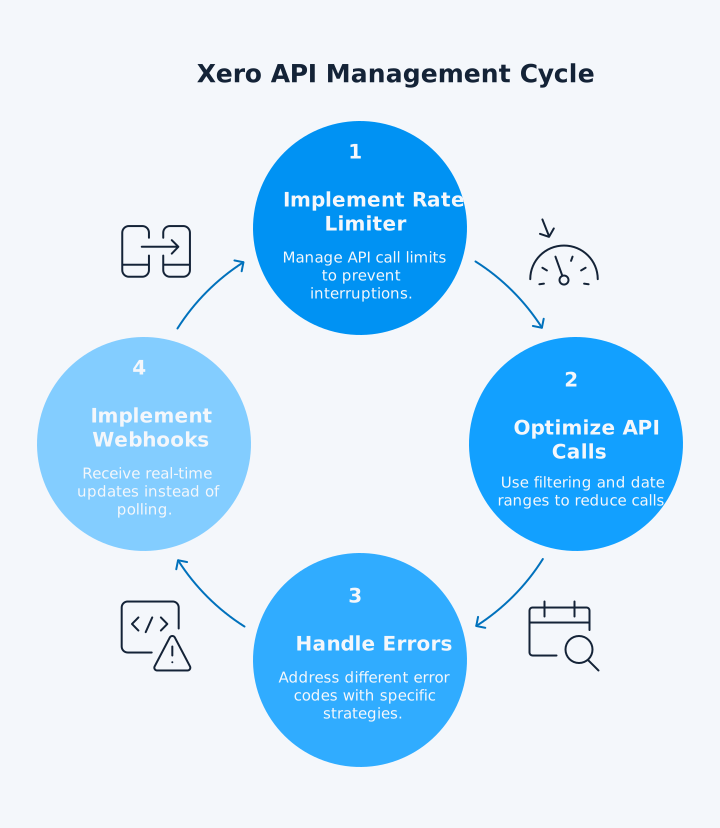
Managing API limits effectively ensures your integration runs smoothly without interruptions. Xero enforces a 5,000 calls per day limit, with additional high-volume thresholds on specific endpoints.
Implementing Rate Limit Management
Here’s a reliable approach to handle rate limiting:
javascript
class XeroRateLimiter {
constructor() {
this.dailyCallCount = 0;
this.lastResetDate = new Date().toDateString();
this.callQueue = [];
}
async makeApiCall(apiFunction) {
// Reset counter if new day
const today = new Date().toDateString();
if (today !== this.lastResetDate) {
this.dailyCallCount = 0;
this.lastResetDate = today;
}
// Check daily limit
if (this.dailyCallCount >= 4900) { // Buffer of 100 calls
throw new Error(‘Approaching daily rate limit’);
}
try {
const result = await apiFunction();
this.dailyCallCount++;
return result;
} catch (error) {
if (error.response?.statusCode === 429) {
// Implement exponential backoff
const retryAfter = error.response.headers[‘retry-after’] || 60;
await this.delay(retryAfter * 1000);
return this.makeApiCall(apiFunction); // Retry
}
throw error;
}
}
delay(ms) {
return new Promise(resolve => setTimeout(resolve, ms));
}
}
Optimising API Calls
Use filtering and date ranges to minimise API calls:
python
# Efficient: Get only updated records
modified_invoices = accounting_api.get_invoices(
xero_tenant_id,
if_modified_since=datetime(2025, 1, 1),
where=’Status==”AUTHORIZED”‘,
order=’UpdatedDateUTC DESC’,
page=1,
page_size=100
)
# Use summaryOnly for lightweight responses
summary_invoices = accounting_api.get_invoices(
xero_tenant_id,
summary_only=True # Returns only essential fields
)
Detailed Error Handling
Different error codes require different handling strategies:
python
def handle_xero_api_error(error):
status_code = error.status_code
error_handlers = {
400: handle_validation_error, # Invalid request data
401: refresh_authentication, # Token expired
403: check_permissions, # Insufficient scopes
404: handle_not_found, # Resource doesn’t exist
429: implement_backoff, # Rate limit exceeded
500: retry_with_backoff, # Server error
503: check_api_status # Service unavailable
}
handler = error_handlers.get(status_code, log_unknown_error)
return handler(error)
def handle_validation_error(error):
# Extract specific validation errors
validation_errors = error.body.get(‘Elements’, [{}])[0].get(‘ValidationErrors’, [])
for validation_error in validation_errors:
print(f”Field: {validation_error.get(‘Field’)}”)
print(f”Error: {validation_error.get(‘Message’)}”)
# Common validation errors and solutions
error_solutions = {
‘The TaxType code’: ‘Check valid tax codes for your region’,
‘Account code’: ‘Ensure account exists and is active’,
‘Contact does not exist’: ‘Create contact before creating invoice’
}
for key, solution in error_solutions.items():
if key in str(validation_errors):
print(f”Solution: {solution}”)
Webhook Implementation for Real-Time Updates
Instead of polling for changes, implement webhooks for efficient real-time updates:
javascript
// Webhook endpoint to receive Xero notifications
app.post(‘/xero-webhook’, async (req, res) => {
const signature = req.headers[‘x-xero-signature’];
const payload = req.body;
// Verify webhook signature
const expectedSignature = crypto
.createHmac(‘sha256’, WEBHOOK_KEY)
.update(JSON.stringify(payload))
.digest(‘base64’);
if (signature !== expectedSignature) {
return res.status(401).send(‘Invalid signature’);
}
// Process webhook events
for (const event of payload.events) {
switch (event.eventType) {
case ‘CREATE’:
if (event.resourceType === ‘INVOICE’) {
await processNewInvoice(event.resourceId);
}
break;
case ‘UPDATE’:
await syncUpdatedResource(event.resourceType, event.resourceId);
break;
}
}
res.status(200).send(‘OK’);
});
Frequently Asked Questions
What Programming Languages Does Xero API Support?
Xero provides official SDKs for Python, Node.js, .NET, PHP, Ruby, and Java. You can also use any language that supports HTTP requests to interact with their REST API directly.
How Do I Test Xero API Calls Without Affecting Live Data?
Xero provides a demo company specifically for testing. When creating your app, select “Demo Company” to access a sandbox environment with sample data for safe experimentation and testing.
What's the Difference Between OAuth 2.0 and Custom Connections?
OAuth 2.0 requires user interaction for authorisation and is suitable for multi-tenant applications. Custom Connections use client credentials for machine-to-machine integration with a single organisation – this is a Xero premium feature.
How Many API Calls Can I Make per Day to Xero?
Xero enforces a limit of 5,000 API calls per day per organisation. This limit resets at midnight UTC. Monitor your usage carefully, as hitting this limit can disrupt your integration.
Can I Create Multiple Invoices in a Single API Call?
Yes, you can create up to 50 invoices in a single POST request. The request size must not exceed 3.5MB. This bulk operation counts as one API call regardless of the number of invoices.
How Do I Handle Pagination When Retrieving Large Datasets?
Implement pagination by incrementing the page parameter until no results are returned, as shown in the Python examples above.
What Scopes Do I Need for Different Xero API Operations?
Primary scopes include accounting.transactions for invoices and bills, accounting.contacts for customer data, and offline_access for refresh tokens. Review the complete scope list to ensure it matches your integration requirements.
How Long Do Xero Access Tokens Last?
Access tokens expire after 30 minutes. Implement automatic token refresh using the refresh token, which remains valid until explicitly revoked by the user.
Master Your Financial Data Integration
Building reliable Xero API integrations opens up powerful automation possibilities for your financial workflows. From automated invoice creation to real-time bank reconciliation, the examples and best practices covered here provide a solid foundation for your development journey. Remember to implement proper error handling, respect rate limits, and secure your authentication tokens to ensure a reliable integration that scales with your business needs.
Transform Your Xero Integration Today
Ready to accelerate your financial automation beyond manual API coding? With dataSights’ Xero consolidation solution, you can connect multiple Xero entities in minutes, not months. Rated 5.0 out of 5 by 90+ Xero users, our platform handles the complex API integration for you. Join 300+ businesses already saving weeks on their month-end close.
About the Author
Kevin Wiegand
Founder & Client happiness