How many spreadsheet tabs does your finance team
maintain just to produce one group P&L? Multi
entity consolidation software replaces manual
consolidation with a structured reporting layer that
combines trial balances from multiple entities,
automates eliminations and FX translation, and reduces
reliance on CSV exports and fragile formulas. For Xero
groups, native consolidation across multiple
organisations is
still not available, so finance teams usually rely on spreadsheets or a
dedicated consolidation tool. The best platforms
produce board-ready management packs through the web
platform, with Excel automation and Power BI available
where needed. This guide explains what multi entity
consolidation software does, how to evaluate your
options, and how dataSights supports automated Xero
group reporting.
Multi Entity Consolidation Software Quick Summary
Multi entity consolidation software combines trial
balances from multiple legal entities into one
reporting layer, applies intercompany eliminations and
FX translation, and produces consolidated statements
and management packs. Xero still does not provide
native consolidation across multiple organisations,
which is why finance teams typically use a dedicated
consolidation layer; dataSights is currently
rated 5.0 by 80+ Xero reviews on the App Store.
What Is Multi Entity Consolidation Software?
Multi entity consolidation software aggregates trial
balance data from all entities in a corporate group,
applies elimination rules for intercompany
transactions, translates currencies, and produces
unified financial statements. Trial balance data is
the backbone of the process: every consolidated output
should reconcile back to each entity's trial balance
before eliminations and group adjustments are applied.
Under IFRS 10, consolidated financial statements present the
assets, liabilities, equity, income, expenses and cash
flows of a parent and its subsidiaries as those of a
single economic entity.
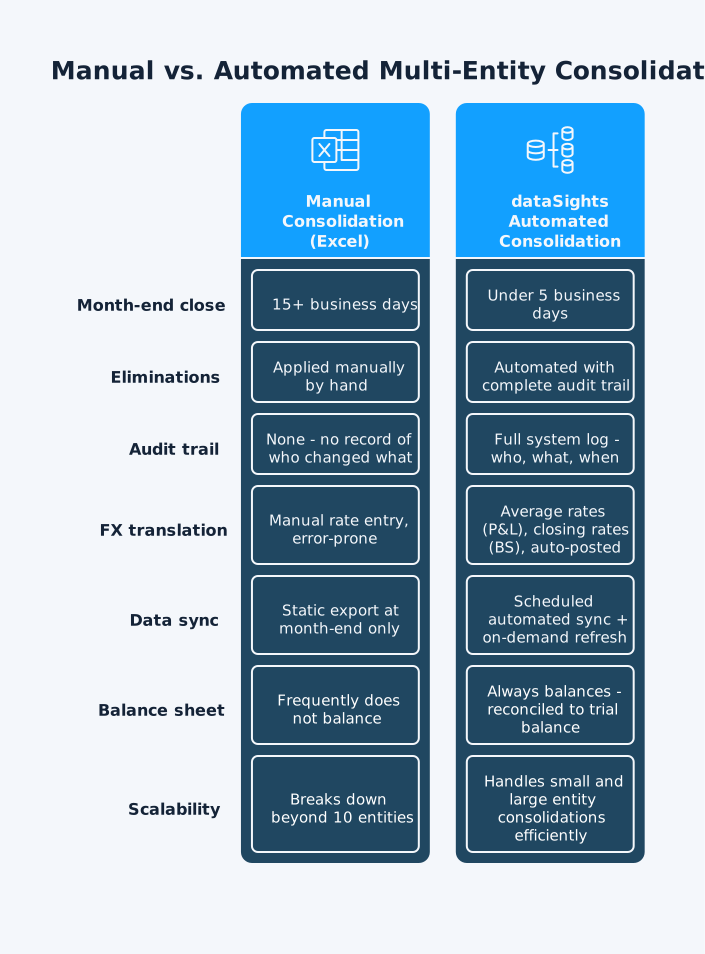
Without software, your finance team manually:
- Downloads data from each entity in Xero
- Reconciles figures across multiple spreadsheets
- Applies intercompany eliminations by hand
- Tracks exchange rates manually for each line item
- Rebuilds the same model every reporting period
The Core Challenge: Complexity Grows Exponentially
As entity count grows, so does the workload:
Key Features to Look for in Group Consolidation
Software
The best group consolidation software does more than
combine numbers at month-end. It should automate the
hardest parts of consolidation, keep every adjustment
auditable, and turn entity-level trial balance data
into reliable management reports with less manual
effort.
Automated Intercompany Eliminations
Intercompany eliminations are the hardest part of
group consolidation software implementation. If Entity
A sells goods worth £50,000 to Entity B, both the sale
and the corresponding purchase appear in individual
entity accounts. Without elimination, group revenue
and expenses are overstated.
For example, Entity A sells £50,000 of inventory to
Entity B at a £10,000 markup. If Entity B still holds
that stock at period-end, the £10,000 unrealised
profit must be eliminated from consolidated inventory
and group profit.
Automated elimination rules:
-
Remove intragroup transactions from group totals
automatically
-
Cover intercompany sales, purchases, loans, and
dividends
-
Log every entry with user, date, and rule applied
With dataSights, automated eliminations with complete audit trails are included as standard.
Multi-Currency Translation
Correct FX translation starts with each entity's
functional currency, then translates results into the
group's presentation currency. Under IAS 21, income
and expense items are translated at transaction-date
rates, with period averages often used as a practical
approximation where rates are not highly volatile;
assets and liabilities are translated at the closing
rate at period-end; and translation differences are
recognised in OCI and accumulated in a separate
component of equity.
- P&L items: Translated using
average rates for the period where appropriate
- Balance sheet items: Translated
using the closing rate at period-end
- Equity items: Generally translated
at historical rates
- Translation differences: Recognised
in OCI and accumulated in equity until disposal of the
foreign operation
- dataSights: Automates average-rate
translation for P&L and closing-rate translation
for balance sheet items
- FX differences: Can be posted to
configured accounts so consolidated reports remain in
balance
- Excel and Power BI: Teams can upload
their own FX tables when they need tighter control over
rate sources or period logic
Chart of Accounts Mapping
Entities within the same group rarely use identical
charts of accounts. dataSights handles this by:
-
Supporting mapping between different charts of accounts across all connected entities
-
Letting you set up account groupings and mapping
rules directly in the platform
-
Accepting uploaded custom mappings for Excel or
Power BI outputs
-
Producing consistent consolidated output regardless
of local coding variations
Scheduled and On-Demand Data Sync
Point-in-time snapshots create month-end discovery
problems. With dataSights:
-
Continuous consolidation with automated tools
provides near real-time visibility aligned to your
refresh cadence (or query-time visibility where
DirectQuery is used)
-
On-demand refresh available after posting
adjustments
- BI dashboards sync on any schedule required
-
Month-end becomes confirmation rather than
discovery
-
Intercompany mismatches surface daily –
investigation time reduces significantly when
problems appear immediately
Management Reports in the web platform are the primary
output, giving finance teams access to consolidated
financial views without needing additional tools,
including:
- Profit and Loss (P&L)
- Balance Sheet
- Trial Balance
-
Accounts Receivable and Accounts Payable (AR/AP)
- Cash flow
- Variance analysis views
For teams that prefer spreadsheets, Excel automation
works through the Office Add-In and Power Query. Power
BI remains the advanced option for custom dashboards,
drill-down analysis, and broader BI use cases.
dataSights delivers the same consolidated data across
three output environments:
- Web platform: Ready-to-use management
reports for day-to-day finance and board reporting
- Excel: Live consolidated data through
the Office Add-In, with refresh and scheduled update
options via Power Query
- Power BI: Advanced dashboards and
interactive analysis without manual exports
All three outputs draw from the same consolidated data
set, so finance teams can work in different formats
without duplicating consolidation logic.
How Multi Entity Financial Consolidation Works in
Practice
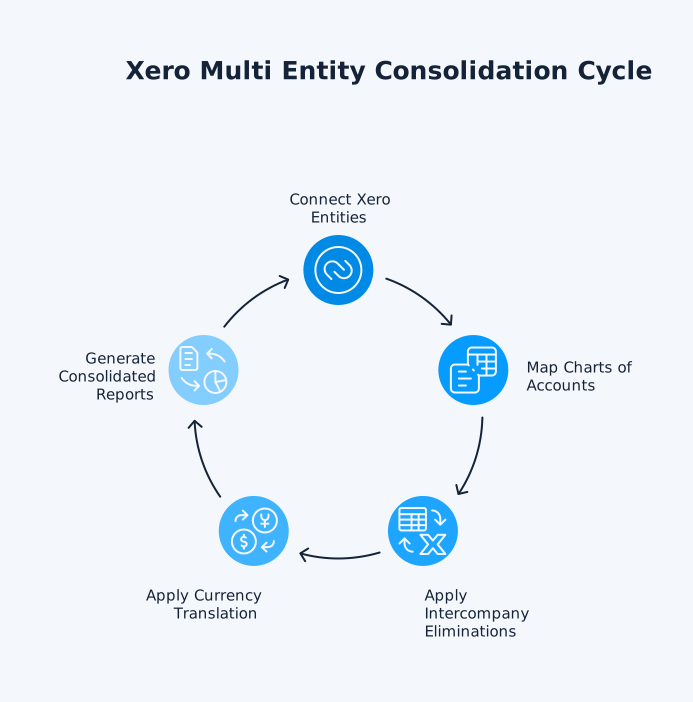
A well-configured consolidation workflow follows five
repeatable steps each period, starting with trial
balance data as the foundation for every consolidated
output:
- Connect your entities: dataSights
connects to each Xero organisation via secure API
and pulls trial balance data into a central reporting
layer. Each entity remains independent in Xero; only
reporting is centralised.
- Map charts of accounts: Each entity's
local account codes are mapped to a standardised group
reporting structure. Once configured, the same mapping
rules can be reused each reporting period.
- Apply elimination rules: Automated
rules remove intercompany sales, purchases, loans, dividends,
and other internal balances, with an audit trail showing
each adjustment applied.
- Apply currency translation: P&L
items are translated using average rates where appropriate,
balance sheet items at the closing rate, and cumulative
translation differences are recorded in equity.
- Generate consolidated reports: Consolidated
P&L, Balance Sheet, cash flow, and management reports
are then available through the web platform, Excel, or Power BI, reconciled back to source trial balances and configured
adjustments.
Why Xero Users Need Dedicated Multi Entity
Consolidation Software
Xero is strong for entity-level accounting, but it
does not currently provide native group consolidation
across multiple organisations, so finance teams
typically export reports and consolidate outside Xero
or use a dedicated add-on.
Without a dedicated solution, your team:
- Exports data from each Xero organisation manually
- Reconciles multiple files in Excel
- Applies eliminations by hand, with no system-enforced audit trail and a much
higher risk of inconsistency between reporting
periods
-
Rebuilds the consolidation model from scratch each
month
- Has no audit trail for elimination decisions
dataSights solves this with Xero multi entity
consolidation that:
-
Connects directly to Xero's API – no CSV exports
-
Pulls trial balance data from all connected
organisations automatically
-
Applies full eliminations with system-level audit
logs
-
Delivers management packs through the web
platform, Excel, and Power BI
-
Handles both small and large entity consolidations
with a structured reporting workflow designed to
scale more reliably than spreadsheet-based
processes
Complex Group Consolidation: Handling Advanced
Structures
Basic consolidation is only the starting point. As
ownership structures, subsidiary layers, and foreign
currency exposure become more complex, finance teams
need a consolidation process that can handle those
technical issues consistently and at scale.
Partial Ownership and Non-Controlling Interests
Both IFRS 10 and US GAAP ASC 810 require groups to
present consolidated financial statements for
controlling interests, with specific treatment for
partial ownership.
Control, not a simple percentage threshold, determines
whether full consolidation is required. Ownership
above 50% often indicates control, while significant
influence is often presumed at 20% or more and usually
leads to equity-method accounting under IAS 28 rather
than full consolidation. Holdings below that level are
often treated as financial assets, depending on the
facts and applicable standards.
dataSights handles both small and large entity
consolidations including configurations for different
ownership structures. Automation enforces consistent
policies across entities and maintains the audit
evidence that manual spreadsheets cannot achieve.
Nested Subsidiary Structures
Groups with subsidiary chains require elimination
logic at each level of the hierarchy:
-
Parent A owns Subsidiary B, which owns Subsidiary
C – eliminations required at every level
-
Purpose-built consolidation software handles
multi-level subsidiary structures far more
reliably than spreadsheet models and keeps
elimination logic documented at each level of the
hierarchy.
-
Manual Excel models become unmanageable beyond
three levels of ownership
Multi-Currency Group Structures
International groups face translation requirements at
every level. The full translation workflow:
- Each entity reports in its functional currency
- P&L translated at average rates for the period
- Balance sheet translated at period-end closing rate
-
Translation differences posted as cumulative
translation adjustment to equity
-
dataSights automates every step – define your
group reporting currency and the platform handles
the rest
- Consolidated reports always balance
How to Choose Group Consolidation Software: Key
Evaluation Criteria
Not all consolidation tools solve the same problems.
When comparing options, focus on the features that
affect accuracy, reporting flexibility, audit
readiness, and your ability to scale from a small
group structure to a much larger one.
- Entity limits: Some tools cap at 10
or 50 entities in lower tiers. dataSights handles both
small and large consolidations of entities efficiently
at any scale.
- Elimination capabilities: Verify coverage
of intercompany sales, loans, dividends, and fixed asset
transfers. All elimination rules must be configurable
and produce full audit logs.
- Reporting flexibility: Confirm you
can customise pre-built reports and build new ones.
dataSights delivers pre-formatted management reports
via the web platform, with full Excel and Power BI automation
for custom outputs.
- Currency handling: Confirm average
rates for P&L, closing rates for the balance sheet,
and automated CTA posting. Manual rate entry is a significant
source of consolidation errors.
- Data source compatibility: For Xero-based
groups, confirm direct API connectivity. dataSights connects
via Xero's API and pulls trial balance data on an automated
daily schedule – no manual CSV exports.
- Audit trail: Every elimination, adjustment,
and mapping change must be logged with timestamps and
user attribution. This is non-negotiable for audit readiness.
- Pricing model: dataSights scales pricing by number of entities, with unlimited users, reports, and data refresh
scheduling included in each tier.
Your Group Reports Belong in Minutes, Not Weeks
Multi entity consolidation software turns a manual,
spreadsheet-heavy process into a repeatable reporting
workflow with automated eliminations, FX translation,
and consistent group outputs. For Xero-based groups,
moving from manual consolidation to automated group
reporting can materially reduce month-end effort and
improve auditability. dataSights supports both small
and large entity consolidations. If your team is still
rebuilding the same consolidation worksheet every
month, the next step is to assess whether your current
process is giving you the speed, control, and
visibility your group now needs.
Automate Your Xero Multi Entity Consolidation with
dataSights
Automate multi-entity reporting with board-ready
management packs through the dataSights web platform.
Excel teams can refresh live consolidated data through
the Office Add-In and Power Query, and Power BI is
available for advanced analytics and drill-down.
dataSights is currently rated 5.0 by 80+ Xero reviews. Join 250+ businesses already running automated
multi-entity reporting, with no credit card required
to start.
See How It Works