How many hours does your finance team lose each month
exporting Xero data, checking formulas, and rebuilding
the same report pack? Automated financial reporting
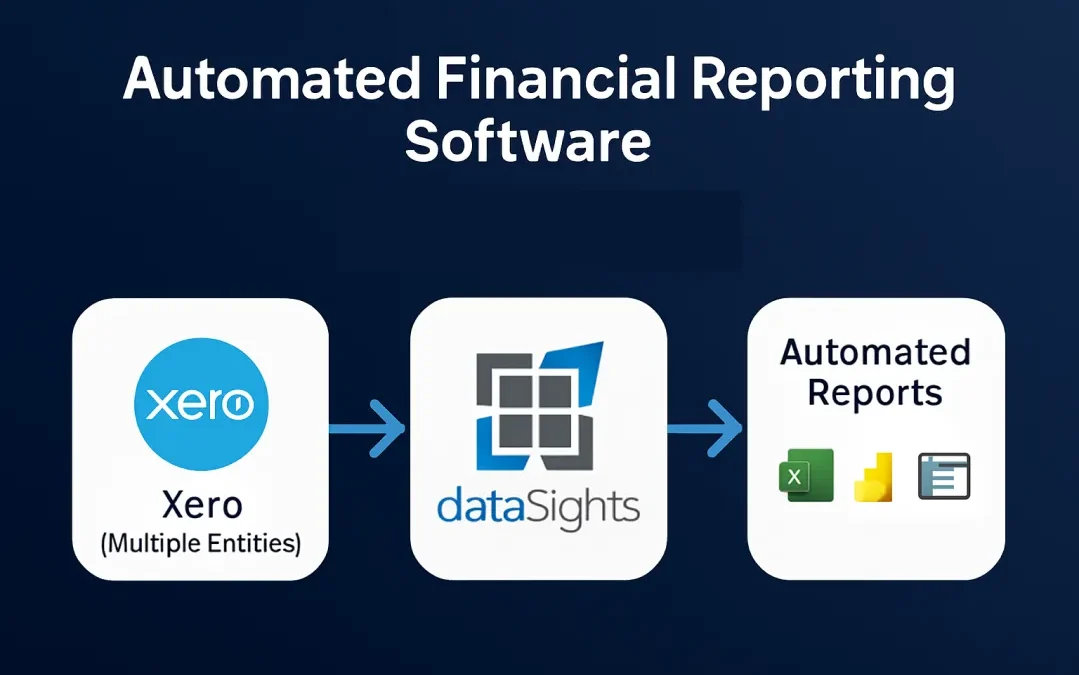
software connects your Xero entities to a reporting
layer that refreshes on schedule, applies consistent
transformation logic, and keeps management reports
current without manual CSV handling. For multi-entity
groups, that means fewer spreadsheet errors, faster
month-end work, and clearer visibility across the
business. This article explains how automated
financial reporting software works, what to look for
in a Xero-connected solution, and how dataSights helps
finance teams move from manual reporting to automated
workflows.
What Is Automated Financial Reporting Software?
Automated financial reporting software connects
directly to your accounting system, extracts financial
data on a scheduled basis, and generates management
reports, consolidated statements, and dashboards
without manual intervention. For Xero users, the
practical shift is simple: instead of exporting CSVs
into spreadsheets, you connect Xero through a secure
API workflow, sync the data into a reporting database,
and refresh the same management outputs each period.
The best platforms start with clean source data,
apply repeatable reporting logic, and deliver
browser-based Management Reports first, with Excel
automation and Power BI available where needed.
Why Manual Reporting Fails Multi-Entity Finance Teams
Manual financial reporting processes create
compounding errors, version control issues, and time
delays that become increasingly costly as your entity
count grows. Understanding these failure points helps
clarify exactly what automated financial reporting
software needs to solve.
The Cost of Spreadsheet-Based Consolidation
Spreadsheet-based consolidation breaks down as entity
count grows because the process depends on manual
exports, copy-paste handling, and formula-based
eliminations outside Xero. For multi-entity finance
teams, the risk is not just speed. It is accuracy. A
single broken formula, missed mapping, or uncleared
intercompany balance can force finance back into
reconciliation mode late in the close.
The real problem starts at Trial Balance level. Each
entity's Trial Balance may reconcile on its own, but
once those balances are merged into a master
workbook, finance still has to manage eliminations,
FX translation, and review checks manually. Xero has
no native intercompany module, so those elimination
steps must be handled outside Xero, and spreadsheets
provide no system-level audit trail for who changed
what, when, or why.
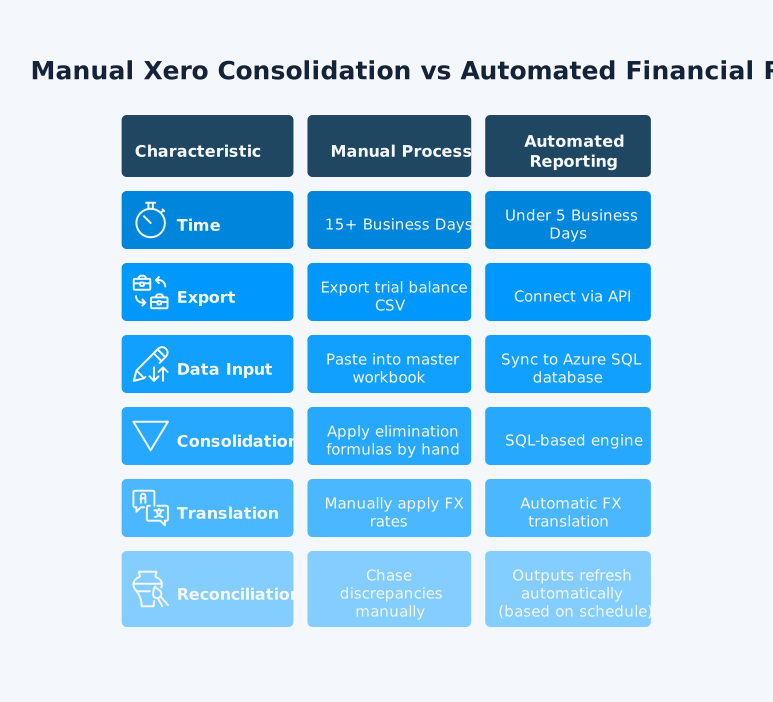
The typical manual consolidation process looks like
this:
- Export Trial Balance data from each Xero entity
-
Paste each entity into a master consolidation
workbook
- Map accounts across entities
- Apply intercompany eliminations manually
- Translate foreign-currency balances
- Reconcile differences and investigate mismatches
- Repeat the process every reporting period
That is why manual spreadsheet consolidation consumes
so much finance capacity. The time goes into checking
formulas, tracing eliminations, and reworking
exceptions instead of reviewing results and
explaining performance. For Xero groups, manual
elimination management in spreadsheets is also the
main source of reconciliation errors, because the
logic is hard to document, hard to repeat, and easy
to break between periods.
What Changes When You Automate
Automated financial reporting software replaces each
manual step with a connected, repeatable process. The
core change is architectural: instead of exporting
and re-importing data, you build a persistent
connection between your source systems and your
reporting environment. The key differences include:
- Data extraction: Your Xero data syncs
automatically on a scheduled basis, with no manual exports
required
- Consolidation: SQL-based transformations
apply intercompany eliminations and currency translations
at the database level
- Report generation: Outputs refresh
automatically in Excel, Power BI, or your web management
reports platform
- Audit trail: Every data point traces
back to its source, making reconciliations faster and
audits cleaner
- Month-end close: Many teams we work
with reduce close times from 15+ business days to under 5 once their Xero consolidation and management reporting
are fully automated.
Core Features of Automated Financial Reporting
Software
Not all automated financial reporting tools deliver
the same capabilities. For Xero users managing
multiple entities, the following features determine
whether a platform can handle your actual reporting
requirements.
Xero Data Sync
Xero data sync is the foundation of any
Xero-connected reporting system. dataSights connects
to the Xero API and pulls your financial data on a scheduled refresh
cycle, including trial balance data, account transactions,
invoices, and bank feeds. The sync runs automatically and
populates a structured Azure SQL database, which becomes
the single source of truth for all downstream reporting.
Accurate automation starts with entity-level Trial
Balance data. Your reporting layer should reconcile
back to each Xero organisation's Trial Balance before
eliminations, mappings, and management pack outputs
are applied.
Key Xero data sync capabilities to verify in any
automated financial reporting software include:
-
Support for multiple Xero organisations under a
single connection
-
Customisable refresh frequency, from daily to
near-real-time depending on your plan
-
Retention of historical data snapshots for
period-over-period comparisons
-
Error logging and notification when a sync fails
or returns incomplete data
-
Secure OAuth-based Xero API connection with no
storage of Xero usernames or passwords, and
encrypted token handling
Near Real-Time Xero Reporting
Near-real-time Xero reporting means your reports
reflect the most recent completed sync, rather than a
static export from last week. dataSights delivers this
through scheduled refresh from Xero into a structured
reporting database, so your Management Reports stay
current without manual CSV handling.
For finance teams, that means:
-
Pre-formatted Management Reports that update
automatically with the latest synced Xero data
-
Consolidated P&L, Balance Sheet, Trial Balance,
AR/AP, budget, and variance reporting through the
web platform
-
Excel automation for teams that want to refresh
consolidated Xero data into existing workbook
models using the Office AddIn and Power Query
-
Power BI integration for teams that need advanced
visualisation, drill-down analysis, and shared
dashboards
-
One reporting layer across all outputs, so finance
works from consistent numbers in every reporting
period
This matters because automated refresh gives your
team current financial visibility without rebuilding
reports manually each month. Instead of exporting
from Xero, reformatting spreadsheets, and checking
version control, finance can review the latest
numbers in the format that suits the workflow.
Note: dataSights uses scheduled refresh
rather than a continuous live data stream. Reports reflect
data as of the last completed sync, which is the standard
model for SQL-based Xero reporting workflows.
Multi-Entity Consolidation
Multi-entity consolidation is where manual processes
break down fastest. dataSights handles this through
its Xero consolidation engine, which applies intercompany eliminations, currency
translations, and chart-of-accounts mapping at the SQL
layer. The consolidation covers:
-
Profit and loss consolidation across all entities
-
Balance sheet reconciliation with automatic
intercompany elimination
-
Multi-currency translation using average rates for
P&L and closing rates for the balance sheet
- Cumulative translation adjustments posted to equity
-
Custom chart-of-accounts mapping when entities use
different account structures in Xero
-
Minority interest calculations for partial
ownership structures
Live Financial Dashboard
A live financial dashboard should sit inside your
broader management reporting layer, not replace it.
Through dataSights, that means:
-
Pre-formatted Management Reports for consolidated
P&L, Balance Sheet, Trial Balance, AR/AP,
budget and variance reporting
-
Group-to-entity drill-down from consolidated
numbers into supporting detail
- Current data based on your configured refresh cadence
-
Excel automation for teams using existing workbook
models
- Power BI integration for advanced visualisation and custom dashboards
where needed
How dataSights Delivers Automated Financial Reporting
dataSights combines multi-entity Xero consolidation,
browser-based Management Reports, Excel automation,
and Power BI connectivity in one reporting stack.
Here is how the platform delivers automated financial
reporting end to end.
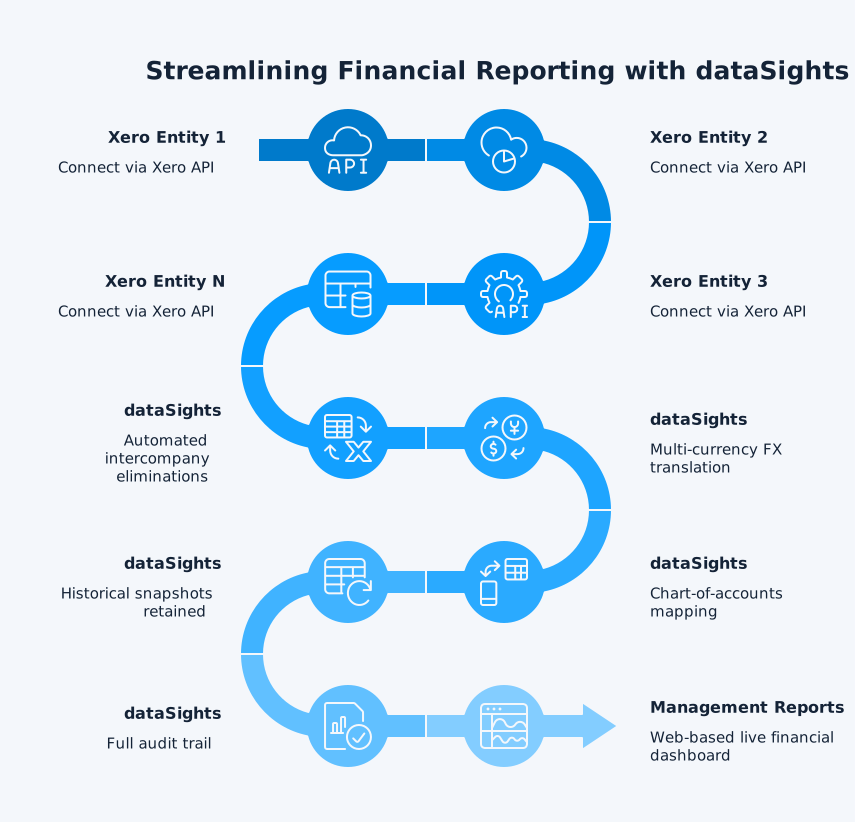
Step 1: Connect Your Xero Entities
You authorise dataSights to connect to each of your
Xero organisations via the Xero API. dataSights
supports multiple entities under a single account,
pulling trial balance data, account transactions,
and other financial data into a structured Azure SQL
database on your configured sync schedule.
Using dataSights' SQL editor and consolidation
configuration tools, you define your:
- Chart-of-accounts mapping across entities
- Intercompany elimination rules
- Currency translation settings
- Reporting period definitions
-
Entity groupings for segment or divisional
reporting
Step 3: Build Your Reporting Outputs
dataSights outputs your consolidated financial data
to three reporting environments, depending on your
team's preferences:
- Management Reports (web platform):
A browser-based management reporting portal that refreshes
automatically from your reporting database, with optional
export to Excel or PDF
- Excel automation: The dataSights Excel add-in connects your existing Excel workbooks directly to
the Azure SQL database, so your templates refresh with
live Xero data on demand
- Power BI: Publish consolidated financial
data to Power BI for interactive dashboards and advanced
visualisation
Step 4: Automate Your Reporting Schedule
Once your reporting environment is configured,
dataSights automates the ongoing process. Xero data
syncs on your schedule, consolidation logic runs
automatically, and your reports refresh without
manual intervention. Finance teams we work with
often reduce month-end close from 15+ business days
to under 5 business days once automated financial
reporting is in place and the workflow is fully
embedded.
Automated Financial Reporting for Xero: Key Use Cases
Automated financial reporting software serves
different needs depending on your entity structure,
reporting requirements, and the tools your team
already uses. The following use cases reflect the
most common scenarios dataSights handles for Xero
businesses.
1. Group Consolidation Reporting
For businesses operating across multiple Xero
entities, group consolidation reporting requires
eliminating intercompany transactions, translating
foreign currency balances, and producing a single
set of consolidated financial statements. dataSights
automates this entirely, replacing the manual
export-and-paste approach. For groups running
consolidation every month, the practical gain is
repeatability:
- Synced data
- Consistent eliminations
- One reporting layer for every period
2. Board and Investor Reporting
Board packs require accurate, timely data formatted
to a consistent template. Manual preparation
introduces risk at every stage. dataSights automates
the data collection and formatting steps, so your
finance team spends time on commentary and analysis
rather than data assembly. Board packs refresh from
the same reporting layer, so finance can focus on
commentary, checks, and actions rather than
reassembling the numbers. Where live stakeholder
access matters, shared Power BI dashboards can
complement the browser-based management pack.
3. Management Reporting Across Departments
Departmental management reporting requires segmenting
Xero data by tracking category, cost centre, or
entity. dataSights pulls this data automatically and
makes it available in your management reports
platform, Excel workbooks, or Power BI dashboards.
Managers access their department view directly
without waiting for finance to compile reports
manually.
4. Accounting Practice Reporting
Accounting practices managing multiple client Xero
files need automated financial reporting at scale.
dataSights Xero practice reporting allows practices to connect all client entities, apply
consistent report templates, and distribute customised
management reports automatically. This replaces hours of
manual preparation per client per month.
What to Look for in Automated Financial Reporting
Software
Choosing the right automated financial reporting
software depends on your entity count, reporting
complexity, and the tools your team already uses. Use
the following criteria to evaluate whether a platform
genuinely fits your requirements.
- Xero API integration: Does it connect
directly via the Xero API, or does it rely on CSV imports?
- Multi-entity support: Can it handle
your current entity count and scale as you grow?
- Consolidation capability: Does it
automate intercompany eliminations and multi-currency
translation?
- SQL or formula-based logic: Can your
finance team apply custom business rules to the data?
- Output flexibility: Does it support
Excel, Power BI, and web dashboards, not just one format?
- Refresh frequency: How often does the
Xero data sync run, and can you trigger a manual sync?
- Xero App Store rating: Check verified
user reviews on the Xero App Store for real-world performance data
- Audit trail: Does it log every data
transformation so you can trace outputs back to source
data?