What Is Management Reporting?
Management reporting is a formal process that transforms raw business data into structured reports for internal stakeholders. The primary purpose of management reporting is to provide decision-makers with the information they need to run the business effectively. This typically supports three core activities:
- Monitoring performance across departments, products, or business units
- Allocating resources to the areas that will drive the most value
- Making strategic decisions based on reliable financial and operational data
Unlike statutory financial reporting, management reports follow no fixed external template and carry no regulatory deadlines. Finance teams design management reports around the specific questions the business needs to answer, such as:
- How did we perform against budget this month?
- Which entities are driving group profitability?
- Are we on track to meet our annual targets?
Most organisations produce management reports on a monthly cadence, though some fast-moving businesses run weekly updates alongside a more detailed monthly pack. The reporting frequency usually falls into two common patterns:
- Monthly management reporting, which aligns with the financial close cycle and provides a structured view of business performance
- Weekly flash reporting, used by faster-moving businesses that need quicker visibility into performance and emerging issues.
The right reporting frequency depends on two factors:
- How quickly the business needs to act on performance data
- How quickly Finance can produce reliable numbers
Management Reports vs Financial Statements
Financial statements – your Profit and Loss, Balance Sheet, and Cash Flow – are the foundation of both statutory reporting and management reporting. The key difference is audience and purpose. Financial statements are prepared for external stakeholders (investors, lenders, regulators) and must comply with applicable standards such as IFRS or local GAAP. Management reports are for internal use only. They incorporate financial statements alongside operational data, KPIs, budget comparisons, and forward-looking commentary that external reports do not require.
A management report might show a consolidated P&L across five Xero entities, a budget-versus-actual variance breakdown, AR ageing by subsidiary, and rolling cash flow forecasts – all of which go beyond what would usually appear in statutory financial statements. You can read more about how consolidated financial statements differ from management reporting outputs on the dataSights blog.
Types of Management Reports
Management reports span a wide range of formats, each serving a different decision-making need. Most organisations use a combination of the following types, typically bundled into a monthly management pack delivered to the board or senior leadership team.
Financial Management Reports
Financial management reports present the monetary performance of the business. They are the most common type and typically include:
- Consolidated Profit and Loss (P&L): Revenue, cost of goods sold, gross margin, operating expenses, and net profit by entity and group.
- Balance Sheet: Assets, liabilities, and equity at a point in time, showing the financial position of the business.
- Cash Flow Statement: Operating, investing, and financing cash flows, critical for liquidity management.
- Trial Balance: The starting point for consolidation, listing all account balances before eliminations.
- Budget and Variance Analysis: Actual results compared against budget and prior-year figures, with commentary explaining significant variances.
- Accounts Receivable and Payable reports: Ageing summaries and detailed listings, tracking what the business is owed and what it owes.
For multi-entity businesses, consolidated management reporting adds an extra layer of complexity:
- Intercompany transactions must be eliminated
- Foreign currency balances translated under IAS 21 (for IFRS-reporting entities) or the applicable local standard
- Group-level results reconciled back to individual entity totals
For example, Entity A sells services to Entity B for £100,000. On consolidation, both the £100,000 revenue and the matching £100,000 expense are eliminated, because the group has not earned income from itself.
Operational Management Reports
Operational reports focus on the day-to-day performance of business processes. They are typically produced weekly or monthly and cover metrics such as:
- Production volumes and efficiency rates
- Inventory levels and stock turn
- Sales activity, pipeline, and conversion rates
- Customer satisfaction scores and service level metrics
- Headcount and workforce productivity
Operational reports are often department-specific. A sales manager needs different metrics from a logistics controller. The most effective management packs combine operational KPIs with financial results, giving the board a complete picture rather than isolated data points.
Strategic Management Reports
Strategic reports take a longer view, tracking progress against the business’s overall goals and helping leadership teams make investment and planning decisions. They typically cover:
- Year-to-date performance against annual targets
- Long-term financial forecasts and rolling budgets
- Market position and competitive performance metrics
- Capital expenditure tracking and return on investment
- Scenario analysis and sensitivity modelling
Strategic reports are usually quarterly or annual and are prepared for board meetings, investor reviews, or major planning cycles.
Key Components of a Management Report
Regardless of type or frequency, an effective management report follows a consistent structure. The specific content varies by business, but the following components appear in most well-constructed management packs.
1. Executive Summary
The executive summary gives senior leaders a high-level overview without requiring them to read the full report. An effective executive summary should:
- Be readable in under five minutes
- Highlight the most significant variances
- Make the next management actions clear
According to CIMA’s Performance Reporting to Boards guidance, good board information should be relevant, timely, and focused on the organisation’s objectives – not exhaustive. The executive summary is the entry point for time-poor board members, giving them the context to act without reading the full pack.
2. Key Performance Indicators (KPIs)
KPIs are the heartbeat of any management report. They provide a quantifiable measure of whether the business is achieving its objectives – from revenue growth rate and gross margin percentage to debtor days and operational throughput. KPIs only help when they stay focused on the measures management actually uses to run the business. dataSights surfaces KPI metrics through pre-formatted management reports, with the same consolidated data also available in Excel and Power BI for teams that need deeper analysis.
3. Financial Statements and Variance Analysis
The financial statements section includes your P&L, Balance Sheet, and Cash Flow, each presented with a comparison to budget, prior month, and prior year. Variance analysis explains why actual results differ from expectations. It is the section most likely to drive action: a gross margin drop flagged against budget prompts an immediate conversation about pricing or cost control.
For multi-entity groups, this section becomes significantly more complex. Group-level statements require intercompany eliminations – removing transactions between related entities to avoid double-counting revenue, costs, and balances. You can explore how intercompany transactions are handled in consolidated statements in more detail on the dataSights blog.
4. Operational Metrics
Beyond the financial statements, operational metrics provide context for the numbers. Revenue per head, units sold, average transaction value, and customer retention rates all explain why the financials look the way they do. Operational data typically comes from systems outside your accounting platform – CRM, ERP, payroll, inventory – which is why data integration is a key challenge for finance teams producing comprehensive management reports.
Management reports should not only look backwards. The most useful packs include a short narrative section covering the outlook for the coming month or quarter: expected challenges, pipeline performance, and any adjustments to forecasts. This commentary transforms a historical data document into a decision-making tool, giving the board context for allocating resources and prioritising action.
Management Reporting KPIs and Metrics
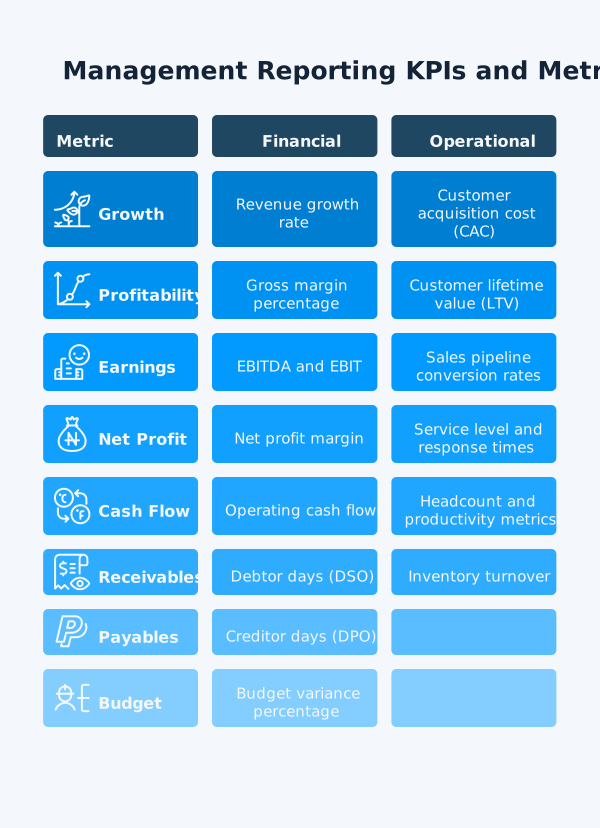
Choosing the right KPIs for your management reports depends on your industry, stage of growth, and strategic priorities. However, most finance teams track a core set of financial and operational metrics across the following categories.
Financial KPIs:
- Revenue growth rate: The percentage change in revenue versus the prior period
- Gross margin percentage: Revenue minus cost of goods sold as a percentage of revenue
- EBIT: Earnings before interest and taxes
- EBITDA: Earnings before interest, taxes, depreciation, and amortisation
- Net profit margin: Bottom-line profitability as a percentage of revenue
- Operating cash flow: Cash generated from core business activities
- Debtor days (DSO): Average time taken to collect receivables
- Creditor days (DPO): Average time taken to pay suppliers
- Budget variance percentage: Actual results versus planned budget
Operational KPIs:
- Headcount and productivity metrics
- Customer acquisition cost (CAC) and lifetime value (LTV)
- Inventory turnover
- Sales pipeline conversion rates
- Service level and response times
As FP&A Trends notes, data has no value without context. KPIs only become meaningful when compared against a benchmark: a budget, a prior period, or an industry norm. A management report that shows revenue is up 12% is informative; one that shows it is up 12% against a 15% budget target prompts a very different conversation.
The Management Reporting Process Step by Step
The management reporting process follows a consistent sequence, regardless of business size or complexity. Here is how high-performing finance teams structure each reporting cycle.
- Define your reporting objectives: Agree what the report needs to answer before you start building it. Which decisions will it support? What does the board need to see? Clarity at this stage prevents rework and ensures the report is actually used.
- Map your data sources: Identify where each metric comes from: your accounting platform, payroll system, CRM, or operational tools. For multi-entity Xero businesses, this means mapping data across multiple organisations into a single consolidated view.
- Collect and consolidate data: Pull data from all relevant sources, apply intercompany eliminations, handle foreign currency translation, and ensure the Trial Balance reconciles. This is the most time-intensive step for manual processes – automated consolidation tools replace the manual export-and-merge workflow.
- Perform variance analysis: Compare actuals against budget and prior periods. Flag material variances for commentary. Identify the root causes of significant movements in revenue, cost, and cash flow.
- Build the report structure: Assemble the executive summary, financial statements, KPI dashboard, and operational metrics into a consistent, branded format. Use charts and tables to make key trends immediately visible.
- Add narrative commentary: Write concise explanations for the key variances and an outlook section covering the next period. This is where Finance adds value beyond the numbers.
- Review and distribute: Validate all figures against source data. Distribute the completed pack to the board, senior leadership, and any other agreed recipients.
Common Management Reporting Challenges
Most finance teams know what a great management report looks like. The challenge is producing it accurately, quickly, and consistently every month. These are the most common obstacles.
1. Manual Data Collection and Consolidation
According to the FP&A Trends 2025 Benchmarking Survey, over 60% of FP&A teams are constrained by manual processes and inconsistent data – leaving limited capacity for the analysis and commentary that drives decisions. For finance teams managing multiple entities, a significant portion of reporting time is typically spent on manual data work, including:
- Exporting data from separate systems
- Mapping account codes across entities
- Building elimination journals
- Reconciling totals that do not initially balance
It is repetitive, error-prone work that leaves less time for the analysis that actually drives decisions.
2. Multi-Entity Reporting Complexity
A single-entity management report is relatively straightforward. A consolidated group report across five or more entities in different currencies introduces a different level of complexity. The challenge is not just producing the pack, but making sure the underlying data is consistent across the whole group.
Common sources of complexity include:
- Different charts of accounts across entities
- Multiple functional or reporting currencies
- Intercompany balances and transactions that must be eliminated
- Different close timetables across subsidiaries
- Varying levels of data quality and account classification
- The need to apply consolidation rules consistently every month
The more entities, systems, and currencies involved, the more reporting time gets consumed by standardising data before Finance can move on to interpretation and decision support.
The consolidated financial statements framework is well-established, but applying it consistently across entities every month is where manual processes break down.
3. Data Accuracy and Integration Issues
When data lives in disconnected systems – accounting software, payroll platforms, CRMs, spreadsheets – pulling it together for a management report creates version control and accuracy risks. A figure updated in one system after the report has been assembled creates a discrepancy that undermines confidence in the numbers.
4. Slow Month-End Close
Management reports can only be as timely as the underlying close process allows. In multi-entity businesses, a slow close pushes management packs further into the following month because Finance still needs time for consolidation, eliminations, review, and commentary after the books are closed. The result is that decision-makers receive the pack later, when some of the insight is already losing relevance. You can read more about how automation accelerates this in the dataSights guide to the financial consolidation and close process.
How to Automate Management Reporting
Automation does not replace the finance team’s judgement – it eliminates the repetitive data work that consumes time and introduces errors. Here is where automation delivers the greatest time savings in a typical management reporting cycle.
- Automated data sync: Connect source systems (accounting, payroll, CRM, inventory) to a centralised data hub. Data flows automatically, removing the need for manual exports and reducing version control issues.
- Automated consolidation: Intercompany eliminations, foreign currency translation under IAS 21, and Trial Balance reconciliation run automatically across all entities. The consolidated group P&L and Balance Sheet are ready without manual journal assembly.
- Pre-formatted report generation: Management packs with P&L, Balance Sheet, Cash Flow, Trial Balance, and budget variance analysis generate automatically from consolidated data. No manual formatting each month.
- Scheduled refresh: Rather than building reports from scratch, automated systems refresh with the latest data on demand or on a schedule – so the pack is always based on current numbers.
- Excel and Power BI integration: Finance teams that prefer to work in Excel or Power BI can connect those tools directly to the consolidated data source, pulling near-real-time figures into existing models with a single refresh.
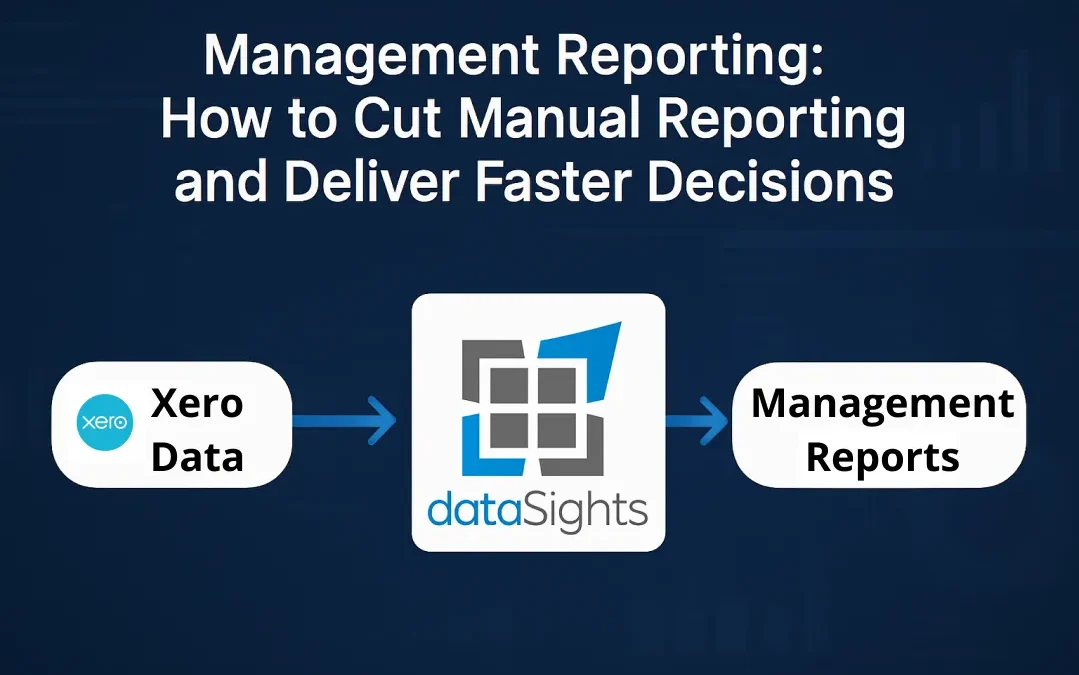
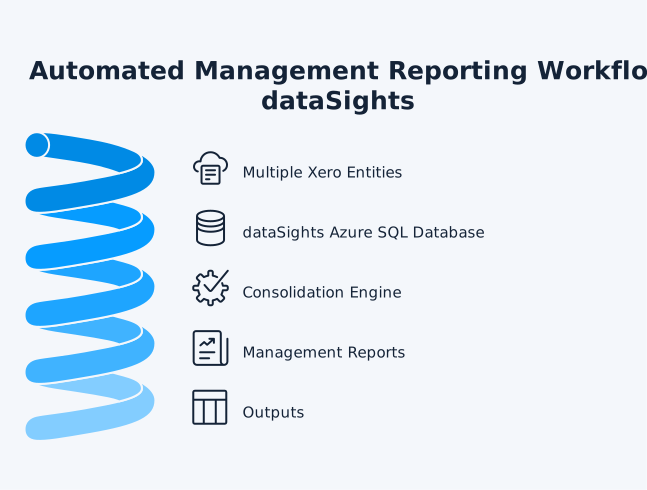
dataSights automates the management reporting workflow for multi-entity Xero groups. If you are starting from Xero’s native reporting and want to understand what is possible before committing to a full setup, the dataSights guide to automating reports in Xero covers the options in detail. Data syncs from your Xero organisations into a dedicated per-customer Azure SQL database, eliminations are handled through configured rules, and reports refresh from that controlled consolidated dataset across the web platform, Excel, and Power BI.
Multi-Entity Management Reporting with Xero
For a single entity, Xero’s built-in reporting covers the basics. For groups running multiple Xero organisations, several reporting limitations create a clear gap at the group level:
- No native consolidation across multiple entities
- No consolidated group-level management reporting pack – Xero’s built-in Management Report pack covers a single organisation only
- No automated intercompany eliminations within Xero itself
The result is that finance teams often resort to manual Excel workflows, including:
- Exporting each entity’s Trial Balance to Excel
- Manually mapping account codes
- Building elimination journals
- Hoping the balance sheet balances
One mapping error in that spreadsheet means the group numbers are wrong – and finding it costs time that finance teams do not have.
dataSights bridges this gap. It connects to your Xero organisations via API, syncs all transactional data into a dedicated Azure SQL database, and produces a fully consolidated management pack – including automated eliminations, budget and variance analysis, and AR/AP detail – through the web platform, Excel, or Power BI. Based on internal dataSights usage data, approximately 75% of customers use the Excel OfficeAddIn or Power Query connection as their primary reporting channel, keeping their existing Excel models while replacing the manual export workflow.
dataSights also supports Looker Studio for multi-entity Xero reporting and integrates with Employment Hero Payroll and 160+ other connectors to bring operational data into the same reporting environment as your financial data.