
You’re spending hours every week manually exporting reports from Xero, copying data into spreadsheets, and emailing financial statements to stakeholders. Your month-end close stretches beyond 15 days because you’re wrestling with CSV files and broken formulas across multiple entities. Wondering how you can automate reports in Xero? Yes, there are ways to automate your Xero reporting, although perhaps not in the way you might expect.
Can You Automate Reports in Xero?
Yes, you can partially automate reports in Xero using its native features; however, full automation typically requires third-party solutions. Xero’s Scheduled Reports feature enables you to generate reports at specific intervals; however, Xero cannot automatically email these reports, despite over 10 years of user requests. For complete automation, including report delivery and multi-entity consolidation, you’ll need to integrate Xero with specialised reporting tools.
Ready to Automate Your Financial Consolidation?
Stop wrestling with manual consolidations and broken formulas. dataSights automates multi-entity reporting, Xero consolidations, and Power BI connections. Join 300+ businesses already transforming their financial reporting with our platform, rated 5.0 out of 5 by 90+ verified Xero users.
Table of Contents
What Report Automation Features Does Xero Actually Offer?
Let’s be clear about what Xero can and cannot do natively for report automation.
Xero provides several built-in reporting capabilities that save time compared to manual bookkeeping.
You can customise report templates, adjust date ranges, apply filters, and add formulas directly within the platform. The system also provides real-time data updates, ensuring that your reports always reflect the most current financial information.
The platform includes standard financial reports, such as profit and loss statements, balance sheets, cash flow reports, and aged receivables. You can export these to Excel, PDF, or CSV formats. Xero’s report builder tool even allows you to create custom reports tailored to your specific business metrics.
However, here’s where Xero’s automation hits a wall. While you can generate reports within Xero, the platform lacks native automation for scheduling and emailing reports. Every time you need to share a report, you must manually log in, generate it, download it, and email it yourself. For businesses running daily cash flow updates or weekly sales summaries, this becomes a significant time drain.
Why Xero’s Native Report Automation Falls Short for Growing Businesses
The limitations become painfully apparent as your business scales. Users report spending hours on repetitive manual tasks that should be automated. One frustrated user noted that “even my bank emails me reports automatically”, while Xero, an accounting platform, doesn’t offer this basic functionality.
Xero’s export process requires manual effort for each report, with no option to export all data at once. If you’re managing multiple entities, you must frequently switch between companies, making consolidated reporting nearly impossible without the use of external tools. There’s no way to schedule recurring exports or set up automated delivery to stakeholders.
The impact on your business operations is substantial. If you’re managing multiple entities, you must frequently switch between companies, making consolidated reporting nearly impossible without external tools. Your team wastes valuable hours on tasks that add no strategic value. Budget holders don’t receive timely updates, and decision-making suffers from delayed access to critical financial data.
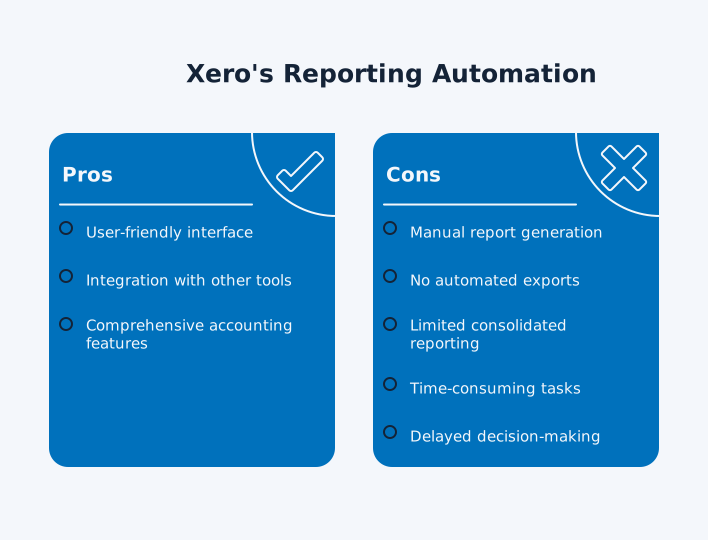
Performance issues compound these problems. Large reports can slow down or timeout in Xero, forcing you to break them into smaller date ranges or run them during off-peak hours. This manual workaround further extends your reporting timeline.
How Third-Party Solutions Transform Xero Report Automation
This is where specialised automation tools bridge the gap. Third-party connectors can automatically sync Xero data to spreadsheets, BI tools, and databases on your preferred schedule – from every 15 minutes to monthly intervals.
dataSights offers comprehensive Xero integration for both Power BI and Excel users. You connect once, and your dashboards or custom Excel reports update automatically through direct data connections. No CSV exports required – dataSights imports your data automatically, enabling multi-entity consolidation with live Xero data. The platform handles consolidation across 30+ entities, with everything balanced and reconciled.
Setting Up Automated Xero Report Workflows: A Practical Guide
Here’s how to implement report automation using a third-party connector like dataSights:
- Sign up for a dataSights account (free trial available).
- Log in to the Connectors page, and choose to add a Xero connector. Authenticate via OAuth.
- Select one or multiple Xero organisations/entities to pull data from.
- Trigger a sync to bring that data into your dataSights-hosted SQL data hub.
- Select your reporting destinations: Excel (Power Query), Power BI, or Google Sheets templates.
- Apply templates, mappings, or SQL views (many are prebuilt).
- Schedule report refreshes and data syncing frequency (e.g. daily or every 5 minutes).
- Publish reports or dashboards and share Power BI dashboards with stakeholders
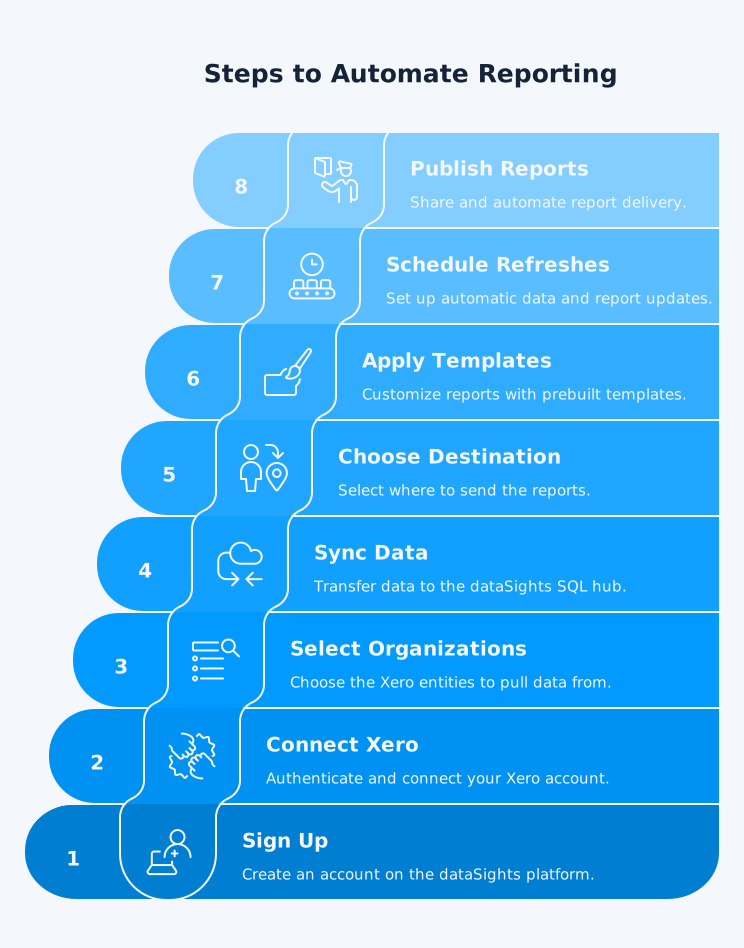
The focus is on automating the extraction, transformation, and delivery of financial data from Xero into reporting tools such as Excel, Power BI, or Google Sheets, across multiple Xero entities if needed.
Breakdown of Each Step and Its Role in Automation
| Step | Description | Purpose |
| 1. Create Account & Database | Set up your dataSights account and provision a SQL data hub | ✅ Creates your cloud-based data pipeline |
| 2. Connect to Xero | Authenticate and link one or more Xero organisations | ✅ Automates secure data sync from Xero |
| 3. Sync & Configure Reporting | Pull data into pre-built SQL views and link to reporting tools | ✅ Prepares the data model for live dashboards or reports |
| 4. Apply Reporting Templates | Use pre-configured Excel, Power BI, or Google Sheets templates | ✅ Skips manual report building |
| 5. Schedule Refreshes | Set daily/hourly sync intervals | ✅ Keeps reports live & up to date without manual intervention |
| 6. Automate Distribution | Share dashboards with stakeholders | ✅ Delivers reporting on autopilot |
Best Practices for Sustainable Xero Report Automation
- Start with your most time-consuming reports. If you’re currently spending 3 hours weekly on cash flow reports, automate those first for immediate time savings. Build complexity gradually rather than trying to automate everything at once.
- Standardise your data structure across Xero entities before automation. Consistent chart of accounts, tracking categories, and naming conventions ensure smooth consolidation. Clean data in equals clean reports out.
- Monitor your automated workflows initially. Check that reports are generated correctly and recipients receive them as expected. Most platforms provide activity logs and error notifications to help you maintain reliability.
- Document your automation setup for team continuity. Include refresh schedules, distribution lists, and any custom transformations that you have created. This documentation proves invaluable during staff transitions or system updates.
- Consider data security throughout implementation. Select tools that are SOC 2 compliant and utilise encrypted connections. Limit access to automated reports based on user roles, maintaining the same security standards as your manual processes.
Watch How to Properly Automate Your Xero Reporting
For a detailed walkthrough of automating Xero reports to Excel, this video demonstrates the complete process, including multi-entity consolidation and automated workflows:
Frequently Asked Questions
Can Xero automatically email reports on a schedule?
No, Xero cannot automatically email reports despite this being one of the most requested features for over 10 years. While you can generate reports within Xero, you must manually download and email them each time. While dataSights doesn’t email management reports directly, you can share Power BI dashboards with stakeholders for real-time access to your automated reports.
How much does it cost to automate Xero reports?
The cost to automate Xero reports depends on the type of reports you need, your Xero plan, and the connector or automation tool you choose.
What's the fastest way to set up Xero report automation?
The quickest setup uses pre-built connectors like dataSights for Power BI or Excel. Basic automation takes 15-30 minutes: connect Xero, select your reports, and set the refresh schedule. dataSights automatically imports your data without requiring CSV exports.
Is it safe to connect third-party automation tools to Xero?
Reputable automation platforms utilise OAuth authentication and maintain SOC 2 compliance to ensure data security. They don’t store your Xero credentials and can only access data you explicitly authorise. Check that your chosen tool encrypts data in transit and at rest. Read user reviews and verify the vendor’s security certifications before establishing a connection.
Can I automate consolidated reports for multiple Xero entities?
Yes, specialised tools excel at multi-entity consolidation where Xero falls short. DataSights handles consolidation across 30+ entities with automatic eliminations and currency conversions. G-Accon and similar platforms also support multi-entity reporting. This automation transforms the month-end close from a 15-day marathon to a 5-day sprint.
Do I need technical skills to set up Xero report automation?
Most modern automation tools require no coding knowledge. They provide visual interfaces for mapping data, setting schedules, and configuring reports. If you can navigate Xero and create basic reports, you can set up automation. Some platforms offer implementation support to ensure a smooth setup.
How often can automated reports refresh from Xero?
Refresh frequency depends on your chosen tool and Xero API limits. Most platforms support updates at intervals ranging from every 15 minutes to monthly. Daily refresh suits most reporting needs without hitting API limits. Real-time requirements may be needed every 15-30 minutes, although this is rarely necessary for financial reporting.
What happens if Xero updates their API?
Xero provides advanced notice for major changes (e.g. deprecating endpoints, requiring OAuth 2.0, or introducing new data models). Established automation platforms, like dataSights, actively monitor Xero’s API; therefore, you need to choose vendors with strong track records and active development teams. They usually communicate any required actions well in advance of changes.
Your Next Step to Automated Xero Reporting
Manual report generation costs your finance team countless hours every month. While Xero provides the data foundation, achieving true automation requires the proper integration tools. You’ve seen how automated workflows can reduce the month-end close from weeks to days, while ensuring stakeholders receive timely and accurate reports.
Transform Your Xero Consolidation Reporting Today
Transform weeks of manual consolidation into automated workflows that run in minutes. dataSights connects your Xero data directly to Power BI and Excel, handling multi-entity consolidation with automatic eliminations. Join 300+ finance teams who’ve already automated their reporting – rated 5.0 by 90+ verified Xero users.
About the Author
Kevin Wiegand
Founder & Client happiness
I’m Kevin Wiegand, and with over 25 years of experience in software development and financial data automation, I’ve honed my skills and knowledge in building enterprise-grade solutions for complex consolidation and reporting challenges. My journey includes developing custom solutions for data teams at Gazprom Marketing & Trading and E.ON, before founding dataSights in 2016. Today, dataSights helps over 300 businesses achieve 100% report automation. I’m passionate about sharing my expertise to help CFOs and Financial Controllers reduce their month-end close time and eliminate the manual Excel exports that drain their teams’ valuable time.