Are you still copying numbers between spreadsheets
every month-end, hoping nothing breaks? Field-audit
evidence suggests operational spreadsheet error rates
can be high. In Raymond Panko's summary of seven
field audits (reported by Powell, Baker, and
Lawson), errors were found in around 94% of audited spreadsheets, with an average formula cell
error rate of about 5.2%. Cloud based financial reporting
software removes that risk by centralising your financial
data, automating consolidation, and delivering accurate
reports without manual intervention. This guide covers
what to look for in a cloud reporting platform, how it
reduces your month-end close time, and why finance teams
managing multiple entities are making the switch. Read
on to find the right approach for your reporting needs.
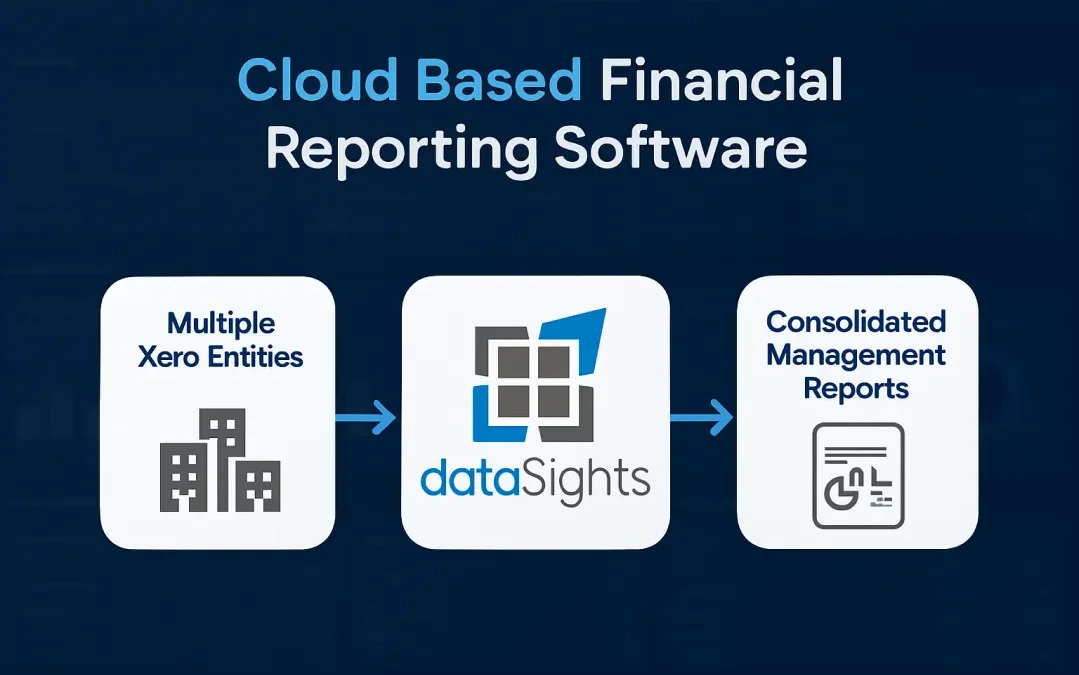
Cloud Based Financial Reporting Software
Cloud based financial reporting software is a web
platform that pulls Trial Balance and transaction
data from each entity, applies consolidation and
adjustments in a controlled layer, and produces
board-ready reports without manual spreadsheet
merges. Cloud adoption is approaching mainstream in
business operations (for example, 52.74% of EU enterprises used paid cloud services in 2025), and spreadsheet field
audits continue to show high error rates – two reasons
multi-entity teams move reporting out of fragile workbooks.
Why Finance Teams Are Moving to Cloud Based Reporting
The shift to cloud based financial reporting is
driven by three realities that every CFO and
Financial Controller faces: accuracy, speed, and
access.
The Spreadsheet Problem Is Worse Than You Think
Field-audit research shows operational spreadsheets
are frequently error-prone in practice – one reason
multi-entity reporting benefits from controlled
consolidation logic and a traceable audit trail. In
a finance context, these errors lead to:
- Incorrect payments and unreliable cash flow data
- Flawed budgets and forecasts
- Lost revenue and mispricing
- Poor decision-making and, in extreme cases, financial failure
For multi-entity businesses, the risk multiplies.
Each additional entity adds another spreadsheet,
another set of manual inputs, and another
opportunity for a broken formula to go undetected.
For groups subject to external audit scrutiny,
reporting errors have real consequences. PCAOB
staff analysis shows 'Big R' restatements have
occurred at around 3% of companies per year over 2005–2024 – one reason audit trails and controlled
consolidation logic matter.
Real-Time Access Changes How Finance Teams Operate
Wolters Kluwer's 2024 survey of US accounting firms
found 71% of cloud-based practices reported improved profitability in 2023 (versus 55% overall).
Cloud platforms give finance teams the ability to:
- Access current data from any location and any device
-
Review consolidated positions without waiting
for emailed spreadsheets
- Run variance analysis on live data
- Generate board packs on demand
This isn't about convenience alone. When your data
refreshes automatically on a set schedule,
month-end close can move faster because issues
surface earlier and consolidation logic stays
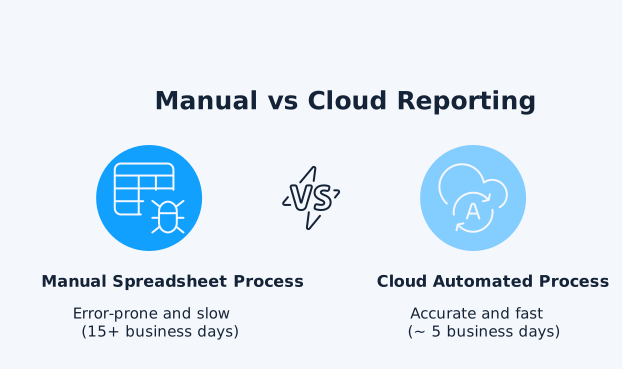
consistent period to period. Many multi-entity
teams we work with reduce month-end close from over
15 business days to under 5 business days once
their consolidated financial statements refresh on the configured schedule (near-real-time
visibility) and they no longer rely on manual data
transfers.
Compliance and Audit Readiness
Cloud platforms provide the controls that auditors look for:
- Full audit trails for every data change
- Version control across all reports
- Role-based access permissions
- Consistent data lineage from source to output
Audit readiness is mostly about controls and evidence:
- Clear access permissions
- Change history
- Traceable data lineage from source to report
That's why many finance teams ask vendors for a
current SOC 2 Type II report (controls relevant to security/availability and
related criteria) alongside their audit trail design. When
your reporting software tracks every change and maintains
consistent data lineage, audit preparation becomes a standard
output rather than a month-long scramble.
Key Features of Cloud Based Financial Reporting
Software
Not all cloud reporting platforms deliver the same
capabilities. Here is what your evaluation should
prioritise.
Automated Data Consolidation
For businesses running multiple entities, automated
consolidation is the feature that delivers the most
value. Look for software that handles:
- Intercompany eliminations
- Journal adjustments
- Foreign exchange conversions
- Full transactional history across all entities
Non-negotiable: your consolidated Trial
Balance should reconcile back to each entity's Trial Balance,
so every elimination and adjustment remains traceable to
source data.
For example, if Entity A sells services to Entity
B for £100,000, consolidation eliminates the
£100,000 intercompany revenue and the £100,000
intercompany expense – leaving only transactions
with external customers.
Manual consolidation across even five or six
entities can consume days of your finance team's
time each month. dataSights automates consolidation
across multiple Xero entities with full transactional
history in one click. Auto-eliminations, journal adjustments,
and FX conversions are included, so your consolidated
P&L, Balance Sheet, and Trial Balance are always accurate
and current.
Your cloud reporting platform should deliver
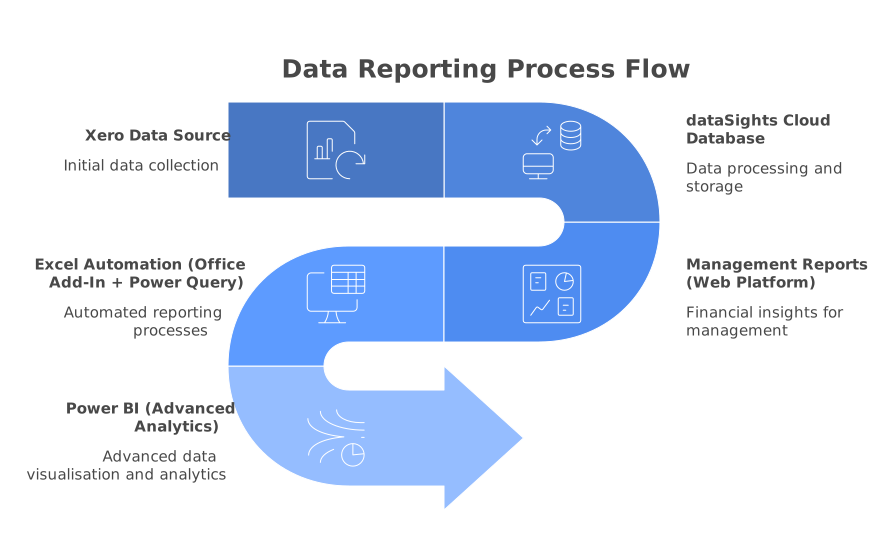
reports where your team actually works. dataSights
delivers this through a three-tier approach:
-
Pre-formatted Management Reports through the web
platform, including consolidated P&L, Balance
Sheet, Trial Balance, and KPI metrics with
automatic refresh
-
Excel automation via the dataSights Office
Add-in and Power Query (the data preparation
engine available across Excel and Power BI), so
spreadsheet workflows refresh without CSV
exports. This is how 75% of dataSights customers
work, building custom reports, month-end tasks,
and cashflow forecasts in their familiar Excel
environment
-
Power BI integration for teams requiring
advanced visualisation and drill-down
capabilities with real-time connections and
interactive dashboards
Scheduled Data Refresh and Near-Real-Time
Visibility
Your reports should reflect the latest transactions
without manual intervention. Cloud platforms
connect directly to your accounting data through
APIs, pulling updated figures on a schedule you
control. This removes the export-import cycle that
introduces errors and delays.
Multi-Entity and Multi-Currency Support
If you manage a group structure, your software must support:
- Multiple entities with distinct charts of accounts
- Multiple currencies with automatic translation
-
IFRS 10 and ASC 810 requirements for
control-based consolidation
- Minority interest calculations
- Foreign currency translation aligned with IAS 21
Note: For foreign currency translation, each entity
reports in its functional currency, then results are translated
to the group presentation currency (typically average rates
for P&L and closing rates for balance sheet), with cumulative
translation differences recognised in equity through OCI.
Security and Access Controls
Financial data requires enterprise-grade protection. Look for platforms with:
- Encryption in transit and at rest, with documented key management
- Multi-factor authentication
- Role-based permissions
-
A current SOC 2 Type II report (or equivalent
assurance) available on request
- Continuous backups and disaster recovery
Remember the shared responsibility model:
the vendor secures the platform, but you still own user
access, MFA, and data governance.
How to Evaluate Financial Reporting Software for
Your Business
Choosing the right platform depends on your group
structure, your accounting system, and how your
team prefers to work.
If your entities run on Xero, your reporting
software needs deep Xero integration. Generic
tools that offer surface-level connections will
not handle the specific data structures, chart of
accounts variations, and tracking categories that
Xero uses. dataSights is built specifically for Xero reporting and
connects to 160+ additional data sources for broader
business intelligence.
Map Your Consolidation Requirements
Before evaluating platforms, document your specific needs:
- How many entities do you need to consolidate?
- Do you have intercompany transactions that require elimination?
- Are your entities in different currencies?
-
What level of consolidation do you need –
management reporting, statutory, or both?
- How frequently do you need updated consolidated positions?
Some finance teams want everything in a web
dashboard. Others live in Excel and want their
data piped directly into familiar workbook
templates. The right platform supports both
without forcing a single workflow. dataSights
supports this flexibility with its Excel add-ins that automate
data imports directly into existing spreadsheet models.
Consider the Implementation Timeline
Cloud platforms should not require months of setup.
Look for solutions that connect to your existing
accounting systems within days, not quarters.
dataSights customers typically see their first
consolidated reports within the first week of
setup, because the platform reads your existing
Xero chart of accounts and transaction history
directly.
Cloud Based Financial Reporting Software for
Australian Businesses
For finance teams evaluating financial reporting
software Australia options, requirements often go
beyond reporting polish. Your platform should
support Australian accounting standards (AASB),
handle GST reporting, and integrate cleanly with
the tools most commonly used by Australian
multi-entity groups, particularly Xero.
Why Xero Integration Matters in Australia
Xero is widely used across Australia and New
Zealand – Xero reported 2.6 million subscribers in Australia and New
Zealand in FY25 – so multi-entity finance teams often need reporting
that works cleanly across multiple Xero organisations.
For multi-entity groups running Xero, a cloud reporting
platform must connect natively to Xero's API to access:
- Full chart of accounts data
- Tracking categories
- Manual journals
- Bank reconciliation data
- Invoice and payment history
Australian Compliance Requirements
Your cloud platform should support reporting
aligned with AASB standards, which are based on
IFRS. For consolidated group reporting, this means proper
treatment of:
- Goodwill on acquisition
- Minority interests and non-controlling interests
- Elimination entries for intercompany transactions
- Foreign currency translation in accordance with AASB 121 (aligned with IAS 21)
dataSights serves 300+ businesses globally
with a 5.0 rating from 90+ reviews, including Australian
multi-entity groups that need compliant, automated consolidation
reporting.
The distinction between web-based reporting tools
and traditional desktop software has become a
deciding factor for modern finance teams.
| Feature | Cloud/Web-Based (typical) | Desktop Installed (typical) |
| Access | Any device, any location | Specific machine only |
| Data currency | Real-time or scheduled refresh | Manual update required |
| Collaboration | Multiple users simultaneously | Single user or file sharing |
| Maintenance | Provider managed | Internal IT responsibility |
| Scalability | Add entities or users instantly | Hardware and licence constraints |
| Backup and recovery | Automatic and continuous | Manual backup processes |
| Cost model | Subscription (operating expense) | Licence + infrastructure (capital cost) |
For finance teams, the operational advantages of
cloud platforms compound over time. Every manual
process you automate reduces your error rate and
accelerates your reporting cycle.
SaaS Financial Reporting: What the Subscription
Model Means for You
SaaS financial reporting platforms operate on a
subscription model, which changes both the cost
structure and the feature set compared to
traditional software licences.
Continuous Updates Without Upgrade Cycles
SaaS platforms push updates automatically. Your
platform updates without any action from your IT
team when:
- Accounting standards change
- New integrations become available
- Security patches are needed
- Performance improvements are released
This removes the version fragmentation that plagues desktop installations.
Predictable Cost Structure
Subscription pricing means your financial reporting
costs are predictable monthly operating expenses
rather than large capital outlays. This is
particularly relevant for growing businesses that
need to add entities or users without purchasing
additional licences.
Integration Ecosystem
SaaS platforms maintain active integrations with other cloud services.
dataSights connects to 160+ data sources, including:
- Xero and other accounting platforms
- CRM systems
- Inventory management tools
- Payroll providers
- Operational and project management tools
This means your financial reports can incorporate
data from across your entire business, not just
your general ledger.
Common Concerns About Cloud Based Financial
Reporting
Moving financial data to the cloud raises valid
questions. Here's what multi-entity finance teams
typically evaluate and what good practice looks
like.
1. Security and Data Governance
Cloud reporting can be secure when controls are
verified and responsibilities are clear. A
practical assessment includes:
- Checking encryption in transit and at rest
- Enforcing MFA and role-based access controls
- Requesting independent assurance such as a SOC 2 Type II report
It's also important to confirm how the vendor
handles privacy and data residency across the
jurisdictions your group operates in.
2. Business Continuity During Outages
Cloud reporting relies on an internet connection,
so teams usually plan a simple close-period
fallback. In practice, that means:
- Exporting board packs to PDF
- Keeping a locally saved copy of close-critical files
- Using a failover connection (for example, a mobile hotspot) when connectivity is unstable
3. Handling Complex Consolidation Requirements
Capability varies widely by platform. Generic
accounting tools may support basic reporting but
often fall short when you need:
- Multi-entity eliminations
- Intercompany balancing and reconciliation
- Foreign exchange translation
- Minority interest adjustments
Purpose-built consolidation platforms like
dataSights are designed to manage these
requirements with controlled logic and an
auditable trail.