
Running payroll across multiple Xero entities creates friction at every month-end. You’re exporting pay runs manually, reconciling payroll costs in Excel, and watching consolidation stretch beyond two weeks. Finance teams managing multi-entity Xero setups know the pain: payroll data sits in one system while your consolidated reporting needs it in another. If you’re wondering how Employment Hero Payroll fits into your Xero consolidation strategy, this guide shows you exactly how to connect payroll automation with multi-entity financial reporting that balances.
How Employment Hero Payroll Fits Into Your Xero Consolidation Strategy
Employment Hero Payroll fits into your Xero consolidation strategy through automated journal postings, syncing payroll data into your chart of accounts without manual exports. For multi-entity businesses, this integration becomes your foundation for consolidated payroll reporting across all Xero entities. dataSights clients consolidating payroll data from multiple Employment Hero Pay instances reduce month-end close from over 15 days to under 5 days through automated data flows that eliminate manual reconciliation.
Ready to Automate Your Financial Consolidation?
Stop wrestling with manual consolidations and broken formulas. dataSights automates multi-entity reporting, Xero consolidations, and Power BI connections. Join 300+ businesses already transforming their financial reporting with our platform, rated 5.0 out of 5 by 90+ verified Xero users.
Table of Contents
What Employment Hero Payroll Brings to Multi-Entity Xero Users
Employment Hero Payroll operates as a cloud-based payroll platform designed specifically for Australian, New Zealand, UK, Singapore, and Malaysian businesses needing compliance-ready payroll processing. The platform automates pay runs and handles Single Touch Payroll reporting for businesses running complex payroll across multiple locations or entities. For Australia, Employment Hero includes modern award interpretation and updates; in NZ/UK/SG/MY, local compliance features apply, but ‘modern awards’ don’t.
For Xero users managing multiple entities, Employment Hero Payroll delivers three critical capabilities:
- Automated Journal Integration: Once configured, Employment Hero automatically posts payroll journals into Xero upon finalising each pay run, eliminating manual data entry and reducing payroll-to-accounts reconciliation time.
- Chart of Accounts Mapping: The integration imports your Xero chart of accounts and maps transaction types to appropriate general ledger codes, ensuring payroll expenses flow to the correct accounts across all entities.
- Multi-Entity Payroll Processing: Teams can process payroll across multiple employing entities in Employment Hero and allocate employee earnings across locations; however, automated cost allocation is location-based rather than inter-entity, and entity-specific journals require running separate pay runs per entity.
Why Payroll Data Matters for Xero Consolidation
Payroll represents a significant operational expense that flows through multiple areas of your consolidated financial statements. When you consolidate financial data from multiple Xero entities, payroll costs must reconcile across:
- Profit & Loss Statements: Wages, superannuation, and payroll taxes appear as operating expenses that consolidate across all entities.
- Balance Sheet Accounts: Payroll liabilities, including PAYG withholding, superannuation payable, and employee leave provisions, must balance across your group.
- Intercompany Allocations: When head office processes payroll for subsidiary staff, these cost allocations create intercompany transactions requiring elimination during consolidation.
- Cash Flow Reporting: Payroll payments represent significant cash outflows that consolidate across your entire business structure.
Without automated payroll integration, finance teams export pay run data manually, reconcile costs in Excel, and spend days ensuring payroll balances match across entities. This manual process introduces errors and delays month-end close significantly.
How Employment Hero Payroll Integration Works with Xero
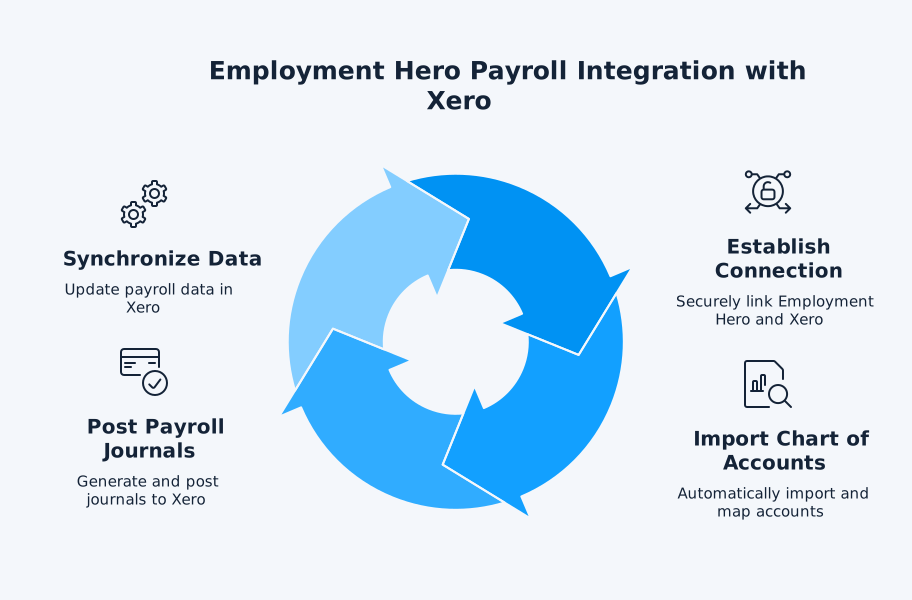
The technical architecture connecting Employment Hero Payroll to Xero follows a straightforward workflow designed to eliminate manual data handling:
Step 1: Initial Connection
Log into Employment Hero Payroll, navigate to Payroll Settings, select Integrations, and choose Xero from available services. The system redirects you to Xero where you authorise access, creating a secure API connection between platforms.
Step 2: Chart of Accounts Import
Employment Hero imports your Xero chart of accounts automatically. You then map payroll transaction types (wages, superannuation, PAYG withholding, leave accruals) to specific general ledger accounts. This mapping ensures payroll costs post to the correct accounts in Xero.
Step 3: Automated Journal Posting
When you finalise a pay run, Employment Hero generates payroll journals and posts them to Xero (optionally as drafts). These journals include all payroll components: gross wages, tax withholdings, superannuation, and employee deductions.
Step 4: Synchronisation
The integration posts payroll journals to Xero when you finalise pay runs. Employee and HR data remains managed in Employment Hero; changes in Xero won’t overwrite Employment Hero records.
Strategic Benefits for Multi-Entity Consolidation
When you’re managing multiple Xero entities, Employment Hero Payroll integration delivers benefits that compound during consolidation:
- Consistent Data Structure: Mapping payroll accounts identically across all Xero entities means your payroll costs consolidate cleanly without manual account mapping or reconciliation adjustments.
- Elimination-Ready Reporting: If head office processes payroll for subsidiary employees, the automated journals create clear audit trails for intercompany payroll allocations that require elimination during consolidation.
- Post-Run Payroll Visibility: See payroll costs in Xero right after each pay run, so you can update consolidated views on your refresh schedule.
- Audit Trail Preservation: Every payroll journal posted from Employment Hero maintains complete documentation showing which pay run generated which journal entries, supporting audit requirements for consolidated financials.
Standards note: Under IFRS 10, consolidation is based on control (not just ownership %). Intra-group transactions and balances are eliminated in full. Associates and JVs are generally accounted for under the equity method (IAS 28).
Where dataSights Fits in Your Payroll Consolidation Strategy
While Employment Hero Payroll handles the challenge of getting payroll data into individual Xero entities accurately, Xero files remain separate by design; there’s no native group-wide consolidation across organisations.
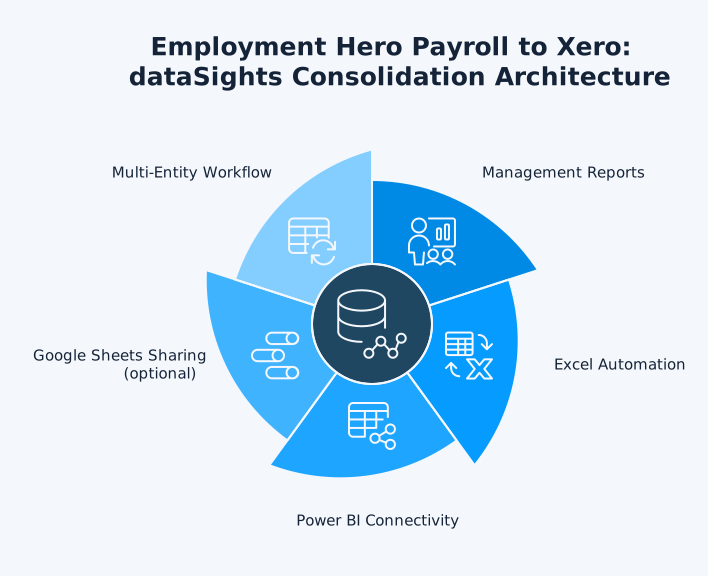
dataSights delivers board-ready Management Reports as your primary output, including:
- Consolidated P&L
- Balance Sheet
- Trial Balance
- Accounts Receivable (AR) and Accounts Payable (AP)
- Budget and Variance analysis
- KPI metrics
These reports refresh automatically on schedule to provide timely and accurate financial insights.
For spreadsheet teams, we automate Excel with one-click refresh via Power Query – no CSVs. For advanced analytics, Power BI connects directly to your consolidated SQL data. Google Sheets is available when you need light-touch sharing.
This architecture solves three critical consolidation challenges:
- Multi-Entity Payroll Aggregation: Pull payroll data from multiple Employment Hero accounts (if you process payroll separately for different entities) or analyse payroll distributed across multiple Xero entities from a single Employment Hero instance.
- Automated Cost Allocation Reporting: When you distribute payroll costs across entities using Employment Hero’s earnings distribution features, consolidation software automatically pulls these allocations into unified reports showing total payroll costs by entity, department, or location.
- Intercompany Elimination Support: If head office processes payroll for subsidiaries and charges back costs, automated consolidation identifies these intercompany allocations and applies elimination rules to prevent double-counting expenses in consolidated financials.
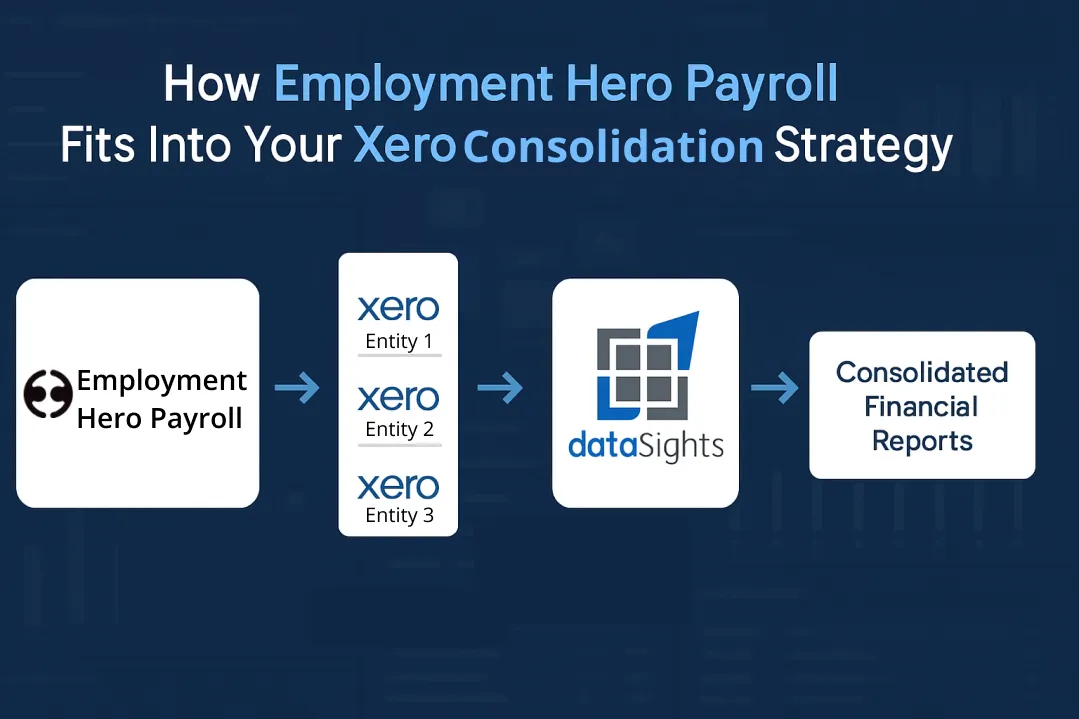
For businesses running complex multi-entity structures, the workflow becomes: Employment Hero Payroll → Xero Entities → dataSights Consolidation → Unified Reporting. This eliminates manual exports entirely.
Implementation Best Practices for Multi-Entity Payroll Consolidation
Success with Employment Hero Payroll in a multi-entity Xero environment requires upfront planning that pays dividends every month-end:
- Standardise Your Chart of Accounts: Before connecting Employment Hero to your first Xero entity, establish a master chart of accounts structure and apply it across all entities. Use identical account codes for payroll-related accounts (wages expense, PAYG liability, superannuation liability) to enable clean consolidation.
- Plan Your Entity Structure: Decide whether to run separate Employment Hero instances for each legal entity or manage all payroll from one Employment Hero account with earnings distribution. The former provides clearer entity separation but requires multiple integration setups. The latter simplifies processing but requires careful earnings distribution configuration.
- Map Intercompany Allocations Clearly: If you charge payroll costs between entities, document these allocation rules explicitly. Use tracking categories in Xero and Employment Hero’s location/cost centre features consistently to maintain clear audit trails for consolidation eliminations.
- Test Before Go-Live: Process a test pay run in Employment Hero and verify that journals post correctly to Xero with amounts flowing to the right accounts. Check that your consolidation process can pull the payroll data and apply any required eliminations before rolling out to production.
- Establish Monthly Reconciliation Processes: Even with automation, reconcile Employment Hero pay run totals against Xero journal entries and verify these match your consolidated payroll reports. This catches configuration errors before they compound.
Important: Always reconcile entity-level Trial Balances first. dataSights consolidates from the TB up, so group results always tie back to source systems before eliminations.
Common Pitfalls and How to Avoid Them
Finance teams implementing Employment Hero Payroll integration with multi-entity Xero consolidation encounter predictable challenges:
- Inconsistent Account Mapping: Mapping wages to different general ledger accounts across entities creates consolidation nightmares. Solution: Document your standard account mapping and apply it identically to every Xero entity before connecting Employment Hero.
- Timing Mismatches: Pay runs processed late in the month may post to Xero after you’ve started consolidation. Solution: Establish cut-off procedures ensuring all pay runs finalise before period close begins.
- Tracking Category Confusion: Employment Hero locations don’t automatically map to Xero tracking categories. Solution: Manually configure tracking category assignments in Xero after journals post, or use consolidation software that handles multi-dimensional reporting without relying on Xero’s tracking categories.
- Incomplete Elimination Rules: Head office payroll allocations to subsidiaries sometimes lack clear documentation for elimination during consolidation. Solution: Create specific intercompany accounts for payroll recharges and document elimination rules in your consolidation system.
Advanced Consolidation Scenarios
Complex organisational structures require additional considerations when consolidating payroll data:
- Multi-Currency Payroll: If you pay employees in different currencies across entities, Employment Hero handles local currency payroll while Xero manages multi-currency accounting. Consolidation software applies appropriate exchange rates (Under IAS 21, expenses are commonly translated at average rates for the period where appropriate; monetary liabilities use the closing (spot) rate) to convert amounts to your group reporting currency.
- Part-Month Acquisitions: When you acquire a business mid-period, you need consolidated payroll reports that include the acquired entity only from acquisition date forward. Consolidation software with powerful filtering capabilities enables date-based inclusion of payroll costs.
- Non-Controlling Interests: If you own less than 100% of entities where you process payroll, consolidated payroll costs must attribute the non-controlling interest portion separately. While Employment Hero and Xero don’t handle this directly, your consolidation platform can calculate NCI based on ownership percentages and settings.
Measuring Success with Automated Payroll Consolidation
Track these metrics to quantify the impact of automated payroll consolidation:
- Month-End Close Time: Measure days from period end to finalised consolidated financial statements. dataSights clients typically report reducing this from 15+ days to under 5 days when automating consolidation including payroll.
- Payroll Reconciliation Time: Track hours spent reconciling Employment Hero pay runs to Xero journals and verifying consolidation. Automation should reduce this from hours to minutes monthly.
- Error Rates: Count payroll-related adjustments required after initial consolidation. Automated integration eliminates most manual entry errors that plague consolidation processes.
- Reporting Frequency: With automation, you can move from monthly consolidated payroll reports to weekly or even daily visibility into group-wide payroll costs.
Future-Proofing Your Payroll Consolidation Strategy
As your business grows, your payroll consolidation needs evolve:
- Scalability: Choose consolidation solutions that handle increasing entity counts without performance degradation. dataSights clients consolidate payroll and financial data from small and large groups of entities without hitting system limits.
- Regulatory Changes: Employment Hero updates automatically for changes to modern awards, tax tables, and superannuation requirements. Ensure your consolidation reporting adapts to capture these changes across all entities.
- Advanced Analytics: Beyond basic consolidation, consider how you’ll analyse payroll trends across entities, locations, and departments. Connecting Employment Hero Payroll data to Power BI or Excel through dataSights enables labour cost analysis, headcount reporting, and budget variance analysis that standard consolidation doesn’t provide.
- Audit Readiness: Maintain clear documentation showing how payroll flows from Employment Hero through Xero into consolidated reports. This audit trail becomes critical during external audits of consolidated financial statements.
Frequently Asked Questions
What Management Reports Do We Get by Default?
You get consolidated P&L, Balance Sheet, Trial Balance, AR/AP, Budget & Variance, and KPI metrics in the dataSights web platform – board-ready and refreshed on your schedule.
Can We Keep Our Excel Models?
Yes. We automate Excel via Power Query and our Office Add-in so your spreadsheets refresh with live, consolidated data – no CSV exports.
Can Employment Hero Payroll Consolidate Data from Multiple Xero Entities Directly?
No, Employment Hero Payroll posts journals to individual Xero entities but doesn’t consolidate across them. You need consolidation software that pulls data from multiple Xero entities and aggregates payroll costs. dataSights provides this capability, syncing data from all your Xero entities and Employment Hero accounts into unified reports.
Does the Employment Hero Xero Integration Work with All Xero Subscription Plans?
You’ll need appropriate Xero permissions to connect the integration; features vary by region and plan. Check your plan’s features and user roles.
How Long Does It Take to Set Up Employment Hero Payroll Integration with Xero?
Initial connection takes just a few minutes. After connecting, plan a short setup session to: import your Xero chart of accounts, choose whether pay runs post to Xero as journals or accounts payable invoices/bills (you can post as drafts), and map GL accounts to payroll transaction types (wages, superannuation, deductions, taxes). Run a test pay run to confirm lines land in the right accounts. Multi-entity structures or complex charts/tracking will add time.
What Happens if I Change Something in Xero After the Payroll Journal Posts?
Employment Hero creates journals that post to Xero, but it doesn’t continuously sync changes. If you modify the posted journal in Xero, Employment Hero won’t overwrite your changes. This one-way flow after posting gives you control while maintaining automation.
Can I Automate Eliminations for Intercompany Payroll Allocations?
Yes, but not within Xero or Employment Hero directly. Consolidation software enables you to define elimination rules that automatically remove intercompany payroll recharges during consolidation, ensuring costs aren’t double-counted in group financials.
Does Employment Hero Payroll Handle Multi-Currency Payroll for Consolidation?
Employment Hero runs payroll in each entity’s local currency and posts the resulting payroll journal to that entity’s Xero organisation, which records amounts in the organisation’s base currency set in Xero. Group-level currency translation happens in your consolidation/reporting layer (e.g., dataSights), not in Employment Hero or Xero. Under IAS 21, income and expense items such as payroll costs are translated at the exchange rates at the dates of the transactions, with an average rate permitted when it approximates those rates; monetary items (for example, payroll-related liabilities) are translated at the closing (spot) rate at period end.
What Payroll Data Syncs from Employment Hero to Xero?
When you finalise a pay run in Employment Hero Payroll, the integration publishes a payroll journal to Xero. Journal lines cover items such as gross wages, employer on-costs like superannuation, employee deductions, and payroll taxes or liabilities, and can use your Xero chart of accounts and tracking categories. Employee records, leave balances, and timesheets live in Employment Hero; they are not synchronised into Xero.
How Do I Handle Payroll for Employees Who Work Across Multiple Entities?
Use Employment Hero’s earnings distribution features to allocate employee costs across entities or locations. The system generates journals that split payroll costs appropriately, which then flow through to each entity’s Xero account for consolidation.
Can I Generate Consolidated Payroll Reports Without Consolidating Full Financial Statements?
Yes, dataSights enables you to connect Employment Hero Payroll data directly to Power BI or Excel for payroll-specific analysis across entities without requiring full financial consolidation. This supports HR and payroll teams needing workforce analytics independent of month-end close processes.
Transform Your Payroll Consolidation Process
Employment Hero Payroll integration with Xero solves the payroll-to-accounts challenge, but true multi-entity consolidation requires purpose-built automation. Manual Excel consolidation consumes days every month, introduces errors, and delays strategic decision-making. The right consolidation strategy puts your payroll data exactly where you need it: in unified reports that balance automatically and update automatically on your refresh schedule across all your entities.
Streamline Your Multi-Entity Xero Consolidation with Payroll Integration
Ready to cut your month-end close from weeks to days? dataSights automates Xero consolidation including Employment Hero Payroll data, delivering consolidated financial statements with automatic eliminations and updates on your refresh schedule. Rated 5.0 out of 5 by 90+ Xero users. Join 300+ businesses who’ve already transformed their financial reporting.
About the Author
Kevin Wiegand
Founder & Client happiness
I’m Kevin Wiegand, and with over 25 years of experience in software development and financial data automation, I’ve honed my skills and knowledge in building enterprise-grade solutions for complex consolidation and reporting challenges. My journey includes developing custom solutions for data teams at Gazprom Marketing & Trading and E.ON, before founding dataSights in 2016. Today, dataSights helps over 300 businesses achieve 100% report automation. I’m passionate about sharing my expertise to help CFOs and Financial Controllers reduce their month-end close time and eliminate the manual Excel exports that drain their teams’ valuable time.