
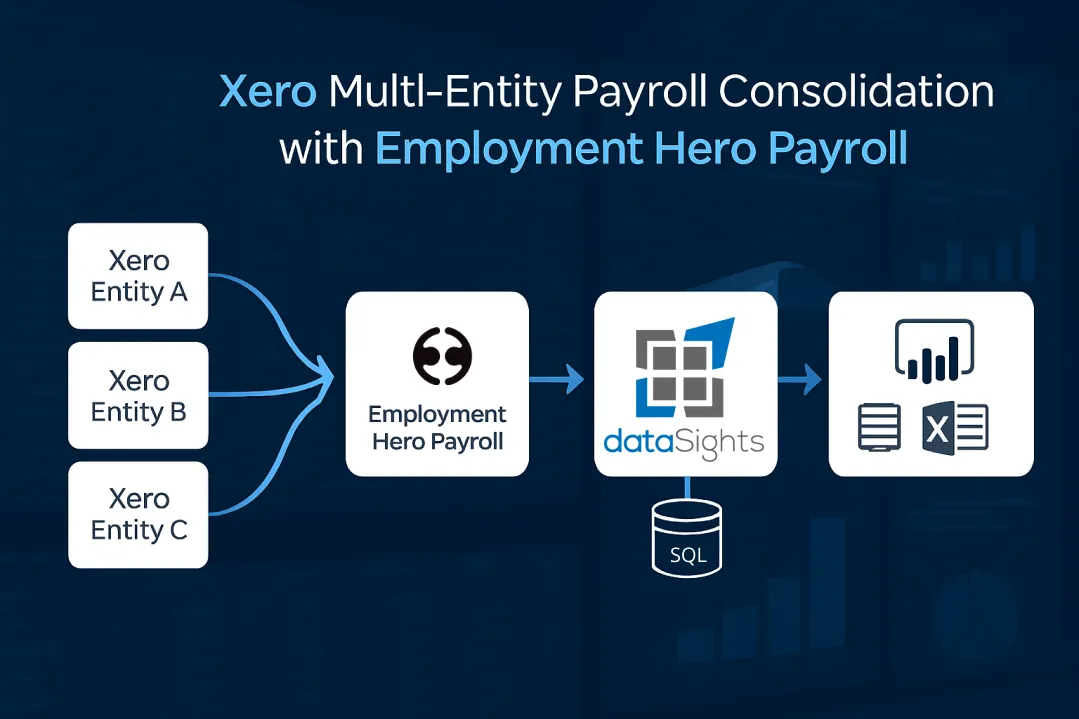
You’re managing payroll for multiple entities through Employment Hero Payroll, posting to separate Xero organisations, and watching your finance team spend 10-15 hours monthly on manual consolidation. Every pay period, they export CSV files, copy data between spreadsheets, and reconcile payroll costs across your group using formulas that break when structures change. Here’s why Xero multi-entity payroll consolidation with Employment Hero Payroll creates this mess: Employment Hero Payroll can only link one employing entity directly to your Xero accounting platform, forcing manual file uploads for all remaining entities. This architectural limitation means finance teams manually piece together payroll data that automated solutions consolidate in minutes, extending month-end close beyond 15 days when it should take under 5.
What is Xero Multi-Entity Payroll Consolidation with Employment Hero Payroll?
Xero multi-entity payroll consolidation with Employment Hero Payroll combines payroll data from multiple Xero organisations into unified reports through automated data synchronisation. Employment Hero Payroll processes payroll across entities, while dataSights connects Employment Hero Payroll data directly to Power BI, Excel, and Google Sheets through Azure SQL databases, eliminating manual CSV exports. Automated consolidation solutions help teams move toward a sub-week close with fewer post-close adjustments.
Ready to Automate Your Financial Consolidation?
Stop wrestling with manual consolidations and broken formulas. dataSights automates multi-entity reporting, Xero consolidations, and Power BI connections. Join 300+ businesses already transforming their financial reporting with our platform, rated 5.0 out of 5 by 90+ verified Xero users.
Table of Contents
Why Employment Hero Payroll Creates Multi-Entity Consolidation Challenges
Employment Hero Payroll’s architecture creates specific obstacles for multi-entity businesses using Xero. Understanding these limitations clarifies why automated consolidation becomes essential as you scale.
The One-Entity Xero Connection Limit
Employment Hero Payroll enforces a critical constraint: if your business has multiple employing entities, you can only link one employing entity to your Xero accounting platform. All remaining entities require manual file uploads to sync payroll data to Xero. If your business has multiple employing entities, only one employing entity can link to the Xero accounting platform; others require manual file uploads.
This means Entity A posts journals automatically to Xero. Entities B, C, D, and beyond require you to:
- Export payroll data as CSV files from Employment Hero Payroll
- Upload these files manually to each respective Xero organisation
- Reconcile accounts across entities without automated validation
- Repeat this process every pay run
For businesses with 3+ entities, this workflow consumes hours every pay period. The manual handling introduces data entry errors, version control issues, and delays in month-end reporting.
Additional Employing Entities Within One Payroll File
Employment Hero Payroll does support additional employing entities within a single payroll file. This feature allows different ABNs to operate under the same payroll platform, which helps with:
- Managing multiple legal structures (companies, trusts, partnerships)
- Processing pay runs that include employees from various entities
- Filtering most reports by employing entity
However, significant consolidation limitations remain:
- Reporting Constraints: Most reports filter by employing entity, but not all do. Consolidated payroll cost visibility requires manual aggregation across entity-specific reports.
- Journal Limitations: While you can process pay runs including multiple entities, only one pay run journal is generated. If you need separate journals per entity for Xero posting, you must run separate pay runs for each entity.
- Single Touch Payroll Complexity: Operating with multiple ABNs under one Employment Hero file requires specific ATO configuration. STP lodgements are submitted per ABN. If you use a registered intermediary, they can lodge separate STP events on behalf of each employing entity.
No Native Consolidated Payroll Reporting
Employment Hero supports multiple employing entities in one file and many reports can be filtered by employing entity; however, some reports remain entity-specific and cross-entity consolidation is limited. When your board asks for group-wide labour cost analysis, you’re exporting entity reports and manually aggregating in Excel.
Finance teams spend most of their time creating and updating reports rather than analysing data. This imbalance stems directly from platforms requiring manual report consolidation.
How Manual Payroll Consolidation Actually Works (And Why It Fails)
Manual consolidation is predictable and painful. Finance teams repeat it every pay period.
The Manual Excel Consolidation Process
Here’s what manual Employment Hero Payroll to Xero consolidation looks like in practice:
Step 1: Export from Employment Hero Payroll
Download CSV reports for each entity showing wages, superannuation, PAYG withholding, leave accruals, and employer contributions. With 5 entities, that’s 5 separate exports per pay run.
Step 2: Upload to Xero
Manually upload payroll journals or invoices to each Xero organisation. Format mismatches require reformatting CSV files to match Xero’s import templates. One formatting error means re-uploading the entire file.
Step 3: Consolidate in Excel
Pull Trial Balance exports from each Xero entity. Copy payroll expense accounts into a consolidation spreadsheet. Manually map account codes where entities use different Chart of Accounts structures. Apply formulas to sum across entities.
Step 4: Reconcile and Validate
Cross-check totals against bank payments. Investigate variances between consolidated payroll costs and actual cash outflows. Identify where formula errors occurred (and they will occur).
Research into multi-entity consolidation identifies this manual process as “time-consuming and prone to errors, especially when dealing with multiple currencies.” Many finance teams report spending significant time each month on manual payroll consolidation steps (exports, mapping, reconciliation).
Common Failure Points
- Formula Errors: Complex VLOOKUP and SUMIF formulas break when entity structures change. One incorrect cell reference propagates errors throughout your consolidation.
- Version Control: Multiple team members update the same consolidation spreadsheet. Conflicting versions mean restarting consolidation from scratch to identify which numbers are correct.
- Timing Delays: Entity-level payroll processing happens at different times. Your consolidation waits for the slowest entity to complete their pay run and Xero posting before you can even start consolidating.
- No Audit Trail: Spreadsheet consolidations lack systematic audit trails. Explaining a variance to your auditor requires reconstructing your consolidation logic manually.
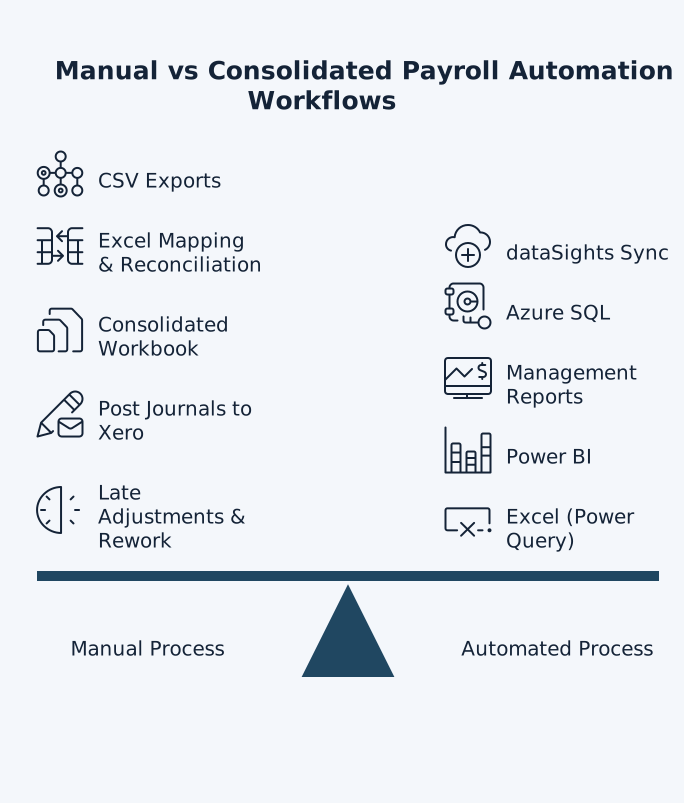
Manual vs automated payroll consolidation: CSV exports and Excel checks vs dataSights sync to SQL and instant consolidated reports.
The Month-End Close Time Impact
Manual consolidation extends month-end close beyond 15 days for multi-entity organisations. Bottom-quartile performers take even longer, while top performers using automated solutions close in under 5 days.
When your finance team spends two weeks consolidating, they have zero time for the analysis that actually drives business decisions. You’re getting backward-looking reports when you need forward-looking insights.
How dataSights Automates Employment Hero Payroll Consolidation
dataSights connects Employment Hero Payroll to Power BI, Excel, and Google Sheets through fully automated data synchronisation, removing manual exports and enabling genuine real-time analysis.
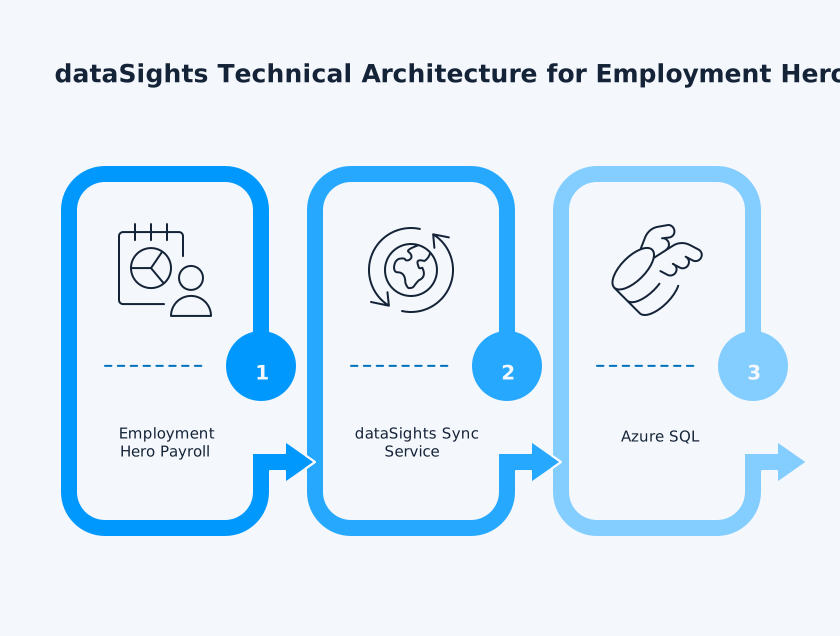
The dataSights Technical Architecture
This architecture underpins Management Reports (Primary) – your default, executive-ready consolidated reporting – while also enabling optional self-service in Power BI and Excel.
Each customer receives a dedicated Azure SQL Database, hosted and managed by dataSights. For teams with existing infrastructure, a bring-your-own-database option lets us integrate directly with your Azure SQL environment.
Once Employment Hero Payroll data lands in SQL, it becomes the single source of truth for multi-entity reporting and analytics.
From there:
- Management Reports (Primary): Pre-built, consolidated packs in the dataSights web platform – no DIY dashboarding. Includes consolidated P&L with eliminations, Balance Sheet, payroll cost by entity/location/department, overtime and penalties, leave and liabilities, headcount and movements, and exception checks. Built for scale with multi-entity consolidation.
- Power BI: Connects natively to SQL using DirectQuery vs. Import Mode as appropriate. Most organisations use Import Mode with scheduled refresh for speed and stability, while reserving DirectQuery for specific real-time needs.
- Excel (Power Query): Power Query – the same data transformation engine used in both Excel and Power BI – refreshes one-click models for payroll and labour-cost analysis. No CSV exports. No copy-paste.
- Google Sheets (optional): Light-touch access for stakeholders who need quick, view-only summaries. Used sparingly in our standard approach.
This design delivers secure, scalable, automated payroll analytics with controlled refresh schedules and transparent data pipelines – giving finance and HR up-to-date insights while maintaining full data ownership and governance.
Connecting Multiple Xero Entities
dataSights doesn’t just handle Employment Hero Payroll data. The platform simultaneously connects all your Xero entities, pulling Trial Balance data, transaction details, and chart of accounts from each organisation.
This dual-source capability means your consolidated reports combine:
- Payroll costs from Employment Hero Payroll
- Financial data from multiple Xero organisations
- Operational data from other connected systems (Cin7 Core, Deputy, etc.)
All data syncs automatically into your dedicated SQL database. No manual exports. No CSV file juggling. No version control nightmares.
Pre-Built SQL Views for Immediate Reporting
dataSights provides pre-configured SQL views specifically designed for payroll and financial analysis:
- Consolidated payroll expense by entity and department
- Employee cost analysis across all organisations
- Leave liability calculations grouped by entity
- Superannuation tracking and reconciliation
- PAYG withholding consolidated reporting
These views eliminate the need to write complex SQL queries. Connect Power BI or Excel to the database, select the relevant view, and your reports populate automatically.
For teams with SQL expertise, the platform provides full database access for custom query development. Build bespoke views that match your specific reporting requirements.
Automated Data Refresh Schedules
Set refresh schedules matching your business cadence. Options include:
- Real-time updates triggered by pay run finalisation
- Daily refreshes for ongoing visibility
- Weekly consolidations for board packs
- Monthly snapshots for period-end reporting
dataSights handles consolidation across both small and large groups of entities without performance degradation. The system processes refreshes efficiently, whether you’re consolidating 3 entities or 30.
Building Power BI Dashboards from Consolidated Payroll Data
Power BI transforms raw Employment Hero Payroll and Xero data into visual dashboards that finance teams actually use.
DirectQuery vs. Import Mode
dataSights supports both Power BI connection modes:
- DirectQuery: Query the SQL database in real-time. Reports always show current data without manual refresh. Best for dashboards requiring up-to-the-minute accuracy. Trade-off: slightly slower query performance for complex reports.
- Import Mode: Load data into Power BI’s in-memory engine. Lightning-fast report performance. Schedule automatic refreshes daily or weekly. Trade-off: reports show data as of last refresh, not real-time.
Most clients use Import Mode with daily refreshes, balancing performance with data currency. See Microsoft’s guidance on when to use DirectQuery versus Import mode.
Essential Payroll Dashboards
- Labour Cost Analysis: Break down payroll expenses by entity, department, and employee category. Visualise trends over time. Identify cost variances requiring investigation. Drill from group totals down to individual pay runs.
- Headcount and FTE Tracking: Monitor employee counts across entities. Track FTE changes month-over-month. Analyse turnover rates by location. Forecast future headcount requirements.
- Leave Liability Management: Consolidate leave balances across all entities. Identify employees with excessive accruals requiring management. Project future leave payouts. Ensure adequate provisions in financial statements.
- Superannuation Reconciliation: Compare Employment Hero Payroll superannuation calculations against actual payments. Identify discrepancies requiring investigation. Track compliance with Superannuation Guarantee requirements.
Combining Payroll with Financial Data
dataSights’ multi-source architecture enables dashboards combining:
- Payroll costs from Employment Hero Payroll
- Revenue data from Xero
- Operational metrics from inventory systems
Calculate labour as a percentage of revenue. Analyse gross margin after labour costs. Identify which entities operate most efficiently. These cross-system insights are impossible with isolated data sources.
Automating Excel Payroll Reports with Power Query
Power Query – the same data transformation engine in both Excel and Power BI – connects to your consolidated SQL database for one-click refreshes. For teams preferring Excel workflows, dataSights automates data imports using Power Query connections to the consolidated SQL database.
Setting Up Power Query Connections
Power Query, available in both Excel and Power BI, provides the data transformation engine for connecting to databases. Here’s how it works with dataSights:
- Step 1: Open Excel and navigate to the Data tab.
- Step 2: Select “Get Data” > “From Database” > “From SQL Server Database”.
- Step 3: Enter your dataSights database credentials (provided when your account is set up).
- Step 4: Select the pre-built views for payroll reporting. These appear as tables you can import directly.
- Step 5: Configure refresh settings. Choose between manual refresh on-demand or scheduled automatic refreshes.
Once connected, your Excel workbooks refresh with one click. No CSV exports. No manual copy-paste. Just live data flowing directly from Employment Hero Payroll and Xero into your spreadsheets.
Custom Payroll Analysis Templates
dataSights clients build Excel templates for recurring analysis:
- Monthly Labour Cost Reports: Compare actual payroll costs against budgets. Calculate variances by entity and department. Include commentary explaining significant movements.
- Cashflow Forecasting: Combine payroll payment schedules with receivables and payables data. Project cash positions considering all committed outflows.
- Budget vs. Actual Analysis: Import budget data from Excel or other sources. Compare against actual payroll costs from Employment Hero Payroll. Visualise trends with Excel charts.
These templates become living documents. Each month, refresh the data connection and your analysis updates automatically with current figures.
Managing Multi-Currency Payroll Consolidation
Businesses operating across Australia, New Zealand, United Kingdom, Singapore, and Malaysia face multi-currency payroll complexities. Employment Hero Payroll supports five countries with local payroll compliance, but consolidation requires currency translation.
Currency Translation in dataSights
dataSights handles FX conversions automatically:
- Define your group reporting currency (typically AUD for Australian businesses)
- Import exchange rates from external sources or configure automatic rate updates
- Apply spot rates for Balance Sheet items
- Apply average rates for Profit & Loss items
- Post FX differences to designated accounts
Consolidated payroll reports present all costs in your chosen currency. Drill-down maintains original transaction currencies for audit purposes.
Exchange Rate Management
Configure exchange rate handling matching your accounting policies:
- Historical Rates: Use transaction-date rates for individual payroll transactions. Provides most accurate cost tracking but requires more granular rate tables.
- Period Average Rates: Apply monthly average rates to all payroll costs for that month. Simpler administration while maintaining reasonable accuracy.
- Custom Rate Tables: Upload your own exchange rate tables for specialised requirements. Useful for businesses with hedging arrangements requiring specific rates.
dataSights’ multi-currency support ensures your consolidated reports always balance, with FX differences clearly identified for investigation.
Solving Common Multi-Entity Payroll Consolidation Problems
Real-world consolidation reveals specific challenges requiring systematic solutions.
Problem 1: Entities Using Different Pay Item Structures
Employment Hero Payroll allows each entity to configure custom pay categories, leave types, and deduction structures. Entity A might use “Base Salary” while Entity B uses “Ordinary Hours”. Consolidation requires mapping these variants to common categories.
Note: Xero allows up to two active tracking categories per organisation.
dataSights Solution: Configure account mappings within the platform. Map Entity A’s “Base Salary” and Entity B’s “Ordinary Hours” to a consolidated “Regular Wages” category. All reports use your consolidated structure while maintaining entity-level detail.
Problem 2: Intercompany Payroll Recharges
Group entities often recharge payroll costs between themselves. Entity A employs staff who work for Entity B, requiring recharge invoices to allocate costs correctly.
Manual Process: Calculate recharge amounts in Excel. Create invoices in Xero. Reconcile intercompany accounts. Time-consuming and error-prone.
dataSights Solution: Automated intercompany eliminations remove these transactions from consolidated reports. View results including or excluding eliminations. Drill down to see which specific transactions were eliminated and why.
Problem 3: Different Pay Run Schedules
Entities might process payroll on different schedules. Entity A pays weekly, Entity B fortnightly, Entity C monthly. Consolidated monthly reports require normalising these different pay periods.
dataSights Solution: The SQL database stores all transactions with timestamps. SQL views aggregate by calendar month regardless of pay run frequency. Consolidated reports present monthly totals from all entities on a consistent basis.
Problem 4: Employee Movements Between Entities
Employees transferring between entities create discontinuities in reporting. Manual consolidation struggles to track individual employee history across entity boundaries.
dataSights Solution: SQL queries link employee records across entities using email addresses or employee IDs. Custom views show employee cost history regardless of entity transfers, providing true employee-level visibility across the group.
Implementation and Onboarding Process
Implementing automated Employment Hero Payroll consolidation follows a structured approach minimising disruption.
Step 1: Connect Employment Hero Payroll
dataSights connects to Employment Hero Payroll via secure API authentication. No changes required to your existing Employment Hero setup. The connection reads data without modifying any payroll records.
Configuration time: Approximately 30 minutes. You provide API credentials, dataSights configures the sync, and initial data loads into your SQL database.
Step 2: Connect Xero Entities
Add each Xero organisation through OAuth authentication. dataSights requests read-only access to financial data. Connecting multiple Xero entities is straightforward, requiring authentication for each organisation.
Configuration time: 10 minutes per Xero entity. For 5 entities, expect 50 minutes total.
Step 3: Configure Mappings and Eliminations
Work with dataSights to establish:
- Account mappings between entities with different Chart of Accounts
- Consolidation groupings for reporting
- Intercompany elimination rules
- Currency translation policies
- Custom dimensions beyond standard tracking categories
This collaborative process ensures consolidated reports match your business structure and reporting requirements.
Configuration time: 1-3 hours, depending on complexity.
Step 4: Build Initial Reports
dataSights provides starter templates for Power BI dashboards and Excel reports. Customise these templates to match your specific requirements or build entirely bespoke reports using the consolidated database.
Most clients achieve usable consolidated reports within the first day of configuration. Refinements continue as you identify additional reporting needs.
Frequently Asked Questions
Can dataSights Consolidate Employment Hero Payroll Data From Multiple Employing Entities Within One Payroll File?
Yes. dataSights pulls all data from your Employment Hero Payroll platform, including multiple employing entities managed within a single payroll file. The consolidated database includes entity identifiers allowing you to filter and report by specific employing entity or view consolidated totals across all entities.
How Does dataSights Handle the Employment Hero Limitation of Only One Xero Connection?
dataSights bypasses this limitation entirely by connecting directly to Employment Hero Payroll via API and to all your Xero organisations separately. You don’t need to route Employment Hero data through Xero at all for reporting purposes. The automated sync pulls payroll data directly into SQL while simultaneously syncing all Xero financial data, providing complete multi-entity visibility.
What Happens to Our Existing Employment Hero Payroll and Xero Setups?
Nothing changes. dataSights connects to your existing systems in read-only mode for reporting purposes. Your Employment Hero Payroll configuration, pay run processing, and Xero journal posting continue exactly as before. dataSights simply reads the data and makes it available for consolidated reporting.
Can We Still Manually Post Employment Hero Journals to Xero If Needed?
Yes. dataSights doesn’t interfere with your existing Employment Hero to Xero journal posting. If you currently post journals from Employment Hero Payroll to one Xero entity, that process continues unchanged. dataSights provides an additional reporting layer on top of your existing workflows. (see Employment Hero’s Xero journal integration steps).
How Long Does It Take to Get Consolidated Payroll Reports After Implementing dataSights?
Initial configuration takes 2-4 hours total. Once configured, data syncs run automatically on your chosen schedule (real-time, daily, weekly). Consolidated reports update within minutes of each data sync completing. Most clients achieve their first consolidated payroll reports on day one.
Does dataSights Support Consolidated Reporting Across Different Employment Hero Payroll Accounts?
Yes. Businesses with separate Employment Hero Payroll accounts for different countries or divisions can connect all accounts to dataSights. The platform consolidates data across completely separate Employment Hero instances, not just multiple entities within one account.
What About Data Security With Automated Payroll Consolidation?
dataSights provides dedicated Azure SQL databases per customer, ensuring your data never commingles with other clients’ information. Azure SQL and the Microsoft cloud meet a wide range of compliance standards, including ISO/IEC 27001 and SOC 2 Type 2. All connections use encrypted authentication. Database access controls restrict visibility to authorised users only. The platform maintains complete audit trails of all data access and modifications.
Can We Use dataSights Just for Employment Hero Payroll Without Connecting Xero?
Yes. While most clients consolidate both payroll and financial data, dataSights supports Employment Hero Payroll connections independently. You can automate payroll reporting to Power BI and Excel without Xero integration if that suits your requirements.
How Does dataSights Handle Changes to Employment Hero Payroll Pay Items or Xero Chart of Accounts?
The platform detects new pay items and accounts automatically during data syncs. These appear in your database immediately. For consolidated reporting, you’ll update your account mappings to include new items in the appropriate reporting categories. dataSights notifies you of structural changes requiring mapping updates.
What If Our Entities Use Completely Different Employment Hero Payroll Configurations?
dataSights handles diverse configurations smoothly. Even if entities use different pay categories, leave types, or deduction structures, the SQL database captures all variations. Configure mappings to standardise these differences in consolidated reports while maintaining entity-level detail.
Can We Automate Report Distribution to Board Members?
Power BI supports scheduled report distribution via email or Teams. Excel reports stored in SharePoint or OneDrive can trigger automated distribution workflows. dataSights provides the data layer; standard Microsoft tooling handles distribution automation.
How Does Pricing Work for Multi-Entity Consolidation?
Pricing scales based on the number of entities and data sources connected. Most configurations involving Employment Hero Payroll and multiple Xero entities fall within standard tier pricing. Contact dataSights for specific pricing matching your entity count and data volume.
Transform Manual Consolidation Into Automated Intelligence
Manual Employment Hero Payroll consolidation across multiple Xero entities consumes weeks every month, delivering backwards-looking reports when you need forward-looking insights. The finance team you hired to analyse business performance instead spends days fighting Excel formulas and reconciling CSV exports. This isn’t a resource problem. It’s an architecture problem that automated consolidation solves immediately.
Automate Your Employment Hero Payroll Consolidation Across Xero Entities
Stop exporting CSV files and wrestling with consolidation spreadsheets. dataSights connects Employment Hero Payroll and all your Xero entities into one automated reporting platform. Finance teams using dataSights cut month-end close from over 15 days to under 5 days, rated 5.0 out of 5 by 90+ verified users. Join 300+ businesses already transforming their multi-entity payroll and financial reporting.
About the Author
Kevin Wiegand
Founder & Client happiness
I’m Kevin Wiegand, and with over 25 years of experience in software development and financial data automation, I’ve honed my skills and knowledge in building enterprise-grade solutions for complex consolidation and reporting challenges. My journey includes developing custom solutions for data teams at Gazprom Marketing & Trading and E.ON, before founding dataSights in 2016. Today, dataSights helps over 300 businesses achieve 100% report automation. I’m passionate about sharing my expertise to help CFOs and Financial Controllers reduce their month-end close time and eliminate the manual Excel exports that drain their teams’ valuable time.