Every VAT-registered business in the UK faces the same recurring challenge: making sure the VAT in its accounting records matches what has been submitted to HMRC. Get it wrong, and you risk penalties, interest charges, and hours of unpicking errors. VAT reconciliation is the process that keeps your books clean and your compliance on track. This guide walks you through exactly how to reconcile VAT in a UK context, from single-entity basics to multi-entity groups running on Xero. You will also learn how automation removes the manual burden that makes reconciliation one of the most time-consuming tasks in the month-end close.
Quick Summary: VAT Reconciliation
VAT reconciliation is the process of matching your VAT control account to the VAT return you submit to HMRC, then investigating and clearing any differences. In the UK, accurate VAT reconciliation matters because late submissions can trigger penalty points and late payments can trigger separate penalties and interest. It also gives finance teams a cleaner audit trail before month-end or year-end review.
What Is VAT Reconciliation and Why Does It Matter?
VAT reconciliation confirms that the VAT you have collected from customers (output VAT) and the VAT you have paid to suppliers (input VAT) matches what you have declared on your VAT returns. It is a cross-check between your internal accounting records and the figures reported to HMRC.
This matters for three reasons:
- First, poor reconciliation creates two distinct compliance risks. If it delays your filing, HMRC’s late-submission points system can apply. If it results in inaccurate figures on a submitted return, you may need to follow HMRC’s error correction process and could face separate inaccuracy penalties. Late-payment penalties and interest are also separate, applying once payment is more than 15 days overdue.
- Second, unreconciled VAT can leave unexplained balance sheet differences.
- Third, a clean VAT control account makes period-end review and audit queries easier to resolve.
If your organisation runs multiple Xero entities, VAT reconciliation becomes more complex because each entity files its own VAT return. Pulling that data together manually in a spreadsheet is where most errors occur.
If your organisation runs multiple Xero entities, VAT reconciliation becomes more complex. Where entities are separately VAT-registered, each files its own return. Where eligible entities have formed a VAT group, the representative member submits a single return, but the underlying data still needs to be gathered and reconciled across all group members. In either case, pulling that data together manually in a spreadsheet is where most errors occur.
The Two Types of VAT Reconciliation
There are two useful VAT cross-checks finance teams often perform alongside the main VAT control account reconciliation. In practice, these checks are most useful each VAT period, or at least as part of the month-end or quarter-end close – not just once a year at annual accounts time.
1. VAT/Turnover Reconciliation
This reconciliation compares your turnover recorded in the nominal ledger to the sales declared on your VAT returns. It confirms that all sales have been captured in your VAT filings and that VAT has been charged at the correct rate. HMRC’s VAT Output Tax Toolkit covers the main output tax risks agents and businesses should check.
In practice, common differences found during this process include the following:
- Omitted sales
- Duplicated invoices
- Misposted credit notes
- Bad debts not adjusted on returns
2. Output VAT Reconciliation
The output VAT reconciliation compares the expected output VAT based on your nominal ledger turnover against the output VAT declared on your returns. This is particularly useful for identifying sales that have been omitted from VAT returns entirely. Both reconciliation types work alongside your VAT control account, which serves as the master record of all VAT transactions in your accounting system.
In practice, this means calculating the output VAT you would expect based on your ledger turnover (applying the relevant VAT rates), then comparing that figure to the output VAT actually declared on your returns.
Treat it as a sense-check rather than a simple turnover-times-rate test, because the following factors can all affect the result:
- VAT schemes
- Mixed supplies
- Credit notes
- Exempt or outside-scope income
- Timing differences
How to Reconcile VAT: A Step-by-Step Process
Whether you use Xero, Sage, or another accounting platform, the core VAT reconciliation process follows the same logic. Here is how to do it.
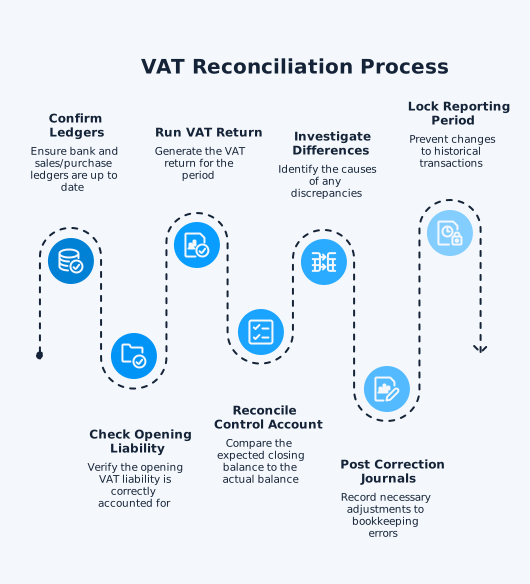
- Confirm your bank account and sales and purchase ledgers are up to date. Under the VAT Cash Accounting Scheme, VAT is triggered by payment received or payment made rather than by the invoice date, so incomplete bank reconciliation directly affects VAT completeness. If a payment is not yet reconciled in your bank feed, it may be excluded from your VAT return. Under the normal invoice basis, bank reconciliation still matters for control, but it does not drive VAT timing in the same way.
- Check that your opening VAT liability is correctly accounted for. If you migrated from another accounting system, verify the opening balance on the VAT control account.
- Run your VAT return for the period you are reconciling. In Xero, this is under Reports > VAT Return. Note the key figures: Box 1 (output VAT due on sales), Box 4 (input VAT reclaimable), and Box 5 (net VAT payable or reclaimable). In most UK businesses, Box 2 is zero, making Box 1 and Box 3 identical, but check Box 2 if your business acquires goods from outside the UK.
- Reconcile the control account movement. The VAT return is derived from the control account, not the other way around, so treat the control account as the single source of truth. Start with the opening VAT liability or asset, add output VAT for the period, subtract input VAT, subtract HMRC payments, then compare the expected closing balance to the actual VAT control account balance. Box 5 (net VAT payable or reclaimable) should reconcile to the net movement in the control account before payments. This is a simplified example for a business using standard VAT accounting:
Opening VAT liability £12,000
+ Output VAT (Box 1) £18,000
– Input VAT (Box 4) £11,000
– HMRC payment £15,000
= Expected closing VAT liability £4,000
If the control account does not end at £4,000, investigate the difference. - Investigate any differences. Common causes include late invoices entered after filing, incorrect dates, direct journals to the VAT control account, wrong VAT codes, partial exemption adjustments, bad debt relief, import VAT entries, credit notes, and prior-period corrections. For partially exempt businesses, the annual adjustment can create a significant reconciliation difference. During the year, you reclaim input VAT based on a provisional recovery percentage. At year end, you recalculate using actual figures, and the difference between provisional and actual recovery flows through the control account as an adjustment on the first return of the next VAT year. If your reconciliation spans this period, the adjustment will appear as a control account movement with no corresponding line on the current period’s return.
- Post correction journals for bookkeeping errors, then determine the VAT correction route separately. Smaller net errors can often be adjusted on the next VAT return, but larger or reportable errors must be disclosed to HMRC separately.
- Lock the reporting period once reconciled. In Xero, use the lock date feature to prevent changes to historical transactions.
Start with the earliest unreconciled period and work forward so opening balances and carry-forwards remain consistent. If the backlog is large, note that older periods still need to be resolved first because later balances build on them.
Common VAT Reconciliation Errors and How to Fix Them
Knowing where errors typically occur saves significant investigation time. Here are the most frequent issues and their fixes.
- Misposted transactions: Sales coded to purchase VAT accounts or vice versa. Check your tax code assignments, especially on manual journals.
- Excluded tax codes: Transactions coded as “No VAT” in Xero (or the equivalent outside-scope code in other platforms) that should carry VAT. These transactions appear in your ledger reports but are excluded from the VAT return.
- Late invoices: Invoices entered after the VAT return was filed for that period. These will appear in the next return but create a timing difference in your control account.
- Cash accounting timing: Under the VAT Cash Accounting Scheme, VAT is triggered by payment received or payment made, not by the invoice date. This means your VAT return only includes transactions where the corresponding bank entry has been reconciled, creating legitimate timing differences between your sales or purchase ledger and your VAT return. These differences must be reconciled separately, and your bank reconciliation must be complete before you can confirm VAT completeness for the period.
- Irrecoverable VAT: VAT on director personal expenditure or non-business use that cannot be reclaimed. This needs a manual adjustment to the control account.
VAT Reconciliation for Multi-Entity Groups in Xero
For businesses running multiple Xero organisations, VAT reconciliation is one of the most painful parts of the month-end close. Where entities are separately VAT-registered, each files its own return and your finance team must reconcile each one individually. Where the group has a VAT group registration, the representative member submits a single return, but the underlying transaction data still needs to be gathered from every Xero organisation. In either case, producing a consolidated group-level view adds a further layer of work.
The typical manual process involves the following steps:
- Exporting VAT return data from each Xero entity
- Building a reconciliation spreadsheet
- Cross-referencing control account balances across entities
- Identifying intercompany transactions that may have VAT implications
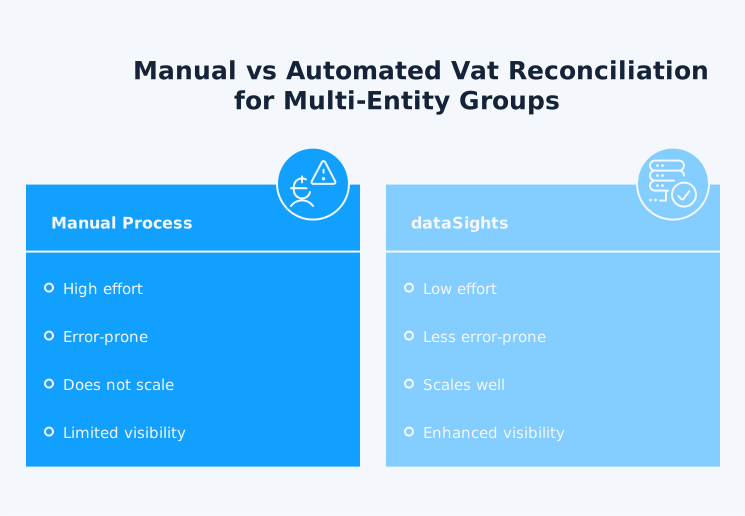
This process is slow, error-prone, and does not scale.
dataSights syncs each Xero entity into a dedicated Azure SQL database per customer, giving finance teams a clean consolidation layer for VAT reporting. From there, teams can review group data in pre-formatted management reports, automate Excel-based reconciliations via Office AddIn and Power Query, or connect Power BI for deeper analysis. For groups that need cross-entity VAT visibility, this can remove most manual export-and-compare work while preserving drill-through to source transactions.
Making Tax Digital and VAT Compliance
Since April 2022, VAT-registered businesses in the UK must keep VAT records digitally and file returns using compatible software, with limited exemptions for businesses where digital filing is not reasonably practicable.
Xero is an HMRC-recognised MTD-compatible platform, which means VAT returns filed through Xero automatically satisfy the digital submission requirement. However, MTD compliance goes beyond filing. You also need digital links between your records and your returns, meaning no manual re-keying of figures between systems.
For multi-entity groups, this is where consolidation software adds significant value. Rather than maintaining separate digital records across multiple Xero accounts and reconciling them manually, you can centralise your data and maintain a complete digital audit trail from source transactions to consolidated reports.
HMRC Penalties for Late VAT Returns and Payments
Late VAT returns and late payments carry direct financial consequences under the penalty regime that took effect on 1 January 2023. Inaccuracies in filed returns are handled under separate penalty rules.
Late Submission Penalties
HMRC uses a points-based system for late VAT return submissions. You receive one penalty point for each late return, including nil and repayment returns.
The penalty threshold depends on your filing frequency, as follows:
- 2 points for annual returns
- 4 points for quarterly returns
- 5 points for monthly returns
Once you reach the threshold, you pay a £200 penalty for that return and every subsequent late return while you remain at the threshold.
Late Payment Penalties
Late payment penalties are separate from submission penalties:
- If payment is up to 15 days late, there is no late payment penalty.
- If payment is 16 to 30 days late, the first late payment penalty is 3% of the VAT outstanding at day 15.
- If payment is 31 days or more late, the first late payment penalty becomes 3% of what was outstanding at day 15 plus 3% of what is still outstanding at day 30.
- From day 31, a second late payment penalty also accrues daily at 10% per year on the outstanding balance.
- Late payment interest runs from the first overdue day at Bank of England base rate plus 4%.
Accurate, timely VAT reconciliation is the most direct way to avoid late-submission points and late-payment penalties. Separately, if your reconciliation uncovers an inaccuracy in a previously filed return, disclosing it to HMRC before they find it (an “unprompted disclosure”) can reduce any inaccuracy penalty that applies, though the reduction depends on the behaviour involved and the quality of the disclosure.
Why Spreadsheet-Based VAT Reconciliation Falls Short
Many businesses still perform VAT reconciliation in Excel, building templates that pull data from their accounting platform. While this can work for a single entity, it creates problems as your business grows.
Spreadsheet-based VAT reconciliation creates control risk because logic changes, manual overrides, and copied files are hard to govern consistently. Research across industries indicates that spreadsheet errors are common, which is why finance teams usually need tighter review controls once reconciliation becomes multi-entity or high-volume.
For multi-entity groups, the spreadsheet approach multiplies the risk. You need a separate reconciliation for each entity, which means more files, more manual data entry, and more opportunities for copy-paste errors. Automating data consolidation from multiple Xero entities into a centralised database removes this layer of risk and gives you a single, auditable data source.
Take the Manual Work Out of VAT Reconciliation
VAT reconciliation does not need to be a quarterly headache. With the right process, single-entity VAT reconciliation can be quick, and multi-entity groups can cut manual effort materially with automation. The key is accurate source data, a clear step-by-step approach, and a system that scales with your business. For single-entity businesses, Xero’s built-in VAT tools handle the basics well. For multi-entity groups, the spreadsheet approach breaks down fast. Automating your Xero consolidation gives your finance team one place to verify VAT across every entity, with a full audit trail and no manual data entry.