
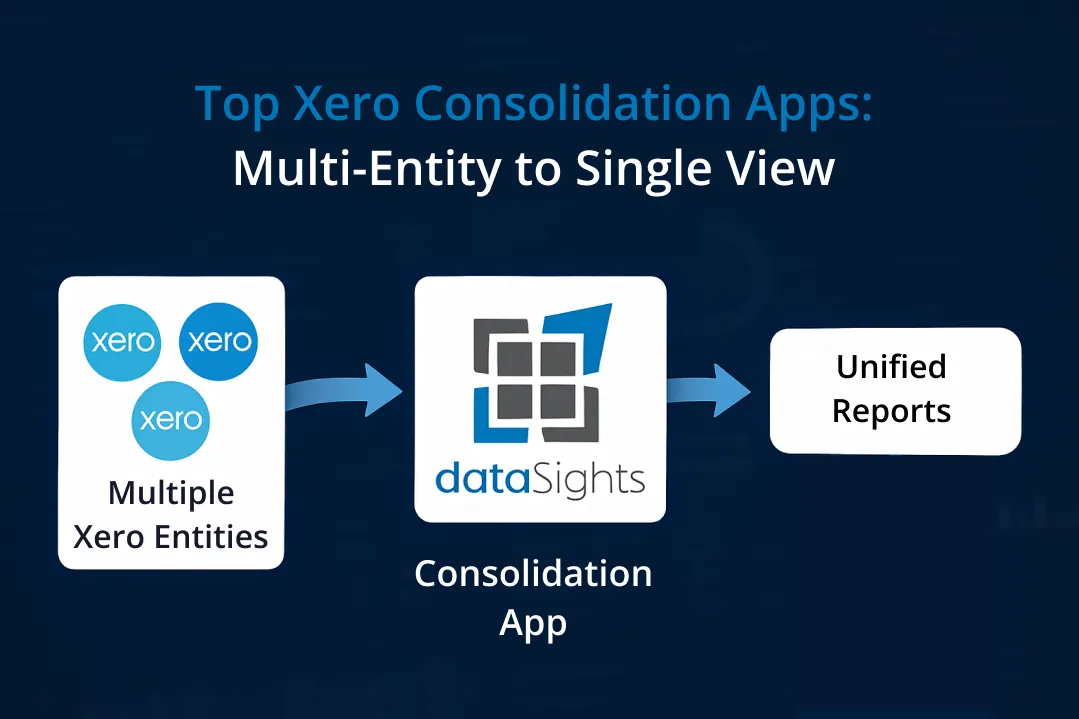
Managing multiple Xero entities shouldn’t mean drowning in CSV exports and broken Excel formulas every month-end. If you’re searching for the top Xero consolidation apps, you’re likely facing the reality that Xero doesn’t offer native consolidation features. This limitation forces finance teams into manual processes that can stretch month-end close from 5 days to over 15. The good news? Purpose-built consolidation apps can automate your entire multi-entity reporting process, eliminating intercompany transactions automatically and delivering consolidated financial statements in minutes, not days.
What Are Top Xero Consolidation Apps?
The top Xero consolidation apps are third-party solutions that automatically combine financial data from multiple Xero entities, handle intercompany eliminations, and produce consolidated reports. Research shows that manual consolidation takes 10+ days for bottom-quartile performers versus 5 days or less for automated top performers, making these apps essential for multi-entity businesses seeking efficiency and accuracy.
Ready to Automate Your Financial Consolidation?
Stop wrestling with manual consolidations and broken formulas. dataSights automates multi-entity reporting, Xero consolidations, and Power BI connections. Join 300+ businesses already transforming their financial reporting with our platform, rated 5.0 out of 5 by 90+ verified Xero users.
Table of Contents
Understanding the Consolidation Challenge in Xero
Xero doesn’t currently provide consolidated reporting features, despite being widely adopted by businesses with multiple entities. Each legal entity requires its own Xero organisation, and without automation, you’re looking at a painful manual process.
Here’s what manual consolidation actually involves:
- Exporting Trial Balances from each entity separately.
- Matching transactions across multiple Excel spreadsheets.
- Calculating and posting elimination entries manually.
- Converting currencies at appropriate exchange rates.
- Checking that consolidated balance sheets actually balance.
The manual approach typically extends month-end close from 5 days to 15+ days, depending on entity count and transaction volume. That’s your finance team buried in spreadsheets instead of analysing results.
Why Standard Xero Features Fall Short
Xero’s limitations become apparent when managing multiple entities:
- No native intercompany elimination features
- Separate subscriptions required for each entity
- Manual CSV exports for every consolidation cycle
- No consolidated Trial Balance functionality
- Limited multi-currency consolidation support
Manual consolidation in Excel creates error rates averaging 1% per cell, compounding into material misstatements when dealing with thousands of transactions across multiple entities.
Essential Features Every Consolidation App Must Have
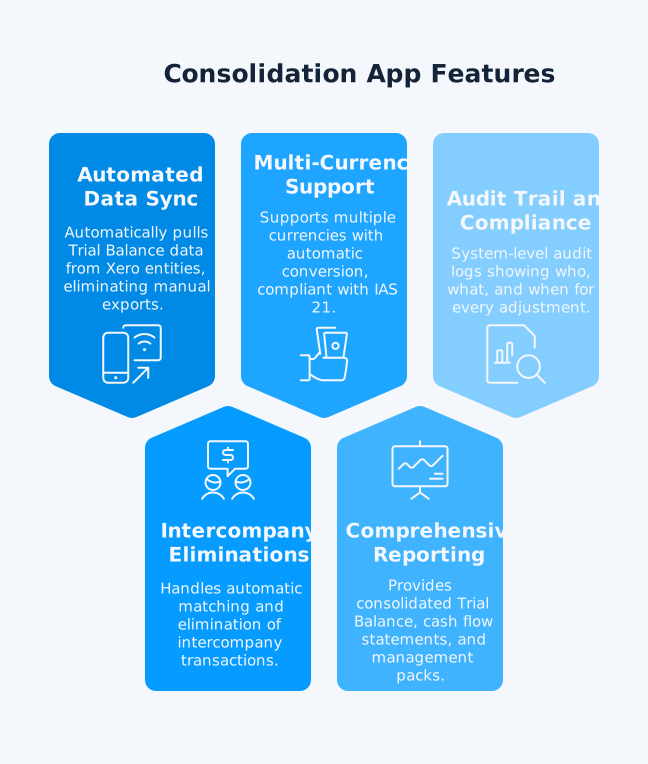
Before evaluating specific apps, understand the non-negotiable features for effective consolidation. Without these capabilities, you’re simply moving from manual Excel work to a prettier version of the same problems. The right features transform consolidation from a multi-day marathon into a streamlined process completed in hours.
Automated Data Sync
Your chosen app must pull Trial Balance data automatically from all Xero entities. Manual CSV exports and uploads should be completely eliminated from your workflow. Look for apps offering real-time or scheduled synchronisation.
Intercompany Eliminations
Without automated eliminations, consolidation means days in Excel. The app should handle:
- Automatic matching of intercompany transactions
- Configurable elimination rules
- Full audit trail of all adjustments
- Drill-down capability to transaction level
Multi-Currency Support
For international groups, currency consolidation is critical. Apps should support multiple currencies with automatic conversion, consistent with IAS 21 requirements, allowing you to:
- Set exchange rates by account type
- Apply spot or historical rates appropriately
- Handle foreign exchange adjustments automatically
- Comply with IAS 21 requirements
Comprehensive Reporting Suite
Beyond basic P&L and Balance Sheet, you need:
- Consolidated Trial Balance with eliminations
- Cash flow statements at group level
- Management packs with KPIs and variance analysis
- Board-ready presentation formats
- Drill-down capabilities from group to entity level
Audit Trail and Compliance
System-level audit logs showing who, what, and when for every adjustment are essential for compliance. Look for:
- Version control and change tracking
- PCAOB documentation standards
- Permanent records for historical recreation
- Role-based access controls
Leading Consolidation Solutions in the Market
The consolidation app market splits into three categories:
- Purpose-built consolidation platforms
- Comprehensive reporting suites
- Technical integration tools.
Each category serves different business needs, from simple two-entity groups to complex international structures with 100+ subsidiaries. Understanding these categories helps you avoid overpaying for features you won’t use or underbuying and hitting limitations within months.
Purpose-Built Consolidation Platforms
Several apps specialise exclusively in multi-entity consolidation. Advanced Consolidation Tools offer sophisticated features, including:
- Consolidation across 100+ entities without performance degradation
- Automated Trial Balance reconciliation
- Complex ownership structures with minority interests
- Multiple consolidation methods for different reporting requirements
Many providers publish entry-tier pricing and limited-time trials. Validate inclusions (entity limits, audit trail, eliminations, FX) before purchase.
Key differentiators to evaluate:
- Setup time (ranging from 30 minutes to several hours)
- Maximum entity limits (some cap at 50, others handle 300+)
- Elimination flexibility (full vs partial eliminations)
- Integration breadth beyond Xero
Comprehensive Reporting Platforms
Some solutions go beyond consolidation to offer complete financial reporting. These platforms typically include:
- Forecasting and budgeting across consolidated entities
- Industry-specific templates and benchmarks
- Advanced analytics and predictive modelling
- Client management features for accounting firms
Pricing varies by provider, features, and entity count. Confirm inclusions such as user seats, eliminations, and audit logs.
Specialised Integration Tools
For businesses requiring deeper technical integration. Power BI and Excel Connectors enable:
- Direct SQL database connections for unlimited customisation
- Real-time data refresh without manual intervention
- Custom dashboard creation with drilling capabilities
- Integration with existing BI infrastructure
These tools suit organisations with technical resources who need maximum flexibility. They typically require more setup but offer unlimited reporting possibilities.
Google Sheets Integration provides:
- Automated consolidation within a familiar spreadsheet interface
- Multi-entity data aggregation with formula preservation
- Collaborative features for distributed teams
- Lower cost entry point for smaller businesses
How Consolidation Apps Transform Your Month-End
The difference between manual and automated consolidation isn’t incremental improvement – it’s complete transformation. Finance teams report cutting their consolidation time from 15 days to under 5. Here’s exactly what changes when you implement the right consolidation app.
From Manual to Automated: The Real Impact
Businesses using consolidation apps report reducing month-end close from over 15 days to under 5 days. Here’s what changes.
Before automation:
- Export data manually from each Xero organisation
- Spend days matching intercompany transactions
- Manually calculate and post eliminations
- Check and recheck that everything balances
- Create static reports that are immediately outdated
After implementing consolidation software:
- Data syncs automatically overnight or on demand
- Eliminations process in seconds with full documentation
- Consolidated reports generate with one click
- Real-time dashboards show group position daily
- Drill down from group to transaction level instantly
Setting Up Your First Consolidation
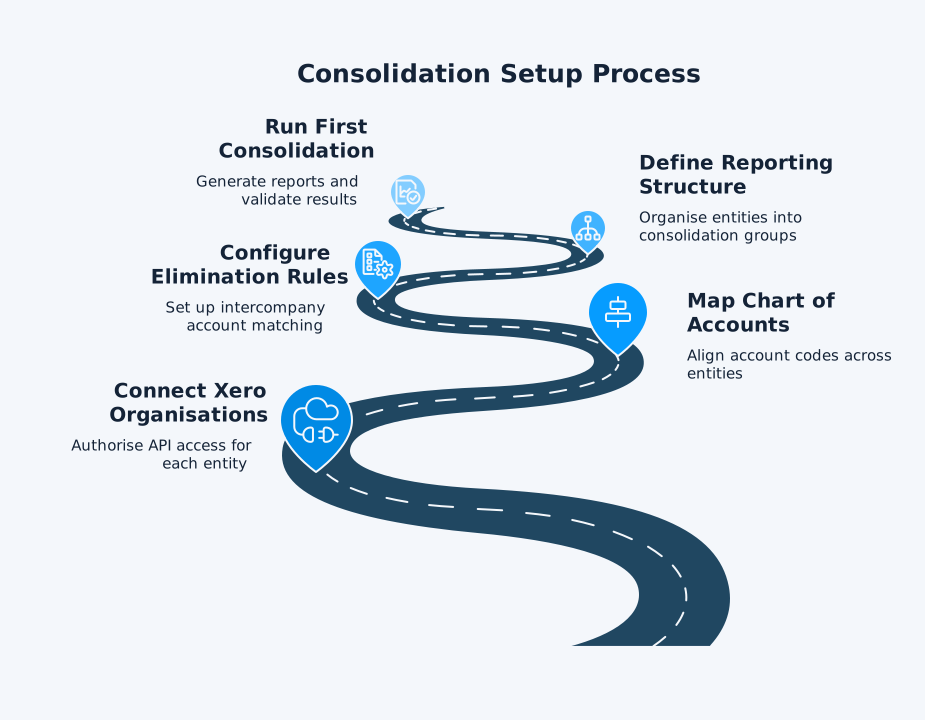
For simple groups, you can often produce a first consolidated P&L within an hour; complex groups take longer due to mapping and eliminations. The typical setup process involves:
- Connecting your Xero organisations: Authorise API access for each entity
- Mapping your Chart of Accounts: Align account codes across entities
- Configuring elimination rules: Set up intercompany account matching
- Defining reporting structure: Organise entities into consolidation groups
- Running your first consolidation: Generate reports and validate results
Handling Complex Scenarios
Modern consolidation apps handle sophisticated requirements:
- Partial Ownership Structures: Apps calculate minority interests automatically, properly attributing profits and losses according to ownership percentages.
- Multi-Level Consolidations: Create sub-groups and roll them up to parent level, maintaining full visibility at each consolidation tier.
- Different Year-Ends: Handle subsidiaries with different reporting dates by adjusting for significant intervening transactions, in line with IFRS 10.
Critical Evaluation Factors
Choosing a consolidation app requires evaluating beyond the feature list. Your decision impacts not just month-end efficiency but your ability to scale, integrate new acquisitions, and provide real-time insights to stakeholders. These factors determine whether your chosen solution remains viable as your business grows.
Integration Capabilities
While Xero is your primary system, consider what else needs connecting:
- Accounting systems: Many apps also integrate with QuickBooks, Sage, and MYOB
- Operational data: Some connect to CRM, inventory, and project management tools
- Reporting platforms: Look for Power BI, Tableau, or Excel connectivity
- Banking systems: Direct bank feed integration for treasury management
The ability to consolidate data from mixed accounting systems is crucial if you’ve acquired businesses using different platforms.
Scalability Considerations
Your consolidation needs will grow. Evaluate:
- Entity limits: Ensure the app can handle your projected growth
- Performance at scale: Some apps slow significantly at higher entity counts
- User limits: Check if additional users incur extra costs
- Data retention: Understand historical data storage limits
Total Cost of Ownership
Beyond subscription fees, consider:
- Implementation costs (ranging from DIY to consultant-led)
- Training requirements for your team
- Ongoing support needs
- Cost of switching if the solution doesn’t scale
Most providers offer transparent pricing, but always clarify what’s included versus add-on costs.
Implementation Best Practices
Success with consolidation apps depends more on preparation than the technology itself. Organised data significantly reduces implementation time, while poor preparation leads to weeks of rework. Follow these practices to ensure smooth deployment and rapid time-to-value.
Preparing Your Xero Data
Before connecting any consolidation app:
- Standardise your Chart of Accounts across entities where possible
- Clean up intercompany accounts to ensure clear matching
- Document your elimination requirements including partial eliminations
- Review tracking categories for consistent usage across entities
- Identify reporting requirements from stakeholders
Organised Xero data can materially reduce implementation time.
Choosing the Right Solution
Match the app to your specific needs.
For simple consolidation (2-10 entities):
- Focus on ease of use and quick setup
- Prioritise cost-effectiveness
- Ensure basic elimination capabilities
For complex groups (10+ entities):
- Require sophisticated elimination rules
- Need multi-currency and minority interest handling
- Demand enterprise-grade audit trails
For accounting practices:
- Look for multi-client management features
- Require white-labelling capabilities
- Need varied integration options
Managing the Transition
Successful implementation requires:
- Run parallel processes initially: Don’t abandon Excel immediately
- Validate eliminations thoroughly: Compare automated results with manual calculations
- Train all users properly: Include both preparers and report consumers
- Document your configuration: Create process guides for consistency
- Test month-end before going live: Run a complete cycle in parallel
Advanced Features Worth Considering
Beyond basic consolidation, modern apps offer capabilities that transform financial reporting from backward-looking compliance to forward-looking strategic insight. These features separate adequate solutions from those that become competitive advantages. Not every business needs them immediately, but understanding what’s possible helps you choose a platform you won’t outgrow.
Real-Time Dashboards
Modern consolidation apps offer live dashboards that update automatically, providing:
- Daily visibility into group performance
- Drill-down capabilities to investigate variances
- Custom KPIs relevant to your business
- Mobile access for executives on the move
Forecasting and Budgeting
Beyond historical consolidation, advanced features include:
- Consolidated budgets with automatic currency conversion
- Rolling forecasts updated with actual results
- Variance analysis at entity and group level
- What-if scenarios for planning
Workflow Automation
The best solutions automate beyond just consolidation:
- Automated journal posting back to Xero
- Scheduled report distribution to stakeholders
- Alert notifications for unusual variances
- Approval workflows for adjustments
Making Your Decision
With dozens of consolidation apps available, the selection process can overwhelm even experienced finance professionals. Focus on these critical decision factors to cut through marketing noise and identify the solution that matches your specific requirements. The right choice saves thousands of hours annually; the wrong one becomes another expensive mistake to unwind.
Essential Questions to Ask Vendors
Before committing to any solution:
- How do you handle partial intercompany eliminations?
- What’s your maximum tested entity count?
- Can you demonstrate your audit trail capabilities?
- How do you manage different Charts of Accounts?
- What happens to our data if we leave?
Red Flags to Avoid
Watch out for:
- Vendors who can’t demonstrate elimination capabilities
- Solutions requiring significant IT involvement
- Apps with limited customer reviews or case studies
- Platforms lacking proper security certifications
- Tools that don’t offer free trials with your actual data
Trial Strategy
When testing solutions:
- Use real data: Don’t rely on demo environments
- Test your most complex scenario: If it handles the hardest case, it’ll handle everything
- Involve your entire team: Get feedback from all users
- Run a complete month-end: Test the full cycle, not just individual features
- Check support responsiveness: Test their support during the trial
The dataSights Advantage
While evaluating consolidation apps, consider how dataSights transforms multi-entity reporting beyond traditional approaches. Our platform doesn’t just consolidate data – it creates a complete automation ecosystem that eliminates manual work across your entire reporting workflow.
Complete Automation Platform
dataSights goes beyond basic consolidation to deliver a fully automated reporting system that connects your Xero data to management reports in our web platform, Excel, Power BI, and Google Sheets.
- Automated sync from multiple Xero entities into a secure, dedicated per-customer SQL database
- Full Trial Balance consolidation with built-in reconciliations and validations
- Complex intercompany eliminations with a complete audit trail and drill-through
- Post to multiple Xero organisations directly from one Excel sheet – eliminating duplicate manual entry
- Efficient data refresh on demand or on schedule for always-current numbers
- Real-time updates to dashboards and models (Power BI, Excel, Google Sheets)
With dataSights, finance teams wrap up month-end consolidation, eliminations, postings, and management reporting from one platform – days faster, not weeks.
Beyond Just Reports
dataSights delivers complete management-reporting automation—across our customisable reports, Excel, Power BI, and Google Sheets.
- Management packs with pre-formatted P&L, Balance Sheet, Cash Flow, and Trial Balance
- Automated budgets and variance analysis with drill-downs
- Consolidated AR and AP detail across all entities
- Real-time KPI dashboards with entity-to-transaction drill-through
Backed by 90+ five-star Xero reviews and adoption by 300+ businesses, teams routinely cut month-end from 15+ days to under 5 while keeping full control in Excel and Power BI.
Proven Performance at Scale
Engineered for everything from two-entity groups to complex international structures with 100+ subsidiaries – without performance slowdowns or manual intervention.
- Accurate, auditable consolidation for small and large groups
- Multi-currency conversion aligned with IAS 21 for foreign-exchange reporting
- Tracking categories/dimensions consolidated across companies for consistent analysis
- Real-time data sync and refresh to keep group results current as transactions change
- Secure, per-customer SQL databases designed for scale, compliance, and performance
Whether you manage a handful of local entities or a global portfolio, dataSights keeps consolidation fast and reliable at any scale – so you can grow without outgrowing your reporting platform.
Frequently Asked Questions
Can Xero Consolidate Multiple Companies Natively?
No, Xero doesn’t offer native consolidation features. Each entity requires a separate Xero organisation and subscription. You’ll need a third-party consolidation app to combine financial data across multiple Xero accounts and handle intercompany eliminations.
How Much Do Xero Consolidation Apps Typically Cost?
Pricing ranges from £14 per month for basic solutions to £39+ for advanced features. Several third-party consolidation tools provide limited-time trials, so confirm their availability and included features before testing. Enterprise solutions with unlimited entities and advanced eliminations may require custom pricing. Consider total cost, including implementation and training, not just subscription fees.
How Long Does It Take to Set Up Consolidation Software?
Initial setup time varies; simple groups can be quick, while complex mappings and eliminations take longer. Complete configuration, including elimination rules and custom reporting, may take a few hours. Having standardised Charts of Accounts across entities significantly reduces setup time.
Do Consolidation Apps Work With Other Accounting Software Besides Xero?
Yes, many consolidation apps, such as dataSights, integrate with QuickBooks, Sage, MYOB, and other platforms. This mixed-system capability is crucial for businesses that have acquired companies using different accounting software.
What Happens to Intercompany Transactions in Consolidation?
Consolidation apps automatically identify and eliminate intercompany transactions to prevent double-counting revenue and expenses. They provide full audit trails showing which transactions were eliminated and why, ensuring compliance with accounting standards.
Can Consolidation Apps Handle Different Currencies?
Yes, leading consolidation tools support multi-currency with policy controls for exchange rates. They handle spot rates for P&L items and historical rates for balance sheet accounts, ensuring IAS 21 compliance.
How Do Consolidation Apps Improve Month-End Close Time?
Automation reduces consolidation time from weeks to under 5 days by eliminating manual CSV exports, automating eliminations, and generating reports instantly. Real-time sync means you’re not waiting for data updates.
What Level of Technical Expertise Is Required?
Most consolidation apps are designed for finance teams, not IT departments. If you can use Excel and Xero, you can typically configure these tools. Initial setup might benefit from vendor support, but daily operation requires no technical skills.
Do I Need to Standardise My Chart of Accounts Across All Entities?
While not mandatory, standardisation significantly simplifies consolidation. Most apps can map different Charts of Accounts, but having consistent account codes can significantly reduce setup time and minimise mapping errors.
Can These Apps Handle Partial Ownership and Minority Interests?
Yes, advanced consolidation apps automatically calculate minority interests based on ownership percentages. They properly attribute profits and losses, showing minority interests as a separate line in consolidated equity, complying with IFRS requirements.
Transform Your Multi-Entity Chaos Into Consolidated Clarity
Manual consolidation is killing your month-end efficiency. Every CSV export, every Excel formula, every manual elimination adds days to your close and increases error risk. The right consolidation app transforms this chaos into automated workflows that deliver accurate, audit-ready consolidations in minutes.
Eliminate Manual Consolidation Today with dataSights
Stop wasting weeks on manual consolidation. dataSights automates your entire Xero consolidation process – from Trial Balance sync to complex eliminations. Join 300+ businesses already saving 10+ days every month. Rated 5.0 out of 5 by 90+ Xero users.
About the Author
Kevin Wiegand
Founder & Client happiness
I’m Kevin Wiegand, and with over 25 years of experience in software development and financial data automation, I’ve honed my skills and knowledge in building enterprise-grade solutions for complex consolidation and reporting challenges. My journey includes developing custom solutions for data teams at Gazprom Marketing & Trading and E.ON, before founding dataSights in 2016. Today, dataSights helps over 300 businesses achieve 100% report automation. I’m passionate about sharing my expertise to help CFOs and Financial Controllers reduce their month-end close time and eliminate the manual Excel exports that drain their teams’ valuable time.