
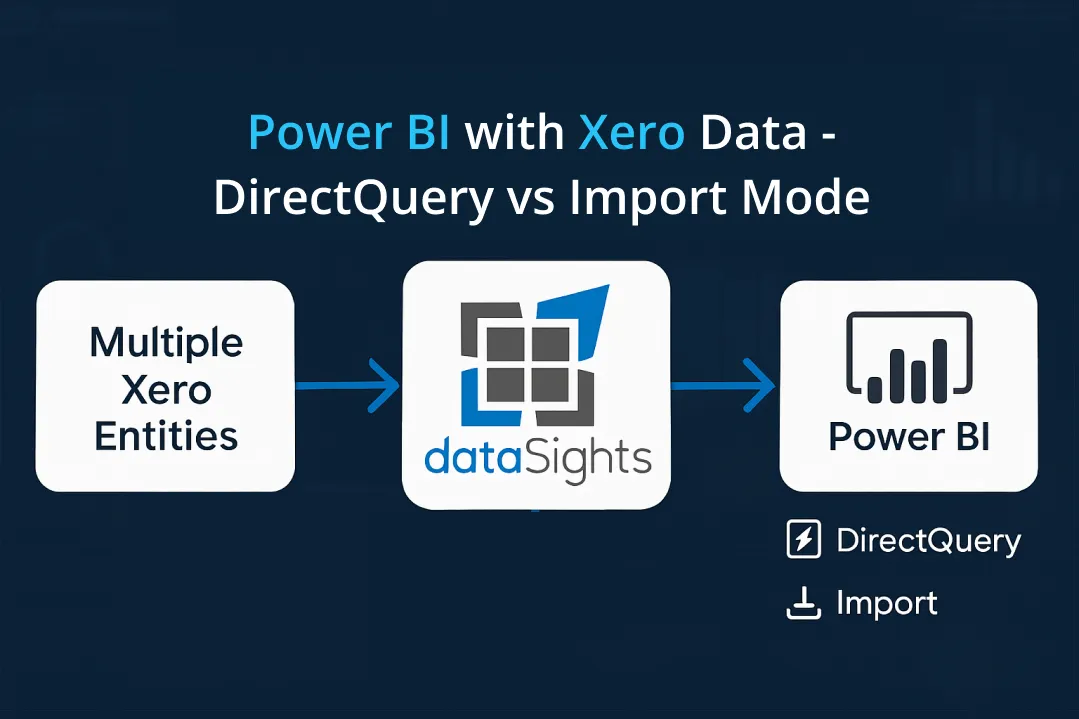
Choosing between Power BI with Xero data – Direct query vs Import Mode determines whether your reports refresh in seconds or minutes. Import mode caches your Xero transactions locally for sub-second queries but requires scheduled refreshes up to 8 times daily on shared capacity. Direct Query promises real-time connections, but Xero offers no native support, forcing you into Import mode or third-party workarounds. For finance teams consolidating multiple entities, this decision affects everything from month-end close times to report performance – dataSights customers cut consolidation from over 2 weeks to under 5 days by optimising their Import mode setup.
Which One to Use in Power BI with Xero Data - DirectQuery vs Import Mode?
Power BI with Xero data – Direct Query vs Import Mode comes down to performance versus freshness. Import mode copies and compresses Xero data into Power BI for sub-second queries, with scheduled refreshes limited to 8 times a day on shared capacity or up to 48 on Premium. Direct Query keeps data at the source, but with no native Xero Direct Query connector and significant feature and performance limitations, most Xero finance teams get better results by optimising Import mode with automated refreshes.
Ready to Automate Your Financial Consolidation?
Stop wrestling with manual consolidations and broken formulas. dataSights automates multi-entity reporting, Xero consolidations, and Power BI connections. Join 300+ businesses already transforming their financial reporting with our platform, rated 5.0 out of 5 by 90+ verified Xero users.
Table of Contents
Understanding Import Mode for Xero Data
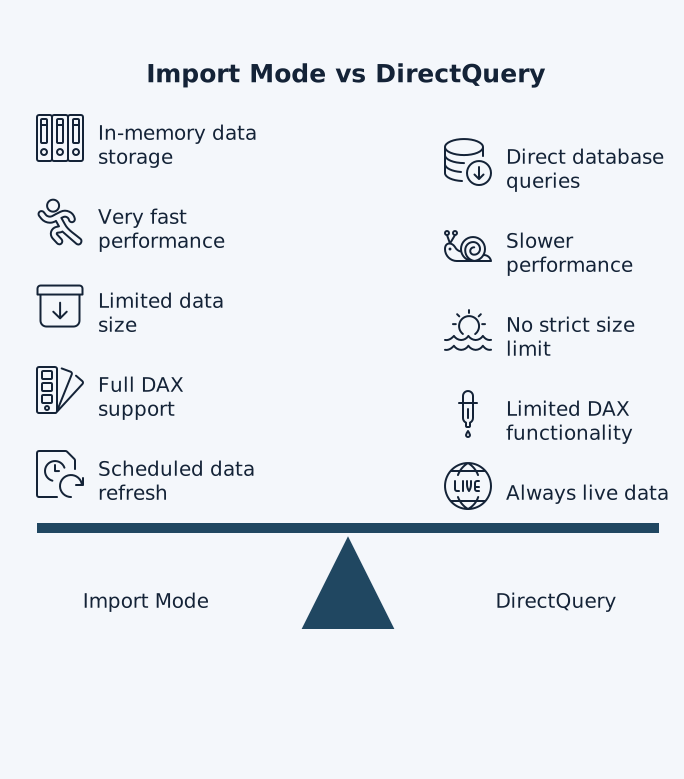
Import mode copies your Xero data directly into Power BI’s compressed in-memory storage. Your financial reports respond instantly because Power BI’s VertiPaq engine often achieves high compression ratios, so several gigabytes of source Xero data can fit comfortably into a 1GB in-memory dataset, keeping everything cached locally. You get full access to Power Query transformations and every DAX function – perfect for complex financial calculations and custom measures.
The trade-off comes with data freshness. Shared capacity limits you to 8 refreshes daily, while Premium allows up to 48. For month-end reporting where accuracy matters more than real-time updates, Import mode delivers the performance finance teams need. Connect your Xero data through dataSights’ automated pipeline, and those refreshes happen automatically – no manual CSV exports required.
Import Mode Performance Benefits
Microsoft’s own guidance recommends Import mode as the default choice because cached data eliminates network latency completely. Your P&L statements render in milliseconds, not seconds. Complex DAX calculations, such as year-over-year variance analysis, run without restrictions. You can even work offline – crucial when presenting board reports without reliable internet.
Storage limits exist but rarely affect Xero implementations. Power BI Pro caps each dataset at 1GB compressed, while Premium capacities increase this to hundreds of gigabytes. In practice, many mid-market Xero implementations find that a 1GB Import model comfortably covers multiple years of transactions across several entities when the model is well designed. Most mid-market businesses running multiple Xero entities stay well within these limits, especially when using dataSights’ optimised data models, which pre-aggregate data where appropriate.
Direct Query Mode: The Theory vs Xero Reality
Direct Query promises real-time data by maintaining a live connection to your source. Every click, filter change, or page navigation triggers fresh queries to the underlying database. In theory, you’re always viewing current data, making it perfect for monitoring cash positions or tracking today’s invoices.
The reality for Xero users proves more challenging. Xero provides no native Direct Query connector, immediately ruling out this mode for direct connections. Even if you route Xero data through an intermediate database, Direct Query imposes severe limitations:
- DAX time intelligence functions disappear
- Power Query transformations vanish, and
- 1 million row cap per visual can break detailed transaction reports.
Why Direct Query Fails for Xero Reporting
Performance degradation hits immediately when using Direct Query for financial data. Each report interaction requires a round trip to your data source, translating DAX to SQL, waiting for results, and then transforming back. What takes milliseconds in Import mode stretches to seconds, frustrating users accustomed to Excel’s responsiveness.
The technical limitations prove even more restrictive:
- Date hierarchies vanish completely
- Calculated columns cannot use aggregate functions or reference other tables, and
- Calculated tables only work in composite models.
For financial reporting where period comparisons, running totals, and consolidated views are essential, these missing features cripple functionality. That’s why dataSights focuses on optimised Import mode connections that maintain sub-second performance while automating the refresh cycle.
See how dataSights transforms Xero consolidation from manual CSV exports into automated Power BI templates in this short walkthrough video:
Composite Models: The Middle Ground
Composite models let you mix Import and Direct Query tables in a single dataset, theoretically offering both performance and freshness. You might import historical Xero transactions for fast analysis while keeping current month data in Direct Query for real-time updates. Dual storage mode even allows tables to switch between modes dynamically.
For Xero implementations, composite models rarely justify the complexity. Without native Direct Query support, you’d need to sync Xero data to an intermediate database first – adding another layer of infrastructure and potential failure points. Configuration becomes intricate:
- Dimension tables require Dual mode
- Relationships need careful planning, and
- Performance can actually degrade if not optimised correctly.
When Composite Models Make Sense
Consider composite models only when combining Xero with true real-time sources, such as IoT sensors or streaming analytics. For pure financial reporting, the added complexity rarely pays off. Composite models can also drive up costs when you rely on Premium-only features such as large-scale aggregations, while management overhead increases as the model becomes more complex.
Most finance teams achieve better results focusing on optimised Import mode with intelligent refresh schedules. dataSights customers typically reduce month-end close from over 2 weeks to under 5 days using automated Import mode pipelines – no composite complexity required.
Setting Up Xero Data Connections
Since Xero lacks Direct Query support, your practical options narrow to Import mode implementations. The manual approach involves CSV exports from each Xero organisation, Power Query transformations, and then loading into Power BI. For single-entity businesses running monthly reports, this might suffice.
Multi-entity consolidation demands automation. Manual CSV exports across 10+ Xero files, matching chart of accounts, eliminating intercompany transactions, then building reports can take days of work every month. The process does not scale as your group grows. Third-party connectors automate this entire pipeline, pulling data via API, standardising formats, and refreshing on schedule.
Gateway Configuration for Automated Refresh
Automated refresh requires an on-premises data gateway unless your connector provides cloud-based refresh. The gateway bridges Power BI’s cloud service with your data sources, enabling scheduled updates without manual intervention. Standard mode supports multiple users, while personal mode is designed for individual implementations.
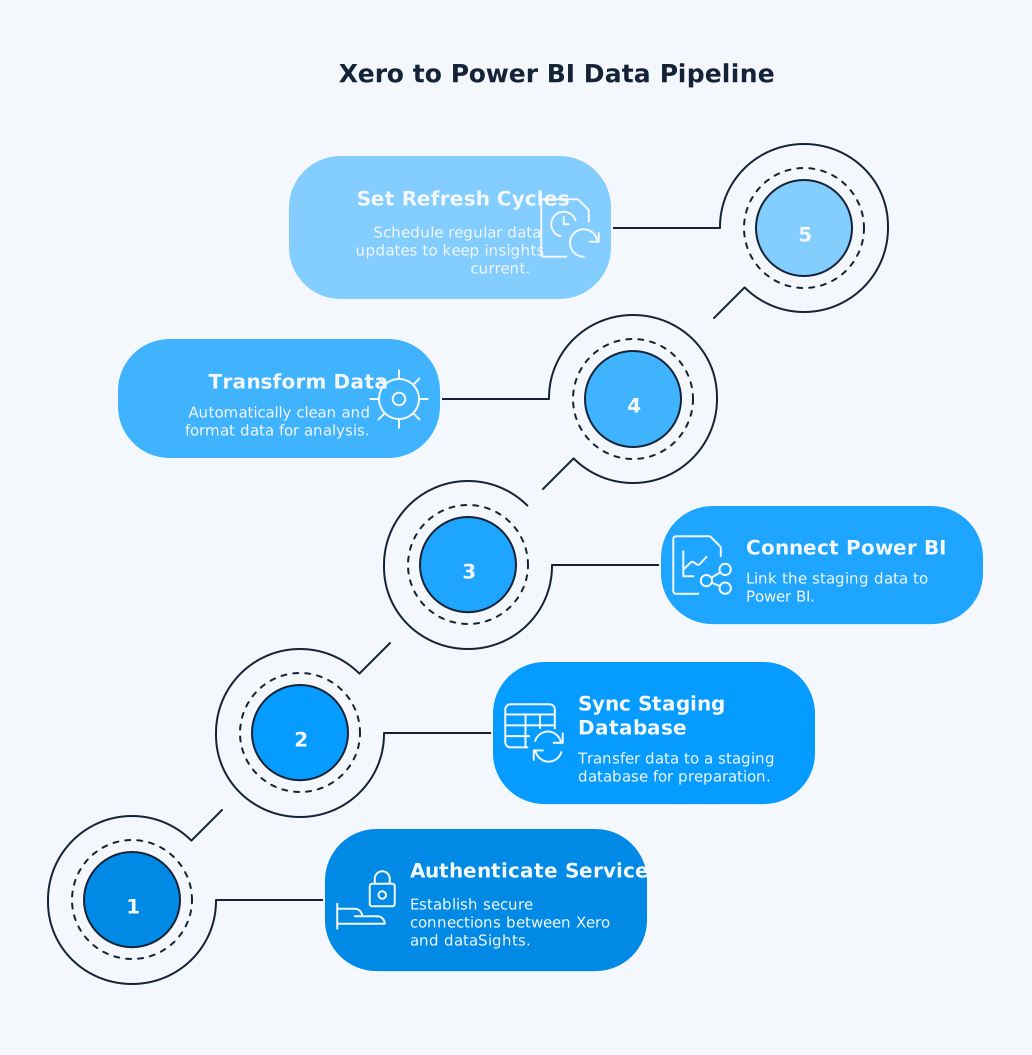
For Xero connections, cloud-based solutions like dataSights eliminate gateway requirements entirely. Data syncs from Xero’s API to dataSights’ Azure infrastructure, then connects directly to Power BI – no local gateway needed. This approach supports hourly refreshes without hitting infrastructure limits.
Performance Optimisation Strategies
Whichever mode you choose, performance optimisation remains critical. Import mode optimisation requires removing columns not used for reporting and pre-summarising fact data. Monthly aggregation can achieve up to a 99% size reduction compared to daily detail.
For Xero data specifically, leverage the Power Query folding capabilities to push transformations back to the source. Filter early in your queries, removing test companies and archived data before import. dataSights’ pre-built data models handle this optimisation automatically, delivering filtered, transformed data ready for analysis.
Incremental Refresh for Large Datasets
Incremental refresh in Power BI Premium solves the challenge of large historical datasets by only refreshing recent partitions. Instead of reloading five years of transactions daily, you might refresh the current month while keeping historical data static. This dramatically reduces refresh times and API calls to Xero.
Configuration requires datetime parameters and careful partition planning. For most Xero implementations under 1GB compressed, standard refresh suffices. However, for consolidated groups with an extensive transaction history, incremental refresh keeps performance optimal while maintaining data completeness.
Real-World Xero to Power BI Scenarios
Consider a 20-entity retail group using Xero across all subsidiaries. Manual CSV exports take 30 minutes per entity, plus hours for consolidation and elimination entries. Using Import mode with dataSights’ automated connector, the same process runs unattended in minutes. Reports refresh overnight, ready for morning review.
Another scenario: a professional services firm needs hourly revenue tracking during month-end. Without Direct Query, they configure 8 daily refreshes on shared capacity or upgrade to Premium for 48 refreshes. Combined with dataSights’ real-time sync, they achieve near real-time visibility without the limitations of Direct Query.
Multi-Currency and Multi-Entity Challenges
Xero’s multi-entity structure creates specific challenges for Power BI connections.
- With OAuth 2.0, you get a single access token that works across multiple organisations – but you must manage different “tenantIds” for each API call.
- Different base currencies require conversion at period-end, with exchange rates applied to every transaction type.
- Intercompany transactions need manual elimination entries, with each adjustment documented and reconciled.
- Without automation, you’re exporting Trial Balances from each entity, mapping accounts in Excel, and creating elimination journals – hoping everything balances.
Import mode can handle most data transformations through Power Query during refresh. However, multi-entity consolidation with eliminations usually needs pre-processing in a data warehouse or dedicated ETL tools before the data reaches Power BI. dataSights customers regularly consolidate multiple entities with full elimination and currency conversion, generating board-ready reports in Power BI that would take weeks manually.
Frequently Asked Questions
Can I Switch From Import to DirectQuery Mode After Creating My Dataset?
You cannot easily switch from Import to Direct Query after setup. Power BI allows Direct Query to Import conversion, but Import to Direct Query requires rebuilding your dataset from scratch. For Xero data, this limitation rarely matters since Direct Query isn’t natively supported anyway.
What’s the Maximum Dataset Size for Import Mode With Xero Data?
Power BI Pro limits datasets to 1GB compressed, whilst Premium capacities support up to hundreds of GB. Most mid-market Xero implementations stay well under 1GB, even with multiple years of history across several entities.
How Often Can I Refresh Xero Data in Import Mode?
Shared capacity allows 8 scheduled refreshes daily, Premium enables up to 48 scheduled refreshes, and Power Automate or custom scripts can trigger additional on-demand refreshes through the Power BI REST API, subject to Microsoft’s API limits and throttling.
Does Xero Support DirectQuery Connections to Power BI?
No, Xero provides no native Direct Query connector. Some third-party solutions claim Direct Query support by routing through intermediate databases, but this adds complexity without solving Direct Query’s inherent limitations.
What Happens to Performance With Multiple Xero Entities in Import Mode?
Performance remains excellent with proper data modelling. dataSights customers consolidate both small and large groups of Xero entities, for example 30 or more organisations, in just a few seconds using optimised Import mode connections. Pre-aggregation and intelligent filtering keep datasets lean while maintaining detail where needed.
Can I Use Composite Models to Mix Import and DirectQuery With Xero?
Composite models are available on non-Premium capacity, but advanced scenarios that rely on large aggregations or big-model performance tuning are usually more practical on Premium capacity. For most Xero reporting use cases, an optimised Import mode model remains the most cost-effective option.
What’s the Difference Between Power BI Gateway Personal and Standard Mode?
Personal mode runs under your Windows account for individual use, whilst standard mode (enterprise) supports multiple users and data sources. For automated Xero refreshes, cloud-based solutions eliminate gateway requirements entirely.
How Do I Handle Xero API Rate Limits With Frequent Refreshes?
Xero implements API throttling to prevent overload. Third-party connectors like dataSights implement intelligent caching and delta updates to minimise API calls whilst maintaining data freshness. This allows hourly refreshes without hitting limits.
Is Real-Time Xero Data Possible in Power BI Without DirectQuery?
Near real-time is achievable through frequent Import mode refreshes or push datasets. dataSights’ automated pipeline can refresh very frequently during critical periods, providing near real-time freshness for most financial reporting needs, subject to your Power BI capacity and API limits.
What DAX Functions Don’t Work in DirectQuery Mode?
Direct Query restricts time intelligence functions, calculated tables, and many iterator functions. For financial reporting requiring YTD calculations, moving averages, or complex allocations, these limitations make Direct Query unsuitable even if Xero supported it.
Making the Right Choice for Your Business
For nearly all Xero to Power BI setups, Import mode is best, offering full DAX support, fast performance, and sufficient refreshes for finance. With no native DirectQuery support, focus on optimising Import mode: use tools like dataSights for multi-entity data, schedule off-peak refreshes, and design efficient models. This ensures timely, accurate reports without the complexity of DirectQuery.
Stop Fighting Connection Modes - Automate Your Xero Consolidation
Stop arguing about connection modes when what you really need is reliable, automated Xero consolidation. dataSights delivers board-ready management packs through our web platform, with consolidated P&L, Balance Sheet, Trial Balance, and eliminations baked in. For teams who prefer Excel, we automate consolidated data into your spreadsheets; for advanced analytics, we connect the same governed data set into Power BI dashboards. Rated 5.0 by over 90 Xero users and trusted by 300+ businesses that now get consolidated financial reports in days, not weeks.
About the Author
Kevin Wiegand
Founder & Client happiness
I’m Kevin Wiegand, and with over 25 years of experience in software development and financial data automation, I’ve honed my skills and knowledge in building enterprise-grade solutions for complex consolidation and reporting challenges. My journey includes developing custom solutions for data teams at Gazprom Marketing & Trading and E.ON, before founding dataSights in 2016. Today, dataSights helps over 300 businesses achieve 100% report automation. I’m passionate about sharing my expertise to help CFOs and Financial Controllers reduce their month-end close time and eliminate the manual Excel exports that drain their teams’ valuable time.