
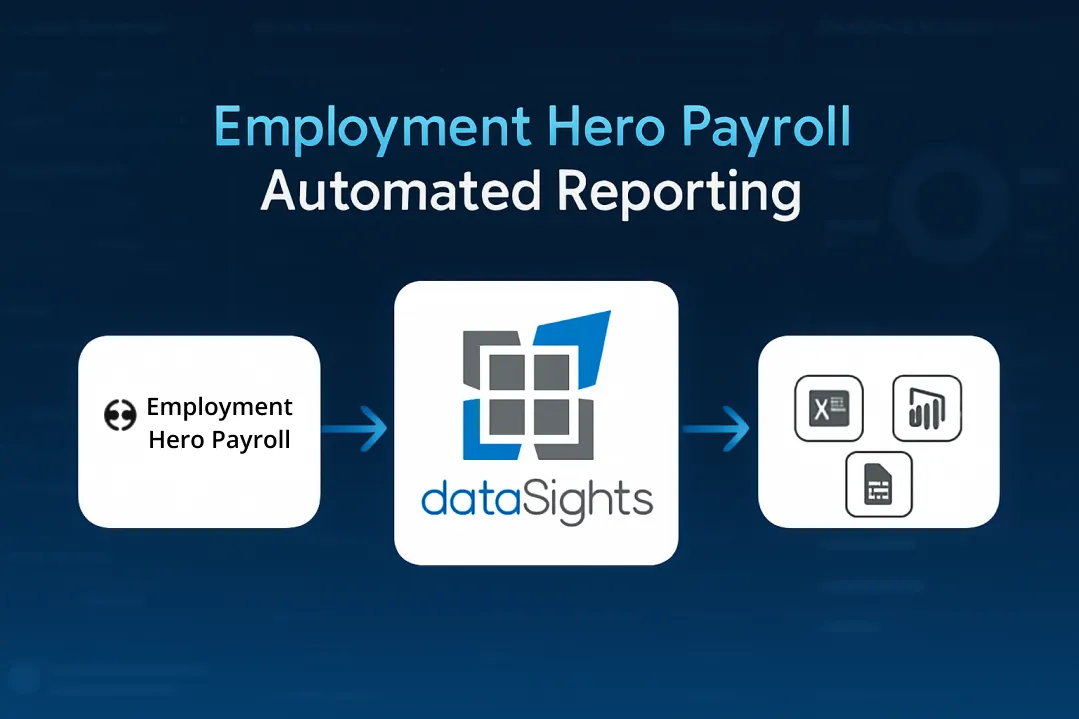
You spend hours each week processing payroll across multiple spreadsheets, manually calculating award rates, and exporting CSVs for reporting. Your finance team needs real-time labour cost visibility, but Employment Hero Payroll’s native reports lack the depth required for board presentations. Manual data exports consume time that should be spent analysing results, not preparing data.
Understanding Employment Hero Payroll
Employment Hero Payroll is designed for small to medium-sized businesses across Australia, New Zealand, the United Kingdom, Singapore, and Malaysia. KeyPay (now Employment Hero Payroll) reported 2.5 million employees paid by July 2022 prior to the rebrand. Employment Hero may publish broader adoption statements, but Employment Hero Payroll customer counts are not consistently disclosed by region/edition.
Ready to Automate Your Financial Consolidation?
Stop wrestling with manual consolidations and broken formulas. dataSights automates multi-entity reporting, Xero consolidations, and Power BI connections. Join 300+ businesses already transforming their financial reporting with our platform, rated 5.0 out of 5 by 90+ verified Xero users.
Table of Contents
What Employment Hero Payroll Actually Delivers
When correctly configured and reviewed, Employment Hero Payroll can reduce manual award interpretation effort by applying award rules, classifications, and pay conditions consistently.
Core Payroll Capabilities
Automated pay calculations process regular wages, overtime, allowances, deductions, and superannuation without manual intervention. The award interpretation engine helps apply pay rates based on the award/settings you select, which can reduce manual checking. In Australia, Single Touch Payroll reporting (STP) reporting submits pay run data to the ATO with each pay cycle.
Employee self-service portals enable staff to access payslips, leave balances, tax documents, and personal information without HR intervention. Timesheet integration flows automatically approve hours into payroll processing, eliminating duplicate data entry.
Workforce Management Features
Rostering tools schedule shifts and manage unexpected changes without spreadsheet chaos. Time and attendance tracking through mobile apps eliminates manual timesheet collection. Leave management workflows handle approvals and automatically update payroll calculations.
Integration Ecosystem
Native integrations with Xero and MYOB sync payroll journals directly into accounting software. The Xero integration posts draft or published journals after pay runs are finalised, ensuring wage allocations flow accurately into financial reports.
Employment Hero Payroll’s Evolution from KeyPay
Employment Hero acquired KeyPay in December 2021 and completed the rebrand in March 2023. KeyPay had grown from 1,911 employees paid in January 2013 to serving 2.5 million employees by July 2022 before the rebrand.
The acquisition brought Employment Hero to unicorn status, making it Australia’s 8th unicorn. The core KeyPay payroll platform continued, with branding and packaging moving under Employment Hero Payroll. Existing customers continued to receive support, although branding, packaging, and partner positioning may vary by region/edition.
Employment Hero Payroll Pricing Structure
Employment Hero offers tiered pricing based on feature access and employee count, with minimum monthly commitments regardless of billable employees.
Pricing (AU)
Employment Hero offers tiered pricing with per-employee rates and monthly minimums. Figures can vary by plan and region – treat any numbers as indicative and confirm on Employment Hero’s pricing page before publishing (as of November 2025).
dataSights automation (this solution): Priced by number of entities, data scope, and refresh frequency. Provide your entity count and desired refresh to receive a transparent quote.
Employment Hero Payroll API and Integration Options
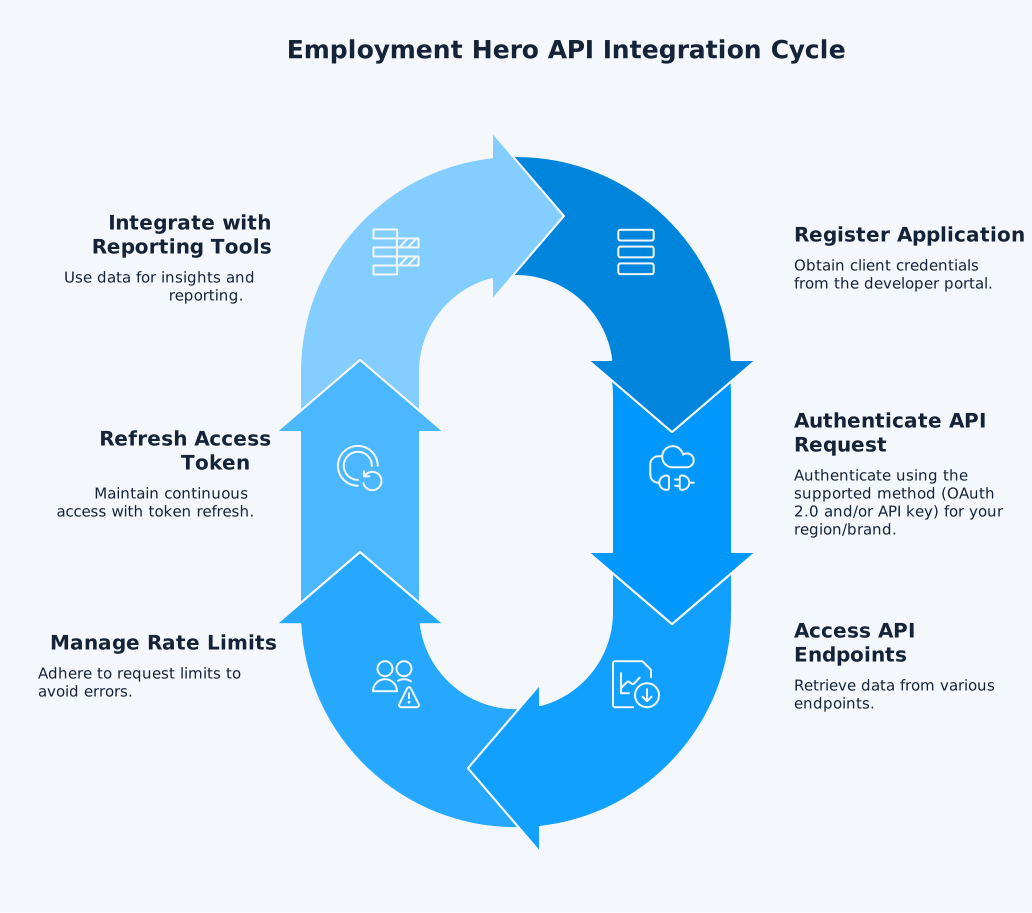
The Employment Hero Payroll API uses REST/JSON architecture for programmatic access to payroll data, employee records, and pay run information.
API Authentication/Rate Limits/Endpoints
Employment Hero Payroll API authentication varies by region/edition. Depending on the brand (for example KeyPay/YourPayroll), the API may support API key authentication and/or OAuth 2.0 (Bearer tokens). Use the official developer documentation for your region/brand to confirm the supported method and requirements. Specific endpoints, base URLs, and throttling can vary by environment and change over time. Always refer to the Employment Hero developer portal for current details, and implement retry/back-off and pagination in your integration.
Power BI Integration Options
Employment Hero lists a Power BI integration in some editions/regions. Refresh frequency depends on your connector and workspace configuration – use scheduled refresh (Import mode), or land data in SQL for DirectQuery (where supported). Confirm limits and schedules with your provider.
Third-Party Integration Partners
dataSights offers Employment Hero connectors for Power BI, Excel, and Google Sheets, staging data in relational databases for complex reporting. For scalable cross-entity reporting, Microsoft recommends staging with dataflows to reduce source load and improve performance – more reliable than stitching multiple API endpoints at query time.
Why Employment Hero Payroll Reporting Requires Automation
Native Employment Hero reports provide pay run summaries, employee cost breakdowns, and compliance documents, but lack the depth required for financial analysis and board presentations.
Manual Reporting Challenges
Employment Hero provides dashboards and standard reports. For deeper multi-entity analysis – such as consolidating multiple payroll accounts or blending with GL and budgets – teams typically stage data in a database or dataflow and reuse a semantic model. This approach scales better than stitching multiple API endpoints per report.
Multi-Entity Consolidation
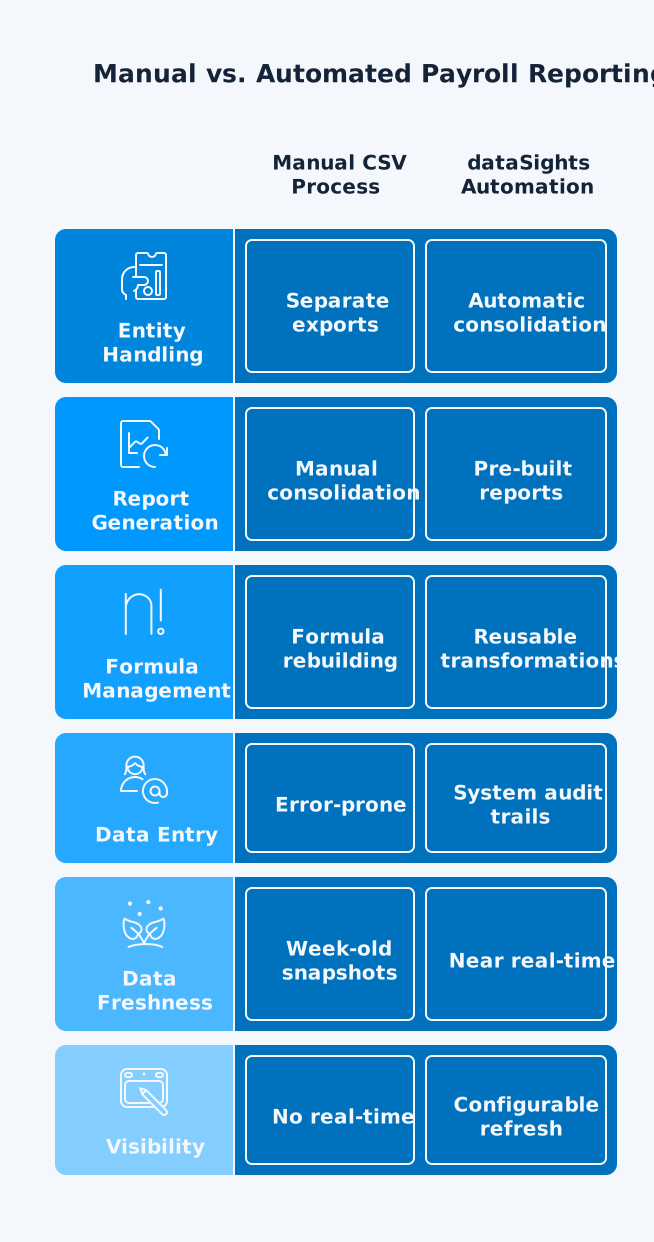
Businesses running payroll across multiple legal entities face compounding manual work. Each entity requires separate CSV exports, manual data cleaning, formula updates, and consolidation into unified reports. Labour cost analysis across entities becomes impossible without automated data aggregation.
Real-Time Visibility Requirements
CFOs need operationally current labour cost visibility for budget variance analysis, not week-old snapshots. Refresh frequency depends on your connector and workspace configuration. For teams that need more frequent updates, land data in SQL and use Import (scheduled) or DirectQuery, subject to source/API limits.
How dataSights Automates Employment Hero Payroll Reporting
dataSights connects Employment Hero Payroll to Power BI and Excel via fully automated data synchronisation -removing manual exports and enabling near real-time analysis based on your refresh schedule. Each customer gets a dedicated Azure SQL Database managed by dataSights (or a bring-your-own-database option in your Azure environment).
Management Reports (Primary)
Pre-built, executive-ready packs delivered in the dataSights web platform – no DIY dashboarding.
What you get:
- Payroll overview (total cost, variances)
- Cost by entity/location/department
- Overtime & penalties
- Leave & liabilities
- Headcount & movements
- Exception checks (missing approvals, outliers).
- Built for scale with multi-entity reporting, consistent dimensions, and scheduled refresh aligned to source/API limits.
Once data lands in SQL, it becomes your single source of truth:
- Power BI connects to SQL via Import or DirectQuery.
- Excel uses Power Query for one-click refresh – no CSVs.
- Google Sheets (optional): light-touch access for stakeholders – minimised in our standard approach.
This architecture delivers secure, scalable, multi-entity analytics with controlled refresh and documented transformations.
Employment Hero Payroll Compliance and Security
Employment Hero states it uses security controls such as encryption and multi-factor authentication (MFA) to help protect payroll data. Confirm current certifications, controls, and audit scope in Employment Hero’s security documentation. Employment Hero supports Single Touch Payroll (STP) in Australia, enabling payroll information to be reported to the ATO each pay cycle. Employers remain responsible for compliance and final review.
Single Touch Payroll Reporting
In Australia, STP reporting submits payroll data to the ATO with each pay cycle. Employers still need to review configuration and outputs (especially where pay conditions, allowances, or custom rules apply). Employment Hero Payroll typically updates tax tables and statutory settings as legislation changes. Employers still need to review configuration and outputs (especially where pay conditions, allowances, or custom rules apply).
Award Interpretation
Automated award interpretation helps apply pay rates, allowances, and conditions based on configured employee agreements; employers remain responsible for final review and compliance. The Pay Conditions Engine helps apply award rules and pay rates; employers remain responsible for compliance.
Data Protection
Encrypted data storage and secure login protocols protect sensitive payroll information against unauthorised access. Multi-factor authentication adds security layers for administrator accounts.
Employment Hero Payroll vs Manual Payroll Processes
Manual payroll processing through spreadsheets creates error risk, compliance challenges, and time waste that automated platforms eliminate.
Processing Time
Manual payroll requires calculating gross pay, tax withholdings, superannuation contributions, allowances, and deductions for each employee. Award interpretation consumes additional time verifying the correct pay rates. Employment Hero automates these calculations, reducing pay run processing from hours to minutes.
Error Reduction
Manual payroll processes increase error risk and rework; automation reduces corrections and time spent. Transposed digits, incorrect award rates, and miscalculated superannuation create compliance risk. Automation reduces calculation errors by standardising formulas and applying award rules consistently, but setup, inputs, and review controls still determine accuracy.
Compliance Maintenance
Tax rates, superannuation guarantee percentages, and award conditions change regularly. Manual processes require constant monitoring of legislative updates and manual formula adjustments. Employment Hero’s system updates reflect legislative changes, subject to correct configuration and review by the employer.
Reporting Limitations
Spreadsheet-based payroll lacks audit trails, version control, and consolidated reporting across entities. Building labour cost analyses requires manual data aggregation from multiple sources. Automated platforms provide instant reporting across all payroll metrics without manual consolidation.
Frequently Asked Questions
Is Employment Hero Payroll the Same as KeyPay?
Employment Hero acquired KeyPay in December 2021 and rebranded the core KeyPay payroll platform as Employment Hero Payroll in 2023. The underlying payroll platform continued, while branding and packaging shifted under the Employment Hero Payroll name.
What Subscription Level Do I Need for Employment Hero Payroll API Access?
API access depends on which API you need and your region/edition. In some editions, the Payroll Classic (KeyPay/YourPayroll) API may be available on standard payroll plans, while Employment Hero platform/HR APIs may require higher tiers (for example Platinum+). Authentication can also vary (API key and/or OAuth 2.0). Confirm the exact requirements in your region’s developer documentation or with Employment Hero for your account.
Does Employment Hero Payroll Integrate With Xero?
Yes. Employment Hero Payroll offers native Xero integration. The integration posts payroll journals to Xero after pay runs are finalised, aligning wage allocations with your chart of accounts.
How Often Does the Official Power BI Integration Refresh Data?
Employment Hero lists a Power BI integration. Refresh frequency depends on your connector and workspace configuration – use scheduled refresh (Import mode) or DirectQuery when the data is landed in a supported SQL database. Confirm the schedule with your provider.
Can I Connect Multiple Employment Hero Payroll Accounts for Consolidated Reporting?
Yes. dataSights supports multiple Employment Hero Payroll accounts, syncing each to separate schemas for cross-entity reporting while maintaining data separation.
Does Employment Hero Payroll Support Multi-Currency Payroll?
Payroll is generally processed in the entity’s/local statutory currency for each country. If you pay employees cross-border (e.g., expats) or report group results in another currency, you’ll need FX translation rules in the reporting/consolidation layer (for example: rate tables, translation timing, and reporting currency logic). dataSights can apply documented conversion rules in the reporting layer.
What Countries Does Employment Hero Payroll Operate In?
Employment Hero Payroll operates across five countries: Australia, New Zealand, the United Kingdom, Singapore, and Malaysia.
How Does dataSights Automate Employment Hero Payroll Reporting?
dataSights lands Employment Hero Payroll data in SQL on a configurable schedule, then surfaces Management Reports (primary), Excel automation, and Power BI dashboards – no CSV exports. Multi-entity consolidation and documented transforms keep metrics consistent.
Can I Export Employment Hero Payroll Data to Excel Without Manual CSV Downloads?
Yes. dataSights enables direct Excel connections via Power Query. Build your reports once, then refresh on demand or on a schedule.
What Are Common Complaints About Employment Hero Payroll?
Public reviews sometimes mention setup complexity, peak-time support delays, and occasional calculation checks. Impact varies by award complexity and number of entities.
Automate Your Employment Hero Payroll Reporting Now
You’ve spent enough time exporting CSVs and rebuilding the same Excel reports every month. Your finance team deserves near real-time labour cost visibility without manual data manipulation. Employment Hero Payroll handles payroll calculations and compliance, but many finance teams still need automated data integration for board-ready reporting. dataSights lands Employment Hero Payroll data into a dedicated Azure SQL database on your configured schedule, then delivers Management Reports (primary), Excel automation, and Power BI for advanced visualisation – without CSV exports. Focus on interpreting results rather than preparing data.
Transform Your Employment Hero Payroll Reporting with dataSights
Ready to eliminate manual CSV exports and access near real-time payroll insights? dataSights connects Employment Hero Payroll to Power BI, Excel, and Google Sheets with automated refresh and multi-entity consolidation. Rated 5.0 out of 5 by 90+ Xero users. Join 300+ businesses already automating their payroll reporting workflows.
About the Author
Kevin Wiegand
Founder & Client happiness
I’m Kevin Wiegand, and with over 25 years of experience in software development and financial data automation, I’ve honed my skills and knowledge in building enterprise-grade solutions for complex consolidation and reporting challenges. My journey includes developing custom solutions for data teams at Gazprom Marketing & Trading and E.ON, before founding dataSights in 2016. Today, dataSights helps over 300 businesses achieve 100% report automation. I’m passionate about sharing my expertise to help CFOs and Financial Controllers reduce their month-end close time and eliminate the manual Excel exports that drain their teams’ valuable time.