
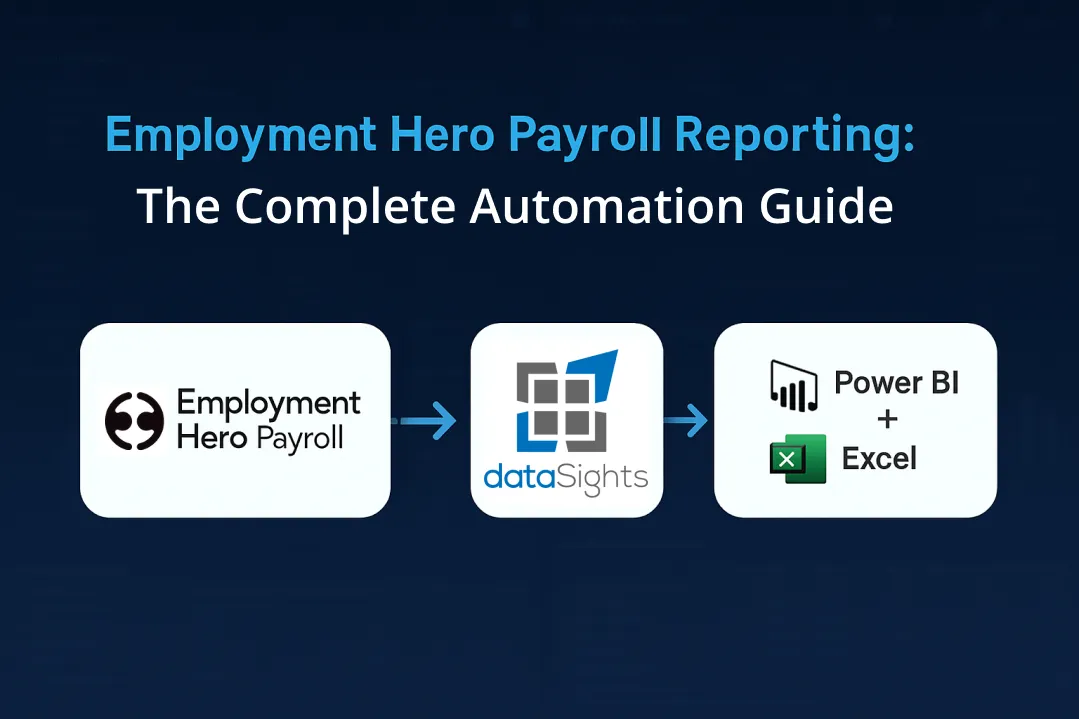
Manual Employment Hero Payroll exports consume hours every month while limiting your ability to analyse labour costs across multiple entities. You export CSVs, manipulate data in Excel, and manually build dashboards that are outdated the moment you create them. Finance teams often need a managed connector to achieve governed, multi-entity analytics without manual exports or custom scripts. This guide shows you how to automate Employment Hero Payroll reporting into Power BI and Excel, cutting hours from your monthly reporting cycle while gaining live visibility into payroll expenses, superannuation contributions, and labour cost breakdowns across all entities.
What Is Employment Hero Payroll Reporting?
Employment Hero Payroll Reporting combines automated data extraction with live dashboard updates. Employment Hero automates the flow of data from rosters, timesheets, leave management, and reporting, providing full visibility of pay runs at all times. Finance teams can analyse payroll expenses, track labour costs by department, and generate compliance reports without manual data exports.
Ready to Automate Your Financial Consolidation?
Stop wrestling with manual consolidations and broken formulas. dataSights automates multi-entity reporting, Xero consolidations, and Power BI connections. Join 300+ businesses already transforming their financial reporting with our platform, rated 5.0 out of 5 by 90+ verified Xero users.
Table of Contents
What Employment Hero Payroll Delivers
Employment Hero/KeyPay operate across Australia, New Zealand, the United Kingdom, Singapore, and Malaysia, with features and terminology varying by region to meet local compliance requirements.
Compliance reporting differs by jurisdiction:
- Australia uses Single Touch Payroll (STP)
- New Zealand uses Payday Filing
- UK uses Real Time Information (RTI)
- Singapore and Malaysia use local statutory filings specific to each region.
Employment Hero Payroll provides cloud-based workforce management that combines:
- Payroll processing
- Tax compliance and
- Employee self-service capabilities.
Core Payroll Capabilities
Employment Hero delivers automated payroll processing with built-in compliance management. The platform calculates wages, taxes, and superannuation automatically, supporting full-time, part-time, casual, and contractor payment structures.
The platform automatically performs key payroll functions, including:
- Calculating wages
- Computing taxes
- Managing superannuation
It supports a variety of payment structures, such as:
- Full-time
- Part-time
- Casual
- Contractor
Single Touch Payroll (STP) reporting submits payroll data to tax authorities with every pay run. This automation ensures timely government filings while maintaining compliance with the Australian Taxation Office and the Inland Revenue Department’s standards.
The employee self-service portal reduces HR enquiries by providing direct access to payslips, leave balances, and tax documents. Managers approve timesheets and leave within the system, feeding approvals directly into payroll processing.
Integration Ecosystem
Employment Hero integrates with key accounting platforms, including:
It also supports journal file exports for manual import to systems like MYOB, as well as direct integrations (e.g., Xero, QuickBooks) where available, eliminating the need for manual reconciliation between payroll and accounting records.
Important Note on Xero Journal Integration: Employment Hero posts journals to Xero per pay run, but cannot:
- Backdate journals
- Reverse or re-sync modified journals automatically
- Split journals across entities
This means that while Employment Hero automates the initial journal posting, any subsequent modifications or corrections require manual intervention in Xero. For multi-entity groups, each entity receives separate journal entries that cannot be split or redistributed automatically.
Additionally, the platform connects with various operational tools such as:
- Time tracking applications
- Rostering tools
- HR management systems
This seamless integration allows data to flow automatically between connected systems, reducing double-handling and minimising data entry errors.
Employment Hero Payroll Reporting Limitations
While Employment Hero provides built-in reporting capabilities, finance teams requiring advanced analytics face technical constraints. Understanding these limitations helps you determine when third-party automation becomes necessary.
Native Reporting Constraints
Employment Hero provides dashboards and compliance reports. Many finance teams still need multi-entity consolidation and cross-system modelling. This is where a governed SQL layer extends native capabilities.
Report packs can be scheduled for delivery in CSV, Excel, or PDF format. However, these static exports require manual processing for deeper analysis. Where direct connections aren’t in place, teams often fall back to manual exports. A governed SQL layer removes that friction and standardises refresh.
API Technical Challenges
Employment Hero provides API access for data extraction, but implementation requires developer resources. API access is available on Platinum plans and above; check current plan requirements. Many users report difficulties connecting the API to Power BI without technical expertise. API implementations often require developer effort, and direct Power BI reporting can be complex for cross-entity scenarios. A governed SQL layer simplifies refresh and performance.
Cross-entity queries involve joining multiple API endpoints, creating performance bottlenecks. Direct API reporting in Power BI proves impractical for most finance teams due to these technical complexities.
Multi-Entity Consolidation Gaps
Employment Hero manages payroll for individual business entities effectively. However, consolidating payroll data across multiple entities requires additional workflows. Finance teams managing group structures need automated consolidation to analyse total labour costs, compare entity performance, and generate board-ready reports.
Manual consolidation from multiple Employment Hero accounts consumes hours during month-end close. Without automated data aggregation, finance teams cannot easily track labour costs across all entities or compare payroll expenses by department, location, or cost centre.
Automating Employment Hero Payroll Reporting with dataSights
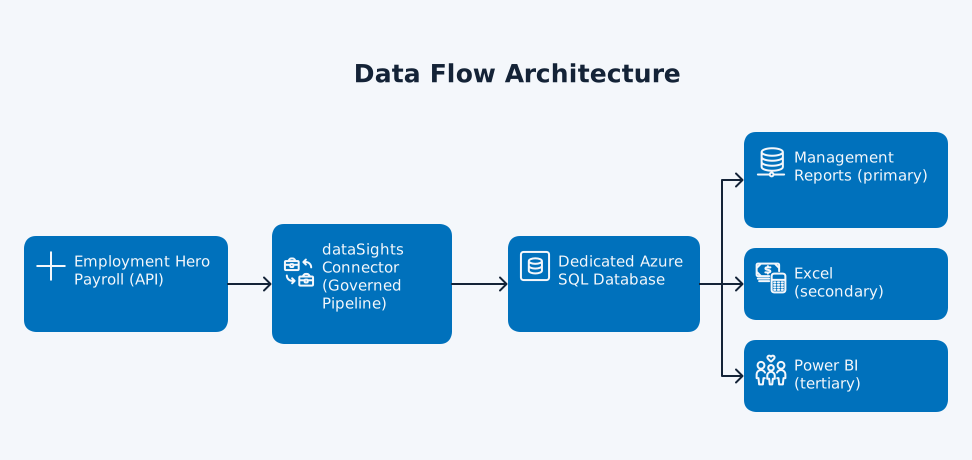
dataSights removes manual payroll exports by delivering a governed dataset that updates on your schedule. See how dataSights processes Employment Hero Payroll data below for the full architecture. This seamless integration ensures scheduled, near-real-time data availability aligned to your refresh cadence. Pre-built, board-ready management packs delivered in the dataSights platform – no DIY dashboarding.
What you get includes:
- Consolidated P&L, Balance Sheet, and Trial Balance
- Labour-cost KPIs
- Variance analysis
- Eliminations
- Accounts Receivable (AR) and Accounts Payable (AP)
- Cash flow
This solution is designed for multi-entity scale and features:
- Automatic data refresh
- Role-based access controls
This enables efficient and secure financial management across complex organisational structures.
Then continue with Excel (secondary) automation and Power BI (tertiary) advanced analytics.
How dataSights Processes Employment Hero Payroll Data
dataSights connects Employment Hero Payroll to Power BI and Excel through fully automated data synchronisation. Each customer receives a dedicated Azure SQL Database, hosted and managed by dataSights, which securely stores all Employment Hero Payroll data, including:
- Pay runs
- Employee records
- Timesheets
- Leave balances
This database ensures high security and reliable access to critical payroll information.
For clients with existing infrastructure, dataSights supports a “bring your own database” option, allowing integration directly into your Azure SQL environment. Once Employment Hero Payroll data lands in SQL, it becomes the single source of truth for all reporting and analytics.
From there:
- Power BI connects natively to the SQL database, supporting either DirectQuery or Import Mode for interactive dashboards
- Excel users automate analysis using Power Query, building dynamic payroll and labour-cost models that refresh with a single click
Note: Google Sheets access is available on request for lightweight sharing.
This architecture provides secure, scalable, and automated payroll analytics, enabling consistent, multi-entity reporting without manual intervention. With controlled refresh schedules and transparent data pipelines, finance and HR teams gain up-to-date insights while maintaining complete data ownership and governance.
Near Real-Time Dashboard Capabilities
Use Power BI to monitor payroll KPIs between pay cycles and spot movement early.
Build custom dashboards tracking:
- Total labour costs by entity, department, and cost centre
- Payroll expense trends over time
- Superannuation contribution tracking
- Leave liability calculations
- Employee cost analysis by classification
Power Query, available in both Excel and Power BI, handles the refresh and transformation of consolidated Employment Hero data. The dataSights OfficeAddIn enables teams to focus on using data rather than exporting CSVs or manipulating data to get it ready for analysis.
Multi-Entity Payroll Consolidation
Use the consolidated dataset to analyse cross-entity labour costs and variances.
Consolidated payroll reporting includes:
- Cross-entity labour cost analysis
- Departmental expense tracking across all entities
- Entity-to-entity payroll comparisons
- Consolidated superannuation reporting
- Group-wide leave liability tracking
Setting Up Employment Hero Payroll Automation
Implementing automated Employment Hero Payroll reporting requires connecting your Employment Hero account to dataSights, configuring data sync schedules, and building reporting dashboards.
Initial Connection Configuration
dataSights connects to Employment Hero Payroll through secure API authentication. The initial setup involves providing API credentials and selecting which Employment Hero entities to sync.
The dataSights platform validates the connection, maps your Employment Hero data structure, and begins the initial data sync. Historical payroll data loads into your dedicated SQL database, creating a complete dataset for analysis.
Data Refresh Scheduling
Configure automated refresh schedules based on your reporting requirements. Most finance teams schedule daily refreshes to maintain current payroll data without manual intervention.
Refresh scheduling options include:
- Daily updates for current payroll visibility
- Pre-pay run refreshes for validation
- Post-pay run updates for immediate reporting
- On-demand refreshes for urgent analysis
The dataSights platform monitors sync status and alerts you to any connection issues requiring attention. Data validation checks ensure Employment Hero data loads wholly and correctly.
Building Payroll Dashboards
Connect as described in How dataSights Processes Employment Hero Payroll Data section. Then design dashboards around the KPIs that matter:
- Cost by entity/department
- Leave liabilities
- Super tracking
- Exceptions.
Employment Hero Payroll Analytics Best Practices
Maximising the value of automated Employment Hero Payroll reporting requires establishing clear analytics workflows, defining key performance indicators, and maintaining data governance.
Labour Cost KPIs to Track
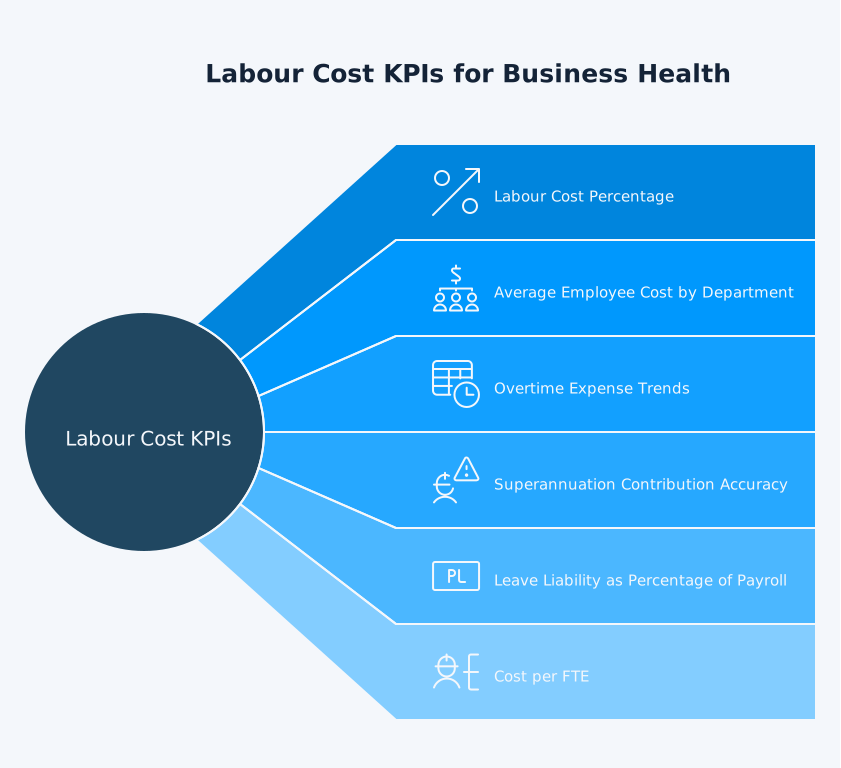
Focus on metrics like labour cost percentage and turnover rate to evaluate overall business health. These indicators lead to cost optimisations and potential increases in profitability.
Critical payroll KPIs include:
- Labour cost as percentage of revenue
- Average employee cost by department
- Overtime expense trends
- Superannuation contribution accuracy
- Leave liability as percentage of payroll
- Cost per full-time equivalent (FTE)
Tracking these KPIs through automated dashboards enables proactive workforce cost management rather than reactive month-end discovery.
Payroll Variance Analysis
Compare actual payroll expenses against budget forecasts automatically. Variance analysis highlights unexpected cost increases, enabling early intervention before expenses spiral.
Build variance dashboards showing:
- Budget vs. actual payroll costs by entity
- Department-level expense variances
- Employee classification cost changes
- Period-over-period payroll trends
- Forecast accuracy tracking
Automated variance alerts notify finance teams when payroll expenses exceed thresholds, enabling rapid investigation and corrective action.
Compliance Reporting Automation
Maintain audit trails and compliance documentation through automated reporting. Generate statutory reports, track superannuation guarantee compliance, and document payroll processing history without manual compilation.
Compliance reporting capabilities include:
- Single Touch Payroll (STP) submission tracking
- Superannuation guarantee payment verification
- Leave accrual liability reporting
- Pay run audit trail documentation
- Employee classification compliance tracking
Automated compliance reporting reduces risk while saving hours during audit preparation and regulatory submissions.
Frequently Asked Questions
Can Employment Hero Payroll Data Be Exported to Excel Automatically?
Yes, through automated integration. While Employment Hero provides manual CSV exports, automated solutions eliminate the export-import cycle. dataSights refreshes Employment Hero data directly into Excel using Power Query, enabling one-click updates without manual file handling.
Does Employment Hero Payroll Integrate with Power BI Natively?
Employment Hero provides Power BI integration capabilities. For scheduled refreshes, multi-entity consolidation, and governed SQL delivery, dataSights provides a fully managed connection aligned to your refresh cadence – no CSVs required.
How Often Can Employment Hero Payroll Data Be Refreshed?
Refresh frequency depends on your integration method. Manual exports update on-demand but require manual processing. Automated integrations typically offer daily refreshes, with some platforms supporting more frequent updates. dataSights enables scheduled refreshes aligned with your reporting cycle, from daily updates to on-demand refreshes for urgent analysis.
What Payroll Reports Does Employment Hero Provide Natively?
Employment Hero provides pay run summaries, tax calculations, superannuation, and leave reports. For tailored analytics across entities, finance teams typically extend with a governed SQL layer.
Can Multiple Employment Hero Entities Be Consolidated Automatically?
Manual consolidation from multiple Employment Hero accounts requires exporting data from each entity separately and merging it manually. Automated consolidation platforms aggregate data from all Employment Hero entities into a unified database, enabling cross-entity analysis without manual data merging.
Does Employment Hero Payroll Support Multi-Currency Reporting?
Employment Hero Payroll processes payroll in local currencies for each operating country. Multi-currency consolidation requires external reporting tools to convert currencies and aggregate payroll expenses across international entities. Automated platforms handle currency conversion and multi-country consolidation automatically.
How Do I Access Historical Employment Hero Payroll Data?
Employment Hero stores historical payroll data within the platform. However, analysing long-term trends requires exporting historical pay runs manually or connecting to the API for automated historical data extraction. Automated integration platforms load complete historical payroll data, enabling trend analysis across multiple years.
What Are Employment Hero Payroll's API Rate Limits?
Employment Hero’s API documentation specifies rate limits for both HR and Payroll data requests. The HR API generally allows 20 requests per second and 100 requests per minute per user, while the Payroll API (KeyPay) typically permits 5 requests per second per API key per IP address. High-volume data extraction may require implementing throttling or retry strategies to avoid errors. Most third-party integration platforms manage these limits automatically, ensuring reliable data sync without exceeding request quotas. For the most current limits, check the Employment Hero developer documentation or your account plan.
Transform Your Employment Hero Payroll Reporting
Ready to modernise payroll analytics? Start with board-ready Management Reports delivered on a governed, refreshable dataset – then extend to Excel and Power BI as needed. No manual exports, full auditability.
Automate Your Employment Hero Payroll Reporting Today
dataSights delivers consolidated, board-ready Management Reports with scheduled refresh and full auditability. For teams preferring spreadsheets or BI, we also automate Excel and connect Power BI directly to your governed SQL data. Start with agreed KPIs, then standardise how you validate and publish results. directly to your governed SQL data.
About the Author
Kevin Wiegand
Founder & Client happiness
I’m Kevin Wiegand, and with over 25 years of experience in software development and financial data automation, I’ve honed my skills and knowledge in building enterprise-grade solutions for complex consolidation and reporting challenges. My journey includes developing custom solutions for data teams at Gazprom Marketing & Trading and E.ON, before founding dataSights in 2016. Today, dataSights helps over 300 businesses achieve 100% report automation. I’m passionate about sharing my expertise to help CFOs and Financial Controllers reduce their month-end close time and eliminate the manual Excel exports that drain their teams’ valuable time.