Xero Inventory Management: How to Connect Cin7 Core and
Automate Reporting
by Kevin Wiegand
|
May 11, 2026
|
Cin7 Core
home
|
Cin7 Core
|
Xero Inventory Management: How to Connect Cin7 Core and
Automate Reporting
In our work with Cin7 Core customers consolidating Xero
across multi-entity groups, the conversation almost
always lands on the same friction point. Xero inventory
management works for a single shop selling under 4,000
tracked or finished inventory items at weighted average
cost, but the moment a product business adds a second
warehouse, a third sales channel or a fourth Xero
entity, native Xero inventory stops being enough. We
have seen 6-entity wholesale groups and 8-entity
homewares brands lose 3 to 5 working days each month-end
exporting Xero Inventory Items reports per entity and
rebuilding consolidated stock and gross margin views in
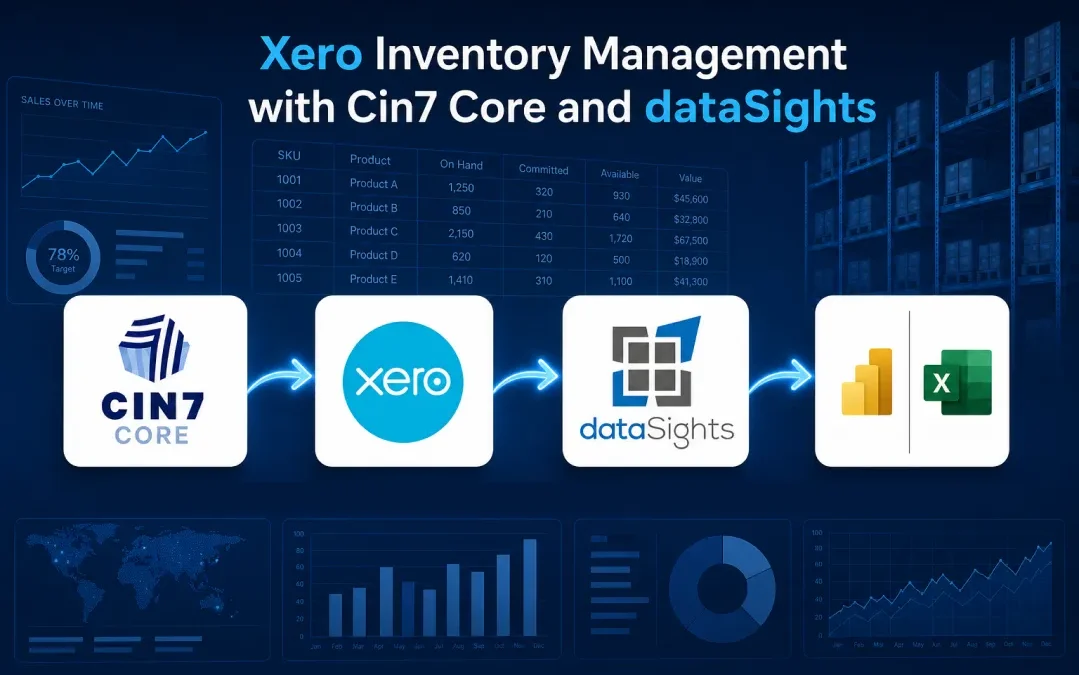
Excel. This post covers how the Cin7 Core to Xero
integration actually behaves, where it stops solving the
reporting problem on its own and how dataSights connects
both systems into a single reporting layer for teams
that need consolidated stock, COGS and gross margin
without copy-paste.
What Is Xero Inventory Management?
Xero inventory management is the built-in stock tracking
module inside Xero accounting that updates quantities,
calculates COGS at weighted average cost and links items
to sales and purchase invoices. Xero's native inventory
is designed to handle up to 4,000 tracked inventory items at average cost only, which is why product businesses with
multiple warehouses or FIFO needs add an app like Cin7 Core with its 70+ customisable inventory reports. dataSights
unifies both into one reporting database with 160+ connectors feeding Excel, Power BI and web dashboards.
Ready to Automate Your Financial Consolidation?
Stop wrestling with manual consolidations and broken
formulas. dataSights automates multi-entity reporting,
Xero consolidations, and Power BI connections. Join 300+
businesses already transforming their financial
reporting with our platform, rated 5.0 out of 5 by 90+ verified Xero users.
Where Native Xero Inventory Management Stops Working
Xero’s native inventory is designed to keep stock data
attached to the general ledger and works well for
straightforward retail and product workflows. It is more
limited for multi-location, manufacturing, barcode and
advanced inventory scenarios, which is why Xero’s own
guidance points users to third-party apps once those
needs appear. When we onboard a 6+ entity inventory-led
group, the first thing we look at is whether the
existing Xero setup is already exhibiting the three
classic limitation effects.
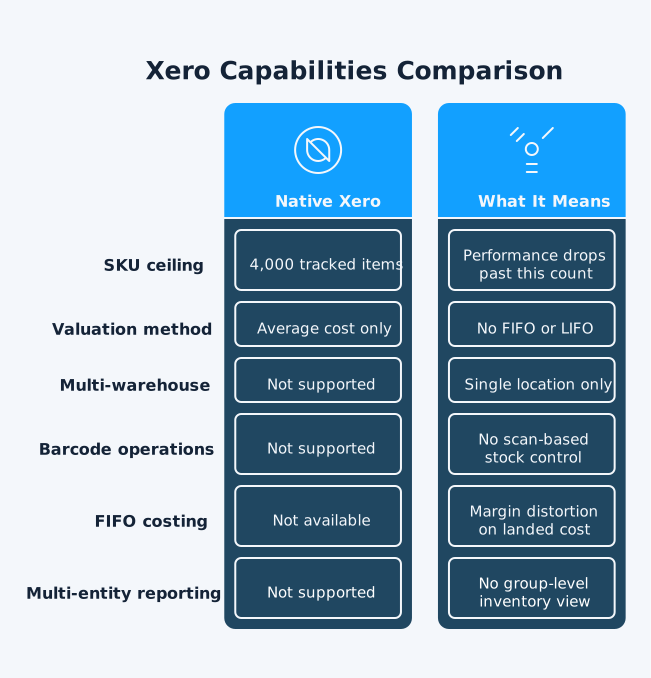
The 4,000 Tracked Item Limit
Xero supports up to 4,000 tracked inventory items and
opening balance imports are capped at the same
4,000-item count. A skincare brand with 80 product lines
across 12 size and shade variants can hit that limit
faster than expected once seasonal lines are added. From
the dataSights customer base, teams approaching that
count typically start moving inventory operations into a
dedicated app rather than continuing to add tracked
items in Xero.
Average Cost Only, No FIFO or LIFO
Xero values inventory at weighted average cost only. For a food and beverage brand pricing to retailers
off landed cost, the loss of FIFO and FEFO visibility
can become a real margin issue. To illustrate, a
shipment landed at $4.20 a unit gets averaged with old
stock landed at $3.10, smoothing out the COGS line and
hiding the cost shock until quarter-end. In our work
with multi-entity product groups, we often see finance
teams in this position keep a parallel inventory
spreadsheet next to Xero specifically to preserve
FIFO-style visibility on landed cost.
One Location, One Set of Books
Xero’s core accounting does not track stock across
multiple warehouses without a third-party inventory app,
which is why Xero’s own guidance points users to apps
like Cin7 Core for multi-location scenarios. Cin7 Core does not support Xero inventory tracking and instructs users to turn off inventory tracking in Xero
before connecting. For groups operating a Sydney warehouse,
a Melbourne 3PL and a Shopify-fulfilled drop-ship line, that
means inventory has to live in the connected app, with Xero
handling only the accounting side.
How Cin7 Core Closes the Inventory Gap (and Where It Stops)
Cin7 Core is the natural extension when Xero alone cannot
handle the inventory side. The integration is mature, with
most inventory and accounting data flowing from Cin7 Core
into Xero, some Xero data optionally downloaded back into
Cin7 Core and payment sync direction set per workflow. Each
of these has its own boundaries that finance teams need to
understand before they design month-end close around the
integration.
What the Cin7 Core to Xero Sync Actually Moves
When you connect Cin7 Core to Xero through the Cin7 Core Xero Connect Wizard, the integration imports your chart of accounts,
customers, suppliers and tax rules in the first sync. After
that, Cin7 Core takes over as the inventory system and the Xero sync options determine what flows where on the ongoing schedule:
Products created or updated in Cin7 Core export to Xero
as items
Sales invoices and purchase bills export from Cin7 Core
to Xero
Manual journals, including COGS and other
inventory-related transactions, export to Xero
Payments sync from Cin7 Core to Xero, from Xero to Cin7
Core, or both, depending on workflow
Base currency must match between the two platforms and the
Xero invoice status can be set to either Draft or
Authorised, depending on whether your bookkeeper wants a
review step before the bill posts.
The integration also supports transaction consolidation up to 500 lines per consolidated invoice, grouping daily or monthly sales by sales channel,
currency and store. For a Shopify operation pushing 300+
orders a day, daily consolidation helps avoid Xero
processing limitations and keeps the audit trail readable in
Xero.
Where Cin7 Core's Reporting Hits Its Own Limits
Cin7 Core's built-in reporting was not designed to
consolidate across multiple Xero entities, which is where
group-level finance teams hit the wall. The pattern we keep
seeing in groups running Cin7 Core plus multiple Xero
entities is that finance ends up with three separate
reporting silos:
Consolidated group reporting with full P&L context that
does not exist in either tool
As an illustrative example, a wholesale group running 8 Xero
entities and one shared Cin7 Core warehouse cannot produce a
consolidated gross margin report by product category from
either platform alone. That is the reporting gap dataSights
was built to close.
How to Connect Cin7 Core to Xero, Step by Step
For finance teams setting this up cleanly the first time,
the recommended sequence is:
Set up the chart of accounts in Xero first, including
the inventory asset, COGS and stock adjustment accounts
that Cin7 Core requires.
Before disabling, review existing tracked items and
opening balances with your accountant or bookkeeper,
since this change affects how stock-on-hand and COGS
have been recorded historically. Then disable Tracked
Inventory in Xero. Cin7 Core will manage inventory from
this point forward.
In Cin7 Core, navigate to Integration, then Xero and run
the Connect Wizard.
Map every Cin7 Core account to a unique Xero account.
Each Cin7 Core account must map to exactly one Xero
account.
Map tax rules. Cin7 Core auto-suggests matches when the
rate and the sale or purchase property align.
Choose whether to import customers, suppliers or both.
Set up auto-sync frequency and define email or in-app
alerts for sync failures.
Decide your consolidation mode per sales channel:
Individual, Daily or Monthly.
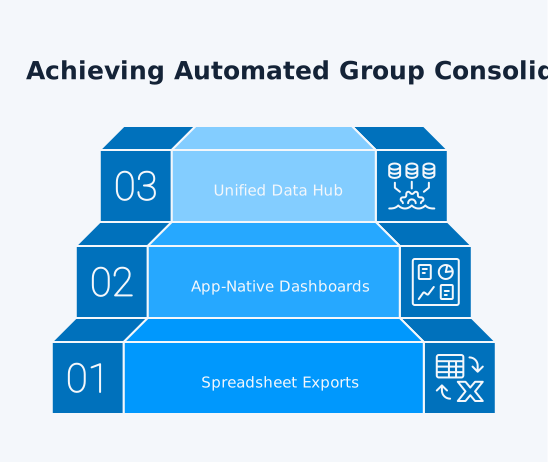
The 3-Tier Inventory Reporting Maturity Model
Across our Cin7 Core and Xero customer base, we see three
distinct tiers of reporting maturity. When we onboard a new
group, we typically place them on the model using four
signals:
The number of Xero entities in the consolidation
The working days month-end reporting takes
Where the consolidated view lives (spreadsheet, app
dashboard, or unified database)
How the data refreshes (manual export, scheduled
refresh, or automated)
Knowing which tier you are operating at right now is the
fastest way to plan the next 12 months of finance
automation.
Tier 1: Spreadsheet Exports
The finance team exports CSVs from Cin7 Core, downloads PDFs
from Xero and pivots them by hand in Excel each month. In
the dataSights customer base, this approach typically holds
up for groups in the 2 to 4 entity range with relatively
contained product catalogues and starts breaking the moment
a journal is reposted or a return changes a prior period.
Controllers operating at this tier often tell us their
month-end consumes 3 to 5 working days, with most of that
time spent reconciling rather than analysing.
Tier 2: App-Native Dashboards
The team uses Cin7 Core's built-in inventory KPI dashboards
and Xero's standard reports per entity. Stock turn and
reorder dashboards live in Cin7 Core. Profit and loss lives
in each Xero entity. The gap is consolidation: there is no
group view that spans both platforms.
Tier 3: Unified Data Hub
Both Cin7 Core and Xero feed into a single SQL database,
refreshed on a scheduled basis. Excel reports, Power BI
dashboards and web management packs all draw from that one
source. Eliminations, FX conversions and group consolidation
happen automatically because the data is already in the same
place. This is the target state dataSights is built to
support and where most of our long-tenured customers
eventually settle.
How dataSights Automates Xero and Cin7 Core Reporting
Together
When a finance team wants Cin7 Core stock data sitting next
to Xero P&L data, with no CSV exports in between, the answer
is a unified data hub. That is what dataSights provides.
Cin7 Core and Xero in One Database
The dataSights Cin7 Core connector syncs Cin7 Core data into a dedicated Azure SQL database, alongside
the Xero data from each connected organisation. Inventory, sales
and product data from both systems land in the same database,
ready for joined reporting in Power BI, Excel and Google Sheets.
From there, a typical use case is a Power BI dashboard showing
gross margin by product family across the group, refreshed on
a scheduled sync or an Excel workbook that any controller can
refresh with one click.
Excel, Power BI and Web Reports From the Same Source
For teams that prefer spreadsheets, the dataSights Excel Add-In and Power Query connection refresh Cin7 Core and Xero data straight
into the workbook on demand or on a scheduled sync. For teams
building dashboards, Power BI connects directly to the same SQL
database. For teams that want pre-built outputs, dataSights ships
management report templates inside the web app. dataSights combines
Xero financial data with CRM, payroll, inventory and SaaS metrics
in a single reporting layer, which is what makes group-level inventory
analysis with full P&L context actually work.
As an illustrative example, a wholesale group running 12
Xero entities and a single Cin7 Core warehouse can produce a
consolidated gross margin report by product category once
the data is refreshed, with the underlying transactional
detail one click away. That is the difference a unified data
hub makes.
Frequently asked question
Xero includes basic inventory management
across its pricing plans, with stock-on-hand
tracking, weighted average cost valuation
and item codes that auto-populate invoices
and purchase orders. The native module works
for small product businesses with under
4,000 tracked items and a single location,
but lacks FIFO costing, multi-warehouse,
barcode operations and advanced reorder
forecasting. Most product businesses pair
Xero with Cin7 Core once they outgrow these
limits.
Set up your chart of accounts in Xero first,
then disable Xero’s Tracked Inventory after
reviewing existing tracked items and opening
balances with your accountant. In Cin7 Core,
go to Integration, then Xero and run the
Connect Wizard. The wizard imports accounts,
tax rules, customers and suppliers, the base
currency must match between the two systems
and you can then configure auto-sync
frequency and consolidation settings.
Yes. Cin7 Core supports daily and monthly
consolidation of invoices, payments and COGS
by sales channel, with a maximum of 500
lines per consolidated invoice. High-volume
Shopify, Amazon or B2B operations use this
to avoid hitting Xero’s processing limits
while keeping the audit trail readable in
Xero.
Yes. Cin7 Core handles multiple locations
natively, with full stock transfer
workflows, location-level reorder points and
dedicated COGS journals. Xero by itself
cannot track inventory across more than one
location, which is why a Cin7 Core to Xero
integration is the standard answer for
multi-warehouse product businesses on Xero.
Xero supports the weighted average cost
method only in its core software. FIFO, LIFO
and standard cost are not available
natively. Cin7 Core uses accounting costing
methods including FIFO and FEFO for COGS,
with batch and serial variants supported and
posts the resulting COGS journals to Xero on
every authorised shipment.
dataSights syncs Cin7 Core and Xero data
into a dedicated Azure SQL reporting
database, so finance teams can build
group-level reports that combine inventory
KPIs from Cin7 Core with profit and loss
data from multiple Xero entities. Outputs
run in the dataSights web app, automated
Excel via the Office Add-In and Power BI
dashboards. This closes the consolidated
reporting gap that neither Cin7 Core nor
Xero solves on its own.
For a single Shopify store with under 4,000
tracked items, single-warehouse fulfilment
and weighted average cost as an acceptable
valuation method, Xero alone may be enough
in the short term. Once you add a second
warehouse, a second sales channel or a
second entity, the answer changes quickly.
In our experience working with growing
product businesses, the move to a dedicated
inventory app often follows within 12 to 18
months of hitting the first of those limits.
Cin7 Core to Xero auto-sync is configurable,
typically with hourly or sub-hourly
schedules. dataSights then runs scheduled
refreshes from each connected source, with
daily as the most common setting and
on-demand refresh available when adjustments
are posted in Xero or Cin7 Core. The
published data hub is therefore near
real-time rather than instantaneous.
Yes. dataSights supports bulk updating
product data in Cin7 Core directly from
Excel through the Office Add-In, which is
faster than CSV imports for routine price,
supplier and category changes across
hundreds of SKUs.
Closing the Loop on Inventory and Accounting
Xero inventory management on its own only takes a product
business so far before the 4,000 tracked item limit, the
weighted-average-cost-only valuation and the single-location
limitation start showing up in month-end. Cin7 Core fills
the operational inventory gap, but the consolidated
reporting gap across Cin7 Core, multiple Xero entities and
other systems still exists. Finance teams that move past CSV
exports and into a unified Cin7 Core and Xero data hub get
back the days they used to lose to manual consolidations and
gain a defensible group view of inventory, COGS and gross
margin. To see how that works end-to-end, the Xero consolidation services page walks through the full reporting model.
Streamline Your Xero Inventory Management With Automated Consolidation
Move from CSV exports and disconnected dashboards to a unified Cin7 Core and Xero data layer. dataSights, rated 5.0 by 90+ verified Xero users, automates inventory, COGS and multi-entity P&L reporting across Excel, Power BI and web dashboards. Join 300+ businesses already running their finance and inventory data through one platform.
I'm Kevin Wiegand, and with over 25 years of experience in software development and financial data automation, I've honed my skills and knowledge in building enterprise-grade solutions for complex consolidation and reporting challenges. My journey includes developing custom solutions for data teams at Gazprom Marketing & Trading and E.ON, before founding dataSights in 2016. Today, dataSights helps over 300 businesses achieve 100% report automation. I'm passionate about sharing my expertise to help CFOs and Financial Controllers reduce their month-end close time and eliminate the manual Excel exports that drain their teams' valuable time.