
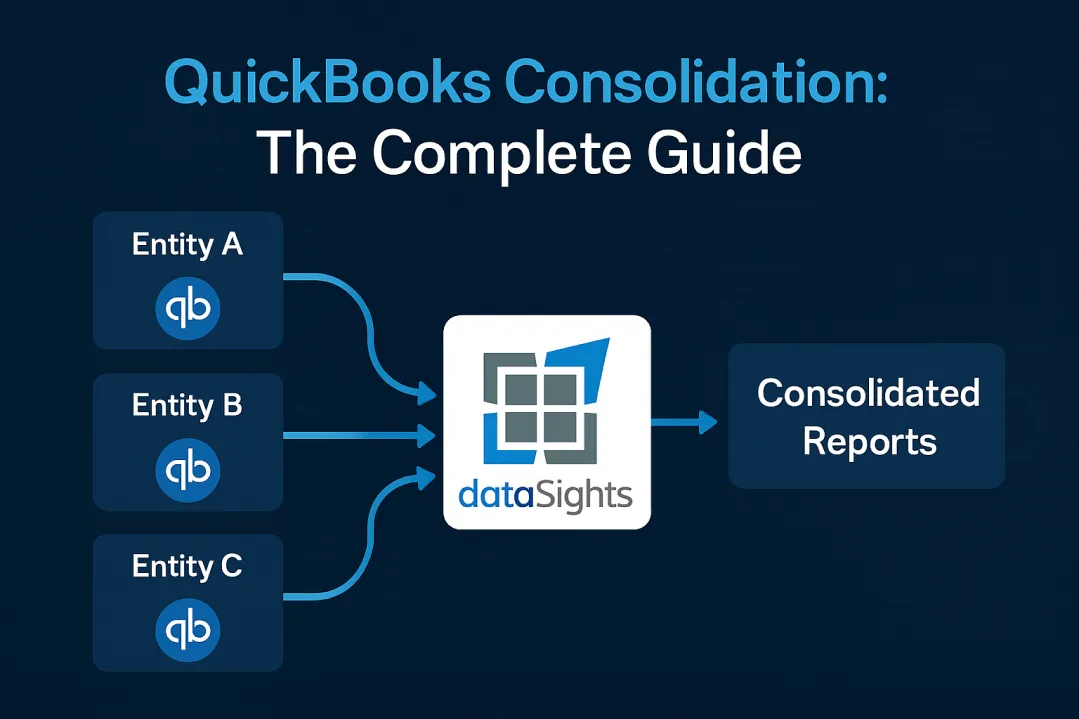
You’re managing multiple QuickBooks entities, drowning in Excel exports every month-end, and your consolidated reports still don’t balance. Sound familiar? QuickBooks consolidation should be simple, but if you’re spending days manually combining financial statements from different QuickBooks files, you’re not alone – and there’s a better way. This guide reveals exactly what QuickBooks can (and can’t) do for consolidation, plus the automation solutions that dramatically accelerate the close process.
What Is QuickBooks Consolidation?
QuickBooks consolidation refers to combining financial data from multiple QuickBooks company files or entities into unified financial statements. QuickBooks Online currently lacks native consolidation features, requiring businesses to either use QuickBooks Desktop Enterprise’s limited “Combine Reports” feature or rely on third-party solutions. The process involves exporting data from each entity, manually eliminating intercompany transactions, and creating consolidated balance sheets, P&L statements, and cash flow reports – typically taking 6 or more days for half of all businesses.
Ready to Automate Your Financial Consolidation?
Stop wrestling with manual consolidations and broken formulas. dataSights automates multi-entity reporting, Xero consolidations, and Power BI connections. Join 300+ businesses already transforming their financial reporting with our platform, rated 5.0 out of 5 by 90+ verified Xero users.
Table of Contents
Understanding QuickBooks’ Native Consolidation Capabilities
Before choosing a path, it’s essential to know what QuickBooks can and cannot do natively across Online and Desktop Enterprise, so you set expectations correctly.
QuickBooks Online: No Built-In Consolidation
QuickBooks Online operates on a fundamental limitation: one company per subscription. You cannot consolidate multiple entities within the platform itself. Here’s what you’re facing:
- Each entity requires its own QBO subscription at full price
- No ability to combine reports across entities within the platform
- Manual export to Excel is required for any consolidation work
- No native elimination features for intercompany transactions
- No support for consolidated financial statements without third-party apps
Your only option? Export everything to spreadsheets and consolidate manually – a process that requires manual workarounds resulting in higher labour costs, delayed insights and potential errors, especially when dealing with different account structures across entities.
QuickBooks Desktop Enterprise: Limited Functionality
QuickBooks Desktop Enterprise offers slightly more capability through its “Combine Reports from Multiple Companies” feature. However, this isn’t true consolidation:
- Creates separate worksheets in Excel for each entity
- Requires identical chart of accounts across all companies
- No automatic elimination of intercompany transactions
- All company files must be on the same QuickBooks version
- Still requires manual consolidation work in Excel
According to Paygration’s analysis, you can combine Balance Sheet Standard, Balance Sheet Summary, Profit & Loss Standard, and other reports – but the actual consolidation mathematics still happens in Excel, not QuickBooks.
The Intercompany Elimination Challenge
Eliminations are where most consolidations stumble: without them, revenue and expenses are overstated and audits get messy. Here’s why they matter and what typically goes wrong.
Eliminations: The Hardest Part of Consolidation
Intercompany eliminations are the single most challenging step in consolidation. Without them, consolidated revenue and expenses are overstated. QuickBooks provides no tools for automated eliminations, leaving you with manual Excel workarounds.
The risks include:
- No system-level audit trail of eliminations
- Complex “Due to/Due from” accounts with no automation
- Reconciliation mismatches discovered only after month-end
Automated solutions solve these issues by applying repeatable elimination rules, generating timestamped audit trails, and validating mismatches before close.
Why QuickBooks Fails at Eliminations
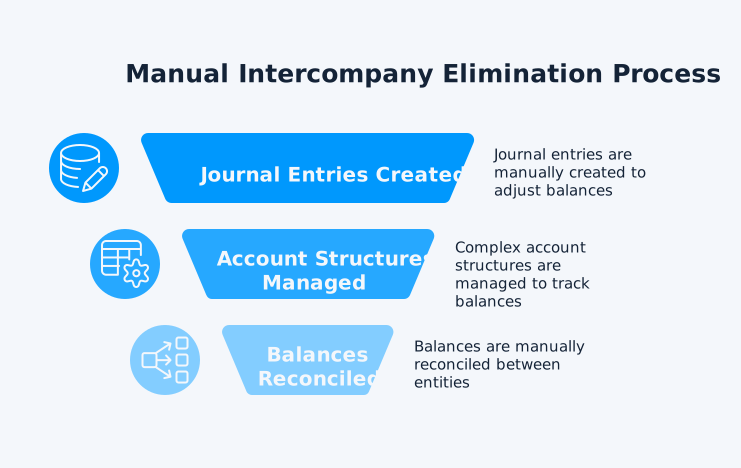
QuickBooks forces you into manual workarounds:
- No automatic elimination rules: Every intercompany transaction must be identified and removed manually
- “Due to/Due from” account gymnastics: Businesses must create complex account structures just to track intercompany balances
- No audit trail: Manual eliminations in Excel leave no documentation for auditors
- Reconciliation nightmares: Users will want to track intercompany balances between legal entities to ensure these balances are eliminated in consolidation, yet QuickBooks provides no tools to reconcile them
As a result, businesses resort to maintaining separate P&L accounts for intercompany versus third-party transactions, which doubles the complexity of your chart of accounts.
The Real Cost of Manual Eliminations
Consider a simple scenario: Entity A sells $20,000 of services to Entity B. Without proper eliminations:
- Consolidated revenue is overstated by $20,000
- Entity B’s expenses are internal, not external costs
- Tax compliance risks increase due to incorrect consolidated income
- Your audit takes longer and costs more
Multi-Currency Consolidation: Another QuickBooks Gap
Operating internationally? QuickBooks’ multi-currency limitations compound consolidation challenges. QuickBooks cannot consolidate companies using different currencies, which is a dealbreaker for global businesses.
Currency Consolidation Barriers
The issues run deep:
- No cross-currency consolidation: Canadian and US entities cannot be consolidated together
- Manual exchange rate calculations: Currency conversions must happen outside QuickBooks
- No consolidated foreign exchange tracking: Gains and losses from currency fluctuations aren’t automatically consolidated
- Premium pricing for multi-currency: Even basic multi-currency requires upgraded plans
QuickBooks’ own support forums confirm that businesses must handle exchange rate differences manually, with the platform stating “QuickBooks is not advisable since it does not have a feature to consolidate all the transactions and reports” for companies in different countries.
QuickBooks Online vs Desktop Enterprise for Consolidation
Choosing between QuickBooks versions for consolidation? Here’s the reality:
QuickBooks Online
Pros:
- Cloud access from anywhere
- Real-time data updates
- 800+ app integrations available
- Automatic backups and updates
Cons:
- Zero native consolidation features
- Requires third-party apps for any consolidation
- Each entity needs separate subscription
- Manual export to Excel for all consolidation work
QuickBooks Desktop Enterprise
Pros:
- “Combine Reports” feature for multiple companies
- Handles up to 40 users
- More robust for complex operations
- Industry-specific versions available
Cons:
- Still requires Excel for actual consolidation
- Desktop-based (limited remote access)
- All entities must use identical chart of accounts
- No automatic eliminations
Method’s comparison reveals that neither version truly handles consolidation – Enterprise just provides slightly better data export tools.
The Hidden Costs of Manual QuickBooks Consolidation
Beyond subscription fees, manual consolidation carries significant hidden costs:
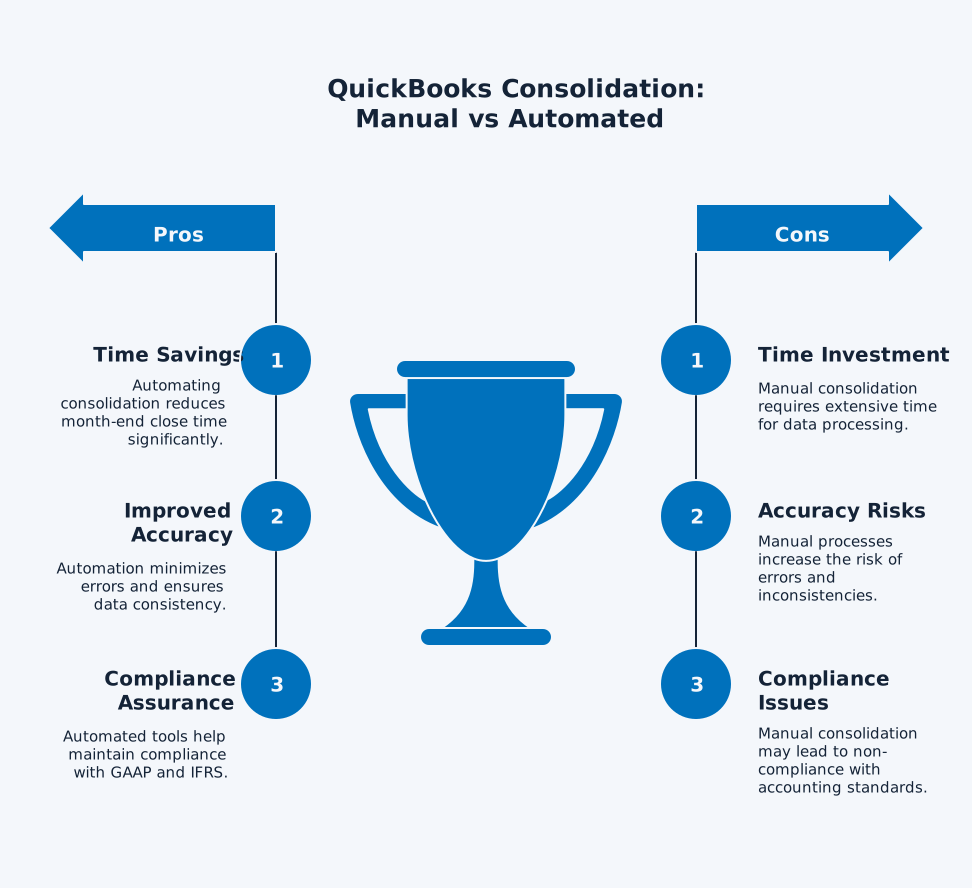
Time Investment
Results of a recent survey found that internal accounting teams take 6+ days for month-end close. For consolidation specifically:
- Excel export and combination process are “time-consuming and error-prone”
- Multiple entities mean repeating export processes for each company file
- Manual eliminations require identifying and documenting every intercompany transaction
- Currency conversions add complexity when exchange rates must be calculated outside QuickBooks
- Error correction extends timelines when manual processes lead to formula mistakes and version control issues
Accuracy Risks
Manual consolidation creates:
- Inconsistent General Ledger naming
- Formula errors in Excel
- Missed intercompany transactions
- Incorrect currency conversions
- Version control problems with multiple spreadsheets
Compliance Issues
GAAP and IFRS require proper elimination of intercompany transactions. Manual processes risk:
- Audit findings and extended audit timeframes
- Tax miscalculations from incorrect consolidated income
- Regulatory penalties for inaccurate reporting
- Loss of stakeholder confidence
Beyond eliminating transactions, compliance also requires robust documentation. Manual Excel eliminations lack version control or permanent records, which auditors expect under PCAOB and IFRS standards.
Automated consolidation platforms create complete audit logs that capture who made adjustments and when, include version control and change tracking, and maintain permanent records that can be recreated at any time. This transforms audits from lengthy investigations into straightforward confirmations.
Jurisdictional Exemptions
Not all groups are legally required to prepare consolidated accounts.
- In the UK, under the Companies Act 2006, small groups may be exempt.
- In Australia and New Zealand, subsidiaries may be exempt if included in higher-level group accounts.
Even when statutory exemptions apply, many QuickBooks users still prepare management consolidations for boards and investors.
Automating QuickBooks Consolidation: Your Options
While QuickBooks itself can’t automate consolidation, several solutions fill the gap:
API-Based Integration
QuickBooks’ API enables automated data extraction for consolidation platforms. Benefits include:
- Real-time data synchronisation across entities
- Automatic currency conversion at current rates
- Rule-based elimination processing
- Direct connection to reporting tools like Power BI
Purpose-Built Consolidation Tools
Specialised platforms connect to multiple QuickBooks instances:
- Automated data extraction from all entities
- Pre-built elimination rules
- Multi-currency handling
- Consolidated report generation
Power BI and Excel Automation
Direct connections between QuickBooks and Microsoft tools enable:
- Automated data refresh from QuickBooks
- Custom consolidation models in Power BI
- Real-time dashboard updates
- Drill down from consolidated to entity level
Businesses using automation reduce month-end close from 15+ days to under 5 days – a 70% time reduction.
Best Practices for QuickBooks Multi-Entity Management
Until you implement automation, optimise your current process:
Standardise Across Entities
- Maintain identical chart of accounts structure
- Use consistent naming conventions
- Implement uniform fiscal periods
- Document all accounting policies
Create Robust Intercompany Processes
QuickBooks Online Advanced recommends:
- Dedicated clearing accounts for each entity pair
- Monthly reconciliation checkpoints
- Standardised intercompany agreements
- Clear approval workflows
Establish Month-End Procedures
- Set calendar deadlines for each consolidation step
- Use batch reconciliation features where available
- Create bank rules for transaction categorisation
- Implement review checkpoints before consolidation
Document Everything
- Maintain consolidation checklists
- Document elimination entries
- Track currency rates used
- Create audit trails for all adjustments
Common QuickBooks Consolidation Pitfalls to Avoid
Learn from others’ mistakes:
Chart of Accounts Misalignment
Different account structures across entities create consolidation chaos.
Solution: Standardise before you consolidate.
Ignoring Timing Differences
Transactions recorded in different periods between entities cause imbalances.
Solution: Track and adjust for:
- In-transit inventory
- Unrecorded payables/receivables
- Different month-end cut-offs
Currency Conversion Errors
Manual currency calculations often use wrong rates, leading to misstatements in consolidated reports.
Solution: Always:
- Document rates used
- Apply consistent rate sources
- Account for unrealised gains/losses
Incomplete Eliminations
Deloitte found 50% of companies lack defined ownership for intercompany processes.
Solution: Ensure you eliminate:
- All intercompany sales/purchases
- Intercompany profit in inventory
- Intercompany loans and interest
- Management fees and allocations
The Future of QuickBooks Consolidation
QuickBooks shows no signs of adding native consolidation features. Intuit’s Enterprise Suite targets this gap but remains separate from core QuickBooks products. This means:
- Continued reliance on third-party solutions
- Increasing importance of API integrations
- Growing ecosystem of consolidation tools
- Evolution toward automated, real-time consolidation
For businesses serious about efficient consolidation, the path forward is clear: embrace automation through integrated solutions that work with, not within, QuickBooks’ limitations.
Frequently Asked Questions
Can QuickBooks Do Consolidated Financial Statements?
No, QuickBooks cannot create true consolidated financial statements natively. QuickBooks Online has no consolidation features, whereas Desktop Enterprise only combines reports in Excel without eliminations or currency handling. You’ll need third-party tools or manual Excel work for actual consolidation.
How Many Entities Can QuickBooks Consolidate?
QuickBooks Desktop Enterprise can technically combine reports from unlimited company files, but all must use identical charts of accounts and the same software version. QuickBooks Online cannot consolidate any entities within the platform – each requires a separate subscription.
Does QuickBooks Online Have Consolidation Features?
No, QuickBooks Online has zero native consolidation capabilities. Each company requires its own subscription, and you cannot combine reports within QBO. Third-party apps or manual Excel exports are your only options.
What's the Cost of QuickBooks for Multiple Entities?
Each entity needs its own subscription. QuickBooks Online ranges from $35-$235/month per entity, while Desktop Enterprise starts at $1,922/year. For 5 entities, you’re looking at $175-$1,175/month for Online or $9,610+/year for Enterprise.
Can I Consolidate Different Currencies in QuickBooks?
No, QuickBooks cannot consolidate entities using different currencies. Multi-currency features only work within single entities. Foreign subsidiary consolidation requires manual currency conversion outside QuickBooks.
Can QuickBooks Handle Eliminations Automatically?
No, QuickBooks provides no automatic elimination features. Every intercompany transaction must be manually identified and eliminated, typically in Excel. This lack of automation is a major consolidation bottleneck.
What Happens to Intercompany Transactions During Consolidation?
Without proper eliminations, intercompany transactions inflate your consolidated statements. A $10,000 sale between entities appears as both revenue and expense, overstating both. Manual elimination in Excel is currently your only QuickBooks option.
Is QuickBooks Desktop Enterprise Better Than Online for Consolidation?
Enterprise offers marginally better consolidation tools with its “Combine Reports” feature, but still requires Excel for actual consolidation work. Neither version provides true consolidation capabilities – Enterprise just exports data more efficiently.
How Are Non-Controlling Interests and Goodwill Handled?
If a parent owns 80% of Subsidiary A and the subsidiary earns $100,000, the consolidated income statement shows $100,000 profit, but $20,000 is attributed to non-controlling interest. On the balance sheet, this appears as a separate equity line.
Goodwill is calculated as: Purchase Price minus the Fair Value of Net Assets Acquired. QuickBooks does not calculate non-controlling interest or goodwill automatically, so these adjustments must be handled manually in your consolidation layer.
Transform Your Consolidation Challenges Into Automated Victories
Manual QuickBooks consolidation doesn’t have to consume weeks of your time every month. While QuickBooks itself lacks native consolidation features, modern automation solutions transform those 15-day consolidation marathons into efficient 5-day processes. Stop wrestling with Excel exports, manual eliminations, and currency conversions that never quite balance.
Automate Your QuickBooks Data with Precision
Transform your fragmented QuickBooks data into unified, real-time insights with dataSights’ QuickBooks connector. Rated 5.0 by businesses that’ve eliminated manual consolidation headaches, our platform seamlessly syncs multiple QuickBooks entities while handling the complex eliminations and multi-currency challenges QuickBooks can’t. Join 300+ finance teams who’ve already reclaimed their month-ends.
About the Author
Kevin Wiegand
Founder & Client happiness
I’m Kevin Wiegand, and with over 25 years of experience in software development and financial data automation, I’ve honed my skills and knowledge in building enterprise-grade solutions for complex consolidation and reporting challenges. My journey includes developing custom solutions for data teams at Gazprom Marketing & Trading and E.ON, before founding dataSights in 2016. Today, dataSights helps over 300 businesses achieve 100% report automation. I’m passionate about sharing my expertise to help CFOs and Financial Controllers reduce their month-end close time and eliminate the manual Excel exports that drain their teams’ valuable time.