
Your Xero data needs to reach a dashboard, but Looker Studio has no native Xero connector. Power BI’s built-in options still often require a connector or staging layer once you add multi-entity reporting and consolidation rules. This forces finance teams to perform manual exports, subscribe to third-party services, or build custom APIs before any reporting begins. This guide compares Looker Studio vs Power BI across pricing, data modelling, Xero connectivity, and performance to help you choose the right platform. You will also learn how a SQL database layer solves the connectivity gap for both tools.
A Quick Guide to Looker Studio vs Power BI
Looker Studio vs Power BI is a trade-off between speed-to-dashboard and modelling depth. Looker Studio is quickest for lightweight reporting, while Power BI is stronger for finance-grade modelling (relationships, Power Query, DAX) and typically requires paid licences for sharing. After the April 2025 update, Power BI Pro is $14 per user per month – so licensing often becomes the deciding factor for Xero teams.
Ready to Automate Your Financial Consolidation?
Stop wrestling with manual consolidations and broken formulas. dataSights automates multi-entity reporting, Xero consolidations, and Power BI connections. Join 300+ businesses already transforming their financial reporting with our platform, rated 5.0 out of 5 by 90+ verified Xero users.
Table of Contents
Platform Overview: What Each Tool Actually Does
Understanding the core differences between these platforms helps you match capabilities to your reporting requirements. Looker Studio prioritises simplicity and accessibility. Power BI prioritises analytical depth and enterprise scalability.
Looker Studio (Formerly Google Data Studio)
Looker Studio was rebranded from Google Data Studio in October 2022, following Google’s acquisition of Looker (completed in 2020). The platform operates entirely in the browser with no desktop application.
Key characteristics include:
- Browser-only access requiring internet connection
- Real-time collaboration similar to Google Docs
- Drag-and-drop interface with minimal learning curve
- Data refresh on every filter change or page load
- Native Google and partner connectors (availability varies by connector and changes over time)
- No relationship management between data tables
- Limited calculated field capabilities compared to DAX
- No predictive analytics or Python/R integration
Power BI: Microsoft’s Enterprise BI Platform
Power BI was launched in 2015 and consists of three main components: Power BI Desktop (Windows-only), Power BI Service (cloud-based), and Power BI Report Server (on-premises).
Power BI capabilities include:
- DAX (Data Analysis Expressions) for advanced calculations
- Power Query (M language) for data transformation
- Relationship management between tables (one-to-many, many-to-many)
- Star schema support for dimensional modelling
- Import mode with cached data for faster performance
- DirectQuery for real-time access to select sources
- Predictive analytics, including clustering and time series forecasting
- Python and R integration for statistical analysis
- 250+ native connectors across databases, cloud services, and applications
Pricing Comparison: Current Licensing and Typical Costs (2026)
Cost structures differ significantly between platforms. Looker Studio offers a genuinely free tier. Power BI requires paid licences for most collaboration scenarios.
Note: Licensing and pricing change frequently. The key takeaway is that Looker Studio has a free tier, while Power BI sharing and collaboration generally require paid licences – confirm current pricing before purchase.
Power BI Pricing Changes Effective April 2025
Microsoft announced significant price increases taking effect on 1 April 2025 for Power BI standalone licences:
| Licence Type | Monthly Cost per User | Key Features |
| Power BI Free | $0 | Personal use only, no sharing capabilities |
| Power BI Pro | $14 (increased from $10) | Collaboration, sharing, 1GB model size limit |
| Power BI Premium Per User | $24 (increased from $20) | AI features, larger datasets, paginated reports |
Critical cost considerations:
- Both report creators and viewers need paid licences unless you purchase Premium capacity.
- Power BI Pro is included with Microsoft 365 E5 and Office 365 E5 licences at no additional cost.
- The April 2025 update increased Pro and Premium Per User pricing versus prior rates.
- Premium capacity pricing varies by SKU and contract, but it can reduce per-viewer licensing requirements for wider distribution.
Looker Studio Pricing Structure
Looker Studio pricing is typically split into:
- Free tier for basic reporting
- Pro tier for governance/workspaces and organisational ownership
- Enterprise Looker platform pricing (varies materially by contract and scope; confirm based on your requirements)
Hidden costs to consider:
- Third-party connectors can add meaningful ongoing subscription costs (pricing varies widely by provider, refresh frequency, and volume).
- Xero connectors are not included in the free tier.
- Free version assigns asset ownership to individuals, creating risk when staff leave.
Data Modelling: Where the Platforms Diverge Most Significantly
Data modelling capabilities represent the most substantial difference between platforms. This matters for financial reporting, where complex calculations and table relationships are standard.
Looker Studio’s Calculated Fields
Looker Studio uses its own formula language resembling Google Sheets functions. The platform does not support relationship management between tables.
Looker Studio data modelling includes:
- Basic aggregations (SUM, COUNT, AVG)
- Date calculations and formatting
- CASE statements for conditional logic
- Text manipulation functions
- Data blending for up to 4-5 sources with shared dimensions
Looker Studio data modelling excludes:
- Time intelligence functions
- Row context and filter context manipulation
- Table relationships
- Predictive analytics
- Python or R integration
Power BI’s DAX and Power Query
DAX provides a complete formula language for data analysis. Power Query handles ETL operations with a visual interface plus the M language for advanced transformations.
DAX capabilities include:
- Time intelligence functions (year-to-date, prior period comparisons)
- Row context and filter context manipulation
- CALCULATE for complex filtering
- Variables for calculation optimisation
- Relationship traversal across tables
- Quick Measures for common calculations without code
- Full star schema and snowflake schema support
The learning curve for DAX is steep. However, the capability payoff for complex financial analysis justifies the training investment for most finance teams.
Data Connectivity: The Xero Challenge
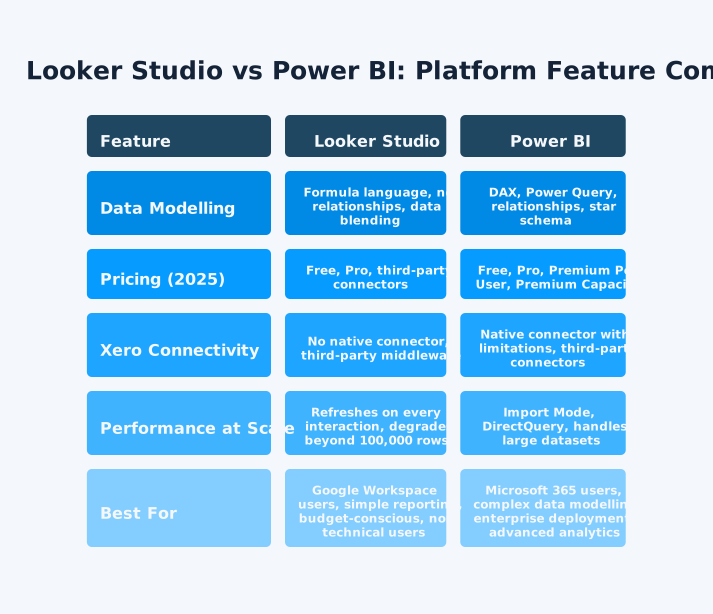
Connecting Xero to either platform requires workarounds. Neither offers native connectivity that meets the needs of finance teams managing multiple entities.
Xero Connectivity Isn’t First-Party by Default
This point bears emphasis:
- Looker Studio: No Google-built Xero connector. Connecting typically uses a partner/community connector from the Connector Gallery or a staging layer (Google Sheets, BigQuery, or a cloud database). Partner/community connectors are developed and supported by their providers, not Google.
- Power BI: Microsoft’s Xero content pack was deprecated (May 28, 2019), so a supported “native” Xero path in the Power BI service shouldn’t be assumed. In practice, teams usually use a third-party connector or stage Xero into SQL and then use Power BI’s standard database connectors – especially once you need multi-entity consolidation and finance-grade transformations.
Whichever approach you use, extraction frequency is constrained by Xero API rate limits (e.g., per-minute and daily call limits), which is one reason teams introduce staging and batching.
Xero to Looker Studio Connection Methods
Available approaches include:
- Third-party connectors: Offer automated refresh on provider-defined intervals. Costs and refresh frequency vary by provider and plan.
- Manual CSV export: Download from Xero, upload to Google Sheets, connect Sheets to Looker Studio. Free but time-consuming and error-prone.
- Google Apps Script: Custom API integration. Requires technical skills and ongoing maintenance.
- SQL database staging: Load Xero data to a database, connect Looker Studio via Database Connector. Best for multi-entity consolidation.
Xero to Power BI Connection Methods
Power BI offers several practical ways to bring in Xero data:
- Deprecated Microsoft Xero content pack (not recommended): Microsoft previously offered a Xero content pack, but it was deprecated as of 28 May 2019.
- Custom API build (Power Query custom connector): Build a connector that calls Xero’s API using OAuth 2.0. This is flexible, but it’s higher-maintenance (token refresh, re-authorisation, scope changes, and per-organisation setup).
- Third-party connectors: Providers can simplify extraction, modelling, and refresh, but they add subscription cost and you’ll need to assess governance (credentials, data residency, refresh behaviour, and auditability).
- OData feed via middleware: Use a service that exposes Xero data as an OData endpoint, then connect using Power BI’s built-in OData Feed connector. This can be simpler than a full custom connector, but complex transformations and consolidation logic usually still need a staging layer.
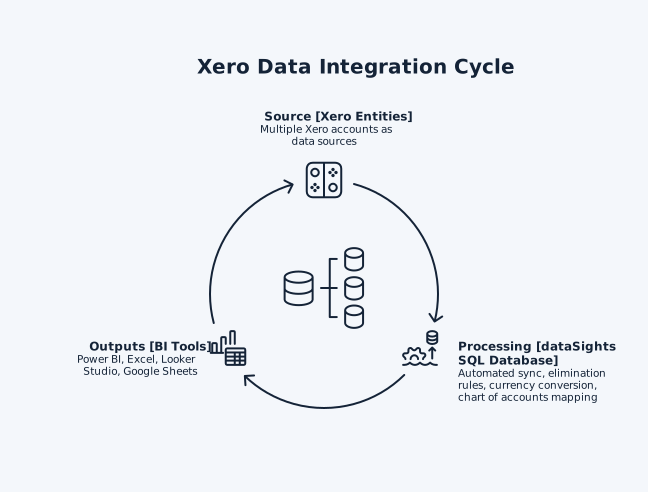
- SQL database middleware: dataSights syncs your Xero entities into a dedicated Azure SQL database per customer on a scheduled refresh. Consolidation logic (mapping, eliminations, FX) is applied before reporting, then Power BI, Excel, or Looker Studio can connect to clean, audit-ready tables.
Power BI doesn’t include a Microsoft-built Xero connector in the standard connector list today, so most ‘direct’ approaches rely on a custom connector or third-party middleware.
Performance at Scale
Performance characteristics affect dashboard usability as data volumes grow. The platforms handle scale differently.
Looker Studio Performance Considerations
Looker Studio performance limitations include:
- Interactive changes can trigger new queries, but results are often served from memory when the same query is repeated within the data freshness window.
- Performance can degrade as dataset size and chart complexity grow, especially when using multiple blended sources or heavy calculated fields.
- Refresh behaviour depends on the connector and data freshness settings, which trade off up-to-date data against speed, quota usage, and query cost.
- Scheduled refresh is available in specific ways: extracted data sources can use Auto update schedules, and Looker Studio Pro reports can auto-refresh while open (but auto-refresh doesn’t necessarily refresh cache).
- Community connectors can be slower or time out because they connect to internet-accessible sources via Google Apps Script, which has execution/runtime limits.
- Large datasets usually benefit from pre-aggregation (e.g., in a database/warehouse) or an extracted data source to reduce repeated heavy queries.
- Blends are limited to up to five data sources, and the blend’s freshness is governed by the minimum freshness setting of its inputs.
Power BI Performance Options
Power BI provides two primary data access modes.
Import Mode:
- Caches data in Power BI’s in-memory engine
- Fastest query performance
- Requires a scheduled refresh to update data
- Works well for datasets under 1GB (Pro) or larger with Premium
DirectQuery Mode:
- Best when you can’t import the data (size) or you need near real-time results since it queries the source database at run time.
- Provides current data
- Performance depends on the source database
- Suitable for Azure SQL, BigQuery, SAP HANA, and other enterprise databases
For Xero data specifically, Import Mode with a SQL database staging layer provides the best balance of performance and data freshness.
Multi-Entity Consolidation: The Real Challenge for Xero Users
Multi-entity financial consolidation requires capabilities beyond basic data connectivity. Neither platform solves this challenge natively.
Why Neither Platform Solves Consolidation Natively
True financial consolidation involves:
- Combining Trial Balances across entities
- Intercompany elimination entries with full audit trails
- Multi-currency translation following accounting standards
- Non-controlling interest calculations where applicable
- Consistent chart of accounts mapping
For example, Entity A invoices Entity B £100,000 for services. On consolidation, you eliminate £100,000 revenue (Entity A) and £100,000 expense (Entity B), so group results don’t count internal trading.
Both platforms can visualise consolidated data. However, the consolidation logic must exist elsewhere. Neither Looker Studio nor Power BI provides elimination rules, currency conversion, or consolidation adjustments out of the box.
The SQL Database Solution
Staging Xero data in a SQL database before connecting to either BI platform solves multiple problems:
- Performance: Database handles complex joins. BI tool focuses on visualisation.
- Consolidation logic: Elimination rules, currency conversion, and mapping live in SQL.
- Audit trail: Every transformation is documented and reproducible.
- Refresh control: Scheduled sync independent of user interactions.
- Platform flexibility: Same database feeds Power BI, Excel, or Looker Studio.
Consolidation rules, eliminations, and transformations happen at the database layer. Teams can produce management packs and financial statements first, then connect Excel and BI tools to the same consolidated, audit-ready dataset.
dataSights also provides pre-formatted management packs directly in the web platform, so you don’t need BI tooling for board-ready reporting.
Which Platform Suits Your Requirements
Platform selection depends on your existing technology stack, reporting complexity, and budget constraints.
Choose Looker Studio When:
- Your organisation primarily uses Google Workspace.
- Budget constraints make the free tier essential.
- Reporting requirements are relatively straightforward.
- Non-technical users need to build and share reports.
- Google Analytics and Google Ads form your primary data sources.
- Real-time collaboration outweighs advanced data modelling needs.
Choose Power BI When:
- Your organisation uses Microsoft 365 extensively.
- Complex data modelling requirements exist.
- Multiple data sources need relationship management.
- Predictive analytics and statistical modelling add value.
- On-premises deployment options matter.
- Excel integration is critical for finance workflows.
Choose Both with a SQL Database Layer When:
- Multi-entity Xero consolidation is required.
- Eliminations, currency conversion, and consolidation adjustments are necessary.
- Different teams prefer different tools (finance in Excel, executives in dashboards).
- Audit trail requirements demand documented transformation logic.
- Performance at scale matters more than connector cost.
Frequently Asked Questions
What Is the Main Difference Between Looker Studio and Power BI?
Looker Studio is a browser-based reporting tool with a free tier that’s built for fast dashboards and sharing, especially across Google services. Power BI is a full BI platform with stronger modelling and transformation: Power Query for shaping data and DAX for advanced calculations across related tables. Looker Studio can work with joined data (and limited blending), but it typically performs best when your finance dataset is already prepared into clean, report-ready tables.
Is Looker Studio Actually Free for Xero Reporting?
Looker Studio has a free tier. However, Xero reporting usually requires a third-party/community connector (developed and supported by the provider, not Google) or a staging approach such as Google Sheets or a database/warehouse. Third-party Xero connectors add ongoing subscription costs, and pricing varies widely by provider, refresh frequency, and data volume.
Can Power BI Connect Directly to Xero?
Power BI shouldn’t be assumed to have a Microsoft-built “native” Xero connector today. Microsoft previously offered a Xero content pack, but it was deprecated as of 28 May 2019, and most current implementations use either a third-party connector or a staging layer (often SQL) before Power BI. This is especially common for multi-entity reporting and consolidation, where you need consistent mappings, eliminations, and FX logic applied before analysis.
Which Platform Handles Larger Datasets Better?
Power BI generally handles large datasets more effectively because it can import data into an in-memory model and also supports DirectQuery for scenarios where importing isn’t feasible. Looker Studio performance depends heavily on the connector and the data freshness (caching) settings – repeat queries can be served from memory within the freshness window, but new/changed queries may re-hit the underlying source. For large finance datasets, pre-aggregation in a database/warehouse typically improves performance and reliability.
How Much Does Power BI Cost After the April 2025 Price Increase?
As of April 1, 2025, Power BI Pro is $14 USD per user per month and Premium Per User is $24 USD per user per month (list pricing is commonly shown for annual commitments). If you need to share content broadly without per-viewer licences, capacity pricing is SKU-based and typically starts in the thousands per month. Licensing changes frequently – confirm current pricing as part of procurement.
Can I Consolidate Multiple Xero Entities in Looker Studio or Power BI?
Neither platform provides native consolidation capabilities. True financial consolidation with eliminations and currency conversion requires a middleware layer. dataSights automates this by syncing multiple Xero entities into a dedicated SQL database where consolidation rules execute before data reaches your BI tool.
What Is Looker Studio Pro and Do I Need It?
Looker Studio Pro adds enterprise features such as organisational ownership, governance, and team workspaces. A self-service Pro subscription is based on named user licences (and is linked to one Google Cloud project), while the older “monthly active user (MAU)” model exists for large organisations via sales setup. You generally need Pro if you want stronger governance/ownership controls beyond the free tier. Licensing changes frequently – confirm current pricing as part of procurement.
Does Looker Studio Support DAX Formulas?
No. Looker Studio uses its own formula language similar to Google Sheets functions. DAX is specific to Power BI and provides significantly more advanced calculation capabilities, including time intelligence and row context manipulation.
Which Is Easier to Learn: Looker Studio or Power BI?
Looker Studio has a gentler learning curve with its drag-and-drop interface familiar to Google Workspace users. Power BI requires more training investment, particularly for DAX. However, Power BI provides greater analytical depth for complex reporting requirements.
Can I Use Both Looker Studio and Power BI With the Same Xero Data?
Yes, when your Xero data feeds into a SQL database. dataSights syncs Xero entities into a dedicated Azure SQL database that can connect to Power BI, Excel, and Looker Studio simultaneously. Each team uses their preferred tool while working from the same consolidated data.
The Right BI Tool Starts With the Right Data Foundation
The Looker Studio vs Power BI decision still matters – but it only pays off when you solve Xero connectivity and consolidation first. Both platforms produce excellent dashboards when fed clean, properly structured data. For multi-entity consolidation with eliminations and audit trails, a SQL database layer between Xero and your BI tool provides the foundation both platforms need.
Automate Your Xero Consolidation for Power BI and Looker Studio
Ready to eliminate manual exports and broken formulas? dataSights delivers automated multi-entity consolidation (eliminations, FX, audit trail) and management-ready outputs. Each customer gets a dedicated Azure SQL database, so Power BI, Excel, or Looker Studio can connect to clean, ready-to-use financial data. Rated 5.0 by 90+ verified Xero users. Join 300+ businesses already using automated Xero consolidation.
About the Author
Kevin Wiegand
Founder & Client happiness
I’m Kevin Wiegand, and with over 25 years of experience in software development and financial data automation, I’ve honed my skills and knowledge in building enterprise-grade solutions for complex consolidation and reporting challenges. My journey includes developing custom solutions for data teams at Gazprom Marketing & Trading and E.ON, before founding dataSights in 2016. Today, dataSights helps over 300 businesses achieve 100% report automation. I’m passionate about sharing my expertise to help CFOs and Financial Controllers reduce their month-end close time and eliminate the manual Excel exports that drain their teams’ valuable time.