
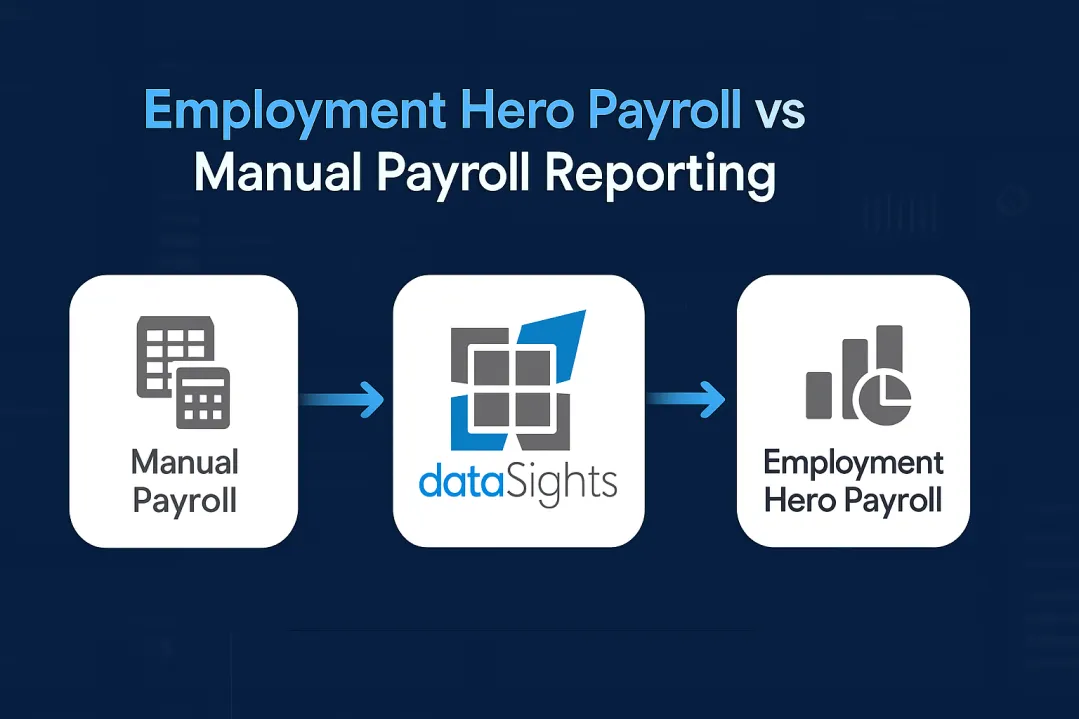
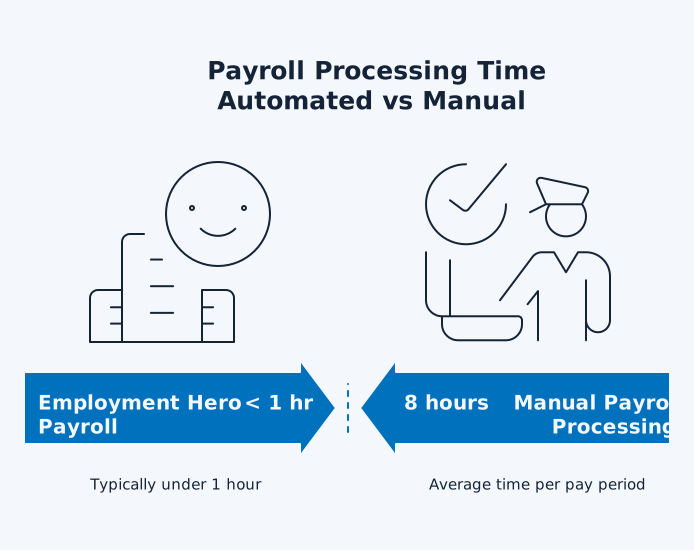
Employment Hero Payroll vs Manual Payroll Reporting comes down to time investment and compliance risk. Manual payroll processing takes anywhere from several hours to an entire week per pay period, requiring you to calculate wages, determine ATO tax withholdings, compute superannuation, and file compliance reports manually. One formula error cascades through your pay run, causing incorrect payments and compliance lodgement issues, which may trigger ATO penalties. Employment Hero Payroll typically automates wage calculations, tax withholding, and Single Touch Payroll reporting in under an hour for well-configured setups. For businesses managing multiple entities or requiring advanced reporting in Power BI and Excel, choosing between manual processes and automation directly impacts month-end close times and compliance accuracy.
Employment Hero Payroll vs Manual Payroll Reporting: Reducing Hours, Errors, and Repetitive Tasks
Employment Hero Payroll automates wage calculations, tax withholding and compliance reporting in the background, so finance teams spend more time reviewing and less time keying data. Manual payroll still relies on spreadsheets, calculators and repetitive data entry. Research shows that 40% of small businesses spend up to 80 hours per year managing payroll tasks. One analysis found that about a third of small businesses spend more than six hours each month handling payroll and payroll taxes, while HR professionals report spending four to twelve hours per pay period on payroll tasks.
Ready to Automate Your Financial Consolidation?
Stop wrestling with manual consolidations and broken formulas. dataSights automates multi-entity reporting, Xero consolidations, and Power BI connections. Join 300+ businesses already transforming their financial reporting with our platform, rated 5.0 out of 5 by 90+ verified Xero users.
Table of Contents
How Manual Payroll Reporting Actually Works
Manual payroll reporting entails the following:
- Tracking everything through spreadsheets, calculators, and repetitive data entry
- Collecting employee timesheets
- Calculating gross pay
- Figuring tax deductions
- Processing superannuation
- Filing compliance reports
- Paying employees and the ATO
Guides to small business payroll describe the same core workflow:
- Tracking hours
- Calculating wages and deductions
- Making payments
- Filing payroll taxes
The Detailed Manual Payroll Workflow
- You start by:
- Gathering employee time cards or timesheets
- Verifying hours worked across regular time, overtime, and leave.
- Next comes calculating gross wages by multiplying hours by pay rates, and applying the correct overtime and penalty rate multipliers based on your awards or enterprise agreements.
- Then you:
- Determine tax withholdings based on current ATO rates
- Calculate superannuation contributions
- Process other deductions (health insurance, garnishments, benefits)
- Reconcile accounts.
- After calculations, you do the following:
- Prepare payment documentation
- Generate payment files or cheques
- Update your accounting system and then run several rounds of review to catch and correct mistakes.
Each step introduces more manual touchpoints, and payroll guides warn that errors in any of these stages can lead to incorrect pay, late tax deposits or non-compliance.
Manual processing requires several rounds of review to catch and correct mistakes, with the initial calculation followed by double-checking and triple-checking before finalising payments.
Time Requirements: Manual vs Employment Hero Payroll
With modern payroll software, most of the heavy lifting – time import, gross pay calculation, deductions, tax and super – is automated. Industry guides describe payroll systems that calculate pay, create payment files and handle tax filings in a single workflow, so the payroll team can review and approve instead of recalculating everything in spreadsheets. When Employment Hero Payroll is configured correctly and integrated with time and attendance, many businesses typically complete pay runs in under an hour rather than spending days on manual calculations.
Time Breakdown by Task (Typical Manual Payroll)
The exact time spent on each task varies by headcount, awards and pay frequency, but industry surveys show that small HR and finance teams commonly spend 4-12 hours per pay period on payroll, and the end-to-end process from collecting timesheets to paying staff can stretch to almost a week in manual setups. Within that, most of the effort goes into five areas:
1. Time tracking and approval
Manual: Collecting and approving timesheets is often the slowest part of a manual payroll cycle. Guides for small businesses note that simply collecting time cards can take hours or even several days in manual environments, especially when you’re chasing late submissions or corrections.
Automation: Employment Hero replaces spreadsheet and email-based timesheets with integrated time and attendance, so hours flow into payroll digitally and managers approve through the platform in minutes.
2. Wage calculations
Manual: In a manual workflow, calculating gross pay, overtime, penalty rates and leave adjustments for every employee is a major chunk of the payroll cycle. Step-by-step guides describe this as a separate stage after time collection, where you compute gross pay, apply deductions and calculate net pay – a process that can take hours for even a modest headcount if done in spreadsheets. Payroll software reduces this to a largely automated “run payroll” step where calculations happen in minutes rather than hours.
Automation: Employment Hero applies awards and pay rules automatically based on pre-configured settings, so the payroll team focuses on exceptions instead of recomputing every line.
3. Tax and superannuation
Manual: Keeping up with PAYG withholding, superannuation rules and other payroll taxes is another major time sink in manual payroll. According to the Q4 2024 MetLife and U.S. Chamber of Commerce Small Business Index, 62% of small businesses report spending a great deal or fair amount of time each year on payroll compliance.
Automation: Employment Hero maintains current tax and super settings and applies them automatically, so the payroll team reviews exceptions instead of recalculating rates and liabilities every period.
4. Payslip generation
Manual: In a manual setup, someone still has to create, check and distribute payslips – often by exporting data to Word or Excel templates and emailing or printing them one by one. Payroll process guides list payslip preparation and distribution as a distinct step after calculations and payments, adding more admin time and more chances for errors.
Automation: Employment Hero generates compliant digital payslips automatically as part of each pay run and delivers them to employees via self-service, eliminating that extra manual layer.
5. Compliance reporting
Manual: On top of paying staff, manual payroll teams still need to prepare and lodge compliance reports – from Single Touch Payroll (STP) events in Australia through to periodic tax filings and year-end summaries. Without integrated software, this means exporting payroll data, checking totals, preparing files in the right format and lodging them through government portals, which adds more admin time and risk.
Automation: With Employment Hero, STP reporting is built into each pay run, and payroll information is sent directly to the ATO as part of normal processing, so there’s no separate manual “reporting day” at the end of the cycle.
The Hidden Costs of Manual Payroll Reporting
Beyond the obvious time investment, manual payroll reporting carries substantial hidden costs that damage your bottom line and operational efficiency.
Error Rates and Financial Impact
Human error in manual payroll is inevitable and expensive. Calculation mistakes lead to over- or underpayments requiring corrections. Tax filing errors can trigger penalties from the ATO and other tax authorities. Globally, payroll compliance penalties demonstrate the cost of manual errors – the IRS issues billions in payroll-related penalties annually, while Australia’s Fair Work Ombudsman recovered $358 million for more than 249,000 workers in 2024-25 alone, highlighting how quickly payroll issues can escalate into compliance and reputational problems.
Misclassifying employees or miscalculating superannuation contributions adds back payments and penalty interest on top of those fines.
Compliance Risks
Manual processes struggle to keep pace with changing legislation and award updates. Mistakes in overtime calculations, leave loading, superannuation or PAYG withholding compound over multiple pay periods, turning small errors into large back payments. The Fair Work Ombudsman’s significant recoveries underscore the importance of maintaining accurate, automated payroll systems that update with regulatory changes.
Opportunity Cost
The hours your finance team spends on manual payroll could drive strategic initiatives. CFOs and Financial Controllers should’nt spend their time reconciling timesheets at month-end, their attention is better focused on activities that drive organisational success:
- Analysing business performance
- Forecasting cash flow
- Advising on growth strategies
Manual payroll processing keeps skilled professionals buried in administrative tasks rather than adding strategic value.
How Employment Hero Payroll Automation Works
Employment Hero Payroll operates as a cloud-based platform that automates the complete payroll workflow from time tracking through to compliance reporting and payment processing.
Automated Payroll Processing
The platform automates wage calculations, including taxes, superannuation, and deductions, accommodating various employment types from full-time and part-time staff to casuals and contractors. Modern award interpretation updates automatically, ensuring pay conditions comply with current Fair Work regulations without manual research.
Employees clock in through mobile apps or kiosks, with time data flowing directly into payroll. The system:
- Calculates gross wages
- Applies tax withholdings using current ATO rates
- Computes superannuation contributions
- Generates payslips automatically
Pre-payroll compilation and easy approval processes streamline pay run management, with managers reviewing calculated pays before finalisation.
Single Touch Payroll Integration
Employment Hero’s STP functionality sends payroll information (such as wages, PAYG withholding and superannuation) directly to the ATO after each pay run, helping employers meet their Single Touch Payroll Phase 1 and Phase 2 reporting obligations without separate end-of-period submissions.
Comprehensive Reporting Capabilities
Employment Hero provides over 40 different payroll reports covering wages, leave, timesheets, tax summaries, and cost centre analysis. Custom reporting exports data in multiple formats for further analysis. Report packs can automate on recurring schedules, delivering regular payroll insights to stakeholders without manual intervention.
Employment Hero Reporting Limitations
Employment Hero Payroll delivers strong automation for pay processing and compliance, and its native reports cover core payroll, leave and tax requirements. However, finance teams that need multi-entity consolidation, advanced analytics or combined payroll and financial views typically require a separate reporting layer.
Native Reporting Constraints
Employment Hero reports operate within the platform interface, requiring manual export for deeper analysis. Custom reporting needs significant Excel manipulation after export. Near-real-time dashboards within Employment Hero provide basic metrics but lack the advanced visualisation and drill-down capabilities finance teams need for strategic decision-making.
For businesses managing multiple entities or wanting consolidated payroll analysis across departments, regions, or business units, Employment Hero’s native reports still need to be exported and combined, which recreates the manual Excel work many teams want to eliminate.
Integration Gaps
Employment Hero integrates with accounting systems like Xero, MYOB, and QuickBooks, syncing payroll totals to financial records. However, these integrations focus on transactional data transfer rather than comprehensive reporting automation. For instance, the following tasks typically require extracting data from Employment Hero and processing it externally:
- Building custom labour cost analyses
- Producing detailed variance reports
- Creating multi-dimensional views for deeper insights
How dataSights Extends Employment Hero Payroll Reporting
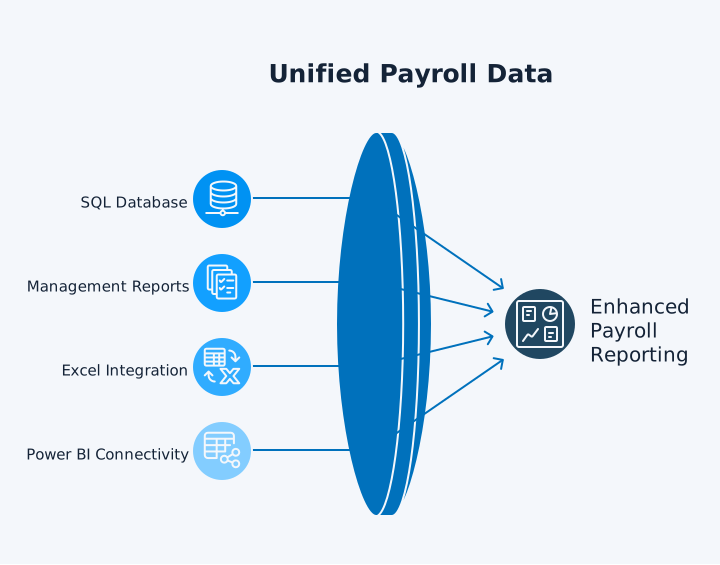
dataSights takes Employment Hero Payroll data and syncs it into a dedicated SQL database as the single source of truth for reporting. From there, the platform delivers pre-formatted Management Reports through the dataSights web application, with additional automation into Excel and Power BI for teams that prefer those tools. This removes manual exports and gives finance teams consistent, near-real-time payroll reporting without spreadsheet work.
Automated Data Architecture
Each customer receives their own dedicated Azure SQL Database, hosted and managed by dataSights. This database securely stores all Employment Hero Payroll data, including:
- Pay runs
- Employee records
- Timesheets
- Leave balances
For clients with existing infrastructure, dataSights supports a “bring your own database” option that integrates directly into customer Azure SQL environments.
The platform checks for Employment Hero Payroll changes on your configured schedule, typically refreshing every two hours via API pull. This staged sync approach ensures data consistency while maintaining near-real-time reporting capabilities.
Once Employment Hero Payroll data lands in SQL, it becomes the single source of truth for all reporting and analytics.
- Management Reports on the dataSights platform provide consolidated, board-ready payroll packs.
- Excel users can refresh Employment Hero data through Power Query, keeping custom labour-cost models up to date without CSVs.
- Power BI connects directly to the same SQL database for interactive dashboards and drill-down analysis.
Real-World Reporting Scenarios
- A multi-entity retail business tracks labour costs across 15 locations, comparing actual wages against budgets by department, analysing overtime patterns, and identifying cost variances. With dataSights, they connect Employment Hero Payroll data to Power BI dashboards that auto-refresh every two hours. Store managers view their location’s labour costs in near-real-time while head office monitors group-wide trends, all from one consolidated dataset.
- A professional services firm needs to reconcile billable hours from project management systems against actual payroll costs. They use dataSights to combine Employment Hero Payroll data with Xero project tracking in Excel. Power Query automatically refreshes both datasets, calculating true project profitability without manual data exports or formula errors.
- An accounting practice manages payroll for 30+ clients through Employment Hero. Rather than manually compiling monthly reports for each client, they automate custom dashboards through dataSights that each client accesses directly, seeing their own payroll metrics, leave balances, and cost centre analysis updated in near-real-time.
Making the Transition from Manual to Automated
Moving from manual payroll reporting to Employment Hero Payroll requires planning but delivers immediate returns through reduced errors and time savings.
When to Automate
- Your business reaches a tipping point when manual payroll consumes more than one working day per pay period. If you’re spending 8+ hours on payroll calculations, compliance filings, and report generation every fortnight, automation becomes cost-effective immediately.
- Analyses of small business payroll in Australia show that roughly 40% of small employers incur payroll-related penalties in a typical year. If you’ve received ATO penalties for late filings, incorrect super calculations, or missed tax payments, automation prevents recurrence. Even a single A$1,000 penalty would cover many months of payroll software fees for a 20-employee business, making prevention a more efficient use of cash than remediation.
- When your finance team struggles to reconcile pay runs, spending hours tracing calculation errors or investigating payslip discrepancies, automation eliminates these reconciliation headaches. Manual payroll often means no one fully understands where specific numbers originated, making corrections painful. Employment Hero provides complete audit trails showing exactly how every calculation occurred.
Implementation Realities
Employment Hero offers managed and guided implementation paths.
- Managed implementation provides dedicated project managers and payroll specialists who handle the complete setup, including modern award configuration, employee migration, and pay rule creation. This path suits organisations with over 100 employees, custom award requirements, or complex payroll structures. Implementation typically takes 4-6 weeks with full hands-on support.
- Guided implementation is offered as a fixed-fee project for organisations under 100 employees with standard award requirements. You receive a dedicated consultant without the expense of a fully managed service, typically launching payroll within 4–6 weeks. The guided path assumes you can commit to the project and run your first STP pay run within four weeks of signing.
Both paths require your active participation. Payroll specialists need detailed information about employee classifications, current pay rates, leave balances, and existing pay rules. The more organised your current data, the smoother your transition. If your manual payroll documentation is inconsistent or incomplete, expect additional time cleaning and validating information before migration.
Cost Considerations
Employment Hero Payroll uses a tiered, per-employee pricing model, with plans such as:
- Free
- Lite
- Plus
- Unlimited
- Managed Payroll
Pricing varies by region, plan and headcount, so finance teams should refer to Employment Hero’s official pricing page for current details before building a business case. For most small and medium businesses, even modest per-employee pricing quickly undercuts the labour cost of spending 8-16 hours each month on manual payroll calculations and compliance.
For example, if a 20-employee business spends the equivalent of A$800 in internal finance time on payroll each month, even a modest per-employee subscription would pay for itself by redirecting that time to analysis and planning rather than manual processing.
Compare this to the loaded hourly cost of your finance team. If your Financial Controller earning $90,000 annually spends 16 hours per month on manual payroll (two days at current rates), that’s roughly $865 in salary costs monthly. Even a modest per-employee subscription quickly undercuts that manual labour cost, especially when you factor in reduced error rates and compliance risks.
Advanced Reporting with dataSights Integration
For businesses requiring payroll reporting that goes beyond Employment Hero’s native dashboards, dataSights delivers consolidated Management Reports on its web platform, with optional automation into Excel and Power BI for deeper modelling and visualisation.
Power BI Integration
Power BI connects natively to dataSights SQL databases containing Employment Hero Payroll data, enabling dynamic dashboards that auto-refresh every two hours. Build custom visualisations showing labour costs by department, overtime trends, leave liability, and headcount analysis. Create executive dashboards for board presentations that update automatically after each pay run, eliminating manual report compilation.
DirectQuery mode enables near-real-time analysis of current payroll status (updating with each refresh), while Import Mode offers faster performance for historical trend analysis. Filter data by cost centre, location, employee classification, or any other Employment Hero dimension, slicing payroll data exactly how your business requires.
Excel Automation
Finance teams preferring Excel maintain their familiar spreadsheet environment while eliminating manual data entry. In Excel, Power Query connects directly to dataSights SQL databases, automatically refreshing Employment Hero Payroll data with a single click. Build labour cost models, variance analysis, or custom consolidations that update automatically without formula errors or copy-paste mistakes.
The dataSights Excel Add-in extends automation by posting data to multiple systems directly from Excel. If you process payroll adjustments or manage multi-entity structures, automate the posting workflow rather than manually entering adjustments across systems.
Multi-Entity Consolidation
Businesses managing Employment Hero Payroll across multiple entities face manual consolidation challenges. You export each entity’s reports, align account structures, eliminate intercompany transactions (if employees transfer between entities), and hope your Excel formulas balance.
dataSights automates this consolidation by:
- Syncing all entities into one SQL database
- Applying consistent account mapping
- Delivering consolidated reports that drill down to individual entity transactions
A hospitality group with eight venues consolidates labour costs across all locations while maintaining the ability to drill into specific venue performance. A holding company with 12 subsidiaries generates group-wide payroll reports for board presentations without manual Excel work.
Frequently Asked Questions
How Accurate Is Employment Hero Payroll Compared to Manual Calculations?
Employment Hero Payroll automates wage calculations, tax withholdings, and superannuation computations, eliminating human calculation errors that plague manual payroll. The platform applies current tax rates and modern award interpretations automatically, updating as regulations change. This delivers consistent accuracy across all pay runs, while manual processing introduces errors through mistyped numbers, incorrect formulas, and outdated tax tables.
Can Employment Hero Payroll Handle Complex Award Interpretations?
Employment Hero includes automated modern award interpretation for pre-built awards, calculating penalty rates, overtime, and allowances according to Fair Work regulations. For organisations with custom awards or enterprise agreements, managed implementation includes award configuration by payroll specialists who ensure calculations match your specific requirements. The system updates automatically as awards change, maintaining compliance without manual monitoring.
What Happens to Historical Payroll Data During Migration?
Employment Hero implementation includes migration of current employee records, pay rates, and leave balances. Historical pay run data typically exports from your manual systems for archival purposes rather than migrating into Employment Hero. You maintain access to past payslips and tax records through your existing files, while Employment Hero becomes the system of record for all future payroll. For businesses requiring consolidated historical and current reporting, dataSights can combine archived data with live Employment Hero data in Power BI or Excel.
How Does Employment Hero Manage Multi-State or Multi-Country Payroll?
Employment Hero supports multi-state payroll processing, calculating taxes according to each employee’s work location and applying relevant state-specific regulations. The platform applies appropriate state tax rates, workers compensation rules, and leave entitlements based on employee location settings. For businesses operating across multiple countries, Employment Hero’s regional versions (Australia, New Zealand, UK, Singapore, Malaysia) handle local compliance separately, though dataSights can consolidate reporting across all regions.
Can Employment Hero Integrate With Our Existing Accounting System?
Employment Hero integrates with Xero, MYOB, and QuickBooks, automatically posting payroll totals to your general ledger. The integration syncs wages, tax liabilities, and superannuation expenses, maintaining alignment between payroll and financial records. For businesses using other accounting systems or requiring deeper integration beyond standard journal postings, dataSights provides flexible connectivity options through direct database access.
What Reporting Capabilities Does Employment Hero Provide Out of the Box?
Employment Hero includes over 40 pre-built reports covering payroll summaries, leave accruals, timesheet analysis, tax liabilities, and cost centre breakdowns. Custom reporting exports data in CSV, Excel, or PDF formats for further analysis. Report packs can be scheduled automatically, delivering regular reports to stakeholders via email. For businesses requiring advanced analytics, interactive dashboards, or multi-entity consolidation, dataSights extends Employment Hero reporting through Power BI and Excel integration.
How Long Does It Take to Generate Monthly Payroll Reports With Employment Hero?
With Employment Hero Payroll, generating standard reports takes minutes after pay run completion. Reports automatically compile from completed pay runs, with options to export immediately or schedule recurring delivery. This contrasts sharply with manual processes, where compiling monthly summaries, leave registers, and tax reports consumes hours of spreadsheet work and reconciliation.
Does Employment Hero Support Payroll Reporting for Contractors and Casuals?
Employment Hero processes payments for full-time staff, part-time employees, casuals, and contractors within the same platform. Reporting differentiates between employment types, tracking superannuation obligations, leave accruals, and tax treatments appropriately for each classification. This unified approach eliminates the need for separate manual systems tracking different worker types, consolidating all payment reporting in one location.
Can We Access Employment Hero Payroll Data in Real-Time?
Employment Hero provides near-real-time access to current payroll data through its web interface and mobile apps. Employees view payslips and leave balances immediately after pay runs process. Managers access timesheet approvals and cost reports in near-real-time. For businesses requiring near-real-time data integration into external reporting tools, dataSights refreshes Employment Hero data every two hours into Power BI and Excel, providing near-real-time reporting without manual exports.
What Compliance Requirements Does Employment Hero Payroll Automatically Handle?
Employment Hero automates Single Touch Payroll reporting, submitting wage data directly to the ATO with each pay run. The platform calculates PAYG withholding, generates payment summaries, processes superannuation guarantee calculations, and maintains required payroll records for audit purposes. Modern award updates apply automatically, ensuring pay calculations comply with current Fair Work regulations. This comprehensive compliance automation eliminates manual tax table lookups, quarterly BAS compilation, and annual payment summary generation.
Stop Manually Processing Payroll Reports
Manual payroll reporting consumes hours every pay period while creating compliance risks that trigger ATO penalties. One formula error cascades through your pay run, which may cause incorrect tax filings, employee disputes, and penalty notices. Employment Hero Payroll typically automates wage calculations, tax withholding, and Single Touch Payroll reporting in under an hour for well-configured setups, compared to the hours or days manual processes require. For businesses requiring advanced reporting in Power BI and Excel, dataSights extends Employment Hero automation through near-real-time data synchronisation, eliminating manual exports and enabling your finance team to drive strategic decisions rather than reconcile spreadsheets.
Transform Your Employment Hero Payroll Reporting Today
Ready to modernise Employment Hero Payroll reporting? dataSights connects your Employment Hero Payroll into pre-formatted Management Reports on the dataSights platform, with additional automation into Excel and Power BI. Eliminate manual exports, build near-real-time dashboards, and consolidate multi-entity payroll without Excel headaches. Rated 5.0 out of 5 by 90+ users. Join 300+ businesses who’ve already automated their reporting.
About the Author
Kevin Wiegand
Founder & Client happiness
I’m Kevin Wiegand, and with over 25 years of experience in software development and financial data automation, I’ve honed my skills and knowledge in building enterprise-grade solutions for complex consolidation and reporting challenges. My journey includes developing custom solutions for data teams at Gazprom Marketing & Trading and E.ON, before founding dataSights in 2016. Today, dataSights helps over 300 businesses achieve 100% report automation. I’m passionate about sharing my expertise to help CFOs and Financial Controllers reduce their month-end close time and eliminate the manual Excel exports that drain their teams’ valuable time.