

James contacted us to get hold of our “Free Excel Xero Download Tool”. The limitation with this tool, is that it directly downloads Xero data from Xero’s API for only one Xero File at a time. After a quick chat with James, we quickly ascertained that what his problem needed was not an Excel plugin, but rather multi-file Excel automation combined with customisable KPIs sent to clients over e-mail and bespoke PowerBI reports embedded in a white labelled reporting portal. Using this combination James could:
- Access all his clients Xero data and add extra datasources to the Xero data
- Use built in Excel functionality to view any data
- Use built in Excel functionality to view cashflow actuals + AR/AP
- Easily create customisable KPI dashboards customisable per client
- Easily create fully customisable PowerBI advisory reports, where his clients only see their data, but he can easily view all the data
- Easily create internal use reports for operational efficiencies, such as when clients have last reconciled their data
- Send clients daily emails of KPI dashboards
- Easily onboard new clients
DataSights split out the solution into three distinct areas;
Step 1 – Excel Automation
Step 2 – Report KPI Automation over e-email
Step 3 – Interactive Insights in a white labelled reporting portal
Step 1 – Excel Automation
To investigate numbers, build excel based reports, automate existing reports. These were a few of the requirements solved with this product.
Using built-in Excel functionality James is able to access all his clients data in Excel with the click of a “Refresh All” button. All the raw data is accessible so it was invaluable in building up the Profit & Loss and Balance Sheet reports, which use the full JournalLines history NOT just the respective report figures from Xero.
Also available is a cashflow actuals plus Accounts Receivable & Accounts Payable data view. Because the raw data is used whether it is Spend/Receive Money bank transactions OR PaymentsOnAccountsReceivable/Payable OR Invoices/Bills owed or payable, the ability to drill down to the underlying data and pick up invoice numbers for example is invaluable in understanding the numbers behind a cashflow forecast.

You can access ALL your clients Xero data using built in Excel functionality
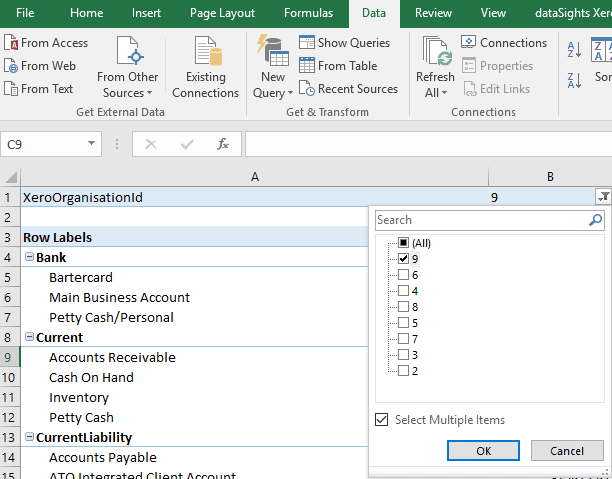
Simply click “Refresh All” and easily switch between Xero files. No more “Get and Transform” csv files
Step 2 – Reports and Dashboards over e-mail
Developing the reports and dashboards was the second step. Armed with a list of KPIs and reports provided by James, DataSights then went to work creating views on his clients’ data that would help guide each of the businesses along the growth path that James sets out for them.
Alongside the standard numbers reporting of
- Actual vs Target revenue
- GP%
- NP%
- Receivable / Payable days
- Total Cash
James also included the requirements of
- Leads
- Lead conversion %
- Customer Acquisition Cost
- Client Lifetime Value
- # of New Customers
We wanted to have all metrics comparable Month on Month and Year on Year including each client’s full Xero history. We also wanted all reports to be interactive, leveraging the power of Power BI. Whilst there are a range of KPIs & reports James wants to automate, this initial set created enough of a value add to mark the first iteration ready for client consumption.
Once these were done we setup an e-mail schedule and the KPI dashboards are now emailed every day to Jame’s clients.
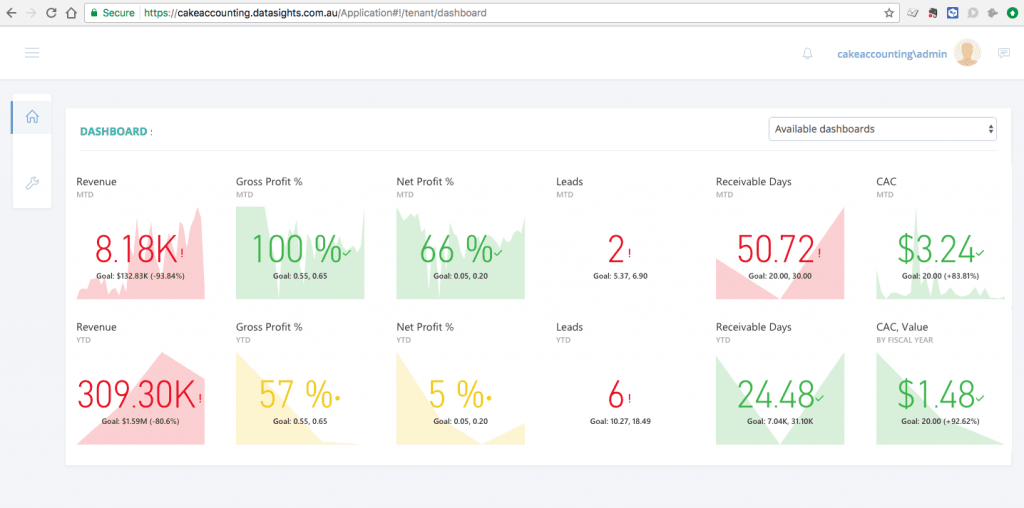
Revenue and Customer KPIs and Reports

KPI Dashboard emailed to CakeAccounting and their clients on either a daily or weekly schedule
One particular area of interest to note was the Leads data capture. Whilst most CRMs APIs can be used to augment the Xero data in the database, James wanted to use Microsoft PowerApps to capture lead information. This meant a simple, uniform and free mechanism for CakeAccountings clients to capture lead information thus automating crucial KPIs as part of the service.
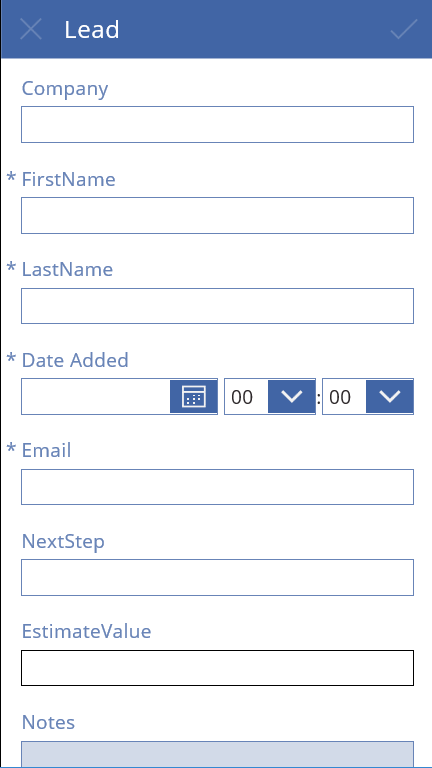
A mobile app we created that CakeAccountings clients use to capture Lead information on the go.
Step 3 – Reporting Portal
Finally came the distribution of the reports. Both internally for CakeAccounting and for their clients.
- White labelled
- Easy to setup
- Slick
Thats what we wanted to deliver and we believe we have! The key features are;
- When James logs in he can see the reports displaying all his clients data
- When James logs in he can switch between all his clients dashboards
- When James’ clients log in, they see the same reports but only with their data
- When James’ clients log in, they see only their dashboard
This means James isn’t setting up ANYTHING report wise when a new client is onboard, because its always the same reports. Simply a login and permissions. But what James does setup (if he wants) is a customisable dashboard that can be unique to each client. Which looks awesome on mobile too! This dashboard can be any KPI or report from the main set of reports and is updated every 15 minutes from the database.
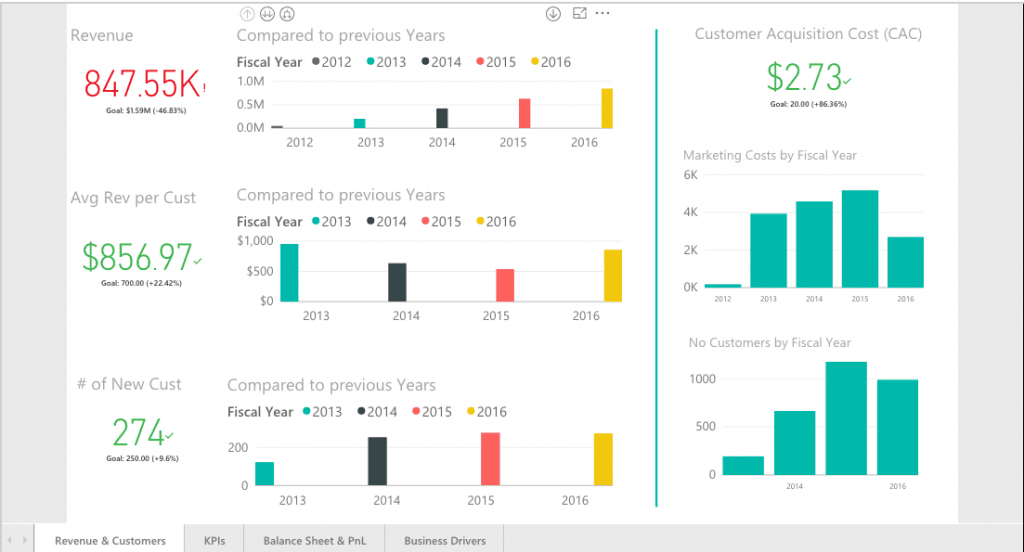
An embedded PowerBI dashboard. Completely customised for one of CakeAccountings clients
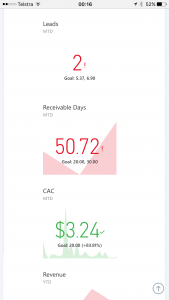
The mobile view of a clients dashboard in the DataSights reporting portal
In summary, the journey with CakeAccounting so far has been truly enjoyable. Although the Xero Reporting Add-On space appears saturated when looking at the surface, scratching a bit deeper reveals a raft of frustrations. James saw the potential in tools like PowerBI with its Microsoft backing and self-service analytics capabilities and we see the potential in providing a set of services combined with PowerBI/Amazon Quicksights/Google DataStudio to cost effectively change the way that Xero and in fact SME reporting is done, essentially ushering in a cost affordable solution of Big Data for SMBs.
